Repair install of Win 11 Pro fails using ISO file


Open device manager > click view > click show hidden devices > manually expand all rows > look for rows displaying a yellow triangle with black exclamation mark or unknown device > post images or share links into this thread
yes, that is all you would need to do.

can you go into diskpart, and take a screenshot of the detail disk command for the disk that you are using?

You have to type ”select disk _” (_being the disc number) first, then just type detail disk, and post a screenshot of that
 

Attachments
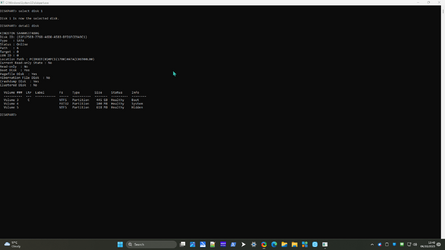
  • A4z6V8MMbV.png
    A4z6V8MMbV.png
    43.6 KB · Views: 1

My Computer My Computer

At a glance

Windows 1112th Gen Intel Core i3-1210016 GbIntegrated Graphics 730
OS
Windows 11
Computer type
PC/Desktop
Manufacturer/Model
Mesh
CPU
12th Gen Intel Core i3-12100
Motherboard
Asus Prime H610M-D D4
Memory
16 Gb
Graphics Card(s)
Integrated Graphics 730

When available post Sea Tools for Windows long generic test result share links.
Also a Kingston drive full error image?
These were supposed to be in the folder - neither found any problem with either disk
 

My Computer My Computer

At a glance

Windows 1112th Gen Intel Core i3-1210016 GbIntegrated Graphics 730
OS
Windows 11
Computer type
PC/Desktop
Manufacturer/Model
Mesh
CPU
12th Gen Intel Core i3-12100
Motherboard
Asus Prime H610M-D D4
Memory
16 Gb
Graphics Card(s)
Integrated Graphics 730
Nice work.

That's a marked improvement post BIOS reset.


For the unknown devices one or more of these links may be useful:


Once the unknown devices are fixed post a new V2 share link into the newest post.

Then if still desired, place the computer into clean boot, an perform an in place upgrade repair using the desktop iso.

For any error message or code take pictures and post share links into this thread.
 

My Computer My Computer

At a glance

Windows 10Intel(R) Core(TM) i7-4800MQ CPU @ 2.70GHz16 GB Total: Manufacturer : Samsung MemoryTyp...NVIDIA Quadro K3100M; Intel(R) HD Graphics 4600
OS
Windows 10
Computer type
Laptop
Manufacturer/Model
HP
CPU
Intel(R) Core(TM) i7-4800MQ CPU @ 2.70GHz
Motherboard
Product : 190A Version : KBC Version 94.56
Memory
16 GB Total: Manufacturer : Samsung MemoryType : DDR3 FormFactor : SODIMM Capacity : 8GB Speed : 1600
Graphics Card(s)
NVIDIA Quadro K3100M; Intel(R) HD Graphics 4600
Sound Card
IDT High Definition Audio CODEC; PNP Device ID HDAUDIO\FUNC_01&VEN_111D&DEV_76E0
Hard Drives
Model Hitachi HTS727575A9E364
Antivirus
Microsoft Defender
Other Info
Mobile Workstation
That's a marked improvement post BIOS reset.
Boot times normal account 33.6 sec, clean boot 23.7 (all are mean of 3)

Boot times normal account after BIOS set to default 35.0 sec, clean boot 26.6.
 

My Computer My Computer

At a glance

Windows 1112th Gen Intel Core i3-1210016 GbIntegrated Graphics 730
OS
Windows 11
Computer type
PC/Desktop
Manufacturer/Model
Mesh
CPU
12th Gen Intel Core i3-12100
Motherboard
Asus Prime H610M-D D4
Memory
16 Gb
Graphics Card(s)
Integrated Graphics 730

Latest Support Threads

Back
Top Bottom