

jcfb
Member
- Local time
- 2:05 PM
- Posts
- 1
- OS
- Windows 11
Hi!
Sorry for the long post but I'd be thankful if someone could help me try to diagnose this issue. Since I've updated to 24h2 a few months ago I keep getting this annoying issue where ocasionally if I skip a video when watching youtube on firefox it cuts the audio to the whole system (also had it happen a couple times when skipping through a song in the new Media Player but it's rarer). This happens to me at least every 2 days but never more than once a day.
I've noticed that sometimes, after a few minutes on idle, the audio may come back but it doesn't always happen and the same thing happens after a few seconds if I am to stop the audio playback, the only real fix to get the audio back is to restart the computer (I tried restarting the audio services and audiodg to no avail). I also should note that the HDMI Out audio from my graphics card stops working, this issue also happens with VBS and core isolation/memory integrity disabled and I've tried both the creative and the DanielK drivers.
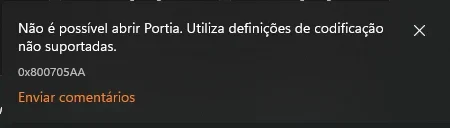
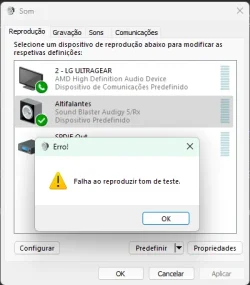
The sound devices still appear in the system and I still can control the volume and all that stuff, but the media player gives me a codification error and the sound test in the control panel gives an error that it can't play the test tone as you can see in the attachments. Some other applications don't give me any kind of error.
I've checked the audiodg process with process explorer and the handles stay from around 250 to 300 so it doesn't seem to be an Handle Leak.
An interesting thing that happened, I went into the Sound Blaster Control Panel and tried to enable Stereo Direct playback
 which bypasses the DSP to see if that would fix the issue. Instead the system BSODed after a couple seconds with the issue related to the hap17v2k.sys driver. I've attached a zip file with the dump from this BSOD.
Also trying to disable or unninstall the sound card from device manager while the system is in this state either does nothing or it gives an error 10 when trying to initialize the sound card, for which i have to restart the computer to fix the issue.
I also tried to attach WinDbg to the audio service and audiodg.exe after this issue occurred and this is an excerpt of what i got in the console for audiodg:
Sorry for the long post but I'd be thankful if someone could help me try to diagnose this issue. Since I've updated to 24h2 a few months ago I keep getting this annoying issue where ocasionally if I skip a video when watching youtube on firefox it cuts the audio to the whole system (also had it happen a couple times when skipping through a song in the new Media Player but it's rarer). This happens to me at least every 2 days but never more than once a day.
I've noticed that sometimes, after a few minutes on idle, the audio may come back but it doesn't always happen and the same thing happens after a few seconds if I am to stop the audio playback, the only real fix to get the audio back is to restart the computer (I tried restarting the audio services and audiodg to no avail). I also should note that the HDMI Out audio from my graphics card stops working, this issue also happens with VBS and core isolation/memory integrity disabled and I've tried both the creative and the DanielK drivers.
The sound devices still appear in the system and I still can control the volume and all that stuff, but the media player gives me a codification error and the sound test in the control panel gives an error that it can't play the test tone as you can see in the attachments. Some other applications don't give me any kind of error.
I've checked the audiodg process with process explorer and the handles stay from around 250 to 300 so it doesn't seem to be an Handle Leak.
An interesting thing that happened, I went into the Sound Blaster Control Panel and tried to enable Stereo Direct playback
Also trying to disable or unninstall the sound card from device manager while the system is in this state either does nothing or it gives an error 10 when trying to initialize the sound card, for which i have to restart the computer to fix the issue.
I also tried to attach WinDbg to the audio service and audiodg.exe after this issue occurred and this is an excerpt of what i got in the console for audiodg:
Code:
(1088.3518): Unknown exception - code 80010108 (first chance)
avcore\audiocore\lib\kslib\kslib.cpp(527)\audiokse.dll!00007FFCA1E303DC: (caller: 00007FFCA1E3013D) ReturnHr(453) tid(3518) 80070492 O conjunto de propriedades especificado não existe no objeto.
avcore\audiocore\lib\kslib\kslib.cpp(216)\audiokse.dll!00007FFCA1E2603E: (caller: 00007FFCA1E2E41D) ReturnHr(454) tid(3518) 800705AA Não existem recursos de sistema suficientes para concluir o serviço pedido.
avcore\audiocore\lib\kslib\kslib.cpp(360)\audiokse.dll!00007FFCA1E2E445: (caller: 00007FFCA1E2DF88) ReturnHr(455) tid(3518) 800705AA Não existem recursos de sistema suficientes para concluir o serviço pedido.
avcore\audiocore\ksendpoint\audiobasepin.cpp(393)\audiokse.dll!00007FFCA1E2E02C: (caller: 00007FFCA1E2DAA4) ReturnHr(456) tid(3518) 800705AA Não existem recursos de sistema suficientes para concluir o serviço pedido.
avcore\audiocore\server\audiodg\exe\endpointinstance.cpp(203)\AUDIODG.EXE!00007FF7AA343423: (caller: 00007FF7AA32848D) ReturnHr(217) tid(3518) 800705AA Não existem recursos de sistema suficientes para concluir o serviço pedido.
(1088.3518): C++ EH exception - code e06d7363 (first chance)
avcore\audiocore\server\audiodg\exe\audiodevicegraph.cpp(714)\AUDIODG.EXE!00007FF7AA34F3A4: (caller: 00007FF7AA347F59) ReturnHr(218) tid(3518) 887C0013 avcore\audiocore\lib\kslib\kslib.cpp(527)\audiokse.dll!00007FFCA1E303DC: (caller: 00007FFCA1E3013D) ReturnHr(457) tid(3518) 80070492 O conjunto de propriedades especificado não existe no objeto.
avcore\audiocore\lib\kslib\kslib.cpp(216)\audiokse.dll!00007FFCA1E2603E: (caller: 00007FFCA1E2E41D) ReturnHr(458) tid(3518) 800705AA Não existem recursos de sistema suficientes para concluir o serviço pedido.
avcore\audiocore\lib\kslib\kslib.cpp(360)\audiokse.dll!00007FFCA1E2E445: (caller: 00007FFCA1E2DF88) ReturnHr(459) tid(3518) 800705AA Não existem recursos de sistema suficientes para concluir o serviço pedido.
avcore\audiocore\ksendpoint\audiobasepin.cpp(393)\audiokse.dll!00007FFCA1E2E02C: (caller: 00007FFCA1E2DAA4) ReturnHr(460) tid(3518) 800705AA Não existem recursos de sistema suficientes para concluir o serviço pedido.
avcore\audiocore\server\audiodg\exe\endpointinstance.cpp(203)\AUDIODG.EXE!00007FF7AA343423: (caller: 00007FF7AA32848D) ReturnHr(219) tid(3518) 800705AA Não existem recursos de sistema suficientes para concluir o serviço pedido.
(1088.3518): C++ EH exception - code e06d7363 (first chance)
avcore\audiocore\server\audiodg\exe\audiodevicegraph.cpp(714)\AUDIODG.EXE!00007FF7AA34F3A4: (caller: 00007FF7AA347F59) ReturnHr(220) tid(3518) 887C0013 avcore\audiocore\lib\kslib\kslib.cpp(527)\audiokse.dll!00007FFCA1E303DC: (caller: 00007FFCA1E3013D) ReturnHr(461) tid(3518) 80070492 O conjunto de propriedades especificado não existe no objeto.
avcore\audiocore\lib\kslib\kslib.cpp(216)\audiokse.dll!00007FFCA1E2603E: (caller: 00007FFCA1E2E41D) ReturnHr(462) tid(3518) 800705AA Não existem recursos de sistema suficientes para concluir o serviço pedido.
avcore\audiocore\lib\kslib\kslib.cpp(360)\audiokse.dll!00007FFCA1E2E445: (caller: 00007FFCA1E2DF88) ReturnHr(463) tid(3518) 800705AA Não existem recursos de sistema suficientes para concluir o serviço pedido.
avcore\audiocore\ksendpoint\audiobasepin.cpp(393)\audiokse.dll!00007FFCA1E2E02C: (caller: 00007FFCA1E2DAA4) ReturnHr(464) tid(3518) 800705AA Não existem recursos de sistema suficientes para concluir o serviço pedido.
avcore\audiocore\server\audiodg\exe\endpointinstance.cpp(203)\AUDIODG.EXE!00007FF7AA343423: (caller: 00007FF7AA32848D) ReturnHr(221) tid(3518) 800705AA Não existem recursos de sistema suficientes para concluir o serviço pedido.
(1088.3518): C++ EH exception - code e06d7363 (first chance)
avcore\audiocore\server\audiodg\exe\audiodevicegraph.cpp(714)\AUDIODG.EXE!00007FF7AA34F3A4: (caller: 00007FF7AA347F59) ReturnHr(222) tid(3518) 887C0013- Windows Build/Version
- Windows 11 24H2 26100.4351
Attachments
My Computer
At a glance
Windows 11Ryzen 5 560016GB 2x8 DDR4@3000MHzRX 6600
- OS
- Windows 11
- Computer type
- PC/Desktop
- CPU
- Ryzen 5 5600
- Motherboard
- MSI B450 Gaming PLUS
- Memory
- 16GB 2x8 DDR4@3000MHz
- Graphics Card(s)
- RX 6600
- Sound Card
- Audigy RX






