Solved Requesting Huawei drivers


Dell intends to move away from offering Drivers support - as a downloadable option from their sites - to using their own bloatware tool too (same as Huawei). Most OEMs - seem to adhere to the OEM software update option - even tho some, might also continue offering the site option for downloading drivers. So, if you hate this type of tools - maybe keep away from Dell. :P
I've seen no evidence to support this claim, and it's not happening now. I'll stick with my Dell Precision.

To the OP: I would avoid the XPS though. HP ProBook delivers comparable performance at about the same price points as XPS but has a better thermal design.
 

My Computer My Computer

At a glance

Windows 11 22H2 Pro (X-lite Micro 11 version)i7 13850HX (20 cores, 28 threads)32GB DDR5Intel UHD/ RTX 1000 ADA
OS
Windows 11 22H2 Pro (X-lite Micro 11 version)
Computer type
Laptop
Manufacturer/Model
Dell/ Precision 7680
CPU
i7 13850HX (20 cores, 28 threads)
Motherboard
Dell
Memory
32GB DDR5
Graphics Card(s)
Intel UHD/ RTX 1000 ADA
Sound Card
Realtek
Monitor(s) Displays
4K UHD Touchscreen
Screen Resolution
3840 x 2400
Hard Drives
Samsung 512GB system drive
WD Blue 1TB game drive
PSU
240W AC adapter, 1800W when docked
Internet Speed
1 gigabit symmetrical
Browser
Firefox, Librewolf
Antivirus
None. Manully configured so nobody except me can change any critical system files. (Don't ask how, it's probably against some rule somewhere)
Hey everyone!

By experimenting with my fuzzing utility (It's a bit like FFUF) and running directory brute-force scans against Huawei’s endpoints, I managed to uncover a few download links from their Chinese website support chats. It looked promising at first, but Huawei developers no longer publish updated drivers in the open. My hope was that this reconnaissance would reveal hidden resources, but after several days I realized I had been interacting with a honeypot environment and my access was flagged.

As a next step, I tried reverse-engineering the request flow of PC Manager — essentially intercepting its API calls and replaying them with custom headers. After some trial and error, I was able to emulate the handshake and retrieve the required driver packages.

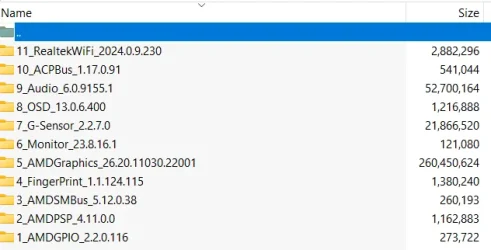
So, if anyone is looking for the latest drivers (silent installers) for the MateBook D15 AMD, I now have the full set archived. Happy to share them if needed.

Download link:

Exact model: Huawei MateBook D 15 Ryzen R5 8GB+256GB+1TB (Boh-WAQ9R)

1763021977200.webp

For security concerns:
SHA256:
C12EAD6188ED251EFB0EF56C39343E6B6F61B422684A59ACB47CB8D32E170EF4
VirusTotal
 

My Computers My Computers

  • At a glance

    Windows 11 Pro 25H2Ryzen 5 3500U8GBVega 8
    OS
    Windows 11 Pro 25H2
    Computer type
    Laptop
    Manufacturer/Model
    Huawei MateBook D15
    CPU
    Ryzen 5 3500U
    Memory
    8GB
    Graphics Card(s)
    Vega 8
    Screen Resolution
    FHD
    Hard Drives
    256GB Samsung SSD + 1TB HDD
    Browser
    Microsoft Edge
    Antivirus
    ESET Smart Security Premium
  • At a glance

    Windows 10 Enterprise LTSC 21H2intel core i7 6700HQ16GBNvidia Geforce GTX1060 (6GB)
    Operating System
    Windows 10 Enterprise LTSC 21H2
    Computer type
    Laptop
    Manufacturer/Model
    MSI GS73 6RF Stealth Pro
    CPU
    intel core i7 6700HQ
    Memory
    16GB
    Graphics card(s)
    Nvidia Geforce GTX1060 (6GB)
    Screen Resolution
    FHD
    Hard Drives
    128GB SSD + 1TB HDD
    Browser
    Microsoft Edge
    Antivirus
    Windows Defender
Why not share the download script, in case your personal folder disappears?
 

My Computer My Computer

At a glance

Windows 7
OS
Windows 7
Why not share the download script, in case your personal folder disappears?
It’s not a full script that you can click on it and it starts downloading! It’s a bit complicated process to crack a software, and the alien bans me if I share a cracked app.
 

My Computers My Computers

  • At a glance

    Windows 11 Pro 25H2Ryzen 5 3500U8GBVega 8
    OS
    Windows 11 Pro 25H2
    Computer type
    Laptop
    Manufacturer/Model
    Huawei MateBook D15
    CPU
    Ryzen 5 3500U
    Memory
    8GB
    Graphics Card(s)
    Vega 8
    Screen Resolution
    FHD
    Hard Drives
    256GB Samsung SSD + 1TB HDD
    Browser
    Microsoft Edge
    Antivirus
    ESET Smart Security Premium
  • At a glance

    Windows 10 Enterprise LTSC 21H2intel core i7 6700HQ16GBNvidia Geforce GTX1060 (6GB)
    Operating System
    Windows 10 Enterprise LTSC 21H2
    Computer type
    Laptop
    Manufacturer/Model
    MSI GS73 6RF Stealth Pro
    CPU
    intel core i7 6700HQ
    Memory
    16GB
    Graphics card(s)
    Nvidia Geforce GTX1060 (6GB)
    Screen Resolution
    FHD
    Hard Drives
    128GB SSD + 1TB HDD
    Browser
    Microsoft Edge
    Antivirus
    Windows Defender
Give Iobit Driver Booster Free a try. If you are successful, back up all your drivers. My favorite is Double Driver and my backup is in a compressed form.
 

My Computer My Computer

At a glance

Win 7,8.1,10,11, Mint, Kde Plasma, DebianIntel(R) Core(TM) i7-6500U CPU @ 2.50GHz16 GBIntel(R) HD Graphics 520/Nvidia GeForce 930M
OS
Win 7,8.1,10,11, Mint, Kde Plasma, Debian
Computer type
Laptop
Manufacturer/Model
Dell
CPU
Intel(R) Core(TM) i7-6500U CPU @ 2.50GHz
Memory
16 GB
Graphics Card(s)
Intel(R) HD Graphics 520/Nvidia GeForce 930M
Sound Card
Intel(R) Display Audio/RealtekAudio
Monitor(s) Displays
Generic Pnp Monitor
Screen Resolution
1366 X 768
Hard Drives
ST2000LM024-1EJ164
Keyboard
Eng (US)
Mouse
Sanwa Supply
Browser
Firefox
Antivirus
Avast One
Other Info
Too many laptops with different system specifications.
Give Iobit Driver Booster Free a try. If you are successful, back up all your drivers. My favorite is Double Driver and my backup is in a compressed form.
These tools install general drivers from hardware manufacturers. Huawei uses some special hardwares which won’t work properly with those drivers. For example my wifi is from Realtek but Realtek drivers won’t work at all. That’s why I did such efforts :)
 

My Computers My Computers

  • At a glance

    Windows 11 Pro 25H2Ryzen 5 3500U8GBVega 8
    OS
    Windows 11 Pro 25H2
    Computer type
    Laptop
    Manufacturer/Model
    Huawei MateBook D15
    CPU
    Ryzen 5 3500U
    Memory
    8GB
    Graphics Card(s)
    Vega 8
    Screen Resolution
    FHD
    Hard Drives
    256GB Samsung SSD + 1TB HDD
    Browser
    Microsoft Edge
    Antivirus
    ESET Smart Security Premium
  • At a glance

    Windows 10 Enterprise LTSC 21H2intel core i7 6700HQ16GBNvidia Geforce GTX1060 (6GB)
    Operating System
    Windows 10 Enterprise LTSC 21H2
    Computer type
    Laptop
    Manufacturer/Model
    MSI GS73 6RF Stealth Pro
    CPU
    intel core i7 6700HQ
    Memory
    16GB
    Graphics card(s)
    Nvidia Geforce GTX1060 (6GB)
    Screen Resolution
    FHD
    Hard Drives
    128GB SSD + 1TB HDD
    Browser
    Microsoft Edge
    Antivirus
    Windows Defender
Hi everyone,

I previously created a thread about this but unfortunately didn’t get a solution, so I’m trying again.

Huawei uses a tool called Huawei PC Manager for installing and updating drivers on their laptops. However, I prefer not to use this software. The issue is that their official support website doesn’t provide direct driver downloads for laptops anymore—they require users to use PC Manager for everything.

I found that on Huawei’s Chinese website, there’s another tool called DriverTools. This tool allows you to select your device model and download a complete driver package (including all drivers and utilities).

DriverTools Download Link

Here’s the problem: I’m located in Iran, and unfortunately, this tool doesn’t work for me. Even with a VPN and changing my IP address, it still detects my region and blocks access.

So, I’m kindly asking if anyone here has the time and is willing to help—could you please use the DriverTools app, select my laptop model, download the full driver package (everything available for this model: drivers, utilities, etc.), zip it, and upload it somewhere I can download it?

I’d really appreciate your help!

My exact laptop model is:
Huawei MateBook D 15 Ryzen R5 8GB+256GB+1TB (Boh-WAQ9R)

Thanks a lot in advance!
Sorry if it is already been suggested, too many posts to read them all. My approach when the OEM doesn't provide drivers is to use a tool such as Aida64 or Speccy to identify my hardware (chipset, VGA, sound, LAN etc) and then I visit the manufacturer of each to download the latest appropriate driver. For the rest devices that I cannot find drivers, I use Windows Update or a tool such as Snappy Driver Installer. In the latter I install only the missing drivers (green text). I avoid upgrading the existing drivers (blue text) because the new driver is not always the best and if installing inappropriate chipset drivers you risk a BSOD.
 

My Computers My Computers

  • At a glance

    Windows 11 Pro 23H2 (5699), 25H2 (8655)Mobile DualCore Intel Core 2 Duo T7250, 2000 MHz4GBMobile Intel(R) GMA 4500M (Mobile 4 series)
    OS
    Windows 11 Pro 23H2 (5699), 25H2 (8655)
    Computer type
    Laptop
    Manufacturer/Model
    Acer Extensa 5630EZ
    CPU
    Mobile DualCore Intel Core 2 Duo T7250, 2000 MHz
    Motherboard
    Acer Extensa 5630
    Memory
    4GB
    Graphics Card(s)
    Mobile Intel(R) GMA 4500M (Mobile 4 series)
    Sound Card
    Realtek ALC268 @ Intel 82801IB ICH9 - High Definition Audio Controller
    Monitor(s) Displays
    1
    Screen Resolution
    1280x800
    Hard Drives
    Samsung SSD 850 EVO 250GB SATA Device (250 GB, SATA-III)
    Internet Speed
    VDSL 50 Mbps
    Browser
    MICROSOFT EDGE
    Antivirus
    WINDOWS DEFENDER
    Other Info
    Legacy MBR installation, no TPM, no Secure Boot, no WDDM 2.0 graphics drivers, no SSE4.2, cannot get more unsupported ;) This is only my test laptop. I had installed Windows 11 here before upgrading my main PC. For my main PC I use everyday see my 2nd system specs.
  • At a glance

    Windows 11 Pro v25H2 (build 26200.8655)Intel Core-i7 3770 3.40GHz s1155 (3rd generat...2x Kingston Hyper-X Blu 8GB DDR3-1600GIGABYTE GeForce RTX 3050 WINDFORCE OC V2 6GB...
    Operating System
    Windows 11 Pro v25H2 (build 26200.8655)
    Computer type
    PC/Desktop
    Manufacturer/Model
    Custom-built PC
    CPU
    Intel Core-i7 3770 3.40GHz s1155 (3rd generation)
    Motherboard
    Asus P8H61 s1155 ATX
    Memory
    2x Kingston Hyper-X Blu 8GB DDR3-1600
    Graphics card(s)
    GIGABYTE GeForce RTX 3050 WINDFORCE OC V2 6GB (GV-N3050WF2OCV2-6GD)
    Sound Card
    Realtek HD audio (ALC887)
    Monitor(s) Displays
    Sony Bravia KDL-19L4000 19" LCD TV via VGA
    Screen Resolution
    1440x900 32-bit 60Hz
    Hard Drives
    WD Blue SA510 2.5 1000GB SSD as system disk, Western Digital Caviar Purple 4TB SATA III (WD40PURZ) as second
    PSU
    Thermaltake Litepower RGB 550W Full Wired
    Case
    SUPERCASE MIDI-TOWER
    Cooling
    Deepcool Gamma Archer CPU cooler, 1x 8cm fan at the back
    Keyboard
    Mitsumi 101-key PS/2
    Mouse
    Sunnyline OptiEye PS/2
    Internet Speed
    100Mbps
    Browser
    Microsoft Edge, Mozilla Firefox
    Antivirus
    Microsoft Windows Defender
    Other Info
    Legacy BIOS (MBR) installation, no TPM, no Secure Boot, WDDM 3.0 graphics drivers, WEI score 7.4
Does anyone using matebook D15 2022 BOD-WXX9 Intel? Damn i can't find drivers for this model..
 

My Computer My Computer

At a glance

WIN11 HOME 25H2Intel i5-1135G7
OS
WIN11 HOME 25H2
Computer type
Laptop
Manufacturer/Model
Huawei Matebook D 15 2022
CPU
Intel i5-1135G7
Sorry if it is already been suggested, too many posts to read them all. My approach when the OEM doesn't provide drivers is to use a tool such as Aida64 or Speccy to identify my hardware (chipset, VGA, sound, LAN etc) and then I visit the manufacturer of each to download the latest appropriate driver. For the rest devices that I cannot find drivers, I use Windows Update or a tool such as Snappy Driver Installer. In the latter I install only the missing drivers (green text). I avoid upgrading the existing drivers (blue text) because the new driver is not always the best and if installing inappropriate chipset drivers you risk a BSOD.
Thanks to this! I've learned that you dont need to update drivers if it's working.
 

My Computer My Computer

At a glance

WIN11 HOME 25H2Intel i5-1135G7
OS
WIN11 HOME 25H2
Computer type
Laptop
Manufacturer/Model
Huawei Matebook D 15 2022
CPU
Intel i5-1135G7
Thanks to this! I've learned that you dont need to update drivers if it's working.
I dared once to update all the drivers in a tablet using Snappy Driver Installer, but then I lost the touch feature and rotation due to inappropriate chipset drivers. The respective devices didn't even show in Device Manager to try and install drivers for them. Before I wipe Windows and reinstall, I tried to reinstall the official chipset drivers (aka platform drivers) from the manufacturer. Thanks God that worked and spared me the trouble of starting from scratch! So we never trust a third-party tool, including Windows Update, to install drivers for tablets. We even avoid official drivers from Intel and other component manufacturers. We only install the official drivers from the tablet manufacturer. If it works don't fix it!
 
Last edited:

My Computers My Computers

  • At a glance

    Windows 11 Pro 23H2 (5699), 25H2 (8655)Mobile DualCore Intel Core 2 Duo T7250, 2000 MHz4GBMobile Intel(R) GMA 4500M (Mobile 4 series)
    OS
    Windows 11 Pro 23H2 (5699), 25H2 (8655)
    Computer type
    Laptop
    Manufacturer/Model
    Acer Extensa 5630EZ
    CPU
    Mobile DualCore Intel Core 2 Duo T7250, 2000 MHz
    Motherboard
    Acer Extensa 5630
    Memory
    4GB
    Graphics Card(s)
    Mobile Intel(R) GMA 4500M (Mobile 4 series)
    Sound Card
    Realtek ALC268 @ Intel 82801IB ICH9 - High Definition Audio Controller
    Monitor(s) Displays
    1
    Screen Resolution
    1280x800
    Hard Drives
    Samsung SSD 850 EVO 250GB SATA Device (250 GB, SATA-III)
    Internet Speed
    VDSL 50 Mbps
    Browser
    MICROSOFT EDGE
    Antivirus
    WINDOWS DEFENDER
    Other Info
    Legacy MBR installation, no TPM, no Secure Boot, no WDDM 2.0 graphics drivers, no SSE4.2, cannot get more unsupported ;) This is only my test laptop. I had installed Windows 11 here before upgrading my main PC. For my main PC I use everyday see my 2nd system specs.
  • At a glance

    Windows 11 Pro v25H2 (build 26200.8655)Intel Core-i7 3770 3.40GHz s1155 (3rd generat...2x Kingston Hyper-X Blu 8GB DDR3-1600GIGABYTE GeForce RTX 3050 WINDFORCE OC V2 6GB...
    Operating System
    Windows 11 Pro v25H2 (build 26200.8655)
    Computer type
    PC/Desktop
    Manufacturer/Model
    Custom-built PC
    CPU
    Intel Core-i7 3770 3.40GHz s1155 (3rd generation)
    Motherboard
    Asus P8H61 s1155 ATX
    Memory
    2x Kingston Hyper-X Blu 8GB DDR3-1600
    Graphics card(s)
    GIGABYTE GeForce RTX 3050 WINDFORCE OC V2 6GB (GV-N3050WF2OCV2-6GD)
    Sound Card
    Realtek HD audio (ALC887)
    Monitor(s) Displays
    Sony Bravia KDL-19L4000 19" LCD TV via VGA
    Screen Resolution
    1440x900 32-bit 60Hz
    Hard Drives
    WD Blue SA510 2.5 1000GB SSD as system disk, Western Digital Caviar Purple 4TB SATA III (WD40PURZ) as second
    PSU
    Thermaltake Litepower RGB 550W Full Wired
    Case
    SUPERCASE MIDI-TOWER
    Cooling
    Deepcool Gamma Archer CPU cooler, 1x 8cm fan at the back
    Keyboard
    Mitsumi 101-key PS/2
    Mouse
    Sunnyline OptiEye PS/2
    Internet Speed
    100Mbps
    Browser
    Microsoft Edge, Mozilla Firefox
    Antivirus
    Microsoft Windows Defender
    Other Info
    Legacy BIOS (MBR) installation, no TPM, no Secure Boot, WDDM 3.0 graphics drivers, WEI score 7.4

Latest Support Threads

Back
Top Bottom