Apps Reset and Clear Open with Context Menu for File Types in Windows 11


Open_with_banner.png

This tutorial will show you how to reset the "Open with" context menu for a file type back to default for your account in Windows 10 and Windows 11.

The Open with context menu allows you to choose an app to open a file with by default.

When you use Open with to select to open a file with an app, that app is added to the "Open with" context menu for that file type for only your account.

If wanted, you can reset the "Open with" context menu back to default for a file type to clear all the apps you added from the "Open with" context menu.

Starting with Windows 11 build 22567, Microsoft has updated the “Open with” dialog box to align with Windows 11 design principles. The updated dialog box honors light/dark theme. We have also simplified the experience by making it possible to update your default app with just one click.

Starting with Windows 11 build 22579, is reverting the Open With dialog box redesign. Microsoft plans to bring this back in the future after addressing some performance issues identified by Windows Insiders.

1646245362661.png


Apps in the "Open with" context menu for a file type are stored in the OpenWithList and OpenWithProgIds registry keys at:

HKEY_CURRENT_USER\Software\Microsoft\Windows\CurrentVersion\Explorer\FileExts\<file type>\OpenWithList

HKEY_CURRENT_USER\Software\Microsoft\Windows\CurrentVersion\Explorer\FileExts\<file type>\OpenWithProgids


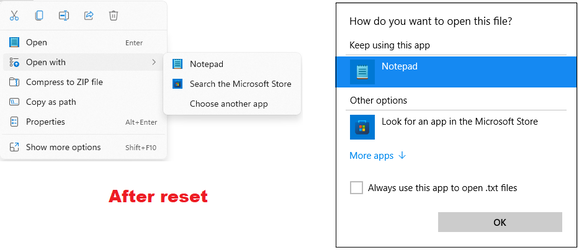
EXAMPLE: Before and after reset "Open with" context menu for ".txt" file type

The current default app will always show in the "Open with" context menu.
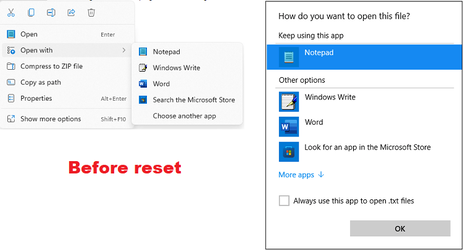

Open_with_before.png Open_with_after_reset.png


Here's How:

1 Click/tap on the file type link in the table below you would like to reset and clear "Open with" for to download its REG file.

2 Save the REG file to your desktop.

4 If you have Smart App Control turned on, you will need to unblock the downloaded REG file.

5 Double click/tap on the downloaded REG file to merge it.

6 When prompted, click/tap on Run, Yes (UAC), Yes, and OK to approve the merge.

7 You can now delete the downloaded REG file if you like.

The list of file types available to download in the table below is just a start for now, and is a work in progress. I will constantly be adding more to the list, but if you need one that is not yet listed, then please post a request for it. I'll be happy to get it added to the list.


File Type
Description
batWindows batch file
bmpBitmap image file
dllApplication extension
docxMicrosoft Word document file
epubeBook file format
exeExecutable application file
gifGraphics Interchange Format (GIF) image files
icoIcon file
isoDisk image file
jpegJoint Photographic Experts Group (JPEG) image file
jpgJoint Photographic Experts Group (JPEG) image file
lnkShortcut
logText document file that Windows writes a record of events to.
mp3MP3 sound format file
mp4MPEG-4 movie file
msiWindows Installer Package
pdfPortable Document Format (PDF) file.
pngPortable Network Graphics (PNG) is a lossless bitmap compression method for image files.
ps1Windows PowerShell Script
rtfRich text file
txtText document file
urlInternet shortcut
wavWave audio file
webpWebP is a raster graphics file format designed to create smaller, high-quality images for the web.
zipCompressed (zipped) folder


That's it,
Shawn Brink


Attachments

Last edited:

"Open with" would be a separate issue. You should be able to use the method in the tutorial below to clear the "Open with" context menu for the affected file extensions.
I noticed you didn't include EPUB files (which I used to use Calibre with), in your list of file types in the Tutorial, will the reg fix still work?
 

My Computer

System One

  • OS
    windows 11 Pro
    Computer type
    Laptop
    Manufacturer/Model
    Dell XPS 15 9510
    CPU
    11th Gen Intel(R) Core(TM) i7-11800H @ 2.30GHz (16 CPUs
    Memory
    16 GB
    Graphics Card(s)
    NVIDIA GeForce RTX 3050 Ti
    Hard Drives
    512GB Solid State Drive
    Browser
    Firefox
I noticed you didn't include EPUB files (which I used to use Calibre with), in your list of file types in the Tutorial, will the reg fix still work?
EPUB now added to the list. :alien:
 

My Computers

System One System Two

  • OS
    Windows 11 Pro for Workstations
    Computer type
    PC/Desktop
    Manufacturer/Model
    Custom self build
    CPU
    Intel i7-8700K 5 GHz
    Motherboard
    ASUS ROG Maximus XI Formula Z390
    Memory
    64 GB (4x16GB) G.SKILL TridentZ RGB DDR4 3600 MHz (F4-3600C18D-32GTZR)
    Graphics Card(s)
    ASUS ROG-STRIX-GTX1080TI-O11G-GAMING (11GB GDDR5X)
    Sound Card
    Integrated Digital Audio (S/PDIF)
    Monitor(s) Displays
    2 x Samsung Odyssey G75 27"
    Screen Resolution
    2560x1440
    Hard Drives
    1TB Samsung 990 PRO M.2,
    4TB Samsung 990 PRO M.2,
    TerraMaster F8 SSD Plus NAS
    PSU
    Seasonic Prime Titanium 850W
    Case
    Thermaltake Core P3 wall mounted
    Cooling
    Corsair Hydro H115i
    Keyboard
    Amazon Basics Wired Full Keyboard MD005
    Mouse
    Logitech MX Master 4
    Internet Speed
    2 Gbps Download and 100 Mbps Upload
    Browser
    Chrome and Edge
    Antivirus
    Microsoft Defender
    Other Info
    Logitech Z625 speaker system,
    Logitech BRIO 4K Pro webcam,
    HP Color LaserJet Pro MFP M477fdn,
    CyberPower CP1500PFCLCD
    Galaxy S23 Plus phone
  • Operating System
    Windows 11 Pro
    Computer type
    Laptop
    Manufacturer/Model
    Surface Laptop 7 Copilot+ PC
    CPU
    Snapdragon X Elite (12 core) 3.42 GHz
    Memory
    16 GB LPDDR5x-7467 MHz
    Monitor(s) Displays
    15" HDR
    Screen Resolution
    2496 x 1664
    Hard Drives
    1 TB SSD
    Internet Speed
    Wi-Fi 7 and Bluetooth 5.4
    Browser
    Chrome and Edge
    Antivirus
    Microsoft Defender

My Computer

System One

  • OS
    windows 11 Pro
    Computer type
    Laptop
    Manufacturer/Model
    Dell XPS 15 9510
    CPU
    11th Gen Intel(R) Core(TM) i7-11800H @ 2.30GHz (16 CPUs
    Memory
    16 GB
    Graphics Card(s)
    NVIDIA GeForce RTX 3050 Ti
    Hard Drives
    512GB Solid State Drive
    Browser
    Firefox

My Computers

System One System Two

  • OS
    Windows 11 Pro for Workstations
    Computer type
    PC/Desktop
    Manufacturer/Model
    Custom self build
    CPU
    Intel i7-8700K 5 GHz
    Motherboard
    ASUS ROG Maximus XI Formula Z390
    Memory
    64 GB (4x16GB) G.SKILL TridentZ RGB DDR4 3600 MHz (F4-3600C18D-32GTZR)
    Graphics Card(s)
    ASUS ROG-STRIX-GTX1080TI-O11G-GAMING (11GB GDDR5X)
    Sound Card
    Integrated Digital Audio (S/PDIF)
    Monitor(s) Displays
    2 x Samsung Odyssey G75 27"
    Screen Resolution
    2560x1440
    Hard Drives
    1TB Samsung 990 PRO M.2,
    4TB Samsung 990 PRO M.2,
    TerraMaster F8 SSD Plus NAS
    PSU
    Seasonic Prime Titanium 850W
    Case
    Thermaltake Core P3 wall mounted
    Cooling
    Corsair Hydro H115i
    Keyboard
    Amazon Basics Wired Full Keyboard MD005
    Mouse
    Logitech MX Master 4
    Internet Speed
    2 Gbps Download and 100 Mbps Upload
    Browser
    Chrome and Edge
    Antivirus
    Microsoft Defender
    Other Info
    Logitech Z625 speaker system,
    Logitech BRIO 4K Pro webcam,
    HP Color LaserJet Pro MFP M477fdn,
    CyberPower CP1500PFCLCD
    Galaxy S23 Plus phone
  • Operating System
    Windows 11 Pro
    Computer type
    Laptop
    Manufacturer/Model
    Surface Laptop 7 Copilot+ PC
    CPU
    Snapdragon X Elite (12 core) 3.42 GHz
    Memory
    16 GB LPDDR5x-7467 MHz
    Monitor(s) Displays
    15" HDR
    Screen Resolution
    2496 x 1664
    Hard Drives
    1 TB SSD
    Internet Speed
    Wi-Fi 7 and Bluetooth 5.4
    Browser
    Chrome and Edge
    Antivirus
    Microsoft Defender
This didn't work for me in Windows build 26100.2605. The entries were there, but didn't correspond to what is in the Open With menus, and changing or deleting the entries didn't do anything.

Does it still work? Or is there another way?

I was able to add Open with Photoshop at the bottom of the context menu using the Microsoft store app Custom Context Menu, so I don't have to rummage through the Open With menu looking for it. And I was able to remove some of the other junk down there. See this post.

All in all, a good day.
 

My Computer

System One

  • OS
    Windows 11 Pro
    Computer type
    PC/Desktop
    Manufacturer/Model
    Dell XPS 8960
    CPU
    i7-14700
    Screen Resolution
    QHD
    Browser
    Chrome
    Antivirus
    Nor_on
This didn't work for me in Windows build 26100.2605. The entries were there, but didn't correspond to what is in the Open With menus, and changing or deleting the entries didn't do anything.

Does it still work? Or is there another way?

I was able to add Open with Photoshop at the bottom of the context menu using the Microsoft store app Custom Context Menu, so I don't have to rummage through the Open With menu looking for it. And I was able to remove some of the other junk down there. See this post.

All in all, a good day.

Hello, :alien:

Please clarify what didn't work for you.

This only clears the apps you chose to open a file type with from its "Open with" context menu. It will not clear the default app.
 

My Computers

System One System Two

  • OS
    Windows 11 Pro for Workstations
    Computer type
    PC/Desktop
    Manufacturer/Model
    Custom self build
    CPU
    Intel i7-8700K 5 GHz
    Motherboard
    ASUS ROG Maximus XI Formula Z390
    Memory
    64 GB (4x16GB) G.SKILL TridentZ RGB DDR4 3600 MHz (F4-3600C18D-32GTZR)
    Graphics Card(s)
    ASUS ROG-STRIX-GTX1080TI-O11G-GAMING (11GB GDDR5X)
    Sound Card
    Integrated Digital Audio (S/PDIF)
    Monitor(s) Displays
    2 x Samsung Odyssey G75 27"
    Screen Resolution
    2560x1440
    Hard Drives
    1TB Samsung 990 PRO M.2,
    4TB Samsung 990 PRO M.2,
    TerraMaster F8 SSD Plus NAS
    PSU
    Seasonic Prime Titanium 850W
    Case
    Thermaltake Core P3 wall mounted
    Cooling
    Corsair Hydro H115i
    Keyboard
    Amazon Basics Wired Full Keyboard MD005
    Mouse
    Logitech MX Master 4
    Internet Speed
    2 Gbps Download and 100 Mbps Upload
    Browser
    Chrome and Edge
    Antivirus
    Microsoft Defender
    Other Info
    Logitech Z625 speaker system,
    Logitech BRIO 4K Pro webcam,
    HP Color LaserJet Pro MFP M477fdn,
    CyberPower CP1500PFCLCD
    Galaxy S23 Plus phone
  • Operating System
    Windows 11 Pro
    Computer type
    Laptop
    Manufacturer/Model
    Surface Laptop 7 Copilot+ PC
    CPU
    Snapdragon X Elite (12 core) 3.42 GHz
    Memory
    16 GB LPDDR5x-7467 MHz
    Monitor(s) Displays
    15" HDR
    Screen Resolution
    2496 x 1664
    Hard Drives
    1 TB SSD
    Internet Speed
    Wi-Fi 7 and Bluetooth 5.4
    Browser
    Chrome and Edge
    Antivirus
    Microsoft Defender
Hello, :alien:

Please clarify what didn't work for you.

This only clears the apps you chose to open a file type with from its "Open with" context menu. It will not clear the default app.
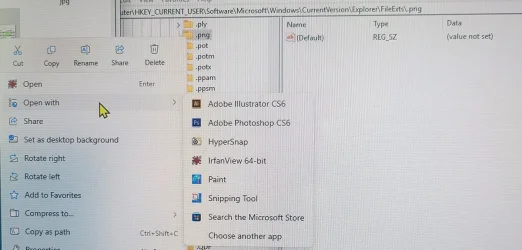
Thanks for your reply, @Brink . I used regedit to change the OpenWithList and OpenWithProgIds keys, trying to duplicate what your file does. If it didn't, please let me know where I went wrong.

(This is in Windows 11 Build 26100, so the Open With dialog box has been changed again, and uses png instead of jpg, but that shouldn't matter.)

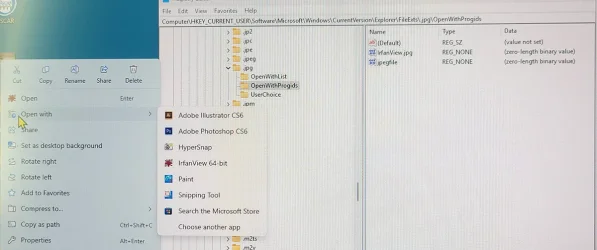
The registry keys and Open With dropdown were initially:

Post 10.webp


The OpenWithList entries are not the same as in the dropdown menu, or in the order from MRUList. Then I deleted OpenWithList and OpenWithProgids (and accidentally UserChoice, but that didn't change Open With the other times, when I left it in).

Post 11.webp


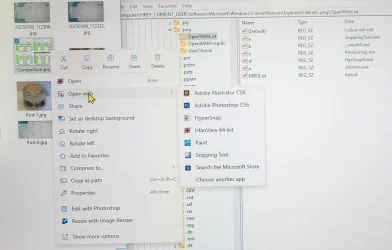
That didn't clear the Open With dropdown, although it did remove Photoshop. I then used Choose another app to open the file with Photoshop, which added it back to the dropdown, but not at the top:

Post last.webp


Did I get this right?
 

Attachments

  • Post 12.webp
    Post 12.webp
    149.4 KB · Views: 62
  • Post 5.webp
    Post 5.webp
    102.6 KB · Views: 71

My Computer

System One

  • OS
    Windows 11 Pro
    Computer type
    PC/Desktop
    Manufacturer/Model
    Dell XPS 8960
    CPU
    i7-14700
    Screen Resolution
    QHD
    Browser
    Chrome
    Antivirus
    Nor_on
@Toolworker,

Just to confirm, your screenshot shows JPG files instead of PNG that you are clearing in the registry.
 

My Computers

System One System Two

  • OS
    Windows 11 Pro for Workstations
    Computer type
    PC/Desktop
    Manufacturer/Model
    Custom self build
    CPU
    Intel i7-8700K 5 GHz
    Motherboard
    ASUS ROG Maximus XI Formula Z390
    Memory
    64 GB (4x16GB) G.SKILL TridentZ RGB DDR4 3600 MHz (F4-3600C18D-32GTZR)
    Graphics Card(s)
    ASUS ROG-STRIX-GTX1080TI-O11G-GAMING (11GB GDDR5X)
    Sound Card
    Integrated Digital Audio (S/PDIF)
    Monitor(s) Displays
    2 x Samsung Odyssey G75 27"
    Screen Resolution
    2560x1440
    Hard Drives
    1TB Samsung 990 PRO M.2,
    4TB Samsung 990 PRO M.2,
    TerraMaster F8 SSD Plus NAS
    PSU
    Seasonic Prime Titanium 850W
    Case
    Thermaltake Core P3 wall mounted
    Cooling
    Corsair Hydro H115i
    Keyboard
    Amazon Basics Wired Full Keyboard MD005
    Mouse
    Logitech MX Master 4
    Internet Speed
    2 Gbps Download and 100 Mbps Upload
    Browser
    Chrome and Edge
    Antivirus
    Microsoft Defender
    Other Info
    Logitech Z625 speaker system,
    Logitech BRIO 4K Pro webcam,
    HP Color LaserJet Pro MFP M477fdn,
    CyberPower CP1500PFCLCD
    Galaxy S23 Plus phone
  • Operating System
    Windows 11 Pro
    Computer type
    Laptop
    Manufacturer/Model
    Surface Laptop 7 Copilot+ PC
    CPU
    Snapdragon X Elite (12 core) 3.42 GHz
    Memory
    16 GB LPDDR5x-7467 MHz
    Monitor(s) Displays
    15" HDR
    Screen Resolution
    2496 x 1664
    Hard Drives
    1 TB SSD
    Internet Speed
    Wi-Fi 7 and Bluetooth 5.4
    Browser
    Chrome and Edge
    Antivirus
    Microsoft Defender
@Brink ,

The example I posted is a PNG file. It was in a folder with mostly JPG files and I cropped its name out. Sorry for the confusion.

Here's a wider crop - I was clicking Comparison.png.
 

Attachments

  • Post 30.webp
    Post 30.webp
    114.3 KB · Views: 57

My Computer

System One

  • OS
    Windows 11 Pro
    Computer type
    PC/Desktop
    Manufacturer/Model
    Dell XPS 8960
    CPU
    i7-14700
    Screen Resolution
    QHD
    Browser
    Chrome
    Antivirus
    Nor_on
@Brink ,

The example I posted is a PNG file. It was in a folder with mostly JPG files and I cropped its name out. Sorry for the confusion.

Here's a wider crop - I was clicking Comparison.png.
Odd. Deleting the two keys below for PNG should clear the Open with context menu other than for the current default app.

HKEY_CURRENT_USER\Software\Microsoft\Windows\CurrentVersion\Explorer\FileExts\.png\OpenWithList

HKEY_CURRENT_USER\Software\Microsoft\Windows\CurrentVersion\Explorer\FileExts\.png\OpenWithProgids
 

My Computers

System One System Two

  • OS
    Windows 11 Pro for Workstations
    Computer type
    PC/Desktop
    Manufacturer/Model
    Custom self build
    CPU
    Intel i7-8700K 5 GHz
    Motherboard
    ASUS ROG Maximus XI Formula Z390
    Memory
    64 GB (4x16GB) G.SKILL TridentZ RGB DDR4 3600 MHz (F4-3600C18D-32GTZR)
    Graphics Card(s)
    ASUS ROG-STRIX-GTX1080TI-O11G-GAMING (11GB GDDR5X)
    Sound Card
    Integrated Digital Audio (S/PDIF)
    Monitor(s) Displays
    2 x Samsung Odyssey G75 27"
    Screen Resolution
    2560x1440
    Hard Drives
    1TB Samsung 990 PRO M.2,
    4TB Samsung 990 PRO M.2,
    TerraMaster F8 SSD Plus NAS
    PSU
    Seasonic Prime Titanium 850W
    Case
    Thermaltake Core P3 wall mounted
    Cooling
    Corsair Hydro H115i
    Keyboard
    Amazon Basics Wired Full Keyboard MD005
    Mouse
    Logitech MX Master 4
    Internet Speed
    2 Gbps Download and 100 Mbps Upload
    Browser
    Chrome and Edge
    Antivirus
    Microsoft Defender
    Other Info
    Logitech Z625 speaker system,
    Logitech BRIO 4K Pro webcam,
    HP Color LaserJet Pro MFP M477fdn,
    CyberPower CP1500PFCLCD
    Galaxy S23 Plus phone
  • Operating System
    Windows 11 Pro
    Computer type
    Laptop
    Manufacturer/Model
    Surface Laptop 7 Copilot+ PC
    CPU
    Snapdragon X Elite (12 core) 3.42 GHz
    Memory
    16 GB LPDDR5x-7467 MHz
    Monitor(s) Displays
    15" HDR
    Screen Resolution
    2496 x 1664
    Hard Drives
    1 TB SSD
    Internet Speed
    Wi-Fi 7 and Bluetooth 5.4
    Browser
    Chrome and Edge
    Antivirus
    Microsoft Defender
Odd. Deleting the two keys below for PNG should clear the Open with context menu other than for the current default app.

HKEY_CURRENT_USER\Software\Microsoft\Windows\CurrentVersion\Explorer\FileExts\.png\OpenWithList

HKEY_CURRENT_USER\Software\Microsoft\Windows\CurrentVersion\Explorer\FileExts\.png\OpenWithProgids
I've been trying to beat the context menus into submission with several tools - ShellFolderFix, ShellExView, ShellMenuView - and some registry tweaks. Possibly one of those is messing with the Open with menu.

I also installed WaveEdit from NCH, which piles hundreds of spurious context menu entries into the registry, based on a post from someone who said he'd managed to make them go away. His method didn't work for me, but when I installed the NCH apps the context menu entries went away too.

So maybe one of those messed up the normal context menus.
 

My Computer

System One

  • OS
    Windows 11 Pro
    Computer type
    PC/Desktop
    Manufacturer/Model
    Dell XPS 8960
    CPU
    i7-14700
    Screen Resolution
    QHD
    Browser
    Chrome
    Antivirus
    Nor_on
I've been trying to beat the context menus into submission with several tools - ShellFolderFix, ShellExView, ShellMenuView - and some registry tweaks. Possibly one of those is messing with the Open with menu.

I also installed WaveEdit from NCH, which piles hundreds of spurious context menu entries into the registry, based on a post from someone who said he'd managed to make them go away. His method didn't work for me, but when I installed the NCH apps the context menu entries went away too.

So maybe one of those messed up the normal context menus.

It's certainly a possibility.
 

My Computers

System One System Two

  • OS
    Windows 11 Pro for Workstations
    Computer type
    PC/Desktop
    Manufacturer/Model
    Custom self build
    CPU
    Intel i7-8700K 5 GHz
    Motherboard
    ASUS ROG Maximus XI Formula Z390
    Memory
    64 GB (4x16GB) G.SKILL TridentZ RGB DDR4 3600 MHz (F4-3600C18D-32GTZR)
    Graphics Card(s)
    ASUS ROG-STRIX-GTX1080TI-O11G-GAMING (11GB GDDR5X)
    Sound Card
    Integrated Digital Audio (S/PDIF)
    Monitor(s) Displays
    2 x Samsung Odyssey G75 27"
    Screen Resolution
    2560x1440
    Hard Drives
    1TB Samsung 990 PRO M.2,
    4TB Samsung 990 PRO M.2,
    TerraMaster F8 SSD Plus NAS
    PSU
    Seasonic Prime Titanium 850W
    Case
    Thermaltake Core P3 wall mounted
    Cooling
    Corsair Hydro H115i
    Keyboard
    Amazon Basics Wired Full Keyboard MD005
    Mouse
    Logitech MX Master 4
    Internet Speed
    2 Gbps Download and 100 Mbps Upload
    Browser
    Chrome and Edge
    Antivirus
    Microsoft Defender
    Other Info
    Logitech Z625 speaker system,
    Logitech BRIO 4K Pro webcam,
    HP Color LaserJet Pro MFP M477fdn,
    CyberPower CP1500PFCLCD
    Galaxy S23 Plus phone
  • Operating System
    Windows 11 Pro
    Computer type
    Laptop
    Manufacturer/Model
    Surface Laptop 7 Copilot+ PC
    CPU
    Snapdragon X Elite (12 core) 3.42 GHz
    Memory
    16 GB LPDDR5x-7467 MHz
    Monitor(s) Displays
    15" HDR
    Screen Resolution
    2496 x 1664
    Hard Drives
    1 TB SSD
    Internet Speed
    Wi-Fi 7 and Bluetooth 5.4
    Browser
    Chrome and Edge
    Antivirus
    Microsoft Defender
Code:
HKEY_CURRENT_USER\Software\Microsoft\Windows\CurrentVersion\Explorer\FileExts
is per extension (.mp3, .jpg, etc) and refers to the flyout "open with" context enry

Code:
HKEY_CURRENT_USER\Software\Classes\Applications
shows apps listed in the popup menu that shows when you right click > properties > change
 

My Computer

System One

  • OS
    Windows 11 Pro

My Computers

System One System Two

  • OS
    Windows 11 Pro for Workstations
    Computer type
    PC/Desktop
    Manufacturer/Model
    Custom self build
    CPU
    Intel i7-8700K 5 GHz
    Motherboard
    ASUS ROG Maximus XI Formula Z390
    Memory
    64 GB (4x16GB) G.SKILL TridentZ RGB DDR4 3600 MHz (F4-3600C18D-32GTZR)
    Graphics Card(s)
    ASUS ROG-STRIX-GTX1080TI-O11G-GAMING (11GB GDDR5X)
    Sound Card
    Integrated Digital Audio (S/PDIF)
    Monitor(s) Displays
    2 x Samsung Odyssey G75 27"
    Screen Resolution
    2560x1440
    Hard Drives
    1TB Samsung 990 PRO M.2,
    4TB Samsung 990 PRO M.2,
    TerraMaster F8 SSD Plus NAS
    PSU
    Seasonic Prime Titanium 850W
    Case
    Thermaltake Core P3 wall mounted
    Cooling
    Corsair Hydro H115i
    Keyboard
    Amazon Basics Wired Full Keyboard MD005
    Mouse
    Logitech MX Master 4
    Internet Speed
    2 Gbps Download and 100 Mbps Upload
    Browser
    Chrome and Edge
    Antivirus
    Microsoft Defender
    Other Info
    Logitech Z625 speaker system,
    Logitech BRIO 4K Pro webcam,
    HP Color LaserJet Pro MFP M477fdn,
    CyberPower CP1500PFCLCD
    Galaxy S23 Plus phone
  • Operating System
    Windows 11 Pro
    Computer type
    Laptop
    Manufacturer/Model
    Surface Laptop 7 Copilot+ PC
    CPU
    Snapdragon X Elite (12 core) 3.42 GHz
    Memory
    16 GB LPDDR5x-7467 MHz
    Monitor(s) Displays
    15" HDR
    Screen Resolution
    2496 x 1664
    Hard Drives
    1 TB SSD
    Internet Speed
    Wi-Fi 7 and Bluetooth 5.4
    Browser
    Chrome and Edge
    Antivirus
    Microsoft Defender
May I have an option for JPEG files?
 

My Computers

System One System Two

  • OS
    Win 11 Pro 25H2 (10.0.26200)
    Computer type
    Laptop
    Manufacturer/Model
    HP EliteBook 840 14 inch G10 Notebook (BIOS HP V70 Ver. 01.11.00, 11/6/202)5
    CPU
    i7-1360p 2.20 GHz
    Motherboard
    HP Model 8B41 KBC Version 51.40.00
    Memory
    32 GB
    Graphics Card(s)
    Intel® Iris® Xe Graphics
    Sound Card
    Realtek High Definition Audio; Intel® Smart Sound Technology for Bluetooth® Audio; Intel® Smart Sound Technology for USB Audio Intel® Smart Sound Technology for Digital Microphones
    Monitor(s) Displays
    as outfitted
    Screen Resolution
    1920 x 1200 (as recommended)
    Hard Drives
    (1) Samsung SSD 990 EVO Plus 2TB; (2) external Samsung Portable SSD T5 Shield 8TB
    Case
    N/A
    Cooling
    as outfitted
    Keyboard
    integrated
    Mouse
    integrated touchpad
    Internet Speed
    800MB/sec up & down
    Browser
    Chrome
    Antivirus
    Malwarebytes
    Other Info
    Device name AWC-840
    Processor 13th Gen Intel(R) Core(TM) i7-1360P 2.20 GHz
    Installed RAM 32.0 GB (31.6 GB usable)
    Product ID 00355-61334-62672-AAOEM
    System type 64-bit operating system, x64-based processor
    Pen and touch Touch support with 10 touch points
  • Operating System
    Win 11 Pro 25H2 (10.0.26200)
    Computer type
    PC/Desktop
    Manufacturer/Model
    HP Elite Tower 800 G9 Desktop PC (7E5P9AV)
    CPU
    Intel i7 (14th generation)
    Motherboard
    8AC1 KBC Version 12.03.39
    Memory
    64 GB
    Graphics card(s)
    (1) Intel UHD Graphics 770 (integrated); (2) Intel Arc B580 graphics card
    Sound Card
    Topping E30 II DAC Preamp Audio Decoder running @ 384.0 kHz
    Monitor(s) Displays
    ASUS ProArt Display PA279CV
    Screen Resolution
    3840 x 2160
    Hard Drives
    (1) Samsung SSD 990 PRO with Heatsink 2TB; (2) internal HHD CT2000BX500SSD1 2 TB; (3) external Samsung Portable SSD T7 Shield 4 TB
    Case
    HP Elite Tower 800
    Cooling
    As God dictates the room temperature
    Keyboard
    HHKB Lite 2
    Mouse
    Microsoft wheel mouse
    Internet Speed
    800MB/sec up & down
    Browser
    Chrome
    Antivirus
    Malwarebytes
    Other Info
    BIOS U01 Ver. 02.18.10

My Computers

System One System Two

  • OS
    Windows 11 Pro for Workstations
    Computer type
    PC/Desktop
    Manufacturer/Model
    Custom self build
    CPU
    Intel i7-8700K 5 GHz
    Motherboard
    ASUS ROG Maximus XI Formula Z390
    Memory
    64 GB (4x16GB) G.SKILL TridentZ RGB DDR4 3600 MHz (F4-3600C18D-32GTZR)
    Graphics Card(s)
    ASUS ROG-STRIX-GTX1080TI-O11G-GAMING (11GB GDDR5X)
    Sound Card
    Integrated Digital Audio (S/PDIF)
    Monitor(s) Displays
    2 x Samsung Odyssey G75 27"
    Screen Resolution
    2560x1440
    Hard Drives
    1TB Samsung 990 PRO M.2,
    4TB Samsung 990 PRO M.2,
    TerraMaster F8 SSD Plus NAS
    PSU
    Seasonic Prime Titanium 850W
    Case
    Thermaltake Core P3 wall mounted
    Cooling
    Corsair Hydro H115i
    Keyboard
    Amazon Basics Wired Full Keyboard MD005
    Mouse
    Logitech MX Master 4
    Internet Speed
    2 Gbps Download and 100 Mbps Upload
    Browser
    Chrome and Edge
    Antivirus
    Microsoft Defender
    Other Info
    Logitech Z625 speaker system,
    Logitech BRIO 4K Pro webcam,
    HP Color LaserJet Pro MFP M477fdn,
    CyberPower CP1500PFCLCD
    Galaxy S23 Plus phone
  • Operating System
    Windows 11 Pro
    Computer type
    Laptop
    Manufacturer/Model
    Surface Laptop 7 Copilot+ PC
    CPU
    Snapdragon X Elite (12 core) 3.42 GHz
    Memory
    16 GB LPDDR5x-7467 MHz
    Monitor(s) Displays
    15" HDR
    Screen Resolution
    2496 x 1664
    Hard Drives
    1 TB SSD
    Internet Speed
    Wi-Fi 7 and Bluetooth 5.4
    Browser
    Chrome and Edge
    Antivirus
    Microsoft Defender
WEBP please. (Yes, now I'm getting pesky.)
 

My Computers

System One System Two

  • OS
    Win 11 Pro 25H2 (10.0.26200)
    Computer type
    Laptop
    Manufacturer/Model
    HP EliteBook 840 14 inch G10 Notebook (BIOS HP V70 Ver. 01.11.00, 11/6/202)5
    CPU
    i7-1360p 2.20 GHz
    Motherboard
    HP Model 8B41 KBC Version 51.40.00
    Memory
    32 GB
    Graphics Card(s)
    Intel® Iris® Xe Graphics
    Sound Card
    Realtek High Definition Audio; Intel® Smart Sound Technology for Bluetooth® Audio; Intel® Smart Sound Technology for USB Audio Intel® Smart Sound Technology for Digital Microphones
    Monitor(s) Displays
    as outfitted
    Screen Resolution
    1920 x 1200 (as recommended)
    Hard Drives
    (1) Samsung SSD 990 EVO Plus 2TB; (2) external Samsung Portable SSD T5 Shield 8TB
    Case
    N/A
    Cooling
    as outfitted
    Keyboard
    integrated
    Mouse
    integrated touchpad
    Internet Speed
    800MB/sec up & down
    Browser
    Chrome
    Antivirus
    Malwarebytes
    Other Info
    Device name AWC-840
    Processor 13th Gen Intel(R) Core(TM) i7-1360P 2.20 GHz
    Installed RAM 32.0 GB (31.6 GB usable)
    Product ID 00355-61334-62672-AAOEM
    System type 64-bit operating system, x64-based processor
    Pen and touch Touch support with 10 touch points
  • Operating System
    Win 11 Pro 25H2 (10.0.26200)
    Computer type
    PC/Desktop
    Manufacturer/Model
    HP Elite Tower 800 G9 Desktop PC (7E5P9AV)
    CPU
    Intel i7 (14th generation)
    Motherboard
    8AC1 KBC Version 12.03.39
    Memory
    64 GB
    Graphics card(s)
    (1) Intel UHD Graphics 770 (integrated); (2) Intel Arc B580 graphics card
    Sound Card
    Topping E30 II DAC Preamp Audio Decoder running @ 384.0 kHz
    Monitor(s) Displays
    ASUS ProArt Display PA279CV
    Screen Resolution
    3840 x 2160
    Hard Drives
    (1) Samsung SSD 990 PRO with Heatsink 2TB; (2) internal HHD CT2000BX500SSD1 2 TB; (3) external Samsung Portable SSD T7 Shield 4 TB
    Case
    HP Elite Tower 800
    Cooling
    As God dictates the room temperature
    Keyboard
    HHKB Lite 2
    Mouse
    Microsoft wheel mouse
    Internet Speed
    800MB/sec up & down
    Browser
    Chrome
    Antivirus
    Malwarebytes
    Other Info
    BIOS U01 Ver. 02.18.10

My Computers

System One System Two

  • OS
    Windows 11 Pro for Workstations
    Computer type
    PC/Desktop
    Manufacturer/Model
    Custom self build
    CPU
    Intel i7-8700K 5 GHz
    Motherboard
    ASUS ROG Maximus XI Formula Z390
    Memory
    64 GB (4x16GB) G.SKILL TridentZ RGB DDR4 3600 MHz (F4-3600C18D-32GTZR)
    Graphics Card(s)
    ASUS ROG-STRIX-GTX1080TI-O11G-GAMING (11GB GDDR5X)
    Sound Card
    Integrated Digital Audio (S/PDIF)
    Monitor(s) Displays
    2 x Samsung Odyssey G75 27"
    Screen Resolution
    2560x1440
    Hard Drives
    1TB Samsung 990 PRO M.2,
    4TB Samsung 990 PRO M.2,
    TerraMaster F8 SSD Plus NAS
    PSU
    Seasonic Prime Titanium 850W
    Case
    Thermaltake Core P3 wall mounted
    Cooling
    Corsair Hydro H115i
    Keyboard
    Amazon Basics Wired Full Keyboard MD005
    Mouse
    Logitech MX Master 4
    Internet Speed
    2 Gbps Download and 100 Mbps Upload
    Browser
    Chrome and Edge
    Antivirus
    Microsoft Defender
    Other Info
    Logitech Z625 speaker system,
    Logitech BRIO 4K Pro webcam,
    HP Color LaserJet Pro MFP M477fdn,
    CyberPower CP1500PFCLCD
    Galaxy S23 Plus phone
  • Operating System
    Windows 11 Pro
    Computer type
    Laptop
    Manufacturer/Model
    Surface Laptop 7 Copilot+ PC
    CPU
    Snapdragon X Elite (12 core) 3.42 GHz
    Memory
    16 GB LPDDR5x-7467 MHz
    Monitor(s) Displays
    15" HDR
    Screen Resolution
    2496 x 1664
    Hard Drives
    1 TB SSD
    Internet Speed
    Wi-Fi 7 and Bluetooth 5.4
    Browser
    Chrome and Edge
    Antivirus
    Microsoft Defender

Latest Support Threads

Back
Top Bottom