Solved Restoring Windows backup Image to new SSD


that is like cutting off the branch you are sitting on.

it has to be done from a different os or from booted media.

I am pretty sure aomei will tell you it needs to restart into winpe to do that.

clik the back button and select the destination.

Am I going to have to install backupper, make an image, then post screenshots to show how it is done?
 

My Computers My Computers

  • At a glance

    Win7,Win11i7-97002x16gb 3600mhz
    OS
    Win7,Win11
    Computer type
    PC/Desktop
    CPU
    i7-9700
    Motherboard
    gigabyte b365m ds3h
    Memory
    2x16gb 3600mhz
    Monitor(s) Displays
    benq gw2480
    PSU
    bequiet pure power 11 400CM
    Cooling
    cryorig m9i
  • At a glance

    win7,win11i5-84002x8gb 3200
    Operating System
    win7,win11
    Computer type
    PC/Desktop
    CPU
    i5-8400
    Motherboard
    gigabyte b365m ds3h
    Memory
    2x8gb 3200
    PSU
    xfx pro 450
2023-07-25_043713-RESTORE-1.jpg

2023-07-25_043713-RESTORE-2.jpg
 

My Computers My Computers

  • At a glance

    Win7,Win11i7-97002x16gb 3600mhz
    OS
    Win7,Win11
    Computer type
    PC/Desktop
    CPU
    i7-9700
    Motherboard
    gigabyte b365m ds3h
    Memory
    2x16gb 3600mhz
    Monitor(s) Displays
    benq gw2480
    PSU
    bequiet pure power 11 400CM
    Cooling
    cryorig m9i
  • At a glance

    win7,win11i5-84002x8gb 3200
    Operating System
    win7,win11
    Computer type
    PC/Desktop
    CPU
    i5-8400
    Motherboard
    gigabyte b365m ds3h
    Memory
    2x8gb 3200
    PSU
    xfx pro 450
I just tried to make the restore with Aomei from winpe by using the Aomei USB boot disk. It gives exactly the same result!
It wants to restore the image to the old SSD and not to the new one. Let's not forget that this backup was made from the Old SSD , so Aomei want's to restore it to the same disk the backup is from.
So I choose: "Restore system to other location" as you advised. But then I get this new window were I can choose one of the partitions and not the all of them! For it to work I need to delete all windows partitions and make an unallocated space and THEN I can choose and restore to the un-allocated partition. In the meantime I made a backup from the new SSD and if I choose to restore it then Aomei will restore it to the new SSD and no longer to the old one! So to make it simple, Aomei ONLY restores to the original drive from which the image was made.

The only solution to restore to another drive is to restore to an unallocated partition .

1690311133277.png
 

My Computer My Computer

At a glance

WindowsIntel i7-12800HX32 GB DDR5 4800 MHz dual-channelNVIDIA® GeForce RTX™ 3070 Ti
OS
Windows
Computer type
Laptop
Manufacturer/Model
Lenovo Legion 7i
CPU
Intel i7-12800HX
Memory
32 GB DDR5 4800 MHz dual-channel
Graphics Card(s)
NVIDIA® GeForce RTX™ 3070 Ti
Sound Card
Steinberg UR44
Hard Drives
1 TB SSD (M.2 NVMe PCIe 4.0 x4
2 TB SSD Samsung 980 PRO NNMe
Browser
Firefox
Antivirus
Windows Defender + Malwarebytes
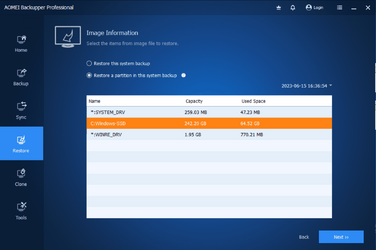
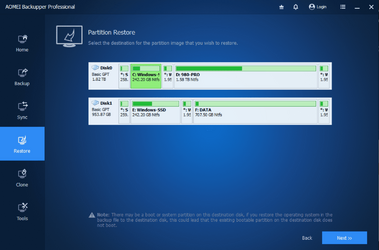
The only solution I can think of and I believe will work is to forget about the other windows partitions (SYSTEM_DRV and WINRE_DRV) as they are already there and have no problem. And choose the option: :Restore a partition in this system backup" and ONLY restore C: Windows partition of one drive to C: Windows partition of the other.

1.png


2.png
 

My Computer My Computer

At a glance

WindowsIntel i7-12800HX32 GB DDR5 4800 MHz dual-channelNVIDIA® GeForce RTX™ 3070 Ti
OS
Windows
Computer type
Laptop
Manufacturer/Model
Lenovo Legion 7i
CPU
Intel i7-12800HX
Memory
32 GB DDR5 4800 MHz dual-channel
Graphics Card(s)
NVIDIA® GeForce RTX™ 3070 Ti
Sound Card
Steinberg UR44
Hard Drives
1 TB SSD (M.2 NVMe PCIe 4.0 x4
2 TB SSD Samsung 980 PRO NNMe
Browser
Firefox
Antivirus
Windows Defender + Malwarebytes
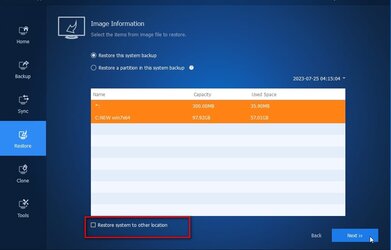
The point is do not tick the box that says "restore to other location"

look at the screenshot I posted. The box is not ticked.

Then it will want to restore to the source. Which was your question

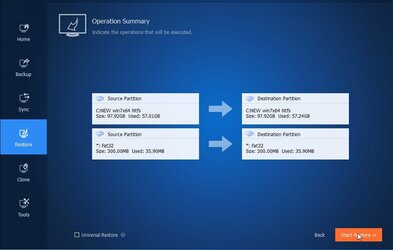
If I try again to restore the backup on the new ssd (the one I am booting from) AOMEI decides to restore it to my other SSD! instead of restoring it to my actual C: it wants to restore it to E: (which is the OLD SDD) :( Is there anyway to fix this

2023-07-25_043713-RESTORE-3.jpg

Now you are asking something different.
 
Last edited:

My Computers My Computers

  • At a glance

    Win7,Win11i7-97002x16gb 3600mhz
    OS
    Win7,Win11
    Computer type
    PC/Desktop
    CPU
    i7-9700
    Motherboard
    gigabyte b365m ds3h
    Memory
    2x16gb 3600mhz
    Monitor(s) Displays
    benq gw2480
    PSU
    bequiet pure power 11 400CM
    Cooling
    cryorig m9i
  • At a glance

    win7,win11i5-84002x8gb 3200
    Operating System
    win7,win11
    Computer type
    PC/Desktop
    CPU
    i5-8400
    Motherboard
    gigabyte b365m ds3h
    Memory
    2x8gb 3200
    PSU
    xfx pro 450
The point is do not tick the box that says "restore to other location"

look at the screenshot I posted. The box is not ticked.

View attachment 65739
This is what i tried first! But if I don't tick that it will automatically restore on the other drive!
Look here:

as you can see it wants to restore c: on e:
 

My Computer My Computer

At a glance

WindowsIntel i7-12800HX32 GB DDR5 4800 MHz dual-channelNVIDIA® GeForce RTX™ 3070 Ti
OS
Windows
Computer type
Laptop
Manufacturer/Model
Lenovo Legion 7i
CPU
Intel i7-12800HX
Memory
32 GB DDR5 4800 MHz dual-channel
Graphics Card(s)
NVIDIA® GeForce RTX™ 3070 Ti
Sound Card
Steinberg UR44
Hard Drives
1 TB SSD (M.2 NVMe PCIe 4.0 x4
2 TB SSD Samsung 980 PRO NNMe
Browser
Firefox
Antivirus
Windows Defender + Malwarebytes
Back
Top Bottom