Right click context menu visually garbled for files/folders


windows11thumba

Member
Member
Local time
8:19 PM
Posts
18
OS
Windows 11 Home
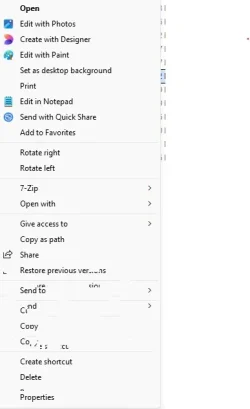
How to fix this? I recently noticed that the classic context menu is garbled and only becomes normal if I hover the mouse over the context menu items. What could be causing this?


Screenshot 2026-07-12 203038.webp
 
Windows Build/Version
Version 25H2
Last edited:

My Computer My Computer

At a glance

Windows 11 HomeAMD Ryzen 7 9800X3SDCorsair Vengeance DDR5 6000 32GBRTX 3080
OS
Windows 11 Home
Computer type
PC/Desktop
CPU
AMD Ryzen 7 9800X3SD
Motherboard
MSI MPG X670E
Memory
Corsair Vengeance DDR5 6000 32GB
Graphics Card(s)
RTX 3080
Antivirus
Bitdefender
Well you haven't filled out your computer specs, and haven't give much information, so I'll just guess.
I don't know whether you have an Nvidia or AMD graphics card, so here's both sets of instructions.

Sometimes the drivers that MS occasionally includes with Windows Updates...
can conflict with drivers that are already installed. Which is what the tutorial at the top is for.

DDU, on the other hand, will remove all the leftovers from MS or Nvidia drivers, so when you install an Nvidia driver, it has a clean slate to work with.


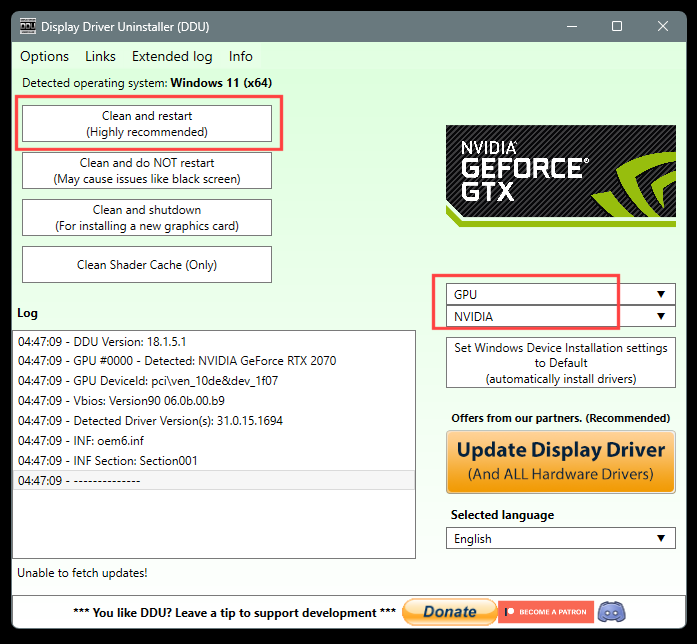
 DDU Instructions - Nvidia

1. First, do Option #2, step #3 and onward, here...
2. This will block MS from including drivers in Windows Updates.
3. They'll still be listed as Optional Updates, if you ever need them.


1. Get this program, here: Display Driver Uninstaller (DDU) | Wagnardsoft ...get the latest version, and save it to your desktop.
2. Get the Nvidia WHQL vid card driver here... https://www.guru3d.com/files/category/videocards-nvidia-geforce-windows-7-8-10/ ...save this to your desktop.
3. Unhook the internet completely.
4. Reboot into Safe Mode and run DDU (Display Driver Uninstaller) choose the "Highly Recommend Option", and just do what it tells you.
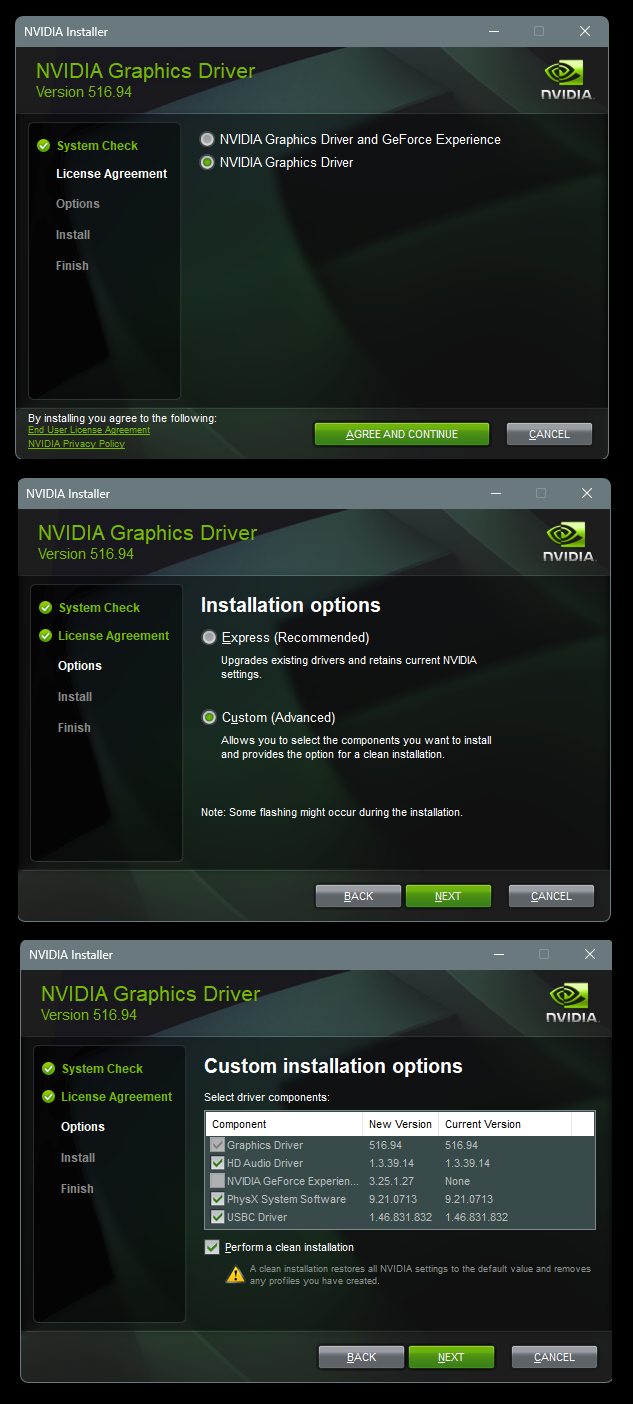
5. After it's done, reboot to normal mode, then just double click the Nvidia driver to install.
[See pics below]. If it want's to reboot, let it.
Rehook the internet.

Wo1E6bz.png


KdHz2yJ.png


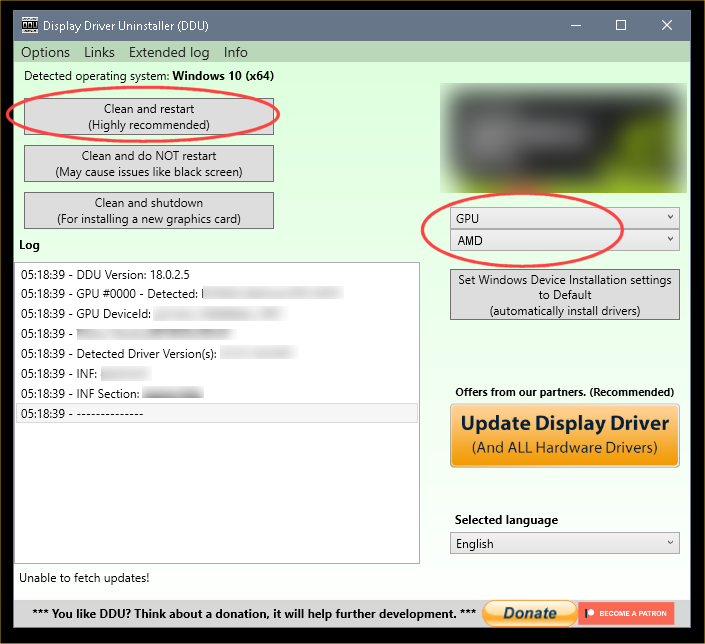
 DDU Instructions - AMD


1. First, do Option #2, step #3 and onward, here...
2. This will block MS from including drivers in Windows Updates.
3. They'll still be listed in the Optional Updates, if you ever need them.


1. Get this program, here: Display Driver Uninstaller (DDU) | Wagnardsoft ...get the latest version, and save it to your desktop.
2. Get your vid card driver here, use the Manual Search: http://support.amd.com/en-us/download ...save this to your desktop.
Unhook the internet completely.
3. Reboot into Safe Mode and run DDU (Display Driver Uninstaller) choose the "Highly Recommend Option", and just do what it tells you.
4. After it's done, reboot to normal mode, then just double click the AMD driver to install. If it want's to reboot, let it.
Rehook the internet.

ZeG5oTO.png
 

My Computers My Computers

  • At a glance

    Win 11 Home ♦♦♦26200.8737 ♦♦♦♦♦♦♦25H2AMD Ryzen 7 3700XG.Skill (F4-3200C14D-16GTZKW)EVGA RTX 2070 (08G-P4-2171-KR)
    OS
    Win 11 Home ♦♦♦26200.8737 ♦♦♦♦♦♦♦25H2
    Computer type
    PC/Desktop
    Manufacturer/Model
    Built by Ghot® [May 2020]
    CPU
    AMD Ryzen 7 3700X
    Motherboard
    Asus Pro WS X570-ACE (BIOS 5302)
    Memory
    G.Skill (F4-3200C14D-16GTZKW)
    Graphics Card(s)
    EVGA RTX 2070 (08G-P4-2171-KR)
    Sound Card
    Realtek ALC1220P / ALC S1220A
    Monitor(s) Displays
    Dell U3011 30"
    Screen Resolution
    2560 x 1600
    Hard Drives
    2x Samsung 860 EVO 500GB,
    WD 4TB Black FZBX - SATA III,
    WD 8TB Black FZBX - SATA III,
    DRW-24B1ST CD/DVD Burner
    PSU
    PC Power & Cooling 750W Quad EPS12V
    Case
    Cooler Master ATCS 840 Tower
    Cooling
    CM Hyper 212 EVO (push/pull)
    Keyboard
    Ducky DK9008 Shine II Blue LED
    Mouse
    Logitech Optical M-100
    Internet Speed
    300/300
    Browser
    Firefox (latest)
    Antivirus
    Bitdefender Total Security
    Other Info
    Speakers: Klipsch Pro Media 2.1
  • At a glance

    Windows XP Pro 32bit w/SP3AMD Athlon 64 X2 5000+ (OC'd @ 3.2Ghz)TWIN2X2048-6400C4DHX (2 x 1GB, DDR2 800)EVGA 256-P2-N758-TR GeForce 8600GT SSC
    Operating System
    Windows XP Pro 32bit w/SP3
    Computer type
    PC/Desktop
    Manufacturer/Model
    Built by Ghot® (not in use)
    CPU
    AMD Athlon 64 X2 5000+ (OC'd @ 3.2Ghz)
    Motherboard
    ASUS M2N32-SLI Deluxe Wireless Edition
    Memory
    TWIN2X2048-6400C4DHX (2 x 1GB, DDR2 800)
    Graphics card(s)
    EVGA 256-P2-N758-TR GeForce 8600GT SSC
    Sound Card
    Onboard
    Monitor(s) Displays
    ViewSonic G90FB Black 19" Professional (CRT)
    Screen Resolution
    up to 2048 x 1536
    Hard Drives
    WD 36GB 10,000rpm Raptor SATA
    Seagate 80GB 7200rpm SATA
    Lite-On LTR-52246S CD/RW
    Lite-On LH-18A1P CD/DVD Burner
    PSU
    PC Power & Cooling Silencer 750 Quad EPS12V
    Case
    Generic Beige case, 80mm fans
    Cooling
    ZALMAN 9500A 92mm CPU Cooler
    Keyboard
    Logitech Classic Keybooard 200
    Mouse
    Logitech Optical M-BT96a
    Internet Speed
    300/300
    Browser
    Firefox 3.x ??
    Antivirus
    Symantec (Norton)
    Other Info
    Still assembled, still runs. Haven't turned it on for 15 years?
Well you haven't filled out your computer specs, and haven't give much information, so I'll just guess.
I don't know whether you have an Nvidia or AMD graphics card, so here's both sets of instructions.

Sometimes the drivers that MS occasionally includes with Windows Updates...
can conflict with drivers that are already installed. Which is what the tutorial at the top is for.

DDU, on the other hand, will remove all the leftovers from MS or Nvidia drivers, so when you install an Nvidia driver, it has a clean slate to work with.


 DDU Instructions - Nvidia

1. First, do Option #2, step #3 and onward, here...
2. This will block MS from including drivers in Windows Updates.
3. They'll still be listed as Optional Updates, if you ever need them.


1. Get this program, here: Display Driver Uninstaller (DDU) | Wagnardsoft ...get the latest version, and save it to your desktop.
2. Get the Nvidia WHQL vid card driver here... https://www.guru3d.com/files/category/videocards-nvidia-geforce-windows-7-8-10/ ...save this to your desktop.
3. Unhook the internet completely.
4. Reboot into Safe Mode and run DDU (Display Driver Uninstaller) choose the "Highly Recommend Option", and just do what it tells you.
5. After it's done, reboot to normal mode, then just double click the Nvidia driver to install.
[See pics below]. If it want's to reboot, let it.
Rehook the internet.

Wo1E6bz.png


KdHz2yJ.png


 DDU Instructions - AMD


1. First, do Option #2, step #3 and onward, here...
2. This will block MS from including drivers in Windows Updates.
3. They'll still be listed in the Optional Updates, if you ever need them.


1. Get this program, here: Display Driver Uninstaller (DDU) | Wagnardsoft ...get the latest version, and save it to your desktop.
2. Get your vid card driver here, use the Manual Search: http://support.amd.com/en-us/download ...save this to your desktop.
Unhook the internet completely.
3. Reboot into Safe Mode and run DDU (Display Driver Uninstaller) choose the "Highly Recommend Option", and just do what it tells you.
4. After it's done, reboot to normal mode, then just double click the AMD driver to install. If it want's to reboot, let it.
Rehook the internet.

ZeG5oTO.png

Thank you for the reply. I tried the NVIDIA one (card is rtx 3080) but the error is still there. I noticed that it's for if I right-click picture files. I think maybe it's got too many items on the context menu. Is there a way to remove "edit with photos, create with designer, edit with paint, and edit with clipchamp"? In safe mode there's very few items on the context menu and it worked perfectly.
 

My Computer My Computer

At a glance

Windows 11 HomeAMD Ryzen 7 9800X3SDCorsair Vengeance DDR5 6000 32GBRTX 3080
OS
Windows 11 Home
Computer type
PC/Desktop
CPU
AMD Ryzen 7 9800X3SD
Motherboard
MSI MPG X670E
Memory
Corsair Vengeance DDR5 6000 32GB
Graphics Card(s)
RTX 3080
Antivirus
Bitdefender
@windows11thumba


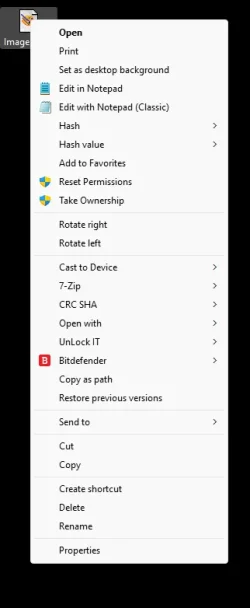
Probably not. I got tons of things I my right click context menu...

Image1.webp


If you have any tweaking apps, they could be affecting it.
Assuming you followed the directions above, exactly... then I would look to some app causing the issue.

Might open a Terminal (Admin) and try running sfc /scannow
Then run Dism.exe /online /Cleanup-Image /StartComponentCleanup the same way.

And then if you still have the issue... run Dism /Online /Cleanup-Image /RestoreHealth


There's also this...
 
Last edited:

My Computers My Computers

  • At a glance

    Win 11 Home ♦♦♦26200.8737 ♦♦♦♦♦♦♦25H2AMD Ryzen 7 3700XG.Skill (F4-3200C14D-16GTZKW)EVGA RTX 2070 (08G-P4-2171-KR)
    OS
    Win 11 Home ♦♦♦26200.8737 ♦♦♦♦♦♦♦25H2
    Computer type
    PC/Desktop
    Manufacturer/Model
    Built by Ghot® [May 2020]
    CPU
    AMD Ryzen 7 3700X
    Motherboard
    Asus Pro WS X570-ACE (BIOS 5302)
    Memory
    G.Skill (F4-3200C14D-16GTZKW)
    Graphics Card(s)
    EVGA RTX 2070 (08G-P4-2171-KR)
    Sound Card
    Realtek ALC1220P / ALC S1220A
    Monitor(s) Displays
    Dell U3011 30"
    Screen Resolution
    2560 x 1600
    Hard Drives
    2x Samsung 860 EVO 500GB,
    WD 4TB Black FZBX - SATA III,
    WD 8TB Black FZBX - SATA III,
    DRW-24B1ST CD/DVD Burner
    PSU
    PC Power & Cooling 750W Quad EPS12V
    Case
    Cooler Master ATCS 840 Tower
    Cooling
    CM Hyper 212 EVO (push/pull)
    Keyboard
    Ducky DK9008 Shine II Blue LED
    Mouse
    Logitech Optical M-100
    Internet Speed
    300/300
    Browser
    Firefox (latest)
    Antivirus
    Bitdefender Total Security
    Other Info
    Speakers: Klipsch Pro Media 2.1
  • At a glance

    Windows XP Pro 32bit w/SP3AMD Athlon 64 X2 5000+ (OC'd @ 3.2Ghz)TWIN2X2048-6400C4DHX (2 x 1GB, DDR2 800)EVGA 256-P2-N758-TR GeForce 8600GT SSC
    Operating System
    Windows XP Pro 32bit w/SP3
    Computer type
    PC/Desktop
    Manufacturer/Model
    Built by Ghot® (not in use)
    CPU
    AMD Athlon 64 X2 5000+ (OC'd @ 3.2Ghz)
    Motherboard
    ASUS M2N32-SLI Deluxe Wireless Edition
    Memory
    TWIN2X2048-6400C4DHX (2 x 1GB, DDR2 800)
    Graphics card(s)
    EVGA 256-P2-N758-TR GeForce 8600GT SSC
    Sound Card
    Onboard
    Monitor(s) Displays
    ViewSonic G90FB Black 19" Professional (CRT)
    Screen Resolution
    up to 2048 x 1536
    Hard Drives
    WD 36GB 10,000rpm Raptor SATA
    Seagate 80GB 7200rpm SATA
    Lite-On LTR-52246S CD/RW
    Lite-On LH-18A1P CD/DVD Burner
    PSU
    PC Power & Cooling Silencer 750 Quad EPS12V
    Case
    Generic Beige case, 80mm fans
    Cooling
    ZALMAN 9500A 92mm CPU Cooler
    Keyboard
    Logitech Classic Keybooard 200
    Mouse
    Logitech Optical M-BT96a
    Internet Speed
    300/300
    Browser
    Firefox 3.x ??
    Antivirus
    Symantec (Norton)
    Other Info
    Still assembled, still runs. Haven't turned it on for 15 years?
@windows11thumba


Probably not. I got tons of things I my right click context menu...

View attachment 176620


If you have any tweaking apps, they could be affecting it.
Assuming you followed the directions above, exactly... then I would look to some app causing the issue.

Might open a Terminal (Admin) and try running sfc /scannow
Then run Dism.exe /online /Cleanup-Image /StartComponentCleanup the same way.

And then if you still have the issue... run Dism /Online /Cleanup-Image /RestoreHealth


There's also this...
Thanks man. I'm still getting errors. What's the best way to narrow down potential tweaking apps?
 

My Computer My Computer

At a glance

Windows 11 HomeAMD Ryzen 7 9800X3SDCorsair Vengeance DDR5 6000 32GBRTX 3080
OS
Windows 11 Home
Computer type
PC/Desktop
CPU
AMD Ryzen 7 9800X3SD
Motherboard
MSI MPG X670E
Memory
Corsair Vengeance DDR5 6000 32GB
Graphics Card(s)
RTX 3080
Antivirus
Bitdefender
Also I've noticed that there are no problems with files located on the desktop, but everywhere else
 

My Computer My Computer

At a glance

Windows 11 HomeAMD Ryzen 7 9800X3SDCorsair Vengeance DDR5 6000 32GBRTX 3080
OS
Windows 11 Home
Computer type
PC/Desktop
CPU
AMD Ryzen 7 9800X3SD
Motherboard
MSI MPG X670E
Memory
Corsair Vengeance DDR5 6000 32GB
Graphics Card(s)
RTX 3080
Antivirus
Bitdefender
Turn off classic context, then right click an image file and go to more options to invoke the classic context normally. Does it appear messed up that way too?
 

My Computer My Computer

At a glance

Windows 11 Pro
OS
Windows 11 Pro
Turn off classic context, then right click an image file and go to more options to invoke the classic context normally. Does it appear messed up that way too?
Thank you for the reply. Yes it does.
 

My Computer My Computer

At a glance

Windows 11 HomeAMD Ryzen 7 9800X3SDCorsair Vengeance DDR5 6000 32GBRTX 3080
OS
Windows 11 Home
Computer type
PC/Desktop
CPU
AMD Ryzen 7 9800X3SD
Motherboard
MSI MPG X670E
Memory
Corsair Vengeance DDR5 6000 32GB
Graphics Card(s)
RTX 3080
Antivirus
Bitdefender
What formats’ context menus display the messed up version? .png, .jpg, .jpeg… etc?
 

My Computer My Computer

At a glance

Windows 11 Pro
OS
Windows 11 Pro
In safe mode there's very few items on the context menu and it worked perfectly.

I expect you know that means e.g. far less is running and you're using a basic graphics driver.

We can't know what modifications you've made, and you say this happened 'recently'.

Two options:

Next up from Safe Mode is a clean boot. Try that and compare.
If no change, then try disabling shell extensions with e.g. shellexview (free) starting with the 'uncommon' or newer ones.

And as this started 'recently', consider using a suitable 'recent' System Restore point, using the Scan option first to note what will change.
 

My Computer My Computer

At a glance

Windows 11 Proi7-8650U16GBIntel UHD 620
OS
Windows 11 Pro
Computer type
Laptop
Manufacturer/Model
Lenovo t480s
CPU
i7-8650U
Memory
16GB
Graphics Card(s)
Intel UHD 620
Screen Resolution
1920x1080
Hard Drives
C SN810 SDCPNRY-512G-1006
Browser
Edge, Firefox
Antivirus
Defender
png, jpg, mka, .tif,

the mka file I think is an audio file and it also has the "play with media player" and "add to media player play queue"
the image files have all the "edit with photos, create with designer, edit with paint, and edit with clipchamp" stuff that I think is doing something

I think I used shellex to remove the "play with media player" options from mp3 and mp4 files and they now appear okay
 

My Computer My Computer

At a glance

Windows 11 HomeAMD Ryzen 7 9800X3SDCorsair Vengeance DDR5 6000 32GBRTX 3080
OS
Windows 11 Home
Computer type
PC/Desktop
CPU
AMD Ryzen 7 9800X3SD
Motherboard
MSI MPG X670E
Memory
Corsair Vengeance DDR5 6000 32GB
Graphics Card(s)
RTX 3080
Antivirus
Bitdefender

Use this. Click the icon with the broom and uncheck what you want to remove from files’ context menu. See if those are the issue. Easiest thing to try first…
 

My Computer My Computer

At a glance

Windows 11 Pro
OS
Windows 11 Pro
What's the best way to narrow down potential tweaking apps?


Do a "Clean Boot" and then slowly add things back in until the problem re-appears.


My Computers My Computers

  • At a glance

    Win 11 Home ♦♦♦26200.8737 ♦♦♦♦♦♦♦25H2AMD Ryzen 7 3700XG.Skill (F4-3200C14D-16GTZKW)EVGA RTX 2070 (08G-P4-2171-KR)
    OS
    Win 11 Home ♦♦♦26200.8737 ♦♦♦♦♦♦♦25H2
    Computer type
    PC/Desktop
    Manufacturer/Model
    Built by Ghot® [May 2020]
    CPU
    AMD Ryzen 7 3700X
    Motherboard
    Asus Pro WS X570-ACE (BIOS 5302)
    Memory
    G.Skill (F4-3200C14D-16GTZKW)
    Graphics Card(s)
    EVGA RTX 2070 (08G-P4-2171-KR)
    Sound Card
    Realtek ALC1220P / ALC S1220A
    Monitor(s) Displays
    Dell U3011 30"
    Screen Resolution
    2560 x 1600
    Hard Drives
    2x Samsung 860 EVO 500GB,
    WD 4TB Black FZBX - SATA III,
    WD 8TB Black FZBX - SATA III,
    DRW-24B1ST CD/DVD Burner
    PSU
    PC Power & Cooling 750W Quad EPS12V
    Case
    Cooler Master ATCS 840 Tower
    Cooling
    CM Hyper 212 EVO (push/pull)
    Keyboard
    Ducky DK9008 Shine II Blue LED
    Mouse
    Logitech Optical M-100
    Internet Speed
    300/300
    Browser
    Firefox (latest)
    Antivirus
    Bitdefender Total Security
    Other Info
    Speakers: Klipsch Pro Media 2.1
  • At a glance

    Windows XP Pro 32bit w/SP3AMD Athlon 64 X2 5000+ (OC'd @ 3.2Ghz)TWIN2X2048-6400C4DHX (2 x 1GB, DDR2 800)EVGA 256-P2-N758-TR GeForce 8600GT SSC
    Operating System
    Windows XP Pro 32bit w/SP3
    Computer type
    PC/Desktop
    Manufacturer/Model
    Built by Ghot® (not in use)
    CPU
    AMD Athlon 64 X2 5000+ (OC'd @ 3.2Ghz)
    Motherboard
    ASUS M2N32-SLI Deluxe Wireless Edition
    Memory
    TWIN2X2048-6400C4DHX (2 x 1GB, DDR2 800)
    Graphics card(s)
    EVGA 256-P2-N758-TR GeForce 8600GT SSC
    Sound Card
    Onboard
    Monitor(s) Displays
    ViewSonic G90FB Black 19" Professional (CRT)
    Screen Resolution
    up to 2048 x 1536
    Hard Drives
    WD 36GB 10,000rpm Raptor SATA
    Seagate 80GB 7200rpm SATA
    Lite-On LTR-52246S CD/RW
    Lite-On LH-18A1P CD/DVD Burner
    PSU
    PC Power & Cooling Silencer 750 Quad EPS12V
    Case
    Generic Beige case, 80mm fans
    Cooling
    ZALMAN 9500A 92mm CPU Cooler
    Keyboard
    Logitech Classic Keybooard 200
    Mouse
    Logitech Optical M-BT96a
    Internet Speed
    300/300
    Browser
    Firefox 3.x ??
    Antivirus
    Symantec (Norton)
    Other Info
    Still assembled, still runs. Haven't turned it on for 15 years?
I did the clean boot and the problem persists. I didn't even try turning on any non MS services
 

My Computer My Computer

At a glance

Windows 11 HomeAMD Ryzen 7 9800X3SDCorsair Vengeance DDR5 6000 32GBRTX 3080
OS
Windows 11 Home
Computer type
PC/Desktop
CPU
AMD Ryzen 7 9800X3SD
Motherboard
MSI MPG X670E
Memory
Corsair Vengeance DDR5 6000 32GB
Graphics Card(s)
RTX 3080
Antivirus
Bitdefender
I uninstalled media player which got rid off the "play with media player" and "add to media player play queue" in mka files and the error went away
 

My Computer My Computer

At a glance

Windows 11 HomeAMD Ryzen 7 9800X3SDCorsair Vengeance DDR5 6000 32GBRTX 3080
OS
Windows 11 Home
Computer type
PC/Desktop
CPU
AMD Ryzen 7 9800X3SD
Motherboard
MSI MPG X670E
Memory
Corsair Vengeance DDR5 6000 32GB
Graphics Card(s)
RTX 3080
Antivirus
Bitdefender

Use this. Click the icon with the broom and uncheck what you want to remove from files’ context menu. See if those are the issue. Easiest thing to try first…

I don't see "edit with paint" as an option, please help
 

My Computer My Computer

At a glance

Windows 11 HomeAMD Ryzen 7 9800X3SDCorsair Vengeance DDR5 6000 32GBRTX 3080
OS
Windows 11 Home
Computer type
PC/Desktop
CPU
AMD Ryzen 7 9800X3SD
Motherboard
MSI MPG X670E
Memory
Corsair Vengeance DDR5 6000 32GB
Graphics Card(s)
RTX 3080
Antivirus
Bitdefender
Try removing it manually via reg then


My Computer My Computer

At a glance

Windows 11 Pro
OS
Windows 11 Pro
Try removing it manually via reg then


Thanks man I think that fixed the problem with image file context menu. However, I think the cmd commands caused cbr and cbz files' thumbnails not to rebuild
 

My Computer My Computer

At a glance

Windows 11 HomeAMD Ryzen 7 9800X3SDCorsair Vengeance DDR5 6000 32GBRTX 3080
OS
Windows 11 Home
Computer type
PC/Desktop
CPU
AMD Ryzen 7 9800X3SD
Motherboard
MSI MPG X670E
Memory
Corsair Vengeance DDR5 6000 32GB
Graphics Card(s)
RTX 3080
Antivirus
Bitdefender
@windows11thumba

Well, here's ten points, just for filling out your computer specs. :-)
 

My Computers My Computers

  • At a glance

    Win 11 Home ♦♦♦26200.8737 ♦♦♦♦♦♦♦25H2AMD Ryzen 7 3700XG.Skill (F4-3200C14D-16GTZKW)EVGA RTX 2070 (08G-P4-2171-KR)
    OS
    Win 11 Home ♦♦♦26200.8737 ♦♦♦♦♦♦♦25H2
    Computer type
    PC/Desktop
    Manufacturer/Model
    Built by Ghot® [May 2020]
    CPU
    AMD Ryzen 7 3700X
    Motherboard
    Asus Pro WS X570-ACE (BIOS 5302)
    Memory
    G.Skill (F4-3200C14D-16GTZKW)
    Graphics Card(s)
    EVGA RTX 2070 (08G-P4-2171-KR)
    Sound Card
    Realtek ALC1220P / ALC S1220A
    Monitor(s) Displays
    Dell U3011 30"
    Screen Resolution
    2560 x 1600
    Hard Drives
    2x Samsung 860 EVO 500GB,
    WD 4TB Black FZBX - SATA III,
    WD 8TB Black FZBX - SATA III,
    DRW-24B1ST CD/DVD Burner
    PSU
    PC Power & Cooling 750W Quad EPS12V
    Case
    Cooler Master ATCS 840 Tower
    Cooling
    CM Hyper 212 EVO (push/pull)
    Keyboard
    Ducky DK9008 Shine II Blue LED
    Mouse
    Logitech Optical M-100
    Internet Speed
    300/300
    Browser
    Firefox (latest)
    Antivirus
    Bitdefender Total Security
    Other Info
    Speakers: Klipsch Pro Media 2.1
  • At a glance

    Windows XP Pro 32bit w/SP3AMD Athlon 64 X2 5000+ (OC'd @ 3.2Ghz)TWIN2X2048-6400C4DHX (2 x 1GB, DDR2 800)EVGA 256-P2-N758-TR GeForce 8600GT SSC
    Operating System
    Windows XP Pro 32bit w/SP3
    Computer type
    PC/Desktop
    Manufacturer/Model
    Built by Ghot® (not in use)
    CPU
    AMD Athlon 64 X2 5000+ (OC'd @ 3.2Ghz)
    Motherboard
    ASUS M2N32-SLI Deluxe Wireless Edition
    Memory
    TWIN2X2048-6400C4DHX (2 x 1GB, DDR2 800)
    Graphics card(s)
    EVGA 256-P2-N758-TR GeForce 8600GT SSC
    Sound Card
    Onboard
    Monitor(s) Displays
    ViewSonic G90FB Black 19" Professional (CRT)
    Screen Resolution
    up to 2048 x 1536
    Hard Drives
    WD 36GB 10,000rpm Raptor SATA
    Seagate 80GB 7200rpm SATA
    Lite-On LTR-52246S CD/RW
    Lite-On LH-18A1P CD/DVD Burner
    PSU
    PC Power & Cooling Silencer 750 Quad EPS12V
    Case
    Generic Beige case, 80mm fans
    Cooling
    ZALMAN 9500A 92mm CPU Cooler
    Keyboard
    Logitech Classic Keybooard 200
    Mouse
    Logitech Optical M-BT96a
    Internet Speed
    300/300
    Browser
    Firefox 3.x ??
    Antivirus
    Symantec (Norton)
    Other Info
    Still assembled, still runs. Haven't turned it on for 15 years?

Latest Support Threads

Back
Top Bottom