Right Click Desktop Menu go straight to Show More Options


TonyBirt

New member
Local time
2:36 AM
Posts
6
OS
Windows 11
Has anyone found a way to bypass the simplified Right Click desktop menu and go straight to show more options. Shift F10 works but puts the menu at the top left of the screen instead of at mouse cursor.
 
Last edited:

My Computer My Computer

At a glance

Windows 11
OS
Windows 11
Not yet - but someone will, if it is there, I'm sure.
 

My Computers My Computers

  • At a glance

    Windows 11 23H2 Current buildAMD Ryzen 9 3950X4 * 32 GB - Corsair Vengeance 3600 MHzEVGA GeForce RTX 3080 Ti XC3 ULTRA GAMING (12...
    OS
    Windows 11 23H2 Current build
    Computer type
    PC/Desktop
    Manufacturer/Model
    HomeBrew
    CPU
    AMD Ryzen 9 3950X
    Motherboard
    MSI MEG X570 GODLIKE
    Memory
    4 * 32 GB - Corsair Vengeance 3600 MHz
    Graphics Card(s)
    EVGA GeForce RTX 3080 Ti XC3 ULTRA GAMING (12G-P5-3955-KR)
    Sound Card
    Realtek® ALC1220 Codec
    Monitor(s) Displays
    2x Eve Spectrum ES07D03 4K Gaming Monitor (Matte) | Eve Spectrum ES07DC9 4K Gaming Monitor (Glossy)
    Screen Resolution
    3x 3840 x 2160
    Hard Drives
    3x Samsung 980 Pro NVMe PCIe 4 M.2 2 TB SSD (MZ-V8P2T0B/AM) } 3x Sabrent Rocket NVMe 4.0 1 TB SSD (USB)
    PSU
    PC Power & Cooling’s Silencer Series 1050 Watt, 80 Plus Platinum
    Case
    Fractal Design Define 7 XL Dark ATX Full Tower Case
    Cooling
    Arctic Liquid Freezer III 420 RGB + Air 3x 140mm case fans (pull front) + 1x 120 mm (push back) and 1 x 120 mm (pull bottom)
    Keyboard
    SteelSeries Apex Pro Wired Gaming Keyboard
    Mouse
    Logitech MX Master 3S | MX Master 3 for Business
    Internet Speed
    AT&T LightSpeed Gigabit Duplex Ftth
    Browser
    Nightly (default) + Firefox (stable), Chrome, Edge , Arc
    Antivirus
    Defender + MB 5 Beta
  • At a glance

    ChromeOS Flex Dev Channel (current)Intel(R) Core(TM) i5-6300U CPU @ 2.40GHz, 250...16 GBIntel(R) HD Graphics 520
    Operating System
    ChromeOS Flex Dev Channel (current)
    Computer type
    Laptop
    Manufacturer/Model
    Dell Latitude E5470
    CPU
    Intel(R) Core(TM) i5-6300U CPU @ 2.40GHz, 2501 Mhz, 2 Core(s), 4 Logical Processor(s)
    Motherboard
    Dell
    Memory
    16 GB
    Graphics card(s)
    Intel(R) HD Graphics 520
    Sound Card
    Intel(R) HD Graphics 520 + RealTek Audio
    Monitor(s) Displays
    Dell laptop display 15"
    Screen Resolution
    1920 * 1080
    Hard Drives
    Toshiba 128GB M.2 22300 drive
    INTEL Cherryville 520 Series SSDSC2CW180A 180 GB SATA III SSD
    PSU
    Dell
    Case
    Dell
    Cooling
    Dell
    Keyboard
    Dell
    Mouse
    Logitech MX Master 3S (shared w. Sys 1) | Dell TouchPad
    Internet Speed
    AT&T LightSpeed Gigabit Duplex Ftth

My Computer My Computer

At a glance

Windows 10Intel i7-4790k @ 5GHZ32GB Corsair Dominator Platinum 2400Mhz @ 10-...Nvidia RTX 3090FE @ Core 2200 MHZ / Memory 21...
OS
Windows 10
Computer type
PC/Desktop
Manufacturer/Model
Self Built
CPU
Intel i7-4790k @ 5GHZ
Motherboard
Asus Maximus VI Extreme
Memory
32GB Corsair Dominator Platinum 2400Mhz @ 10-12-11-27-1T
Graphics Card(s)
Nvidia RTX 3090FE @ Core 2200 MHZ / Memory 21 GHZ
Sound Card
Creative SoundBlaster ZxR
Monitor(s) Displays
LG 32GN600 (G-Sync Comp)
Screen Resolution
1440p
Hard Drives
C: Primary SSD > Samsung 860 PRO 512GB
G: Gaming SSD > Samsung 860 PRO 1TB
S: Storage SSD > Samsung 860 EVO 4TB x2 (Windows Storage Spaces = 8TB)
X: Ext Backup > IcyBox+WD Red 4TB x4 (Raid 10)
PSU
Corsair AX1600i
Case
NZXT Phantom 630 (Black)
Cooling
Noctua NH-D15S Chromax Black
Keyboard
Logitech G613
Mouse
Logitech G903 LS (Hero)+PowerPlay Wireless Charge Pad
Internet Speed
VM 1Gb/s
Browser
Edge
Antivirus
Eset
Has anyone found a way to bypass the simplified Right Click desktop menu and go straight to show more options. Shift F10 works but puts the menu at the top left of the screen instead of at mouse cursor.
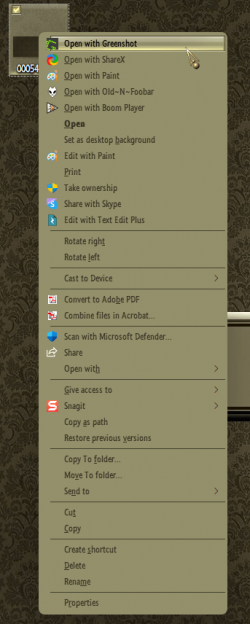
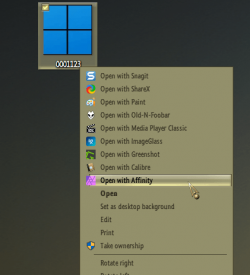
I assigned a mouse button...

000552.png

... menu stays at mouse when selecting an item...

000553.png
 

My Computers My Computers

  • At a glance

    Windows 11 Pro
    OS
    Windows 11 Pro
    Computer type
    PC/Desktop
    Manufacturer/Model
    ASUS ROG Strix
  • At a glance

    Windows 11 Pro
    Operating System
    Windows 11 Pro
    Computer type
    Laptop
    Manufacturer/Model
    ASUS VivoBook
  • ASUS VivoBook 'Lite' ~ Windows 11 Home
What a terrible change!!! 🤮
 

My Computers My Computers

  • At a glance

    Windows 11 Pro
    OS
    Windows 11 Pro
    Computer type
    PC/Desktop
    Manufacturer/Model
    ASUS ROG Strix
  • At a glance

    Windows 11 Pro
    Operating System
    Windows 11 Pro
    Computer type
    Laptop
    Manufacturer/Model
    ASUS VivoBook
  • ASUS VivoBook 'Lite' ~ Windows 11 Home
I think they think that they want only the most used options available from the right click, to keep the menu from being so obnoxiously large that it displays off the monitor screen.

But I sure wasn't asked what I thought needed to be in the small context menu. So, I wonder who they actually asked.....
 

My Computers My Computers

  • At a glance

    Windows 11 23H2 Current buildAMD Ryzen 9 3950X4 * 32 GB - Corsair Vengeance 3600 MHzEVGA GeForce RTX 3080 Ti XC3 ULTRA GAMING (12...
    OS
    Windows 11 23H2 Current build
    Computer type
    PC/Desktop
    Manufacturer/Model
    HomeBrew
    CPU
    AMD Ryzen 9 3950X
    Motherboard
    MSI MEG X570 GODLIKE
    Memory
    4 * 32 GB - Corsair Vengeance 3600 MHz
    Graphics Card(s)
    EVGA GeForce RTX 3080 Ti XC3 ULTRA GAMING (12G-P5-3955-KR)
    Sound Card
    Realtek® ALC1220 Codec
    Monitor(s) Displays
    2x Eve Spectrum ES07D03 4K Gaming Monitor (Matte) | Eve Spectrum ES07DC9 4K Gaming Monitor (Glossy)
    Screen Resolution
    3x 3840 x 2160
    Hard Drives
    3x Samsung 980 Pro NVMe PCIe 4 M.2 2 TB SSD (MZ-V8P2T0B/AM) } 3x Sabrent Rocket NVMe 4.0 1 TB SSD (USB)
    PSU
    PC Power & Cooling’s Silencer Series 1050 Watt, 80 Plus Platinum
    Case
    Fractal Design Define 7 XL Dark ATX Full Tower Case
    Cooling
    Arctic Liquid Freezer III 420 RGB + Air 3x 140mm case fans (pull front) + 1x 120 mm (push back) and 1 x 120 mm (pull bottom)
    Keyboard
    SteelSeries Apex Pro Wired Gaming Keyboard
    Mouse
    Logitech MX Master 3S | MX Master 3 for Business
    Internet Speed
    AT&T LightSpeed Gigabit Duplex Ftth
    Browser
    Nightly (default) + Firefox (stable), Chrome, Edge , Arc
    Antivirus
    Defender + MB 5 Beta
  • At a glance

    ChromeOS Flex Dev Channel (current)Intel(R) Core(TM) i5-6300U CPU @ 2.40GHz, 250...16 GBIntel(R) HD Graphics 520
    Operating System
    ChromeOS Flex Dev Channel (current)
    Computer type
    Laptop
    Manufacturer/Model
    Dell Latitude E5470
    CPU
    Intel(R) Core(TM) i5-6300U CPU @ 2.40GHz, 2501 Mhz, 2 Core(s), 4 Logical Processor(s)
    Motherboard
    Dell
    Memory
    16 GB
    Graphics card(s)
    Intel(R) HD Graphics 520
    Sound Card
    Intel(R) HD Graphics 520 + RealTek Audio
    Monitor(s) Displays
    Dell laptop display 15"
    Screen Resolution
    1920 * 1080
    Hard Drives
    Toshiba 128GB M.2 22300 drive
    INTEL Cherryville 520 Series SSDSC2CW180A 180 GB SATA III SSD
    PSU
    Dell
    Case
    Dell
    Cooling
    Dell
    Keyboard
    Dell
    Mouse
    Logitech MX Master 3S (shared w. Sys 1) | Dell TouchPad
    Internet Speed
    AT&T LightSpeed Gigabit Duplex Ftth
I think they think that they want only the most used options available from the right click, to keep the menu from being so obnoxiously large that it displays off the monitor screen.

But I sure wasn't asked what I thought needed to be in the small context menu. So, I wonder who they actually asked.....
I think they think they're doing the world a favor dumbing down the OS...,

... what about the Photoshop user that edits hundreds of images a day?
I'd want the Tools readily available without having to wade through a barrage of menus, sub-menus and sub-sub menus!!!
 

My Computers My Computers

  • At a glance

    Windows 11 Pro
    OS
    Windows 11 Pro
    Computer type
    PC/Desktop
    Manufacturer/Model
    ASUS ROG Strix
  • At a glance

    Windows 11 Pro
    Operating System
    Windows 11 Pro
    Computer type
    Laptop
    Manufacturer/Model
    ASUS VivoBook
  • ASUS VivoBook 'Lite' ~ Windows 11 Home
I agree they wanted to stop the clutter but how often do you change desktop icons Size or change Sort view or such?

I suppose as the desktop is a folder it has to be that way for the other Explorer folders but they could change that.
 

My Computer My Computer

At a glance

Windows 10Intel i7-4790k @ 5GHZ32GB Corsair Dominator Platinum 2400Mhz @ 10-...Nvidia RTX 3090FE @ Core 2200 MHZ / Memory 21...
OS
Windows 10
Computer type
PC/Desktop
Manufacturer/Model
Self Built
CPU
Intel i7-4790k @ 5GHZ
Motherboard
Asus Maximus VI Extreme
Memory
32GB Corsair Dominator Platinum 2400Mhz @ 10-12-11-27-1T
Graphics Card(s)
Nvidia RTX 3090FE @ Core 2200 MHZ / Memory 21 GHZ
Sound Card
Creative SoundBlaster ZxR
Monitor(s) Displays
LG 32GN600 (G-Sync Comp)
Screen Resolution
1440p
Hard Drives
C: Primary SSD > Samsung 860 PRO 512GB
G: Gaming SSD > Samsung 860 PRO 1TB
S: Storage SSD > Samsung 860 EVO 4TB x2 (Windows Storage Spaces = 8TB)
X: Ext Backup > IcyBox+WD Red 4TB x4 (Raid 10)
PSU
Corsair AX1600i
Case
NZXT Phantom 630 (Black)
Cooling
Noctua NH-D15S Chromax Black
Keyboard
Logitech G613
Mouse
Logitech G903 LS (Hero)+PowerPlay Wireless Charge Pad
Internet Speed
VM 1Gb/s
Browser
Edge
Antivirus
Eset
I feel ya. Even though I use Xplorer² as my default FM, I do still need to use Explorer. And having to double my way through a context menu is pretty stupid.

Know what aould be smart? Allowing the end user to pick what they want there.

Doubt we'll ever see that sort of choice from them though.
 

My Computers My Computers

  • At a glance

    Windows 11 23H2 Current buildAMD Ryzen 9 3950X4 * 32 GB - Corsair Vengeance 3600 MHzEVGA GeForce RTX 3080 Ti XC3 ULTRA GAMING (12...
    OS
    Windows 11 23H2 Current build
    Computer type
    PC/Desktop
    Manufacturer/Model
    HomeBrew
    CPU
    AMD Ryzen 9 3950X
    Motherboard
    MSI MEG X570 GODLIKE
    Memory
    4 * 32 GB - Corsair Vengeance 3600 MHz
    Graphics Card(s)
    EVGA GeForce RTX 3080 Ti XC3 ULTRA GAMING (12G-P5-3955-KR)
    Sound Card
    Realtek® ALC1220 Codec
    Monitor(s) Displays
    2x Eve Spectrum ES07D03 4K Gaming Monitor (Matte) | Eve Spectrum ES07DC9 4K Gaming Monitor (Glossy)
    Screen Resolution
    3x 3840 x 2160
    Hard Drives
    3x Samsung 980 Pro NVMe PCIe 4 M.2 2 TB SSD (MZ-V8P2T0B/AM) } 3x Sabrent Rocket NVMe 4.0 1 TB SSD (USB)
    PSU
    PC Power & Cooling’s Silencer Series 1050 Watt, 80 Plus Platinum
    Case
    Fractal Design Define 7 XL Dark ATX Full Tower Case
    Cooling
    Arctic Liquid Freezer III 420 RGB + Air 3x 140mm case fans (pull front) + 1x 120 mm (push back) and 1 x 120 mm (pull bottom)
    Keyboard
    SteelSeries Apex Pro Wired Gaming Keyboard
    Mouse
    Logitech MX Master 3S | MX Master 3 for Business
    Internet Speed
    AT&T LightSpeed Gigabit Duplex Ftth
    Browser
    Nightly (default) + Firefox (stable), Chrome, Edge , Arc
    Antivirus
    Defender + MB 5 Beta
  • At a glance

    ChromeOS Flex Dev Channel (current)Intel(R) Core(TM) i5-6300U CPU @ 2.40GHz, 250...16 GBIntel(R) HD Graphics 520
    Operating System
    ChromeOS Flex Dev Channel (current)
    Computer type
    Laptop
    Manufacturer/Model
    Dell Latitude E5470
    CPU
    Intel(R) Core(TM) i5-6300U CPU @ 2.40GHz, 2501 Mhz, 2 Core(s), 4 Logical Processor(s)
    Motherboard
    Dell
    Memory
    16 GB
    Graphics card(s)
    Intel(R) HD Graphics 520
    Sound Card
    Intel(R) HD Graphics 520 + RealTek Audio
    Monitor(s) Displays
    Dell laptop display 15"
    Screen Resolution
    1920 * 1080
    Hard Drives
    Toshiba 128GB M.2 22300 drive
    INTEL Cherryville 520 Series SSDSC2CW180A 180 GB SATA III SSD
    PSU
    Dell
    Case
    Dell
    Cooling
    Dell
    Keyboard
    Dell
    Mouse
    Logitech MX Master 3S (shared w. Sys 1) | Dell TouchPad
    Internet Speed
    AT&T LightSpeed Gigabit Duplex Ftth

My Computers My Computers

  • At a glance

    Windows 11 Pro
    OS
    Windows 11 Pro
    Computer type
    PC/Desktop
    Manufacturer/Model
    ASUS ROG Strix
  • At a glance

    Windows 11 Pro
    Operating System
    Windows 11 Pro
    Computer type
    Laptop
    Manufacturer/Model
    ASUS VivoBook
  • ASUS VivoBook 'Lite' ~ Windows 11 Home

My Computers My Computers

  • At a glance

    Win 11 Home ♦♦♦26200.8737 ♦♦♦♦♦♦♦25H2AMD Ryzen 7 3700XG.Skill (F4-3200C14D-16GTZKW)EVGA RTX 2070 (08G-P4-2171-KR)
    OS
    Win 11 Home ♦♦♦26200.8737 ♦♦♦♦♦♦♦25H2
    Computer type
    PC/Desktop
    Manufacturer/Model
    Built by Ghot® [May 2020]
    CPU
    AMD Ryzen 7 3700X
    Motherboard
    Asus Pro WS X570-ACE (BIOS 5302)
    Memory
    G.Skill (F4-3200C14D-16GTZKW)
    Graphics Card(s)
    EVGA RTX 2070 (08G-P4-2171-KR)
    Sound Card
    Realtek ALC1220P / ALC S1220A
    Monitor(s) Displays
    Dell U3011 30"
    Screen Resolution
    2560 x 1600
    Hard Drives
    2x Samsung 860 EVO 500GB,
    WD 4TB Black FZBX - SATA III,
    WD 8TB Black FZBX - SATA III,
    DRW-24B1ST CD/DVD Burner
    PSU
    PC Power & Cooling 750W Quad EPS12V
    Case
    Cooler Master ATCS 840 Tower
    Cooling
    CM Hyper 212 EVO (push/pull)
    Keyboard
    Ducky DK9008 Shine II Blue LED
    Mouse
    Logitech Optical M-100
    Internet Speed
    300/300
    Browser
    Firefox (latest)
    Antivirus
    Bitdefender Total Security
    Other Info
    Speakers: Klipsch Pro Media 2.1
  • At a glance

    Windows XP Pro 32bit w/SP3AMD Athlon 64 X2 5000+ (OC'd @ 3.2Ghz)TWIN2X2048-6400C4DHX (2 x 1GB, DDR2 800)EVGA 256-P2-N758-TR GeForce 8600GT SSC
    Operating System
    Windows XP Pro 32bit w/SP3
    Computer type
    PC/Desktop
    Manufacturer/Model
    Built by Ghot® (not in use)
    CPU
    AMD Athlon 64 X2 5000+ (OC'd @ 3.2Ghz)
    Motherboard
    ASUS M2N32-SLI Deluxe Wireless Edition
    Memory
    TWIN2X2048-6400C4DHX (2 x 1GB, DDR2 800)
    Graphics card(s)
    EVGA 256-P2-N758-TR GeForce 8600GT SSC
    Sound Card
    Onboard
    Monitor(s) Displays
    ViewSonic G90FB Black 19" Professional (CRT)
    Screen Resolution
    up to 2048 x 1536
    Hard Drives
    WD 36GB 10,000rpm Raptor SATA
    Seagate 80GB 7200rpm SATA
    Lite-On LTR-52246S CD/RW
    Lite-On LH-18A1P CD/DVD Burner
    PSU
    PC Power & Cooling Silencer 750 Quad EPS12V
    Case
    Generic Beige case, 80mm fans
    Cooling
    ZALMAN 9500A 92mm CPU Cooler
    Keyboard
    Logitech Classic Keybooard 200
    Mouse
    Logitech Optical M-BT96a
    Internet Speed
    300/300
    Browser
    Firefox 3.x ??
    Antivirus
    Symantec (Norton)
    Other Info
    Still assembled, still runs. Haven't turned it on for 15 years?
Yep, awful crap, dumbing down of Windows. I use an oled with a plain black background, no icons and autohide taskbar. Just about everything of use I have shortcuts for in the Right Click Desktop Context Menu. Can't find anything specific in Winaero Tweaker for this.
 
Last edited:

My Computer My Computer

At a glance

Windows 11
OS
Windows 11
I just used Winrar earlier, Jesus it used the windows unzip crap via Extract all and it then puts it in a folder then opens that folder.

I now to avoid this have to unhide that bottom menu to do it the proper way via Exract Here.
 

My Computer My Computer

At a glance

Windows 10Intel i7-4790k @ 5GHZ32GB Corsair Dominator Platinum 2400Mhz @ 10-...Nvidia RTX 3090FE @ Core 2200 MHZ / Memory 21...
OS
Windows 10
Computer type
PC/Desktop
Manufacturer/Model
Self Built
CPU
Intel i7-4790k @ 5GHZ
Motherboard
Asus Maximus VI Extreme
Memory
32GB Corsair Dominator Platinum 2400Mhz @ 10-12-11-27-1T
Graphics Card(s)
Nvidia RTX 3090FE @ Core 2200 MHZ / Memory 21 GHZ
Sound Card
Creative SoundBlaster ZxR
Monitor(s) Displays
LG 32GN600 (G-Sync Comp)
Screen Resolution
1440p
Hard Drives
C: Primary SSD > Samsung 860 PRO 512GB
G: Gaming SSD > Samsung 860 PRO 1TB
S: Storage SSD > Samsung 860 EVO 4TB x2 (Windows Storage Spaces = 8TB)
X: Ext Backup > IcyBox+WD Red 4TB x4 (Raid 10)
PSU
Corsair AX1600i
Case
NZXT Phantom 630 (Black)
Cooling
Noctua NH-D15S Chromax Black
Keyboard
Logitech G613
Mouse
Logitech G903 LS (Hero)+PowerPlay Wireless Charge Pad
Internet Speed
VM 1Gb/s
Browser
Edge
Antivirus
Eset
Hi there
I use (or often use) 7-zip for file extraction and de-compression. The new extra nonsense you have to get to delete, copy, rename etc from File explorer is BONKERS. Who decides these things --I can't imagine any project meeting on the planet where anybody at all would have preferred this method to the old way Windows explorer works.

C'mon Ms Developers --who OK'd this change through your design phases -- be lovely to have "Voice recorders" at these meetings like commercial aircraft have to with the "Cockpit Voice recorder".

Cheers
jimbo
 

My Computer My Computer

At a glance

Windows XP,11 Linux Fedora Rawhide pre-releas...2 X Intel i7
OS
Windows XP,11 Linux Fedora Rawhide pre-release 45
Computer type
PC/Desktop
CPU
2 X Intel i7
Screen Resolution
4KUHD X 2
Start using tweaks or a 3rd party FM - I'm using Xplorer² and the full context menu still shows in there.

Thankfully - because I also use 7-Zip and routinely extract using the "Extract to {zipfilename as foldername} function.
 

My Computers My Computers

  • At a glance

    Windows 11 23H2 Current buildAMD Ryzen 9 3950X4 * 32 GB - Corsair Vengeance 3600 MHzEVGA GeForce RTX 3080 Ti XC3 ULTRA GAMING (12...
    OS
    Windows 11 23H2 Current build
    Computer type
    PC/Desktop
    Manufacturer/Model
    HomeBrew
    CPU
    AMD Ryzen 9 3950X
    Motherboard
    MSI MEG X570 GODLIKE
    Memory
    4 * 32 GB - Corsair Vengeance 3600 MHz
    Graphics Card(s)
    EVGA GeForce RTX 3080 Ti XC3 ULTRA GAMING (12G-P5-3955-KR)
    Sound Card
    Realtek® ALC1220 Codec
    Monitor(s) Displays
    2x Eve Spectrum ES07D03 4K Gaming Monitor (Matte) | Eve Spectrum ES07DC9 4K Gaming Monitor (Glossy)
    Screen Resolution
    3x 3840 x 2160
    Hard Drives
    3x Samsung 980 Pro NVMe PCIe 4 M.2 2 TB SSD (MZ-V8P2T0B/AM) } 3x Sabrent Rocket NVMe 4.0 1 TB SSD (USB)
    PSU
    PC Power & Cooling’s Silencer Series 1050 Watt, 80 Plus Platinum
    Case
    Fractal Design Define 7 XL Dark ATX Full Tower Case
    Cooling
    Arctic Liquid Freezer III 420 RGB + Air 3x 140mm case fans (pull front) + 1x 120 mm (push back) and 1 x 120 mm (pull bottom)
    Keyboard
    SteelSeries Apex Pro Wired Gaming Keyboard
    Mouse
    Logitech MX Master 3S | MX Master 3 for Business
    Internet Speed
    AT&T LightSpeed Gigabit Duplex Ftth
    Browser
    Nightly (default) + Firefox (stable), Chrome, Edge , Arc
    Antivirus
    Defender + MB 5 Beta
  • At a glance

    ChromeOS Flex Dev Channel (current)Intel(R) Core(TM) i5-6300U CPU @ 2.40GHz, 250...16 GBIntel(R) HD Graphics 520
    Operating System
    ChromeOS Flex Dev Channel (current)
    Computer type
    Laptop
    Manufacturer/Model
    Dell Latitude E5470
    CPU
    Intel(R) Core(TM) i5-6300U CPU @ 2.40GHz, 2501 Mhz, 2 Core(s), 4 Logical Processor(s)
    Motherboard
    Dell
    Memory
    16 GB
    Graphics card(s)
    Intel(R) HD Graphics 520
    Sound Card
    Intel(R) HD Graphics 520 + RealTek Audio
    Monitor(s) Displays
    Dell laptop display 15"
    Screen Resolution
    1920 * 1080
    Hard Drives
    Toshiba 128GB M.2 22300 drive
    INTEL Cherryville 520 Series SSDSC2CW180A 180 GB SATA III SSD
    PSU
    Dell
    Case
    Dell
    Cooling
    Dell
    Keyboard
    Dell
    Mouse
    Logitech MX Master 3S (shared w. Sys 1) | Dell TouchPad
    Internet Speed
    AT&T LightSpeed Gigabit Duplex Ftth
I got classic context menu's, (skinned via Windows Blinds), back in W11!
dll injection! Kinda sketchy!!! :sneaky:

000562.png
 

My Computers My Computers

  • At a glance

    Windows 11 Pro
    OS
    Windows 11 Pro
    Computer type
    PC/Desktop
    Manufacturer/Model
    ASUS ROG Strix
  • At a glance

    Windows 11 Pro
    Operating System
    Windows 11 Pro
    Computer type
    Laptop
    Manufacturer/Model
    ASUS VivoBook
  • ASUS VivoBook 'Lite' ~ Windows 11 Home
Pray Tell...
 

My Computer My Computer

At a glance

Windows 11
OS
Windows 11
Pray Tell...
I would, except for 2 reasons...
• I can't remember where I found this stuff,
• it screws up Explorer pretty badly at times! :rolleyes:
 

My Computers My Computers

  • At a glance

    Windows 11 Pro
    OS
    Windows 11 Pro
    Computer type
    PC/Desktop
    Manufacturer/Model
    ASUS ROG Strix
  • At a glance

    Windows 11 Pro
    Operating System
    Windows 11 Pro
    Computer type
    Laptop
    Manufacturer/Model
    ASUS VivoBook
  • ASUS VivoBook 'Lite' ~ Windows 11 Home
I think they think that they want only the most used options available from the right click, to keep the menu from being so obnoxiously large that it displays off the monitor screen.

But I sure wasn't asked what I thought needed to be in the context menu. So, I wonder who they actually asked.....
It can't be the most used option because it takes two mouse clicks or a keyboard shortcut and a mouse click to delete a file. Surely "delete" would be one of the most used options - a very annoying change.
 

My Computer My Computer

At a glance

Fedora Silverblue Rawhide Debian 13 Ubuntu 25...AMD Ryzen 7 7800X3D 8-Core64GBNvidia
OS
Fedora Silverblue Rawhide Debian 13 Ubuntu 25.10,
Computer type
PC/Desktop
Manufacturer/Model
HomeBrew
CPU
AMD Ryzen 7 7800X3D 8-Core
Motherboard
Gigabyte
Memory
64GB
Graphics Card(s)
Nvidia
Monitor(s) Displays
Dell
Hard Drives
3 ssd 2 spinners configured as raid 0
Keyboard
Eluktronics
Mouse
Eluktronics
Browser
Firefox and Chromium
Other Info
Gnome 46
I agree this is really annoying.
 

My Computer My Computer

At a glance

Windows 11 ProCore i7-13700K64 GB Kingston Fury Beast DDR5Gigabyte GeForce RTX 2060 Super Gaming OC 8G
OS
Windows 11 Pro
Computer type
PC/Desktop
Manufacturer/Model
Self build
CPU
Core i7-13700K
Motherboard
Asus TUF Gaming Plus WiFi Z790
Memory
64 GB Kingston Fury Beast DDR5
Graphics Card(s)
Gigabyte GeForce RTX 2060 Super Gaming OC 8G
Sound Card
Realtek S1200A
Monitor(s) Displays
Viewsonic VP2770 & Dell (secondary)
Screen Resolution
2560 x 1440
Hard Drives
Kingston KC3000 2TB NVME SSD & SATA HDDs & SSD
PSU
EVGA SuperNova G2 850W
Case
Nanoxia Deep Silence 1
Cooling
Noctua NH-D14
Keyboard
Microsoft Digital Media Pro
Mouse
Logitech Wireless
Internet Speed
80 Mb / s
Browser
Chrome
Antivirus
Defender, Malwarebytes Free & AdwCleaner
Back
Top Bottom