

Available to download now:
This is a major new version. Here's a summary:
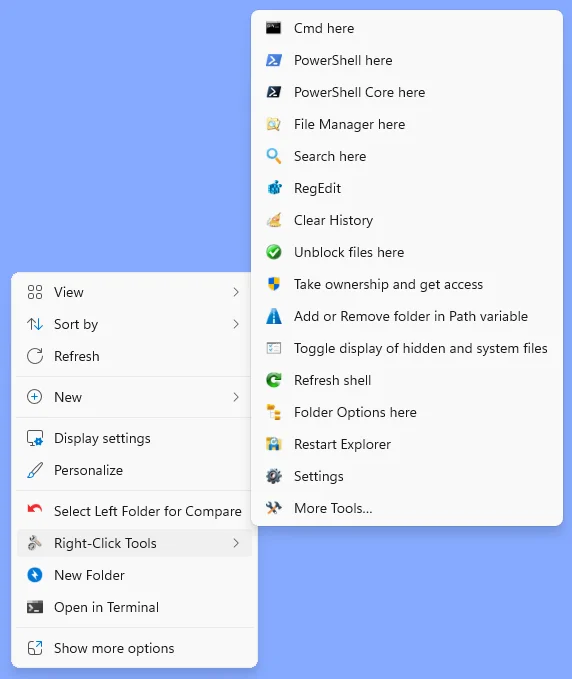
The tools may be added to the Windows 11 modern context menu or to the classic context menu. A built-in launcher also allow the tools to be used completely portable (e.g. from a flash drive or network volume).
The default settings provide a ready-to-use suite of tools, but many configuration options are provided via the INI files to allow for individual customization.
This is a major new version. Here's a summary:
Right-Click Tools
This package provides a user-extendable set of tools, primarily targetted to power users, that may be run in the User, Administrator, or TrustedInstaller security context.The tools may be added to the Windows 11 modern context menu or to the classic context menu. A built-in launcher also allow the tools to be used completely portable (e.g. from a flash drive or network volume).
The default settings provide a ready-to-use suite of tools, but many configuration options are provided via the INI files to allow for individual customization.
Tool highlights
- Cmd here, PowerShell here, PowerShell Core here, File Manager here, and RegEdit allow launching those programs as User, Administrator, or TrustedInstaller via the default pop-up or by holding the Ctrl key (with the default elevation mode configurable for each item). The File Manager here tool can be configured to launch the file manager of your choice.
- Search here provides a GUI to help construct complex searches, using Advanced Query Syntax, that are passed to Explorer. This menu item may instead be configured to run your preferred search tool, such as Everything or FileLocator Pro, starting at the current folder.
- Clear History provides options to clear recent and auto-suggest lists, temporary files, Recycle Bin, Defender history, and a user-specified list of folders.
- Unblock files here unblocks (i.e. clears the Mark of the Web) from files in the current folder and all of its subfolders.
- Take ownership and get access uses the program SetACL to reset ownership and access to the current user for the selected folder and all of its subfolders.
- Add or remove folder in Path variable shows you if the current path has already been added to the User and/or System path and lets you add or remove it by a simple checkbox click.
- Toggle display of hidden and system files provides a quick way to see hidden/system files and hide them again.
- Refresh shell provides options to do a quick shell refresh (e.g. to see an updated icon) or do a whole reset of the icon and/or thumbnail cache.
- Folder options here provides options to set folder type for whole folder trees, set folder colors and icons, and several special thumbnail options via automatic image to icon conversion.
- Restart Explorer does just that (with a confirmation).
- Settings provides convenient access to the Right-Click Tools configuration files, all classic and modern Windows settings dialogs and pages, and quick pick menus to select display scaling and light/dark mode.
- Shortcut Tool provides options to convert URL shortcuts to LNK shortcuts and search and replace in LNK shortcuts.
- Date Time Tool provides options to set file dates and times and copy one date/time property to another (e.g. copy Date taken to Date created). These operations apply to an entire folder and, optionally, all subfolders.
- Snip with border provides a tool to capture a screenshot of any window to the clipboard with a small amount of the background included for contrast. This works best with the background set to a solid color.
- More Tools allows for more than 16 tools to be in the right-click menu, but still work without having to add a context menu handler. User-specified programs and scripts may be added to this menu by editing the MoreTools.ini file.
- Launcher mode opens when RightClickTools.exe is run without any arguments (i.e. double-click it). This provides a portable option to run any of the tools without having to add them to the right-click context menu. User-specified programs and scripts may be added to this menu by editing the Launcher.ini file.
My Computer
At a glance
Windows 10/11
- OS
- Windows 10/11
- Computer type
- Laptop
- Manufacturer/Model
- Acer






