
I use Robocopy to create a backup of a folder structure - 3469 files in 285 folders. I run it every few months. A handful of files get added or deleted but it's basically very static. The command (in a script) is "RoboCopy %Source% %Dest% /mir /dcopy:T". Since there are few changes usually very few files get copied but today almost every file got flagged "Newer" and got copied:
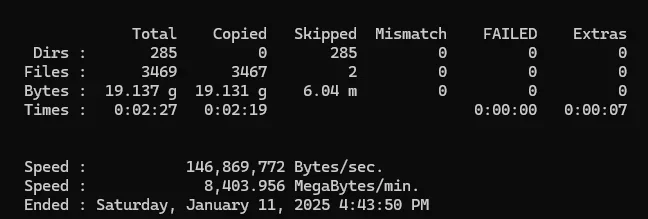
(I couldn't find the 2 that got skipped, but I didn't look very hard.)
In order to debug this I restored the whole destination volume and ran a WinMerge compare of the source and destination. It found no differences so I randthe Robocopy again with the same results - all but 2 files were copied. I have no idea how either WinMerge or Robocopy do their comparisons but I believe there were no additions or deletions of files since I did the last copy so I think I believe WinMerge in this case.
Does Robocopy look at the "Last accessed" date? The source is on a flash drive and my antiviral product - BitDefender - did a scan of the device when I plugged it in.
The last time I did a copy was last year. Would that have any effect?
This mostly just curiosity on my part.
(I couldn't find the 2 that got skipped, but I didn't look very hard.)
In order to debug this I restored the whole destination volume and ran a WinMerge compare of the source and destination. It found no differences so I randthe Robocopy again with the same results - all but 2 files were copied. I have no idea how either WinMerge or Robocopy do their comparisons but I believe there were no additions or deletions of files since I did the last copy so I think I believe WinMerge in this case.
Does Robocopy look at the "Last accessed" date? The source is on a flash drive and my antiviral product - BitDefender - did a scan of the device when I plugged it in.
The last time I did a copy was last year. Would that have any effect?
This mostly just curiosity on my part.
- Windows Build/Version
- Win11 Pro 23H2 build 22631.4602
My Computers
-
At a glance
Windows 11Intel Core i5-840016GBIntel UHD Graphics 630- OS
- Windows 11
- Computer type
- PC/Desktop
- Manufacturer/Model
- Microsoft
- CPU
- Intel Core i5-8400
- Motherboard
- ASUS PRIME H370-PLUS
- Memory
- 16GB
- Graphics Card(s)
- Intel UHD Graphics 630
- Sound Card
- On board
- Monitor(s) Displays
- Samsung SyncMaster 2043BWX
- Screen Resolution
- 1680 x 1050
- Hard Drives
- Samsung SSD 850 256GB
WDC 1TB NVMe
WD 3TB external USB drive
- PSU
- I don't remember
- Case
- Corsair something-or-other
- Cooling
- Air CPU + 2 case fans
- Keyboard
- DAS S Pro (Cherry Brown)
- Mouse
- Logitech USB of some sort
-
At a glance
Windows 10 21H1i5-840016GBon board- Operating System
- Windows 10 21H1
- Computer type
- PC/Desktop
- Manufacturer/Model
- Homegrown
- CPU
- i5-8400
- Motherboard
- ASUS PRIME H370-PLUS
- Memory
- 16GB
- Graphics card(s)
- on board
- Sound Card
- on board
- Monitor(s) Displays
- Samsung SyncMaster 2043 BWX
- Screen Resolution
- 1280 x 1024
- Hard Drives
- Samsung SSD 850 EVO 250GB, WDS100T3X0C-00SJG0
- PSU
- don't remember
- Case
- Corsair Carbide 100r
- Cooling
- stock
- Keyboard
- DAC something or other
- Mouse
- Logitech M-U-0007
- Internet Speed
- 80/6 Mbs
- Browser
- FireFox
- Antivirus
- Kaspersky Internet security






