
Robocopy puzzle


pokeefe0001

Well-known member
Member
VIP
Local time
4:31 AM
Posts
299
Location
Pacific Northwest USA
OS
Windows 11
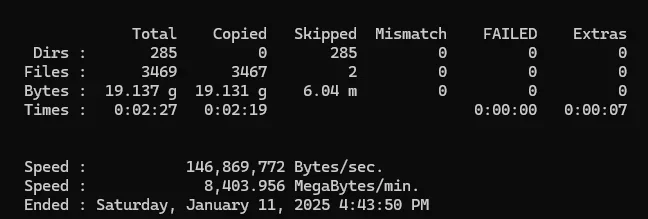
I use Robocopy to create a backup of a folder structure - 3469 files in 285 folders. I run it every few months. A handful of files get added or deleted but it's basically very static. The command (in a script) is "RoboCopy %Source% %Dest% /mir /dcopy:T". Since there are few changes usually very few files get copied but today almost every file got flagged "Newer" and got copied:
1736643281055.webp

(I couldn't find the 2 that got skipped, but I didn't look very hard.)

In order to debug this I restored the whole destination volume and ran a WinMerge compare of the source and destination. It found no differences so I randthe Robocopy again with the same results - all but 2 files were copied. I have no idea how either WinMerge or Robocopy do their comparisons but I believe there were no additions or deletions of files since I did the last copy so I think I believe WinMerge in this case.

Does Robocopy look at the "Last accessed" date? The source is on a flash drive and my antiviral product - BitDefender - did a scan of the device when I plugged it in.
The last time I did a copy was last year. Would that have any effect?

This mostly just curiosity on my part.
 
Windows Build/Version
Win11 Pro 23H2 build 22631.4602

My Computers My Computers

  • At a glance

    Windows 11Intel Core i5-840016GBIntel UHD Graphics 630
    OS
    Windows 11
    Computer type
    PC/Desktop
    Manufacturer/Model
    Microsoft
    CPU
    Intel Core i5-8400
    Motherboard
    ASUS PRIME H370-PLUS
    Memory
    16GB
    Graphics Card(s)
    Intel UHD Graphics 630
    Sound Card
    On board
    Monitor(s) Displays
    Samsung SyncMaster 2043BWX
    Screen Resolution
    1680 x 1050
    Hard Drives
    Samsung SSD 850 256GB
    WDC 1TB NVMe
    WD 3TB external USB drive
    PSU
    I don't remember
    Case
    Corsair something-or-other
    Cooling
    Air CPU + 2 case fans
    Keyboard
    DAS S Pro (Cherry Brown)
    Mouse
    Logitech USB of some sort
  • At a glance

    Windows 10 21H1i5-840016GBon board
    Operating System
    Windows 10 21H1
    Computer type
    PC/Desktop
    Manufacturer/Model
    Homegrown
    CPU
    i5-8400
    Motherboard
    ASUS PRIME H370-PLUS
    Memory
    16GB
    Graphics card(s)
    on board
    Sound Card
    on board
    Monitor(s) Displays
    Samsung SyncMaster 2043 BWX
    Screen Resolution
    1280 x 1024
    Hard Drives
    Samsung SSD 850 EVO 250GB, WDS100T3X0C-00SJG0
    PSU
    don't remember
    Case
    Corsair Carbide 100r
    Cooling
    stock
    Keyboard
    DAC something or other
    Mouse
    Logitech M-U-0007
    Internet Speed
    80/6 Mbs
    Browser
    FireFox
    Antivirus
    Kaspersky Internet security

Robocopy will consider a file changed if the file size or timestamp is different, unless you fiddle with parameters to change that. You might be triggering by using DCOPY:T.

You can specify how WinMerge compares directories by using the Options button when you start the comparison. Changing to date, size, or both might help you narrow down which is triggering your re-copy.

View attachment 121803
 

My Computer My Computer

At a glance

Windows 11 Enterprise 25H2 [rev. 8893]
OS
Windows 11 Enterprise 25H2 [rev. 8893]
I think the DCOPY parm controls Robocopy's detection of directory changes, and the directory comparisons seemed fine.

I ran a WinMerge comparison again (comparing full content) - this time between a source from a Macrium Reflect backup of the destination (taken this morning) and the source on the flash drive. Once again all content was judged identical, but right and left "dates" were off by exactly one hour. That explains Robocopy copying everything, but I can't explain the timestamp differences (but I bet daylight savings time is involved somehow).

And I found a problem in my Robocpy commands. This was actually a two-step process" export from a laptop to a flash drive, and import from the flash drive to my PC. The export Robocopy had /XO in addition to the parms I showed earlier ... and the problematic time differences exist between the laptop and flash drive. I think I need the /XO everywhere. (But I don't know if that will fix the problem.)
 

My Computers My Computers

  • At a glance

    Windows 11Intel Core i5-840016GBIntel UHD Graphics 630
    OS
    Windows 11
    Computer type
    PC/Desktop
    Manufacturer/Model
    Microsoft
    CPU
    Intel Core i5-8400
    Motherboard
    ASUS PRIME H370-PLUS
    Memory
    16GB
    Graphics Card(s)
    Intel UHD Graphics 630
    Sound Card
    On board
    Monitor(s) Displays
    Samsung SyncMaster 2043BWX
    Screen Resolution
    1680 x 1050
    Hard Drives
    Samsung SSD 850 256GB
    WDC 1TB NVMe
    WD 3TB external USB drive
    PSU
    I don't remember
    Case
    Corsair something-or-other
    Cooling
    Air CPU + 2 case fans
    Keyboard
    DAS S Pro (Cherry Brown)
    Mouse
    Logitech USB of some sort
  • At a glance

    Windows 10 21H1i5-840016GBon board
    Operating System
    Windows 10 21H1
    Computer type
    PC/Desktop
    Manufacturer/Model
    Homegrown
    CPU
    i5-8400
    Motherboard
    ASUS PRIME H370-PLUS
    Memory
    16GB
    Graphics card(s)
    on board
    Sound Card
    on board
    Monitor(s) Displays
    Samsung SyncMaster 2043 BWX
    Screen Resolution
    1280 x 1024
    Hard Drives
    Samsung SSD 850 EVO 250GB, WDS100T3X0C-00SJG0
    PSU
    don't remember
    Case
    Corsair Carbide 100r
    Cooling
    stock
    Keyboard
    DAC something or other
    Mouse
    Logitech M-U-0007
    Internet Speed
    80/6 Mbs
    Browser
    FireFox
    Antivirus
    Kaspersky Internet security

The flash drive could be the issue if it’s not NTFS.

Anyhoo…. Robocopy has a DST switch for times like this (pun intended).

Also this sounds like an excellent case for using git or some other source control.
 

My Computer My Computer

At a glance

Windows 11 Enterprise 25H2 [rev. 8893]
OS
Windows 11 Enterprise 25H2 [rev. 8893]
Hmm. I hadn't noticed the DST switch. It isn't very well documented. I'll play with it to see how it works.

I think git is far beyond my needs. These are just some simple scripts used to get data to and from several off-line laptops.
 

My Computers My Computers

  • At a glance

    Windows 11Intel Core i5-840016GBIntel UHD Graphics 630
    OS
    Windows 11
    Computer type
    PC/Desktop
    Manufacturer/Model
    Microsoft
    CPU
    Intel Core i5-8400
    Motherboard
    ASUS PRIME H370-PLUS
    Memory
    16GB
    Graphics Card(s)
    Intel UHD Graphics 630
    Sound Card
    On board
    Monitor(s) Displays
    Samsung SyncMaster 2043BWX
    Screen Resolution
    1680 x 1050
    Hard Drives
    Samsung SSD 850 256GB
    WDC 1TB NVMe
    WD 3TB external USB drive
    PSU
    I don't remember
    Case
    Corsair something-or-other
    Cooling
    Air CPU + 2 case fans
    Keyboard
    DAS S Pro (Cherry Brown)
    Mouse
    Logitech USB of some sort
  • At a glance

    Windows 10 21H1i5-840016GBon board
    Operating System
    Windows 10 21H1
    Computer type
    PC/Desktop
    Manufacturer/Model
    Homegrown
    CPU
    i5-8400
    Motherboard
    ASUS PRIME H370-PLUS
    Memory
    16GB
    Graphics card(s)
    on board
    Sound Card
    on board
    Monitor(s) Displays
    Samsung SyncMaster 2043 BWX
    Screen Resolution
    1280 x 1024
    Hard Drives
    Samsung SSD 850 EVO 250GB, WDS100T3X0C-00SJG0
    PSU
    don't remember
    Case
    Corsair Carbide 100r
    Cooling
    stock
    Keyboard
    DAC something or other
    Mouse
    Logitech M-U-0007
    Internet Speed
    80/6 Mbs
    Browser
    FireFox
    Antivirus
    Kaspersky Internet security

I meant git for the data, not the scripts.
 

My Computer My Computer

At a glance

Windows 11 Enterprise 25H2 [rev. 8893]
OS
Windows 11 Enterprise 25H2 [rev. 8893]
I know nothing about git so I may be way off base here, but I don't think it makes much sense for my purposes. I have a set of data and config files for an application running on a couple laptops. The laptops are off-line except for the rare occasions when I take them home to apply maintenance (and once Win10 goes out of support they will remain off-line always). I use robocopy scripts to move data between the laptops and a flash drive and between the flash drive and my desktop. On the desktop I have another copy of the application and the data and config files.

I could use git (or something similar) as a repository for the data, but I would still need a working copy of the data (not a git repository) on the PC and would still need to get data to and from the off-line laptops.
 

My Computers My Computers

  • At a glance

    Windows 11Intel Core i5-840016GBIntel UHD Graphics 630
    OS
    Windows 11
    Computer type
    PC/Desktop
    Manufacturer/Model
    Microsoft
    CPU
    Intel Core i5-8400
    Motherboard
    ASUS PRIME H370-PLUS
    Memory
    16GB
    Graphics Card(s)
    Intel UHD Graphics 630
    Sound Card
    On board
    Monitor(s) Displays
    Samsung SyncMaster 2043BWX
    Screen Resolution
    1680 x 1050
    Hard Drives
    Samsung SSD 850 256GB
    WDC 1TB NVMe
    WD 3TB external USB drive
    PSU
    I don't remember
    Case
    Corsair something-or-other
    Cooling
    Air CPU + 2 case fans
    Keyboard
    DAS S Pro (Cherry Brown)
    Mouse
    Logitech USB of some sort
  • At a glance

    Windows 10 21H1i5-840016GBon board
    Operating System
    Windows 10 21H1
    Computer type
    PC/Desktop
    Manufacturer/Model
    Homegrown
    CPU
    i5-8400
    Motherboard
    ASUS PRIME H370-PLUS
    Memory
    16GB
    Graphics card(s)
    on board
    Sound Card
    on board
    Monitor(s) Displays
    Samsung SyncMaster 2043 BWX
    Screen Resolution
    1280 x 1024
    Hard Drives
    Samsung SSD 850 EVO 250GB, WDS100T3X0C-00SJG0
    PSU
    don't remember
    Case
    Corsair Carbide 100r
    Cooling
    stock
    Keyboard
    DAC something or other
    Mouse
    Logitech M-U-0007
    Internet Speed
    80/6 Mbs
    Browser
    FireFox
    Antivirus
    Kaspersky Internet security
 

My Computer My Computer

At a glance

Windows 11AMD Ryzen 7 5700GMicron Technology DDR4-3200 16GBNVIDIA GeForce RTX 3060
OS
Windows 11
Computer type
PC/Desktop
Manufacturer/Model
HP Pavilion
CPU
AMD Ryzen 7 5700G
Motherboard
Erica6
Memory
Micron Technology DDR4-3200 16GB
Graphics Card(s)
NVIDIA GeForce RTX 3060
Sound Card
Realtek ALC671
Monitor(s) Displays
Samsung SyncMaster U28E590
Screen Resolution
3840 x 2160
Hard Drives
SAMSUNG MZVLQ1T0HALB-000H1
Thanks, but I have it working now. The /DST and /XO fixed my problem. I didn't walk through your script so I'm not sure if understand what you're doing, but it looks more complex than I need.
 

My Computers My Computers

  • At a glance

    Windows 11Intel Core i5-840016GBIntel UHD Graphics 630
    OS
    Windows 11
    Computer type
    PC/Desktop
    Manufacturer/Model
    Microsoft
    CPU
    Intel Core i5-8400
    Motherboard
    ASUS PRIME H370-PLUS
    Memory
    16GB
    Graphics Card(s)
    Intel UHD Graphics 630
    Sound Card
    On board
    Monitor(s) Displays
    Samsung SyncMaster 2043BWX
    Screen Resolution
    1680 x 1050
    Hard Drives
    Samsung SSD 850 256GB
    WDC 1TB NVMe
    WD 3TB external USB drive
    PSU
    I don't remember
    Case
    Corsair something-or-other
    Cooling
    Air CPU + 2 case fans
    Keyboard
    DAS S Pro (Cherry Brown)
    Mouse
    Logitech USB of some sort
  • At a glance

    Windows 10 21H1i5-840016GBon board
    Operating System
    Windows 10 21H1
    Computer type
    PC/Desktop
    Manufacturer/Model
    Homegrown
    CPU
    i5-8400
    Motherboard
    ASUS PRIME H370-PLUS
    Memory
    16GB
    Graphics card(s)
    on board
    Sound Card
    on board
    Monitor(s) Displays
    Samsung SyncMaster 2043 BWX
    Screen Resolution
    1280 x 1024
    Hard Drives
    Samsung SSD 850 EVO 250GB, WDS100T3X0C-00SJG0
    PSU
    don't remember
    Case
    Corsair Carbide 100r
    Cooling
    stock
    Keyboard
    DAC something or other
    Mouse
    Logitech M-U-0007
    Internet Speed
    80/6 Mbs
    Browser
    FireFox
    Antivirus
    Kaspersky Internet security
Thanks, but I have it working now. The /DST and /XO fixed my problem. I didn't walk through your script so I'm not sure if understand what you're doing, but it looks more complex than I need.
It opens file explorer for you to select source and target folders and creates a full or incremental backup of the source files to target folder, it only copies changed and missing files to target folder.


You can change the Robocopy /E /IM /FP command at the bottom of the script with your command.
 

My Computer My Computer

At a glance

Windows 11AMD Ryzen 7 5700GMicron Technology DDR4-3200 16GBNVIDIA GeForce RTX 3060
OS
Windows 11
Computer type
PC/Desktop
Manufacturer/Model
HP Pavilion
CPU
AMD Ryzen 7 5700G
Motherboard
Erica6
Memory
Micron Technology DDR4-3200 16GB
Graphics Card(s)
NVIDIA GeForce RTX 3060
Sound Card
Realtek ALC671
Monitor(s) Displays
Samsung SyncMaster U28E590
Screen Resolution
3840 x 2160
Hard Drives
SAMSUNG MZVLQ1T0HALB-000H1
It opens file explorer for you to select source and target folders and creates a full or incremental backup of the source files to target folder, it only copies changed and missing files to target folder.
I thought that might be what it did when you mentioned "incremental backup". I'm not creating backups; I'm creating a working copy of the original source ... including additions, changes, and deletions. Having incremental changes in a separate folder would do me no good.
 

My Computers My Computers

  • At a glance

    Windows 11Intel Core i5-840016GBIntel UHD Graphics 630
    OS
    Windows 11
    Computer type
    PC/Desktop
    Manufacturer/Model
    Microsoft
    CPU
    Intel Core i5-8400
    Motherboard
    ASUS PRIME H370-PLUS
    Memory
    16GB
    Graphics Card(s)
    Intel UHD Graphics 630
    Sound Card
    On board
    Monitor(s) Displays
    Samsung SyncMaster 2043BWX
    Screen Resolution
    1680 x 1050
    Hard Drives
    Samsung SSD 850 256GB
    WDC 1TB NVMe
    WD 3TB external USB drive
    PSU
    I don't remember
    Case
    Corsair something-or-other
    Cooling
    Air CPU + 2 case fans
    Keyboard
    DAS S Pro (Cherry Brown)
    Mouse
    Logitech USB of some sort
  • At a glance

    Windows 10 21H1i5-840016GBon board
    Operating System
    Windows 10 21H1
    Computer type
    PC/Desktop
    Manufacturer/Model
    Homegrown
    CPU
    i5-8400
    Motherboard
    ASUS PRIME H370-PLUS
    Memory
    16GB
    Graphics card(s)
    on board
    Sound Card
    on board
    Monitor(s) Displays
    Samsung SyncMaster 2043 BWX
    Screen Resolution
    1280 x 1024
    Hard Drives
    Samsung SSD 850 EVO 250GB, WDS100T3X0C-00SJG0
    PSU
    don't remember
    Case
    Corsair Carbide 100r
    Cooling
    stock
    Keyboard
    DAC something or other
    Mouse
    Logitech M-U-0007
    Internet Speed
    80/6 Mbs
    Browser
    FireFox
    Antivirus
    Kaspersky Internet security
Back
Top Bottom

