hussainaseeri
New member
- Local time
- 8:16 PM
- Posts
- 2
- OS
- Windows 11 24H2
Hello,
I recently installed a used ASUS TUF RTX 3080 Gaming OC.
System Specs:
- Intel Core i9-14900KF
- ASUS Prime B760-PLUS
- ASUS TUF RTX 3080 Gaming OC 10GB
- Windows 11 24H2
- Latest NVIDIA driver
Issue:
The PC works perfectly during normal desktop use, browsing and videos.
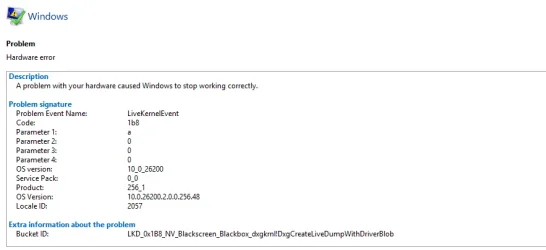
However, while gaming, the screen suddenly goes black and the game crashes. Windows reports:
LiveKernelEvent 141
nvlddmkm
Observations:
- GPU temperatures are normal.
- GPU hotspot temperature is normal.
- Memory junction temperature is normal.
- No WHEA errors are reported.
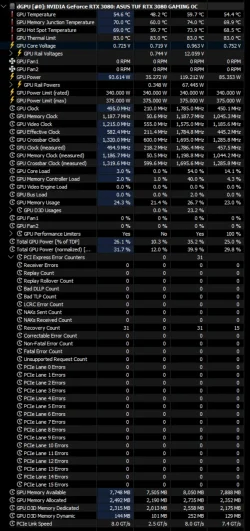
- HWiNFO shows PCI Express Error Counters increasing slowly.
- Recovery Count increases over time.
- No PCIe Lane Errors are reported.
What I already tried:
- Clean NVIDIA driver installation.
- Reseated the GPU.
- Checked PCIe power cables.
- Reset all GPU settings to stock.
Could this be related to:
- GPU hardware failure?
- PCIe slot issue?
- PCIe signal integrity problem?
- Power delivery problem?
Any advice would be appreciated.
I recently installed a used ASUS TUF RTX 3080 Gaming OC.
System Specs:
- Intel Core i9-14900KF
- ASUS Prime B760-PLUS
- ASUS TUF RTX 3080 Gaming OC 10GB
- Windows 11 24H2
- Latest NVIDIA driver
Issue:
The PC works perfectly during normal desktop use, browsing and videos.
However, while gaming, the screen suddenly goes black and the game crashes. Windows reports:
LiveKernelEvent 141
nvlddmkm
Observations:
- GPU temperatures are normal.
- GPU hotspot temperature is normal.
- Memory junction temperature is normal.
- No WHEA errors are reported.
- HWiNFO shows PCI Express Error Counters increasing slowly.
- Recovery Count increases over time.
- No PCIe Lane Errors are reported.
What I already tried:
- Clean NVIDIA driver installation.
- Reseated the GPU.
- Checked PCIe power cables.
- Reset all GPU settings to stock.
Could this be related to:
- GPU hardware failure?
- PCIe slot issue?
- PCIe signal integrity problem?
- Power delivery problem?
Any advice would be appreciated.
- Windows Build/Version
- Windows 11 Pro 24H2, OS Build 26100.2
Attachments
My Computer
At a glance
Windows 11 24H2
- OS
- Windows 11 24H2
- Computer type
- PC/Desktop
- Manufacturer/Model
- Custom Build