Rufus question on customization


cheaterslick

Well-known member
Power User
Local time
7:17 PM
Posts
1,449
Location
Virginia, USA
OS
Windows 11 Pro 25H2 build: (26200.7623)
Hello,

I'm looking to create a bootable media with Rufus and I want to customize it so it will be able to upgrade to 24H2 on supported hardware, so I was wondering if I can use the following custom options:

Rufus.webp

So will I be able to use these options?

And will it still force BitLocker regardless? Or will it fail doing that? In other words, should I untick the "Disable BitLocker..." option?

Thanks
 

My Computers My Computers

  • At a glance

    Windows 11 Pro 25H2 build: (26200.7623)32GB
    OS
    Windows 11 Pro 25H2 build: (26200.7623)
    Computer type
    Laptop
    Manufacturer/Model
    Microsoft Surface Pro
    Memory
    32GB
  • At a glance

    Microsoft 25H2 ProIntel Core Ultra 764GBIntel Integrated Graphics
    Operating System
    Microsoft 25H2 Pro
    Computer type
    Laptop
    Manufacturer/Model
    Dell Pro 14 - PC14250
    CPU
    Intel Core Ultra 7
    Memory
    64GB
    Graphics card(s)
    Intel Integrated Graphics
    Hard Drives
    Micron 1TB SSD
you saying in the future upgrade to 24h2 or you're making this usb with a 24h2 iso to upgrade compatible systems?
 

My Computer My Computer

At a glance

Windows 11 Pro
OS
Windows 11 Pro
you saying in the future upgrade to 24h2 or you're making this usb with a 24h2 iso to upgrade compatible systems?

Future upgrade from 23H2 to 24H2 doing a clean install.
 

My Computers My Computers

  • At a glance

    Windows 11 Pro 25H2 build: (26200.7623)32GB
    OS
    Windows 11 Pro 25H2 build: (26200.7623)
    Computer type
    Laptop
    Manufacturer/Model
    Microsoft Surface Pro
    Memory
    32GB
  • At a glance

    Microsoft 25H2 ProIntel Core Ultra 764GBIntel Integrated Graphics
    Operating System
    Microsoft 25H2 Pro
    Computer type
    Laptop
    Manufacturer/Model
    Dell Pro 14 - PC14250
    CPU
    Intel Core Ultra 7
    Memory
    64GB
    Graphics card(s)
    Intel Integrated Graphics
    Hard Drives
    Micron 1TB SSD
Those options will work on all supported or unsupported PC's.

What Rufus does is create a hidden Windows\Panther unattend.xml file, to change some reg keys or insert unattended mode options.
 

My Computer My Computer

At a glance

Windows 7
OS
Windows 7
I use a RUFUS modified installer for ALL my Win11 installs now. Mostly to just disable the stuff I don't want to deal with especially with the default Bitlocker settings and MS account.
 

My Computer My Computer

At a glance

Win 7/10/11
OS
Win 7/10/11
Computer type
PC/Desktop
Other Info
I'm a computer enthusiast so have quite a few systems that I run. More like an advanced hobby.
I use a RUFUS modified installer for ALL my Win11 installs now. Mostly to just disable the stuff I don't want to deal with especially with the default Bitlocker settings and MS account.

Yeah, that's kind of the direction I'm heading in. I'm wondering if those options I have checked will be what I'm looking for before I create it.
 

My Computers My Computers

  • At a glance

    Windows 11 Pro 25H2 build: (26200.7623)32GB
    OS
    Windows 11 Pro 25H2 build: (26200.7623)
    Computer type
    Laptop
    Manufacturer/Model
    Microsoft Surface Pro
    Memory
    32GB
  • At a glance

    Microsoft 25H2 ProIntel Core Ultra 764GBIntel Integrated Graphics
    Operating System
    Microsoft 25H2 Pro
    Computer type
    Laptop
    Manufacturer/Model
    Dell Pro 14 - PC14250
    CPU
    Intel Core Ultra 7
    Memory
    64GB
    Graphics card(s)
    Intel Integrated Graphics
    Hard Drives
    Micron 1TB SSD
Yeah, that's kind of the direction I'm heading in. I'm wondering if those options I have checked will be what I'm looking for before I create it.
they wont effect the ability to update. you'll be good
 

My Computer My Computer

At a glance

Windows 11 Pro
OS
Windows 11 Pro

My Computers My Computers

  • At a glance

    Windows 11 Pro 25H2 build: (26200.7623)32GB
    OS
    Windows 11 Pro 25H2 build: (26200.7623)
    Computer type
    Laptop
    Manufacturer/Model
    Microsoft Surface Pro
    Memory
    32GB
  • At a glance

    Microsoft 25H2 ProIntel Core Ultra 764GBIntel Integrated Graphics
    Operating System
    Microsoft 25H2 Pro
    Computer type
    Laptop
    Manufacturer/Model
    Dell Pro 14 - PC14250
    CPU
    Intel Core Ultra 7
    Memory
    64GB
    Graphics card(s)
    Intel Integrated Graphics
    Hard Drives
    Micron 1TB SSD
no, i believe if it gets forced you'll have to turn it off then. or just make a 24h2 rufus usb in the future and upgrade via that method. 24h2 sets bitlocker to active;ready but does not encrypt automatically that i know of. i didnt have that issue. just go into control panel after install and turn off bitlocker
 

My Computer My Computer

At a glance

Windows 11 Pro
OS
Windows 11 Pro
but does not encrypt automatically

Ok, well that's good. I thought it might do that.

Or at the very least, **fail** the re-instillation because of it.

just go into control panel after install and turn off bitlocker

Good to know. I'll just leave that Rufus box ticked, anyway. Thanks.
 

My Computers My Computers

  • At a glance

    Windows 11 Pro 25H2 build: (26200.7623)32GB
    OS
    Windows 11 Pro 25H2 build: (26200.7623)
    Computer type
    Laptop
    Manufacturer/Model
    Microsoft Surface Pro
    Memory
    32GB
  • At a glance

    Microsoft 25H2 ProIntel Core Ultra 764GBIntel Integrated Graphics
    Operating System
    Microsoft 25H2 Pro
    Computer type
    Laptop
    Manufacturer/Model
    Dell Pro 14 - PC14250
    CPU
    Intel Core Ultra 7
    Memory
    64GB
    Graphics card(s)
    Intel Integrated Graphics
    Hard Drives
    Micron 1TB SSD
24h2 sets bitlocker to active;ready but does not encrypt automatically that i know of.

just go into control panel after install and turn off bitlocker

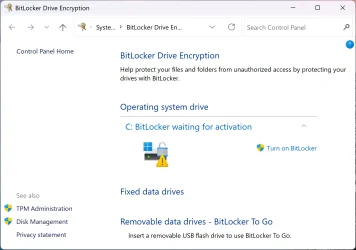
Not possible from the control panel.

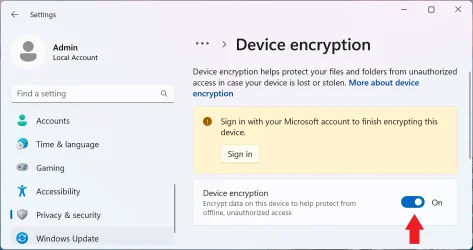
You have to choose Settings > Privacy & security > Device encryption > Off

BitLocker waiting for activation.webp

Sign in with your Microsoft account to finish encrypting this device.webp
 

My Computers My Computers

  • At a glance

    Windows 11 ProAMD Ryzen 9 9950X3DKingston FURY Beast 64GB (2x32GB) DDR5 6000MT/sASUS TUF Gaming Radeon RX 9070 OC Edition 16G...
    OS
    Windows 11 Pro
    Computer type
    PC/Desktop
    CPU
    AMD Ryzen 9 9950X3D
    Motherboard
    ASRock B650E Taichi Lite
    Memory
    Kingston FURY Beast 64GB (2x32GB) DDR5 6000MT/s
    Graphics Card(s)
    ASUS TUF Gaming Radeon RX 9070 OC Edition 16GB GDDR6
    Hard Drives
    Solidigm P44 Pro 2TB M.2 NVMe SSD
  • At a glance

    Windows 11 HomeIntel Core Ultra 9 275HX64GB (2x 32GB) DDR5-6400NVIDIA GeForce RTX 5080 16GB GDDR7 Laptop GPU
    Operating System
    Windows 11 Home
    Computer type
    Laptop
    Manufacturer/Model
    Lenovo Legion Pro 7i Gen 10 16"
    CPU
    Intel Core Ultra 9 275HX
    Memory
    64GB (2x 32GB) DDR5-6400
    Graphics card(s)
    NVIDIA GeForce RTX 5080 16GB GDDR7 Laptop GPU
    Hard Drives
    2x 1TB M.2 NVMe SSD (SK Hynix)
ahh yeah guess i was thinking of bitlocker on/off

Code:
reg add HKLM\SYSTEM\CurrentControlSet\Control\BitLocker /v PreventDeviceEncryption /d 1 /t REG_DWORD /f

you can also just run that command ^ in command prompt as admin
 

My Computer My Computer

At a glance

Windows 11 Pro
OS
Windows 11 Pro
I recently used Rufus to do a clean install of 24H2 on a second SSD with those settings and it worked great. The only thing I changed was the User name.
 

My Computers My Computers

  • At a glance

    Windows 11 Pro 25H2Intel Core i7-10700K16GB (8GB PC4-19200 DDR4 SDRAM x2)NVIDIA GeForce GTX 1050 TI
    OS
    Windows 11 Pro 25H2
    Computer type
    PC/Desktop
    Manufacturer/Model
    PowerSpec B746
    CPU
    Intel Core i7-10700K
    Motherboard
    ASRock Z490 Phantom Gaming 4/ax
    Memory
    16GB (8GB PC4-19200 DDR4 SDRAM x2)
    Graphics Card(s)
    NVIDIA GeForce GTX 1050 TI
    Sound Card
    Realtek Audio
    Monitor(s) Displays
    #1. LG ULTRAWIDE 34" #2. AOC Q32G2WG3 32"
    Screen Resolution
    #1. 3440 X 1440 #2. 1920 x 1080
    Hard Drives
    NVMe WDC WDS100T2B0C-00PXH0 1TB
    Samsung SSD 860 EVO 1TB
    PSU
    750 Watts (62.5A)
    Case
    PowerSpec/Lian Li ATX 205
    Keyboard
    Logitech K270
    Mouse
    Logitech M185
    Browser
    Microsoft Edge and Firefox
    Antivirus
    Webroot SecureAnywhere CE 26.1
  • At a glance

    Windows 11 Canary ChannelIntel Core i5-8400 CPU @ 2.80GHz16 MB DDR 4-2666
    Operating System
    Windows 11 Canary Channel
    Computer type
    PC/Desktop
    Manufacturer/Model
    PowerSpec G156
    CPU
    Intel Core i5-8400 CPU @ 2.80GHz
    Motherboard
    AsusTeK Prime B360M-A
    Memory
    16 MB DDR 4-2666
    Monitor(s) Displays
    23" Speptre HDMI 75Hz
    Screen Resolution
    1920x1080
    Hard Drives
    Samsung 970 EVO 500GB NVMe
    Keyboard
    Logitek K270
    Mouse
    Logitek M185
    Browser
    Firefox, Edge and Edge Canary
    Antivirus
    Windows Defender
btw - when you open Rufus, press "Alt+E". this will activate a mode that creates a flash drive that will work in both UEFI and MBR modes. stays activated until you toggle it off with Alt+E again
 

My Computer My Computer

At a glance

Windows 11 Pro
OS
Windows 11 Pro
btw - when you open Rufus, press "Alt+E". this will activate a mode that creates a flash drive that will work in both UEFI and MBR modes. stays activated until you toggle it off with Alt+E again
I just found that trick out the other day. I downloaded and made a Hiren's boot disk and it was included in the instructions.
 

My Computers My Computers

  • At a glance

    Windows 11 Pro 25H2Intel Core i7-10700K16GB (8GB PC4-19200 DDR4 SDRAM x2)NVIDIA GeForce GTX 1050 TI
    OS
    Windows 11 Pro 25H2
    Computer type
    PC/Desktop
    Manufacturer/Model
    PowerSpec B746
    CPU
    Intel Core i7-10700K
    Motherboard
    ASRock Z490 Phantom Gaming 4/ax
    Memory
    16GB (8GB PC4-19200 DDR4 SDRAM x2)
    Graphics Card(s)
    NVIDIA GeForce GTX 1050 TI
    Sound Card
    Realtek Audio
    Monitor(s) Displays
    #1. LG ULTRAWIDE 34" #2. AOC Q32G2WG3 32"
    Screen Resolution
    #1. 3440 X 1440 #2. 1920 x 1080
    Hard Drives
    NVMe WDC WDS100T2B0C-00PXH0 1TB
    Samsung SSD 860 EVO 1TB
    PSU
    750 Watts (62.5A)
    Case
    PowerSpec/Lian Li ATX 205
    Keyboard
    Logitech K270
    Mouse
    Logitech M185
    Browser
    Microsoft Edge and Firefox
    Antivirus
    Webroot SecureAnywhere CE 26.1
  • At a glance

    Windows 11 Canary ChannelIntel Core i5-8400 CPU @ 2.80GHz16 MB DDR 4-2666
    Operating System
    Windows 11 Canary Channel
    Computer type
    PC/Desktop
    Manufacturer/Model
    PowerSpec G156
    CPU
    Intel Core i5-8400 CPU @ 2.80GHz
    Motherboard
    AsusTeK Prime B360M-A
    Memory
    16 MB DDR 4-2666
    Monitor(s) Displays
    23" Speptre HDMI 75Hz
    Screen Resolution
    1920x1080
    Hard Drives
    Samsung 970 EVO 500GB NVMe
    Keyboard
    Logitek K270
    Mouse
    Logitek M185
    Browser
    Firefox, Edge and Edge Canary
    Antivirus
    Windows Defender
Not tested the bitlocker option, the rest are fine when selecting them during bootable USB creation.
 

My Computer My Computer

At a glance

Windows 11Intel i5 7500Kingston 8 GB DDR4Intel Graphics HD 630
OS
Windows 11
Computer type
PC/Desktop
Manufacturer/Model
DIY
CPU
Intel i5 7500
Motherboard
ASRock B250M
Memory
Kingston 8 GB DDR4
Graphics Card(s)
Intel Graphics HD 630
Monitor(s) Displays
HKC M242
Hard Drives
SanDisk SSD PLus 240
Browser
Chrome
Back
Top Bottom