Samsung One UI 8.5 Official Rollout Starts May 6, 2026


 Samsung Newsroom:

Samsung is expanding the One UI 8.5 rollout to more devices, bringing the latest Galaxy AI features across the Samsung Galaxy ecosystem. The update focuses on enhancing communication and creative experiences on Galaxy mobile phones and tablets, including the Galaxy S25 series, Galaxy S25 FE, Galaxy S24 series, Galaxy S24 FE, Galaxy Z Fold7 and Galaxy Z Flip7, Galaxy Z Fold6 and Galaxy Z Flip6, Galaxy Tab S11 series and Galaxy Tab S10 series.

One UI 8.5 will begin rolling out in Korea starting May 6 with additional regions to follow.


 Source:

 
Probably. You could Show System Apps and check again just to be sure. Mine was on the main list, same with AppCloud!
Yeah I have Show System Apps on, no AppHub, AppCloud, AppAtizer, nada...

A Guy
 

My Computers

System One System Two

  • OS
    Windows 10 Home x64
    Computer type
    PC/Desktop
    Manufacturer/Model
    Custom
    CPU
    INTEL Core i5-11400
    Motherboard
    ASUS PRIME H570-PLUS
    Memory
    KINGSTON HyperX Fury Black DDR4 16GB (2 x 8GB) 3200MHz, CL16
    Graphics Card(s)
    EVGA GeForce GTX 750 Superclocked 1GB 128-Bit GDDR5
    Monitor(s) Displays
    LG 32MA68HY 32" IPS
    Screen Resolution
    1920 x 1080
    Hard Drives
    SAMSUNG 250GB 970 EVO Plus NVMe, M.2 SSD, Crucial 250GB MX500, SEAGATE 500GB Barracuda® 7200.12, SATA 3 Gb/s, 7200 RPM, 16MB cache
    PSU
    CORSAIR RM550x 80 PLUS Gold 550W
    Case
    ANTEC P10 FLUX
    Cooling
    be quiet! Pure Rock 2, 5 x 120 mm Case Fans
    Internet Speed
    480 + Mbps Up/ 12+ Mbps Down
    Browser
    Vivaldi Snapshot
    Antivirus
    Avast
  • Operating System
    Windows 10 Home x64
    Computer type
    PC/Desktop
    Manufacturer/Model
    Custom
    CPU
    Intel Core i5-750
    Motherboard
    ASUS P7P55D
    Memory
    Kingston HyperX Fury Black 8GB (2x4GB) DDR3-1600MHz CL8
    Graphics card(s)
    MSI GeForce GT 240 N240GT-MD1G/D5 1 GB DDR5
    Monitor(s) Displays
    LG 32MA68HY 32" IPS
    Screen Resolution
    1980x1040
    Hard Drives
    Samsung Electronics 840 EVO 120GB, SEAGATE 500GB Barracuda® 7200.12, SATA 3 Gb/s, 7200 RPM, 16MB cache
    PSU
    Antec TruePower New TP-550 550W
    Case
    Antec 300
    Cooling
    Cooler Master Hyper 212+, 4 Noctua NF-P12 120mm, 1 Noctua NF-P14 FLX
    Internet Speed
    480+ Mbps Down/12+Mbps Up
    Browser
    Vivaldi Snapshot
    Antivirus
    Avast

My Computers

System One System Two

  • OS
    Windows 11 Pro
    Computer type
    PC/Desktop
    Manufacturer/Model
    ASUS ROG Strix
  • Operating System
    Windows 11 Pro
    Computer type
    Laptop
    Manufacturer/Model
    ASUS VivoBook
Yeah I have Show System Apps on, no AppHub, AppCloud, AppAtizer, nada...

A Guy
I don't have those either, S series are different from A series apparently.
 

My Computer

System One

  • OS
    windows 11 Pro
    Computer type
    Laptop
    Manufacturer/Model
    Dell XPS 15 9510
    CPU
    11th Gen Intel(R) Core(TM) i7-11800H @ 2.30GHz (16 CPUs
    Memory
    16 GB
    Graphics Card(s)
    NVIDIA GeForce RTX 3050 Ti
    Hard Drives
    512GB Solid State Drive
    Browser
    Firefox

My Computers

System One System Two

  • OS
    Windows 11 Pro
    Computer type
    PC/Desktop
    Manufacturer/Model
    ASUS ROG Strix
  • Operating System
    Windows 11 Pro
    Computer type
    Laptop
    Manufacturer/Model
    ASUS VivoBook
Have they removed the 5g option...
Yes,
Samsung permanently removed the dedicated "Turn off 5G" toggle from the Power Saving menu. The feature was retired because modern mobile processors handle 5G power consumption more efficiently, and certain network carriers requested the removal to keep devices on their latest networks.
 

My Computers

System One System Two

  • OS
    Windows 11 Pro
    Computer type
    PC/Desktop
    Manufacturer/Model
    ASUS ROG Strix
  • Operating System
    Windows 11 Pro
    Computer type
    Laptop
    Manufacturer/Model
    ASUS VivoBook
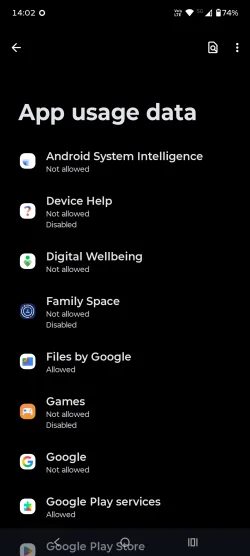
Settings > Apps > tap on the three dots (top right) > Special app access > Usage access > Digital wellbeing
Thanks, no matter how much I disable, there is always more hidden somewhere.
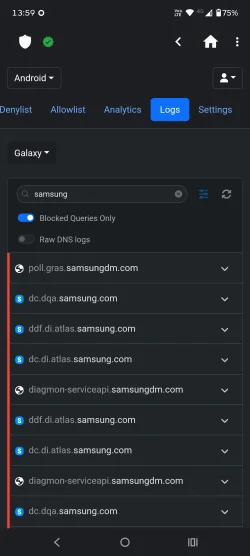
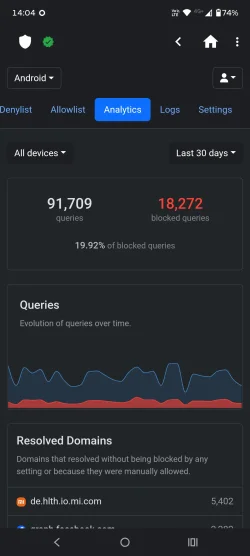
Anyway, I rely on DNS to block tracking, it blocks 20% of the traffic, that should do.

Screenshot_20260614-140242_Settings.webp Screenshot_20260614-135907_NextDNS Manager.webp Screenshot_20260614-140438_NextDNS Manager.webp
 

My Computer

System One

  • OS
    Home26H2Can
    Computer type
    PC/Desktop
    CPU
    AMD Ryzen 5 8600G (07/24)
    Motherboard
    ASROCK B650M-HDV/M.2 (07/24) BIOS 4.21 AGESA ComboAM5 1.3.0.1 (04/26)
    Memory
    2x32GB Kingston FURY DDR5 5600 MHz CL36 @5200 CL36 (07/24)
    Graphics Card(s)
    ASROCK Radeon RX 6600 Challenger D 8G @48FPS (08/24)
    Sound Card
    Creative Sound BlasterX AE-5 Plus (05/24)
    Monitor(s) Displays
    24" Philips 24M1N3200ZS/00 (05/24)
    Screen Resolution
    1920×1080@165Hz via DP1.4
    Hard Drives
    Kingston KC3000 NVMe 2TB (05/24)
    ADATA XPG GAMMIX S11 Pro 512GB (07/19)
    PSU
    Seasonic Core GM 550 Gold (04/24)
    Case
    Fractal Design Define 7 Mini with 3x Noctua NF-P14s/12@555rpm (04/24)
    Cooling
    Noctua NH-U12S with Noctua NF-P12 (04/24)
    Keyboard
    HP Pavilion Wired Keyboard 300 (07/24) + Rabalux 76017 Parker (01/24)
    Mouse
    Logitech M330 Silent Plus (01/26)
    Internet Speed
    500/100 Mbps via RouterOS (05/21) & TCP Optimizer
    Browser
    Edge, Brave for YouTube, LibreWolf for FB
    Antivirus
    NextDNS blocking 1/3 Traffic
    Other Info
    Phone: Motorola Moto G86 (02/26)
    Backup: Hasleo Backup Suite (PreOS)
    Headphones: Sennheiser RS170 (09/10)
    Chair: Huzaro Force 4.4 Grey Mesh (05/24)
    Notifier: Xiaomi Mi Band 9 Milanese (10/24)
    FlexCore USB-C 3.2 Gen 1 (M) to LAN (F) (08/25)
Just got a new A57 a few days ago and wanted to use Battery Saver. In my old A52 under Standard Saver I could keep 5g turned on but the rest off. The turn 5g on/off option seems to have gone. I turned Standard Saver on and missed calls etc. Have they removed the 5g option or hidden it somewhere else?
On my A56 EE the option doesn't exist either. Like @Edwin said, it's because on modern hardware turning 5G off doesn't make that much of a difference to the battery anymore. You can still turn 5G off in Settings > Connections > Mobile networks > Network mode. If you want to be able to turn it off and turn Battery Saver on with just a single tap, then use the Modes and Routines feature where you can choose the "Start Manually" trigger option to create a widget so you can add it to your Home screen.
 

My Computers

System One System Two

  • OS
    11 Home
    Computer type
    Laptop
    Manufacturer/Model
    Asus TUF Gaming F16 (2024)
    CPU
    i7 13650HX
    Memory
    16GB DDR5
    Graphics Card(s)
    GeForce RTX 4060 Mobile
    Sound Card
    Eastern Electric MiniMax DAC Supreme; Emotiva UMC-200; Astell & Kern AK240
    Monitor(s) Displays
    Sony Bravia XR-55X90J
    Screen Resolution
    3840×2160
    Hard Drives
    512GB SSD internal
    37TB external
    PSU
    Li-ion
    Cooling
    2× Arc Flow Fans, 4× exhaust vents, 5× heatpipes
    Keyboard
    Logitech K800
    Mouse
    Logitech G402
    Internet Speed
    30Mbit/s up, 500Mbit/s down
    Browser
    FF
    Antivirus
    What's an antivirus?
  • Operating System
    11 Home
    Computer type
    Laptop
    Manufacturer/Model
    Medion S15450
    CPU
    i5 1135G7
    Memory
    16GB DDR4
    Graphics card(s)
    Intel Iris Xe
    Sound Card
    Eastern Electric MiniMax DAC Supreme; Emotiva UMC-200; Astell & Kern AK240
    Monitor(s) Displays
    Sony Bravia XR-55X90J
    Screen Resolution
    3840×2160
    Hard Drives
    2TB SSD internal
    37TB external
    PSU
    Li-ion
    Keyboard
    Logitech K800
    Mouse
    Logitech G402
    Internet Speed
    30Mbit/s up, 500Mbit/s down
    Browser
    FF
Phones are weird! They give you all these options to save battery, dim the screen, limit CPU usage etc., but they hide all the bloatware running in the background!
I'd rather have the device running at top speed and kill all the bloatware instead!
 

My Computers

System One System Two

  • OS
    Windows 11 Pro
    Computer type
    PC/Desktop
    Manufacturer/Model
    ASUS ROG Strix
  • Operating System
    Windows 11 Pro
    Computer type
    Laptop
    Manufacturer/Model
    ASUS VivoBook
Hi @cereberus . Yes, I already have 5g preferred under mobile networks. However, when I turn on standard battery saver it stops all calls and emails. There was an option on my older a52, to use battery saver and in the settings for that you could keep 5g on. This toggle is missing from the a57.
 

My Computer

System One

  • OS
    Windows 11 Home
Hi. Sorry. Just saw the other replies. I want to keep 5g running when using battery saver as the 4g in our area isn't strong. Our 5g is more reliable. Battery saver seems to be stopping 5g which I need.
 

My Computer

System One

  • OS
    Windows 11 Home
Battery saver seems to be stopping 5g which I need.
Does the setting inadvertently switch it to airplane mode?
 

My Computers

System One System Two

  • OS
    Windows 11 Pro
    Computer type
    PC/Desktop
    Manufacturer/Model
    ASUS ROG Strix
  • Operating System
    Windows 11 Pro
    Computer type
    Laptop
    Manufacturer/Model
    ASUS VivoBook
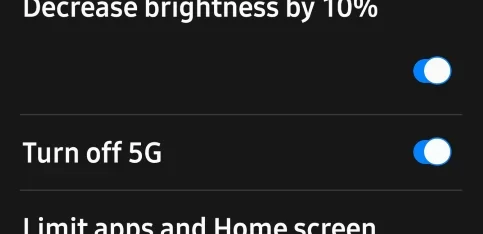
There was an option on my older a52, to use battery saver and in the settings for that you could keep 5g on.
There sure was!

13356.webp
 

My Computers

System One System Two

  • OS
    Windows 11 Pro
    Computer type
    PC/Desktop
    Manufacturer/Model
    ASUS ROG Strix
  • Operating System
    Windows 11 Pro
    Computer type
    Laptop
    Manufacturer/Model
    ASUS VivoBook
Hi. Sorry. Just saw the other replies. I want to keep 5g running when using battery saver as the 4g in our area isn't strong. Our 5g is more reliable. Battery saver seems to be stopping 5g which I need.
If you are able to use wifi where you are, turn on airplane mode and use wifi calling.

This will enable calls over wifi but turn off the normal 4G/5G radios which are heavy battey users.

You still usual charges over wifi unless you use whatsapp or similar for calls.

You can turn bluetooth off as well if not using it.

Also calls are much clearer generally especially if you normally get only one or 2 bars.

I am slightly surprised you get better 5G than 4G as 5G piggybacks of 4G unless you have newer dedicated 5G+ signals.
 

My Computer

System One

  • OS
    Windows 11 Pro + Win11 Canary VM.
    Computer type
    Laptop
    Manufacturer/Model
    ASUS Zenbook 14
    CPU
    I9 13th gen i9-13900H 2.60 GHZ
    Motherboard
    Yep, Laptop has one.
    Memory
    16 GB soldered
    Graphics Card(s)
    Integrated Intel Iris XE
    Sound Card
    Realtek built in
    Monitor(s) Displays
    laptop OLED screen
    Screen Resolution
    2880x1800 touchscreen
    Hard Drives
    1 TB NVME SSD (only weakness is only one slot)
    PSU
    Internal + 65W thunderbolt USB4 charger
    Case
    Yep, got one
    Cooling
    Stella Artois (UK pint cans - 568 ml) - extra cost.
    Keyboard
    Built in UK keybd
    Mouse
    Bluetooth , wireless dongled, wired
    Internet Speed
    900 mbs (ethernet), wifi 6 typical 350-450 mb/s both up and down
    Browser
    Edge
    Antivirus
    Defender
    Other Info
    TPM 2.0, 2xUSB4 thunderbolt, 1xUsb3 (usb a), 1xUsb-c, hdmi out, 3.5 mm audio out/in combo, ASUS backlit trackpad (inc. switchable number pad)

    Macrium Reflect Home V8
    Office 365 Family (6 users each 1TB onedrive space)
    Hyper-V (a vm runs almost as fast as my older laptop)
Hi @cereberus . Thanks for the reply. I'll give wifi calling a try. Our 5g service is strong probably because we have a new dedicated 5g mast about 300 meters from the house - not sure about the spec of the mast. Thanks again.
 

My Computer

System One

  • OS
    Windows 11 Home

Latest Support Threads

Back
Top Bottom