Solved Sanity check for manual offline update to fresh 26100.1 install


So after the install is completed what can I do to get the latest security patches ?

If you have a different machine that has access to the Internet, you could simply download the latest cumulative update from the Microsoft Update Catalog. Then you can copy that over to the other system on a thumb drive or whatever media you like and simply run to install the latest cumulative update which will include all the security updates. If you need any more information or more specific details just let me know.
 

My Computers My Computers

  • At a glance

    Win11 Pro 25H2 (RTM+)Intel i7-14650HX32 GBNo GPU - Built-in Intel Graphics
    OS
    Win11 Pro 25H2 (RTM+)
    Computer type
    PC/Desktop
    Manufacturer/Model
    Acemagic
    CPU
    Intel i7-14650HX
    Memory
    32 GB
    Graphics Card(s)
    No GPU - Built-in Intel Graphics
    Sound Card
    Integrated
    Monitor(s) Displays
    Varies as machine will often be moved to locations with different monitors
    Screen Resolution
    Varies
    Hard Drives
    1 x 1TB Gen 4 NVMe SSD
    PSU
    120W Power Brick
    Keyboard
    Corsair K70 Max RGB Magnetic Keyboard
    Mouse
    Logitech MX Master 3
    Internet Speed
    1Gb Up / 1 Gb Down
    Browser
    Edge
    Antivirus
    Windows Defender
  • At a glance

    Win11 Pro 25H2 (RTM+)Intel i7-1255U16 GBIntel Iris Xe Graphics
    Operating System
    Win11 Pro 25H2 (RTM+)
    Computer type
    Laptop
    Manufacturer/Model
    Lenovo ThinkBook 13x Gen 2
    CPU
    Intel i7-1255U
    Memory
    16 GB
    Graphics card(s)
    Intel Iris Xe Graphics
    Sound Card
    Realtek® ALC3306-CG codec
    Monitor(s) Displays
    13.3-inch IPS Display
    Screen Resolution
    WQXGA (2560 x 1600)
    Hard Drives
    2 TB 4 x 4 NVMe SSD
    PSU
    USB-C / Thunderbolt 4 Power / Charging
    Keyboard
    Backlit, spill resistant keyboard
    Mouse
    Buttonless Glass Precision Touchpad
    Internet Speed
    1Gb Up / 1Gb Down
    Browser
    Edge
    Antivirus
    Windows Defender
    Other Info
    WiFi 6e / Bluetooth 5.1 / Facial Recognition / Fingerprint Sensor / ToF (Time of Flight) Human Presence Sensor
Amen, I got tired of doing it manually so I scriped it.
Windows Image Updater bVersion 6.0.4 by Hannes Sehestedt I had to find out WHY he would write this! I see now it lets us have a clean setup of 24H2 of Win 11 PRO that has all of its boot files aligned and with current updates and avoids mishaps with DU. I need to at least update to CA 2023 first the revoks are not required just yet ? I can run rufus on the win pro ISO it after it is done ?
 

My Computers My Computers

  • At a glance

    Windows 11 proProcessor 13th Gen Intel(R) Core(TM) i9-13950...64GIGNVIDIA RTX 5000 Ada Generation Laptop GPU
    OS
    Windows 11 pro
    Computer type
    Laptop
    Manufacturer/Model
    Precision 7780
    CPU
    Processor 13th Gen Intel(R) Core(TM) i9-13950HX, 2200 M
    Motherboard
    Dell calls it the “system board” in the service manual.
    Memory
    64GIG
    Graphics Card(s)
    NVIDIA RTX 5000 Ada Generation Laptop GPU
    Sound Card
    NVIDIA HIGH DEFINITION AUDIO
    Monitor(s) Displays
    Samsung and a HP Monitor
    Screen Resolution
    Resolution 3840 x 2160 x 60 hertz
    Hard Drives
    3 1T NVME and 1 223 Gb
    PSU
    External
    Case
    Laptop
    Cooling
    Dual fans
    Keyboard
    LOGI REMOTE KEYBOARD
    Mouse
    LOGI REMOTE MOUSE
    Internet Speed
    538 Mbps 163 Mbps upload
    Browser
    Duck, Chrome, Edge, Opra
    Antivirus
    Norton Antivirus
  • At a glance

    WIN 11 PRORTX ADA 500032
    Operating System
    WIN 11 PRO
    Computer type
    Laptop
    Manufacturer/Model
    HP
    CPU
    RTX ADA 5000
    Memory
    32
    Monitor(s) Displays
    MY BIG SCREEN TV
    Screen Resolution
    3840 X 2016
    Hard Drives
    2 NVME
    Keyboard
    REMOTE USB
    Mouse
    REMOTE USB LOGI
    Internet Speed
    FIBER TO MY DOOR
    Browser
    DUCK FIREFOX CHROME OPRA
    Antivirus
    NORTON
You do not yet have to install the 2023 certs or revoke the 2011, but it won't hurt if you want to do that.

Yes, you can use Rufus with the resulting ISO image just as with any Windows installation ISO.
 

My Computers My Computers

  • At a glance

    Win11 Pro 25H2 (RTM+)Intel i7-14650HX32 GBNo GPU - Built-in Intel Graphics
    OS
    Win11 Pro 25H2 (RTM+)
    Computer type
    PC/Desktop
    Manufacturer/Model
    Acemagic
    CPU
    Intel i7-14650HX
    Memory
    32 GB
    Graphics Card(s)
    No GPU - Built-in Intel Graphics
    Sound Card
    Integrated
    Monitor(s) Displays
    Varies as machine will often be moved to locations with different monitors
    Screen Resolution
    Varies
    Hard Drives
    1 x 1TB Gen 4 NVMe SSD
    PSU
    120W Power Brick
    Keyboard
    Corsair K70 Max RGB Magnetic Keyboard
    Mouse
    Logitech MX Master 3
    Internet Speed
    1Gb Up / 1 Gb Down
    Browser
    Edge
    Antivirus
    Windows Defender
  • At a glance

    Win11 Pro 25H2 (RTM+)Intel i7-1255U16 GBIntel Iris Xe Graphics
    Operating System
    Win11 Pro 25H2 (RTM+)
    Computer type
    Laptop
    Manufacturer/Model
    Lenovo ThinkBook 13x Gen 2
    CPU
    Intel i7-1255U
    Memory
    16 GB
    Graphics card(s)
    Intel Iris Xe Graphics
    Sound Card
    Realtek® ALC3306-CG codec
    Monitor(s) Displays
    13.3-inch IPS Display
    Screen Resolution
    WQXGA (2560 x 1600)
    Hard Drives
    2 TB 4 x 4 NVMe SSD
    PSU
    USB-C / Thunderbolt 4 Power / Charging
    Keyboard
    Backlit, spill resistant keyboard
    Mouse
    Buttonless Glass Precision Touchpad
    Internet Speed
    1Gb Up / 1Gb Down
    Browser
    Edge
    Antivirus
    Windows Defender
    Other Info
    WiFi 6e / Bluetooth 5.1 / Facial Recognition / Fingerprint Sensor / ToF (Time of Flight) Human Presence Sensor
my iso copy of 24H2 the boot files within are not dual signed for CA 2011 / CA 2023 but I am told some are. I hope obtain a 24H2 ISO that does have dual signed boot files. MS does not offer a ISO anymore and do not know how to obtain it, or at least one that I can verify its hash.
 

My Computers My Computers

  • At a glance

    Windows 11 proProcessor 13th Gen Intel(R) Core(TM) i9-13950...64GIGNVIDIA RTX 5000 Ada Generation Laptop GPU
    OS
    Windows 11 pro
    Computer type
    Laptop
    Manufacturer/Model
    Precision 7780
    CPU
    Processor 13th Gen Intel(R) Core(TM) i9-13950HX, 2200 M
    Motherboard
    Dell calls it the “system board” in the service manual.
    Memory
    64GIG
    Graphics Card(s)
    NVIDIA RTX 5000 Ada Generation Laptop GPU
    Sound Card
    NVIDIA HIGH DEFINITION AUDIO
    Monitor(s) Displays
    Samsung and a HP Monitor
    Screen Resolution
    Resolution 3840 x 2160 x 60 hertz
    Hard Drives
    3 1T NVME and 1 223 Gb
    PSU
    External
    Case
    Laptop
    Cooling
    Dual fans
    Keyboard
    LOGI REMOTE KEYBOARD
    Mouse
    LOGI REMOTE MOUSE
    Internet Speed
    538 Mbps 163 Mbps upload
    Browser
    Duck, Chrome, Edge, Opra
    Antivirus
    Norton Antivirus
  • At a glance

    WIN 11 PRORTX ADA 500032
    Operating System
    WIN 11 PRO
    Computer type
    Laptop
    Manufacturer/Model
    HP
    CPU
    RTX ADA 5000
    Memory
    32
    Monitor(s) Displays
    MY BIG SCREEN TV
    Screen Resolution
    3840 X 2016
    Hard Drives
    2 NVME
    Keyboard
    REMOTE USB
    Mouse
    REMOTE USB LOGI
    Internet Speed
    FIBER TO MY DOOR
    Browser
    DUCK FIREFOX CHROME OPRA
    Antivirus
    NORTON
I hope obtain a 24H2 ISO that does have dual signed boot files.

Is there some reason that you are not using 25H2?

EDIT: I should just add that 24H2 and 25H2 are identical with the only real difference being that some features are enabled in 25H2 that are not in 24H2, although they are present, just dormant in 24H2. Both 24H2 and 25H2 share effectively the same updates.
 

My Computers My Computers

  • At a glance

    Win11 Pro 25H2 (RTM+)Intel i7-14650HX32 GBNo GPU - Built-in Intel Graphics
    OS
    Win11 Pro 25H2 (RTM+)
    Computer type
    PC/Desktop
    Manufacturer/Model
    Acemagic
    CPU
    Intel i7-14650HX
    Memory
    32 GB
    Graphics Card(s)
    No GPU - Built-in Intel Graphics
    Sound Card
    Integrated
    Monitor(s) Displays
    Varies as machine will often be moved to locations with different monitors
    Screen Resolution
    Varies
    Hard Drives
    1 x 1TB Gen 4 NVMe SSD
    PSU
    120W Power Brick
    Keyboard
    Corsair K70 Max RGB Magnetic Keyboard
    Mouse
    Logitech MX Master 3
    Internet Speed
    1Gb Up / 1 Gb Down
    Browser
    Edge
    Antivirus
    Windows Defender
  • At a glance

    Win11 Pro 25H2 (RTM+)Intel i7-1255U16 GBIntel Iris Xe Graphics
    Operating System
    Win11 Pro 25H2 (RTM+)
    Computer type
    Laptop
    Manufacturer/Model
    Lenovo ThinkBook 13x Gen 2
    CPU
    Intel i7-1255U
    Memory
    16 GB
    Graphics card(s)
    Intel Iris Xe Graphics
    Sound Card
    Realtek® ALC3306-CG codec
    Monitor(s) Displays
    13.3-inch IPS Display
    Screen Resolution
    WQXGA (2560 x 1600)
    Hard Drives
    2 TB 4 x 4 NVMe SSD
    PSU
    USB-C / Thunderbolt 4 Power / Charging
    Keyboard
    Backlit, spill resistant keyboard
    Mouse
    Buttonless Glass Precision Touchpad
    Internet Speed
    1Gb Up / 1Gb Down
    Browser
    Edge
    Antivirus
    Windows Defender
    Other Info
    WiFi 6e / Bluetooth 5.1 / Facial Recognition / Fingerprint Sensor / ToF (Time of Flight) Human Presence Sensor
Is there some reason that you are not using 25H2
Non of the oobe BYPASS methodes i know of work, MSA OK for corporate but we want old school local only setup and MSA by choice. So reason is I dont know a way with 25H2.
 

My Computers My Computers

  • At a glance

    Windows 11 proProcessor 13th Gen Intel(R) Core(TM) i9-13950...64GIGNVIDIA RTX 5000 Ada Generation Laptop GPU
    OS
    Windows 11 pro
    Computer type
    Laptop
    Manufacturer/Model
    Precision 7780
    CPU
    Processor 13th Gen Intel(R) Core(TM) i9-13950HX, 2200 M
    Motherboard
    Dell calls it the “system board” in the service manual.
    Memory
    64GIG
    Graphics Card(s)
    NVIDIA RTX 5000 Ada Generation Laptop GPU
    Sound Card
    NVIDIA HIGH DEFINITION AUDIO
    Monitor(s) Displays
    Samsung and a HP Monitor
    Screen Resolution
    Resolution 3840 x 2160 x 60 hertz
    Hard Drives
    3 1T NVME and 1 223 Gb
    PSU
    External
    Case
    Laptop
    Cooling
    Dual fans
    Keyboard
    LOGI REMOTE KEYBOARD
    Mouse
    LOGI REMOTE MOUSE
    Internet Speed
    538 Mbps 163 Mbps upload
    Browser
    Duck, Chrome, Edge, Opra
    Antivirus
    Norton Antivirus
  • At a glance

    WIN 11 PRORTX ADA 500032
    Operating System
    WIN 11 PRO
    Computer type
    Laptop
    Manufacturer/Model
    HP
    CPU
    RTX ADA 5000
    Memory
    32
    Monitor(s) Displays
    MY BIG SCREEN TV
    Screen Resolution
    3840 X 2016
    Hard Drives
    2 NVME
    Keyboard
    REMOTE USB
    Mouse
    REMOTE USB LOGI
    Internet Speed
    FIBER TO MY DOOR
    Browser
    DUCK FIREFOX CHROME OPRA
    Antivirus
    NORTON
So reason is I dont know a way with 25H2.

I did see Rufus mentioned when skimming. Have you used it before?

You don’t need to format the USB, RUFUS will do it.

  • The latest ISO is available via the Media Creation Tool. (Option One in the tutorial below)
    • At the time of this post, the latest version available from Microsoft is: > Windows 11 Version 25H2 build 26200.7840 ISO
    • Before Media Creation Tool starts downloading Windows 11, when asked, tell Media Creation Tool to create the ISO and not burn to media (USB)


  • Download RUFUS
    • #1 Direct RUFUS to your USB
    • #2 Click “Select” and direct RUFUS to the ISO that you downloaded from Microsoft.
    • #3 should sort itself out if the OS drive is partitioned properly. But to be sure, make certain it’s GPT. Your Windows OS really should be partitioned to GPT. Make sure #3 says GPT
    • If you’re running an older system and have no choice but to use MBR (According to your HDD partition structure) then choose MBR at #3 in the image below. Find what partition table is used, in this Tutorial

  • Click “Start”

  • After clicking “Start”, the following options will show — Make your selections.
    • Select Remove requirement for 4GB+ RAM, Secure Boot and TPM 2.0 (to bypass requirements) IF you need to.
    • Select Remove requirement for an online Microsoft account
    • Pre tell the installation to Create a local account with username and give it a name (if you want to)
    • Set regional options to the same values as this user (On the PC you’re creating the media on)
    • Disable data collection
    • Disable Bitlocker automatic drive encryption
    • Use “Windows CA 2023”
  • Click OK and the USB install media will be created on the USB
  • Once Rufus has created the USB installer, you can proceed with the Windows installation.

IMG_5801.webp


  • Let Rufus create the USB
  • Install Windows.
 

My Computers My Computers

  • At a glance

    Windows 11 Pro 25H2 Build 26200.8655Intel(R) Core(TM) i7-4770K CPU @ 3.50GHz32.0 GB of I forget and the box is in storage.Gigabyte nVidia GeForce GTX 1660 Super OC 6GB
    OS
    Windows 11 Pro 25H2 Build 26200.8655
    Computer type
    PC/Desktop
    Manufacturer/Model
    Sin-built 2013
    CPU
    Intel(R) Core(TM) i7-4770K CPU @ 3.50GHz
    Motherboard
    ASUS ROG Maximus VI Formula
    Memory
    32.0 GB of I forget and the box is in storage.
    Graphics Card(s)
    Gigabyte nVidia GeForce GTX 1660 Super OC 6GB
    Sound Card
    ROG SupremeFX Formula 8-Channel High Definition Audio
    Monitor(s) Displays
    5 x LG 25MS500-B - 1 x 24MK430H-B - 1 x Wacom Pro 22" Touch Screen Tablet
    Screen Resolution
    All over the place
    Hard Drives
    Too many to list. OS on Samsung 1TB 870 QVO SATA
    PSU
    Silverstone 1500
    Case
    NZXT Phantom 820 Full-Tower Case
    Cooling
    Noctua NH-D15 Elite Class Dual Tower CPU Cooler / 6 x EziDIY 120mm / 2 x Corsair 140mm somethings / 1 x 140mm Thermaltake something / 2 x 200mm Corsair.
    Keyboard
    Corsair K95 / Logitech diNovo Edge Wireless
    Mouse
    Logitech: G402 / G502 / Mx Masters / Mx Air Cordless
    Internet Speed
    2000/500Mbps
    Browser
    All sorts
    Antivirus
    Kaspersky Premium
    Other Info
    ㅤㅤㅤㅤㅤㅤㅤㅤㅤㅤㅤㅤㅤㅤㅤㅤㅤㅤㅤㅤㅤㅤㅤㅤㅤㅤㅤㅤㅤㅤㅤㅤㅤㅤㅤㅤㅤㅤㅤㅤ⠀⠀⠀⠀⠀⠀⠀⠀⠀⠀
    TP-Link BE9300 WiFi 7 Bluetooth 5.4 (Archer TBE550E)
    TP-Link TX201 V1 2.5GB Lan

    Grandstream HT812 - VoIP
    ASUS DSL-AX82U - Mesh
    ASUS RT-AC68U - Mesh
    ASUS RT-BE88U Router

    Brother MFC-L2880DW Printer

    I’m on a horse.
  • At a glance

    Windows 11 Pro 25H2 Build 26200.8655 (Wifes)13th Generation Intel® Core™ i5-1340P Process...16GB LPDDR5-52001x Intel® Iris® Xe Graphics
    Operating System
    Windows 11 Pro 25H2 Build 26200.8655 (Wifes)
    Computer type
    Laptop
    Manufacturer/Model
    LENOVO Yoga 7 14IRL8 - Type 82YL
    CPU
    13th Generation Intel® Core™ i5-1340P Processor(Core™ i5-1340P)
    Memory
    16GB LPDDR5-5200
    Graphics card(s)
    1x Intel® Iris® Xe Graphics
    Sound Card
    Optimized with Dolby Atmos®
    Screen Resolution
    QHD 2880 x 1800 OLED
    Hard Drives
    M.2 512 GB SSD PCIe
    Mouse
    Logiteck MX Master 3S
    Internet Speed
    2000/500
    Antivirus
    Defender / Malwarebytes
    Other Info
    …still on a horse.


    Wireless Network: Wi-Fi 6E 2x2 AX; Bluetooth® 5.1 or above
    Ports: 1x 1 Novo button; 2 in 1 Audio Combo jack; Micro SD Card Reader; HDMI 1.4b; 2 x USB Type-C (TBT4)
    USB 3.2 Gen 2 DP 1.4a
    PD 3.0); 1 x USB 3.2 Gen1 Type A
    Camera
    1x 1080P FHD IR/RGB Hybrid with Privacy Shutter and Dual Array Microphone
    Graphics
    1x Intel® Iris® Xe Graphics
    Monitor
    14" WUXGA
    Form Factor
    Convertible Notebook
  • Windows 11 Pro 25H2 Build 26200.8655 (Wifes)

    Yoga 7 2-in-1 14IML9 - Type 83DJ

    Processor: Intel® Core™ Ultra 7 155H Processor(Core™ Ultra 7 155H)

    Memory: 32GB LPD5X-7467

    Hard Drive: 1 TB SSD PCIe

    Wireless Network: 1x Wi-Fi 6E 2x2 AX; Bluetooth® 5.1 or above

    Ports: 1 x HDMI 2.1 TMDS; 1 x Novo Button; 1 x Combo Audio Jack
    2 x USB-C (USB 4.0)
    1 x USB-A 3.2 Gen 1

    Camera: 1080P FHD IR Hybrid with Dual Microphone

    Graphics: Intel® Arc™ Graphics

    Monitor: 14" 2.8K

    ...Where's my horse?
Non of the oobe BYPASS methodes i know of work, MSA OK for corporate but we want old school local only setup and MSA by choice. So reason is I dont know a way with 25H2.
BypassNRO.cmd still exists in 25H2.
 

My Computer My Computer

At a glance

Windows 7
OS
Windows 7
Non of the oobe BYPASS methodes i know of work, MSA OK for corporate but we want old school local only setup and MSA by choice. So reason is I dont know a way with 25H2.
Did you try the solution I provided in DM?
 

My Computers My Computers

  • At a glance

    Win11 Pro 25H2 (RTM+)Intel i7-14650HX32 GBNo GPU - Built-in Intel Graphics
    OS
    Win11 Pro 25H2 (RTM+)
    Computer type
    PC/Desktop
    Manufacturer/Model
    Acemagic
    CPU
    Intel i7-14650HX
    Memory
    32 GB
    Graphics Card(s)
    No GPU - Built-in Intel Graphics
    Sound Card
    Integrated
    Monitor(s) Displays
    Varies as machine will often be moved to locations with different monitors
    Screen Resolution
    Varies
    Hard Drives
    1 x 1TB Gen 4 NVMe SSD
    PSU
    120W Power Brick
    Keyboard
    Corsair K70 Max RGB Magnetic Keyboard
    Mouse
    Logitech MX Master 3
    Internet Speed
    1Gb Up / 1 Gb Down
    Browser
    Edge
    Antivirus
    Windows Defender
  • At a glance

    Win11 Pro 25H2 (RTM+)Intel i7-1255U16 GBIntel Iris Xe Graphics
    Operating System
    Win11 Pro 25H2 (RTM+)
    Computer type
    Laptop
    Manufacturer/Model
    Lenovo ThinkBook 13x Gen 2
    CPU
    Intel i7-1255U
    Memory
    16 GB
    Graphics card(s)
    Intel Iris Xe Graphics
    Sound Card
    Realtek® ALC3306-CG codec
    Monitor(s) Displays
    13.3-inch IPS Display
    Screen Resolution
    WQXGA (2560 x 1600)
    Hard Drives
    2 TB 4 x 4 NVMe SSD
    PSU
    USB-C / Thunderbolt 4 Power / Charging
    Keyboard
    Backlit, spill resistant keyboard
    Mouse
    Buttonless Glass Precision Touchpad
    Internet Speed
    1Gb Up / 1Gb Down
    Browser
    Edge
    Antivirus
    Windows Defender
    Other Info
    WiFi 6e / Bluetooth 5.1 / Facial Recognition / Fingerprint Sensor / ToF (Time of Flight) Human Presence Sensor
@hsehestedt this command line from your script is not extracting the SSU*.cab file out of the .msu:

1771713397977.webp

Have you tested this?
 

My Computer My Computer

At a glance

Windows 11
OS
Windows 11
After much searching .. looks like Microsoft has decided to convert the format of an .msu file into a WIM image but still name them with the .msu extension.

¯\_(ツ)_/¯

This change breaks use of the extract command for scripts that are pulling .cab's out of the newer file format.

Starting on line 499 you can read where the code is detecting the format of the file. If it matches the newer format it then proceeds to mount it as an image in order to extract the .cab files out:


@hsehestedt .. I hate to be the bearer of bad news but looks like some retooling of your script is in order to accomplish the same goal.
 

My Computer My Computer

At a glance

Windows 11
OS
Windows 11
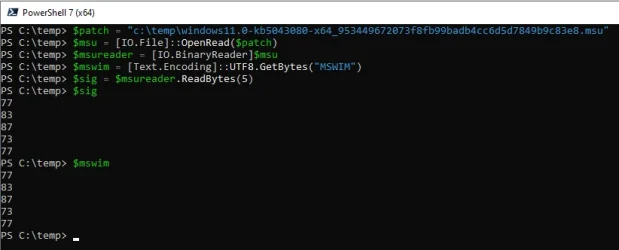
.. and running the code by hand on the February 2026 update you can see that UTF8 encoding matches that of WIM:

1771719154234.webp
 

My Computer My Computer

At a glance

Windows 11
OS
Windows 11
@hsehestedt this command line from your script is not extracting the SSU*.cab file out of the .msu:

View attachment 164003

Have you tested this?

Thanks for the heads up on this. If it is broken in this script, then it is likely also broken in my program. I may not have the opportunity to look at this in detail until tomorrow, but I will do so and will respond back.

Thanks again for taking the time to let me know!
 

My Computers My Computers

  • At a glance

    Win11 Pro 25H2 (RTM+)Intel i7-14650HX32 GBNo GPU - Built-in Intel Graphics
    OS
    Win11 Pro 25H2 (RTM+)
    Computer type
    PC/Desktop
    Manufacturer/Model
    Acemagic
    CPU
    Intel i7-14650HX
    Memory
    32 GB
    Graphics Card(s)
    No GPU - Built-in Intel Graphics
    Sound Card
    Integrated
    Monitor(s) Displays
    Varies as machine will often be moved to locations with different monitors
    Screen Resolution
    Varies
    Hard Drives
    1 x 1TB Gen 4 NVMe SSD
    PSU
    120W Power Brick
    Keyboard
    Corsair K70 Max RGB Magnetic Keyboard
    Mouse
    Logitech MX Master 3
    Internet Speed
    1Gb Up / 1 Gb Down
    Browser
    Edge
    Antivirus
    Windows Defender
  • At a glance

    Win11 Pro 25H2 (RTM+)Intel i7-1255U16 GBIntel Iris Xe Graphics
    Operating System
    Win11 Pro 25H2 (RTM+)
    Computer type
    Laptop
    Manufacturer/Model
    Lenovo ThinkBook 13x Gen 2
    CPU
    Intel i7-1255U
    Memory
    16 GB
    Graphics card(s)
    Intel Iris Xe Graphics
    Sound Card
    Realtek® ALC3306-CG codec
    Monitor(s) Displays
    13.3-inch IPS Display
    Screen Resolution
    WQXGA (2560 x 1600)
    Hard Drives
    2 TB 4 x 4 NVMe SSD
    PSU
    USB-C / Thunderbolt 4 Power / Charging
    Keyboard
    Backlit, spill resistant keyboard
    Mouse
    Buttonless Glass Precision Touchpad
    Internet Speed
    1Gb Up / 1Gb Down
    Browser
    Edge
    Antivirus
    Windows Defender
    Other Info
    WiFi 6e / Bluetooth 5.1 / Facial Recognition / Fingerprint Sensor / ToF (Time of Flight) Human Presence Sensor
@johnblue, thanks for reporting the problem with my batch file. I spent several hours trying to find a solution that would not require any third-party tools. Unfortunately, so far everything that I have tried has failed so I had to resort to making use of 7-Zip. I've updated the batch file to make use of 7-Zip to extract the SSU. This will require that 7-Zip is installed on the system, or at the very least, that the 7z.exe command line utility from 7-Zip be available.

To accommodate this change, I have added another user defined variable to specify the location of 7-Zip. Right now, you will find that it is set to the default location of 7-Zip. If you install to a different location, then that variable will need to be updated.

If I find a way to do this without 7-Zip, then I'll certainly post an update.

You can find the updated batch file in post #13 of this thread.

NOTE: My program up on GitHub had the same flaw but I have also fixed that now. That one will not require 7-Zip to be installed because I am simply embedding 7z.exe into the program. I have not yet updated the version posted on GitHub. I have not gone through my battery of testing yet on it but I expect that if all goes well, I will be post9ing the updated version later today (Sunday, Feb 22). The new version will be 25.0.5.285.

Thanks again for reporting this! BTW, out of curiosity how was it that you realized that the SSU was not being updated? Clearly, I need to implement some error checking because this issue has apparently existed silently for a while without me even realizing it.
 

My Computers My Computers

  • At a glance

    Win11 Pro 25H2 (RTM+)Intel i7-14650HX32 GBNo GPU - Built-in Intel Graphics
    OS
    Win11 Pro 25H2 (RTM+)
    Computer type
    PC/Desktop
    Manufacturer/Model
    Acemagic
    CPU
    Intel i7-14650HX
    Memory
    32 GB
    Graphics Card(s)
    No GPU - Built-in Intel Graphics
    Sound Card
    Integrated
    Monitor(s) Displays
    Varies as machine will often be moved to locations with different monitors
    Screen Resolution
    Varies
    Hard Drives
    1 x 1TB Gen 4 NVMe SSD
    PSU
    120W Power Brick
    Keyboard
    Corsair K70 Max RGB Magnetic Keyboard
    Mouse
    Logitech MX Master 3
    Internet Speed
    1Gb Up / 1 Gb Down
    Browser
    Edge
    Antivirus
    Windows Defender
  • At a glance

    Win11 Pro 25H2 (RTM+)Intel i7-1255U16 GBIntel Iris Xe Graphics
    Operating System
    Win11 Pro 25H2 (RTM+)
    Computer type
    Laptop
    Manufacturer/Model
    Lenovo ThinkBook 13x Gen 2
    CPU
    Intel i7-1255U
    Memory
    16 GB
    Graphics card(s)
    Intel Iris Xe Graphics
    Sound Card
    Realtek® ALC3306-CG codec
    Monitor(s) Displays
    13.3-inch IPS Display
    Screen Resolution
    WQXGA (2560 x 1600)
    Hard Drives
    2 TB 4 x 4 NVMe SSD
    PSU
    USB-C / Thunderbolt 4 Power / Charging
    Keyboard
    Backlit, spill resistant keyboard
    Mouse
    Buttonless Glass Precision Touchpad
    Internet Speed
    1Gb Up / 1Gb Down
    Browser
    Edge
    Antivirus
    Windows Defender
    Other Info
    WiFi 6e / Bluetooth 5.1 / Facial Recognition / Fingerprint Sensor / ToF (Time of Flight) Human Presence Sensor
Thanks again for reporting this! BTW, out of curiosity how was it that you realized that the SSU was not being updated?
So. :-) The way my brain is wired to learn is to actually do things instead of simply kicking off a script. I found it by manually issuing each command of the script in sequence and then checking the result.

That said, I recommend that you keep using DISM in your script instead of trying to bolt 7zip onto the process to copy out the needed .cab file.

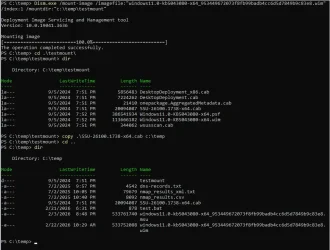
Rename the .msu file extension to .wim, mount the image and then copy out the SSU .cab:

1771778257561.webp

Should be only a minor change to include the extra step.
 

My Computer My Computer

At a glance

Windows 11
OS
Windows 11
I was thinking along those lines but had not tried it yet. I wanted to get a fairly quick fix out before going that route because I had limited time and that option is going to need a lot more testing by me and time I just won't have for a couple of days. It's good to know that this is an option.
 

My Computers My Computers

  • At a glance

    Win11 Pro 25H2 (RTM+)Intel i7-14650HX32 GBNo GPU - Built-in Intel Graphics
    OS
    Win11 Pro 25H2 (RTM+)
    Computer type
    PC/Desktop
    Manufacturer/Model
    Acemagic
    CPU
    Intel i7-14650HX
    Memory
    32 GB
    Graphics Card(s)
    No GPU - Built-in Intel Graphics
    Sound Card
    Integrated
    Monitor(s) Displays
    Varies as machine will often be moved to locations with different monitors
    Screen Resolution
    Varies
    Hard Drives
    1 x 1TB Gen 4 NVMe SSD
    PSU
    120W Power Brick
    Keyboard
    Corsair K70 Max RGB Magnetic Keyboard
    Mouse
    Logitech MX Master 3
    Internet Speed
    1Gb Up / 1 Gb Down
    Browser
    Edge
    Antivirus
    Windows Defender
  • At a glance

    Win11 Pro 25H2 (RTM+)Intel i7-1255U16 GBIntel Iris Xe Graphics
    Operating System
    Win11 Pro 25H2 (RTM+)
    Computer type
    Laptop
    Manufacturer/Model
    Lenovo ThinkBook 13x Gen 2
    CPU
    Intel i7-1255U
    Memory
    16 GB
    Graphics card(s)
    Intel Iris Xe Graphics
    Sound Card
    Realtek® ALC3306-CG codec
    Monitor(s) Displays
    13.3-inch IPS Display
    Screen Resolution
    WQXGA (2560 x 1600)
    Hard Drives
    2 TB 4 x 4 NVMe SSD
    PSU
    USB-C / Thunderbolt 4 Power / Charging
    Keyboard
    Backlit, spill resistant keyboard
    Mouse
    Buttonless Glass Precision Touchpad
    Internet Speed
    1Gb Up / 1Gb Down
    Browser
    Edge
    Antivirus
    Windows Defender
    Other Info
    WiFi 6e / Bluetooth 5.1 / Facial Recognition / Fingerprint Sensor / ToF (Time of Flight) Human Presence Sensor
EDIT: Resolved. Below I said that I could not mount the cumulative update. I resolved that problem.

I did have enough time to try a quick sanity check. I tried to mount the latest differential update (KB5077241 for build 26200.7921) and even when renamed to .wim DISM is unable to mount it.

BTW, I see that you were mounting KB5043080. I just want to make sure that you are aware that this file is not needed if you are updating any build from 26100.1742 and newer. That KB is already built into those builds. You only need the differential update to update those builds since the checkpoint update is already present.
 
Last edited:

My Computers My Computers

  • At a glance

    Win11 Pro 25H2 (RTM+)Intel i7-14650HX32 GBNo GPU - Built-in Intel Graphics
    OS
    Win11 Pro 25H2 (RTM+)
    Computer type
    PC/Desktop
    Manufacturer/Model
    Acemagic
    CPU
    Intel i7-14650HX
    Memory
    32 GB
    Graphics Card(s)
    No GPU - Built-in Intel Graphics
    Sound Card
    Integrated
    Monitor(s) Displays
    Varies as machine will often be moved to locations with different monitors
    Screen Resolution
    Varies
    Hard Drives
    1 x 1TB Gen 4 NVMe SSD
    PSU
    120W Power Brick
    Keyboard
    Corsair K70 Max RGB Magnetic Keyboard
    Mouse
    Logitech MX Master 3
    Internet Speed
    1Gb Up / 1 Gb Down
    Browser
    Edge
    Antivirus
    Windows Defender
  • At a glance

    Win11 Pro 25H2 (RTM+)Intel i7-1255U16 GBIntel Iris Xe Graphics
    Operating System
    Win11 Pro 25H2 (RTM+)
    Computer type
    Laptop
    Manufacturer/Model
    Lenovo ThinkBook 13x Gen 2
    CPU
    Intel i7-1255U
    Memory
    16 GB
    Graphics card(s)
    Intel Iris Xe Graphics
    Sound Card
    Realtek® ALC3306-CG codec
    Monitor(s) Displays
    13.3-inch IPS Display
    Screen Resolution
    WQXGA (2560 x 1600)
    Hard Drives
    2 TB 4 x 4 NVMe SSD
    PSU
    USB-C / Thunderbolt 4 Power / Charging
    Keyboard
    Backlit, spill resistant keyboard
    Mouse
    Buttonless Glass Precision Touchpad
    Internet Speed
    1Gb Up / 1Gb Down
    Browser
    Edge
    Antivirus
    Windows Defender
    Other Info
    WiFi 6e / Bluetooth 5.1 / Facial Recognition / Fingerprint Sensor / ToF (Time of Flight) Human Presence Sensor
I just want to make sure that you are aware that this file is not needed if you are updating any build from 26100.1742 and newer.
Thanks for the reminder. (y)

As mentioned at the beginning of the thread and in a couple of other places .. I am exclusively working with 26100.1.
 

My Computer My Computer

At a glance

Windows 11
OS
Windows 11
@johnblue, I did at least take the time to do a full assesment here. Your post has had me completely re-evaluate the batch file. I now realize that there is one other major that I need to address:

For now, since only the latest differential update needs to be installed, the batch file will work fine (with the exception of the SSU issue). The problem would be that if both a checkpoint AND differential update need to be installed, I am not handling that correctly. I have never had to do that so I didn't catch that.

It's not going to be a real quick fix. Worse yet is my program because it does WAY more than this batch file so fixing it will be a bit of a job.

But again, thanks so much for reporting this.
 

My Computers My Computers

  • At a glance

    Win11 Pro 25H2 (RTM+)Intel i7-14650HX32 GBNo GPU - Built-in Intel Graphics
    OS
    Win11 Pro 25H2 (RTM+)
    Computer type
    PC/Desktop
    Manufacturer/Model
    Acemagic
    CPU
    Intel i7-14650HX
    Memory
    32 GB
    Graphics Card(s)
    No GPU - Built-in Intel Graphics
    Sound Card
    Integrated
    Monitor(s) Displays
    Varies as machine will often be moved to locations with different monitors
    Screen Resolution
    Varies
    Hard Drives
    1 x 1TB Gen 4 NVMe SSD
    PSU
    120W Power Brick
    Keyboard
    Corsair K70 Max RGB Magnetic Keyboard
    Mouse
    Logitech MX Master 3
    Internet Speed
    1Gb Up / 1 Gb Down
    Browser
    Edge
    Antivirus
    Windows Defender
  • At a glance

    Win11 Pro 25H2 (RTM+)Intel i7-1255U16 GBIntel Iris Xe Graphics
    Operating System
    Win11 Pro 25H2 (RTM+)
    Computer type
    Laptop
    Manufacturer/Model
    Lenovo ThinkBook 13x Gen 2
    CPU
    Intel i7-1255U
    Memory
    16 GB
    Graphics card(s)
    Intel Iris Xe Graphics
    Sound Card
    Realtek® ALC3306-CG codec
    Monitor(s) Displays
    13.3-inch IPS Display
    Screen Resolution
    WQXGA (2560 x 1600)
    Hard Drives
    2 TB 4 x 4 NVMe SSD
    PSU
    USB-C / Thunderbolt 4 Power / Charging
    Keyboard
    Backlit, spill resistant keyboard
    Mouse
    Buttonless Glass Precision Touchpad
    Internet Speed
    1Gb Up / 1Gb Down
    Browser
    Edge
    Antivirus
    Windows Defender
    Other Info
    WiFi 6e / Bluetooth 5.1 / Facial Recognition / Fingerprint Sensor / ToF (Time of Flight) Human Presence Sensor

Latest Support Threads

Back
Top Bottom