Solved Sanity check for manual offline update to fresh 26100.1 install


Reminder: if any Language Packs or Feature on Demand updates are added to a 24H2/25H2 image, both the Checkpoint and LCU must be applied (or re-applied) afterwards. Regardless of the starting build number.
 

My Computer My Computer

At a glance

Windows 7
OS
Windows 7
No worries .. team effort. (y) ;-)

Had a chance do a cursory look at both my program and this batch file and discovered a few interesting things:

First, the ability of DISM to open one of these .msu files renamed to .wim seems to be something that cannot be relied upon to work consistently. Apparently, 7-Zip is considered to be the most reliable solution for the moment. So, for the time being I am going to stick with using 7-Zip. However, I do know that I need to fix the logic so that the batch file can apply both the Checkpoint and Differential updates.

For my program, going with 7-Zip is an easier choice. I have the ability to embed the 7z.exe file for 7-Zip directly in my executable and extract it on the fly so the user does not need to bother installing 7-Zip at all.

I'm one of those people who hate to use a third party utility when I can accomplish a task nativly with what is right there in Windows. But the flow is just so much cleaner with 7-Zip it simply makes more sense to me. If I do it with DISM then I need to all of this:

rename the .msu file(s) to .wim
mount the .wim(s)
copy the SSU file(s) to another location
unmount the .wim(s)
rename the files back to .msu

With 7-Zip, it is literally only one step: Just extract the SSU directly from the .msu file. That's it.

In thinking about this, I realize that I could also embed the 7z.exe into the batch file and extract it on the fly. The only issue is that this will make for a rather huge file, at least as far as batch files go. But it would allow the batch file to work without a user needing to install 7-Zip on their system.

Any thoughts? Is this solution acceptable to you or would you still prefer to avoid 7-Zip altogether?
 

My Computers My Computers

  • At a glance

    Win11 Pro 25H2 (RTM+)Intel i7-14650HX32 GBNo GPU - Built-in Intel Graphics
    OS
    Win11 Pro 25H2 (RTM+)
    Computer type
    PC/Desktop
    Manufacturer/Model
    Acemagic
    CPU
    Intel i7-14650HX
    Memory
    32 GB
    Graphics Card(s)
    No GPU - Built-in Intel Graphics
    Sound Card
    Integrated
    Monitor(s) Displays
    Varies as machine will often be moved to locations with different monitors
    Screen Resolution
    Varies
    Hard Drives
    1 x 1TB Gen 4 NVMe SSD
    PSU
    120W Power Brick
    Keyboard
    Corsair K70 Max RGB Magnetic Keyboard
    Mouse
    Logitech MX Master 3
    Internet Speed
    1Gb Up / 1 Gb Down
    Browser
    Edge
    Antivirus
    Windows Defender
  • At a glance

    Win11 Pro 25H2 (RTM+)Intel i7-1255U16 GBIntel Iris Xe Graphics
    Operating System
    Win11 Pro 25H2 (RTM+)
    Computer type
    Laptop
    Manufacturer/Model
    Lenovo ThinkBook 13x Gen 2
    CPU
    Intel i7-1255U
    Memory
    16 GB
    Graphics card(s)
    Intel Iris Xe Graphics
    Sound Card
    Realtek® ALC3306-CG codec
    Monitor(s) Displays
    13.3-inch IPS Display
    Screen Resolution
    WQXGA (2560 x 1600)
    Hard Drives
    2 TB 4 x 4 NVMe SSD
    PSU
    USB-C / Thunderbolt 4 Power / Charging
    Keyboard
    Backlit, spill resistant keyboard
    Mouse
    Buttonless Glass Precision Touchpad
    Internet Speed
    1Gb Up / 1Gb Down
    Browser
    Edge
    Antivirus
    Windows Defender
    Other Info
    WiFi 6e / Bluetooth 5.1 / Facial Recognition / Fingerprint Sensor / ToF (Time of Flight) Human Presence Sensor
Reminder: if any Language Packs or Feature on Demand updates are added to a 24H2/25H2 image, both the Checkpoint and LCU must be applied (or re-applied) afterwards. Regardless of the starting build number.

Thanks for the reminder, Garlin. I was aware of that and in fact my program (but not the batch file) takes that into account and at least checks for pending operations. But that is as far as I take it because I specifically avoid adding any features on demand.

I may look into that one day in the future, but because I have zero interest in adding FOD updates I have simply never bothered to write the code to address that.

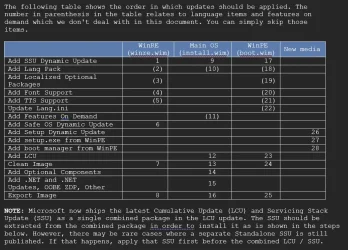
I even have this documented for myself like this:

Image1.webp

But I do thank you for the reminder. Maybe I will need to look into supporting that in the future. It's just hard motivating myself to write code for an operation that I know I will never use personally.
 

My Computers My Computers

  • At a glance

    Win11 Pro 25H2 (RTM+)Intel i7-14650HX32 GBNo GPU - Built-in Intel Graphics
    OS
    Win11 Pro 25H2 (RTM+)
    Computer type
    PC/Desktop
    Manufacturer/Model
    Acemagic
    CPU
    Intel i7-14650HX
    Memory
    32 GB
    Graphics Card(s)
    No GPU - Built-in Intel Graphics
    Sound Card
    Integrated
    Monitor(s) Displays
    Varies as machine will often be moved to locations with different monitors
    Screen Resolution
    Varies
    Hard Drives
    1 x 1TB Gen 4 NVMe SSD
    PSU
    120W Power Brick
    Keyboard
    Corsair K70 Max RGB Magnetic Keyboard
    Mouse
    Logitech MX Master 3
    Internet Speed
    1Gb Up / 1 Gb Down
    Browser
    Edge
    Antivirus
    Windows Defender
  • At a glance

    Win11 Pro 25H2 (RTM+)Intel i7-1255U16 GBIntel Iris Xe Graphics
    Operating System
    Win11 Pro 25H2 (RTM+)
    Computer type
    Laptop
    Manufacturer/Model
    Lenovo ThinkBook 13x Gen 2
    CPU
    Intel i7-1255U
    Memory
    16 GB
    Graphics card(s)
    Intel Iris Xe Graphics
    Sound Card
    Realtek® ALC3306-CG codec
    Monitor(s) Displays
    13.3-inch IPS Display
    Screen Resolution
    WQXGA (2560 x 1600)
    Hard Drives
    2 TB 4 x 4 NVMe SSD
    PSU
    USB-C / Thunderbolt 4 Power / Charging
    Keyboard
    Backlit, spill resistant keyboard
    Mouse
    Buttonless Glass Precision Touchpad
    Internet Speed
    1Gb Up / 1Gb Down
    Browser
    Edge
    Antivirus
    Windows Defender
    Other Info
    WiFi 6e / Bluetooth 5.1 / Facial Recognition / Fingerprint Sensor / ToF (Time of Flight) Human Presence Sensor
@johnblue,

Below is an experiment. You will find the latest version of the batch file below - I have not posted it to the original posting (#13 in this thread if I recall correctly). Please be aware that this version still relies upon 7-Zip but you do not need to have 7-Zip installed on your PC. Instead, the files 7z.exe and 7z.dll are embedded directly within the batch file. When you run the batch file, it will create those files on the fly and when done delete them again.

Feel free to give this a try if you like.

BTW, in case you are wondering why I'm even trying this, there is good reason for it. I'll explain my logic either later tonight or tomorrow. For now, let me just say briefly that I will be maintaining the dependance upon 7-Zip for the foreseeable future. Again, explanation to follow.
 

Attachments

My Computers My Computers

  • At a glance

    Win11 Pro 25H2 (RTM+)Intel i7-14650HX32 GBNo GPU - Built-in Intel Graphics
    OS
    Win11 Pro 25H2 (RTM+)
    Computer type
    PC/Desktop
    Manufacturer/Model
    Acemagic
    CPU
    Intel i7-14650HX
    Memory
    32 GB
    Graphics Card(s)
    No GPU - Built-in Intel Graphics
    Sound Card
    Integrated
    Monitor(s) Displays
    Varies as machine will often be moved to locations with different monitors
    Screen Resolution
    Varies
    Hard Drives
    1 x 1TB Gen 4 NVMe SSD
    PSU
    120W Power Brick
    Keyboard
    Corsair K70 Max RGB Magnetic Keyboard
    Mouse
    Logitech MX Master 3
    Internet Speed
    1Gb Up / 1 Gb Down
    Browser
    Edge
    Antivirus
    Windows Defender
  • At a glance

    Win11 Pro 25H2 (RTM+)Intel i7-1255U16 GBIntel Iris Xe Graphics
    Operating System
    Win11 Pro 25H2 (RTM+)
    Computer type
    Laptop
    Manufacturer/Model
    Lenovo ThinkBook 13x Gen 2
    CPU
    Intel i7-1255U
    Memory
    16 GB
    Graphics card(s)
    Intel Iris Xe Graphics
    Sound Card
    Realtek® ALC3306-CG codec
    Monitor(s) Displays
    13.3-inch IPS Display
    Screen Resolution
    WQXGA (2560 x 1600)
    Hard Drives
    2 TB 4 x 4 NVMe SSD
    PSU
    USB-C / Thunderbolt 4 Power / Charging
    Keyboard
    Backlit, spill resistant keyboard
    Mouse
    Buttonless Glass Precision Touchpad
    Internet Speed
    1Gb Up / 1Gb Down
    Browser
    Edge
    Antivirus
    Windows Defender
    Other Info
    WiFi 6e / Bluetooth 5.1 / Facial Recognition / Fingerprint Sensor / ToF (Time of Flight) Human Presence Sensor
@johnblue,

I've taken some time to think through what changes I should make and what changes I should not make to this batch file.

Let's start by looking at the options that I have available:

Option 1 - A major rewrite of the batch file and program

I could rewrite the code to be able to accommodate the installation of both a checkpoint and differential update using DISM rather than 7-Zip. This may sound easy, but as I look into the details of what is involved, I realize that there are a few challenges. First, when installing an LCU, whether that be a checkpoint or a differential update, other updates should be installed along with it. For example, the safe OS dynamic update, setup dynamic update, and more should be installed along with that update. This means that not only will the installation of the checkpoint or differential update itself have to be completely rearchitected, but pretty much the rest will have to be redesigned around those changes. Those are major changes that introduce some big risks of breaking things so it would require some pretty serious testing and debugging. Still, if the juice is worth the squeeze, I would have no problem doing that.

Option 2 - Literally change nothing

Right now, the way the program stands you could update from a Windows build earlier than a checkpoint by simply running the program as is, supplying the latest checkpoint update and all of the other updates appropriate for that build. Then, simply run it a second time but with the latest differential update and associated updates. Now consider the fact that Microsoft has only ever published a single checkpoint update way back in September of 2024 and NEVER followed up with another one. This means that once you are working with any build of Windows 11 24H2 newer than 26100.1742 or ANY build of 25H2, you only need to update one time since only the differential update needs to be installed. In other words, installing the checkpoint update should be an exceedingly rare event.

Batch file vs WIM Tools program

With the WIM tools program, making these changes becomes a lot more complex. WIM Tools can upgrade not only a single edition of Windows, but as many different editions of Windows as you want all in one shot. For example, if you have a Windows 11 Consumer Editions ISO image for US English, this actually contains 11 different editions of Windows. I can select any combination of editions, a single edition, all editions, I can even combine editions from different ISO editions all in one operation. The end result is that updating WIM tools is going to take a huge effort when compared to the batch file. The reason that this is an issue for me is that I try to keep the core logic between the batch file and WIM Tools program as similar as possible. This means that when I make a change to one, I can adapt it fairly easily to the other. With the changes needed for the batch file, it would require some rather major changes to WIM Tools.

Finally, the use of 7-Zip is far less of an issue with WIM Tools because I can embed this into the program which means that it is 100% invisible to the end user without a need to install 7-Zip on the system. Yes, technically, it is possible to embed an executable into a batch file as well, but that is something that I still need to investigate.

Conclusion

As a result of this analysis, I just don't find the value proposition to be there. For the moment, I think that I am content with the changes I already made (using 7-Zip) and will leave well enough alone.

Yesterday I provided a version of the batch file that has 7z.exe and 7z.dll embedded into so that 7-zip does not need to be installed. Hopefully that will meet your requirements.

 

My Computers My Computers

  • At a glance

    Win11 Pro 25H2 (RTM+)Intel i7-14650HX32 GBNo GPU - Built-in Intel Graphics
    OS
    Win11 Pro 25H2 (RTM+)
    Computer type
    PC/Desktop
    Manufacturer/Model
    Acemagic
    CPU
    Intel i7-14650HX
    Memory
    32 GB
    Graphics Card(s)
    No GPU - Built-in Intel Graphics
    Sound Card
    Integrated
    Monitor(s) Displays
    Varies as machine will often be moved to locations with different monitors
    Screen Resolution
    Varies
    Hard Drives
    1 x 1TB Gen 4 NVMe SSD
    PSU
    120W Power Brick
    Keyboard
    Corsair K70 Max RGB Magnetic Keyboard
    Mouse
    Logitech MX Master 3
    Internet Speed
    1Gb Up / 1 Gb Down
    Browser
    Edge
    Antivirus
    Windows Defender
  • At a glance

    Win11 Pro 25H2 (RTM+)Intel i7-1255U16 GBIntel Iris Xe Graphics
    Operating System
    Win11 Pro 25H2 (RTM+)
    Computer type
    Laptop
    Manufacturer/Model
    Lenovo ThinkBook 13x Gen 2
    CPU
    Intel i7-1255U
    Memory
    16 GB
    Graphics card(s)
    Intel Iris Xe Graphics
    Sound Card
    Realtek® ALC3306-CG codec
    Monitor(s) Displays
    13.3-inch IPS Display
    Screen Resolution
    WQXGA (2560 x 1600)
    Hard Drives
    2 TB 4 x 4 NVMe SSD
    PSU
    USB-C / Thunderbolt 4 Power / Charging
    Keyboard
    Backlit, spill resistant keyboard
    Mouse
    Buttonless Glass Precision Touchpad
    Internet Speed
    1Gb Up / 1Gb Down
    Browser
    Edge
    Antivirus
    Windows Defender
    Other Info
    WiFi 6e / Bluetooth 5.1 / Facial Recognition / Fingerprint Sensor / ToF (Time of Flight) Human Presence Sensor
If you're persistent about starting from a .1 base image (some folks do that), then abbodi1406's W10UI script is your best solution. It's basically the same script as used by UUP dump to integrate pending updates to .1 images.

BatUtil/W10UI at master · abbodi1406/BatUtil
 

My Computer My Computer

At a glance

Windows 7
OS
Windows 7
For the moment, I think that I am content with the changes I already made (using 7-Zip) and will leave well enough alone.
Thank you for the effort expended and, I agree, your code should work for best for you first and foremost. :-)
 

My Computer My Computer

At a glance

Windows 11
OS
Windows 11
@johnblue,

A bit of an update. It was bothering that I wasn't handling the use of both a checkpoint and a differential update in one shot so I went back and checked my notes from around the time where checkpoint updates were introduced. It turns out that the way I have my code written will already properly handle both.

All you need to do is put both the checkpoint and the differential update in the LCU folder and make sure to name them so that the checkpoint update is first alphabetically so that it gets processed first.

Now that my memory has been jogged on this this would make changing the code to mount the files and use DISM to extract the SSU(s) much easier. My one concern is that my research turned up statements that using DISM on these files might not always be reliable, but I also don't know how reliable those statements are!

I'm going to research this and get back to you. Expect this to take a few days. The batch file should work just fine as it is right now using 7-Zip, but I'll see what I can do. My thinking is that I may attempt to use DISM and if I can successfully implement error detection, then I safely try DISM first and if it fails use 7-Zip as a last resort.
 

My Computers My Computers

  • At a glance

    Win11 Pro 25H2 (RTM+)Intel i7-14650HX32 GBNo GPU - Built-in Intel Graphics
    OS
    Win11 Pro 25H2 (RTM+)
    Computer type
    PC/Desktop
    Manufacturer/Model
    Acemagic
    CPU
    Intel i7-14650HX
    Memory
    32 GB
    Graphics Card(s)
    No GPU - Built-in Intel Graphics
    Sound Card
    Integrated
    Monitor(s) Displays
    Varies as machine will often be moved to locations with different monitors
    Screen Resolution
    Varies
    Hard Drives
    1 x 1TB Gen 4 NVMe SSD
    PSU
    120W Power Brick
    Keyboard
    Corsair K70 Max RGB Magnetic Keyboard
    Mouse
    Logitech MX Master 3
    Internet Speed
    1Gb Up / 1 Gb Down
    Browser
    Edge
    Antivirus
    Windows Defender
  • At a glance

    Win11 Pro 25H2 (RTM+)Intel i7-1255U16 GBIntel Iris Xe Graphics
    Operating System
    Win11 Pro 25H2 (RTM+)
    Computer type
    Laptop
    Manufacturer/Model
    Lenovo ThinkBook 13x Gen 2
    CPU
    Intel i7-1255U
    Memory
    16 GB
    Graphics card(s)
    Intel Iris Xe Graphics
    Sound Card
    Realtek® ALC3306-CG codec
    Monitor(s) Displays
    13.3-inch IPS Display
    Screen Resolution
    WQXGA (2560 x 1600)
    Hard Drives
    2 TB 4 x 4 NVMe SSD
    PSU
    USB-C / Thunderbolt 4 Power / Charging
    Keyboard
    Backlit, spill resistant keyboard
    Mouse
    Buttonless Glass Precision Touchpad
    Internet Speed
    1Gb Up / 1Gb Down
    Browser
    Edge
    Antivirus
    Windows Defender
    Other Info
    WiFi 6e / Bluetooth 5.1 / Facial Recognition / Fingerprint Sensor / ToF (Time of Flight) Human Presence Sensor
Serious technical question.

When calling:
Batch:
DISM /image:"c:mounted\image\here" /cleanup-image /StartComponentCleanup
the option ..
Batch:
/ResetBase
is not used.

Is that because it is not needed due to the unmount commit option doing the same thing?
 

My Computer My Computer

At a glance

Windows 11
OS
Windows 11
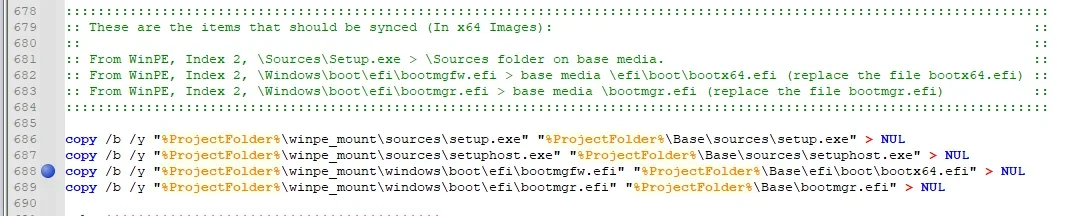
Also .. anyone know the backstory on why the copy and rename of bootmgfw.efi to bootx64.efi in line 688?

1772596718047.webp

Why two different names for the same file is probably a better question to ask.
 

My Computer My Computer

At a glance

Windows 11
OS
Windows 11
UEFI normally boots from bootmgfw.efi, but if that fails then looks for bootx64.efi.

It's the same file, but copied to two different folders and under two different filenames. Technically it could be two different binaries, but Windows always follows this rule in preparing the boot image.
 

My Computer My Computer

At a glance

Windows 7
OS
Windows 7
On why /ResetBase isn't used, I'll probably get the answer wrong and get yelled at...

Back in the older days, DISM /StartComponentCleanup /ResetBase would do a great job of cleaning up superseded components (older versions of a component which were replaced a newer one from a recently installed update). The idea was you could save lots of disk space, if you never planned on rolling back the last update.

Rollback of the last update on a live system is always useful. But rollback on an offline image that you're going to clean install is pointless. If you applied a bad update, then you go find a different (good) update to apply to the image.

But they changed the Windows servicing stack (for various technical reasons), so /ResetBase no longer really "resets the base".

It's not the magic bullet as in older Windows releases where it shrank an updated image by several GB's. There's an unofficial hack (which abbodi's the expert on) which allows the older DISM behavior, but it can break your ability to apply future updates to a live system.

A /unmount /commit writes everything in the mount folder back into a WIM file. There is no cleanup during the commit process. Any cleanup should have been made before the unmount is requested.
 

My Computer My Computer

At a glance

Windows 7
OS
Windows 7
Rollback of the last update on a live system is always useful. But rollback on an offline image that you're going to clean install is pointless. If you applied a bad update, then you go find a different (good) update to apply to the image.

But they changed the Windows servicing stack (for various technical reasons), so /ResetBase no longer really "resets the base".
Suspected but thanks for the comments.
 

My Computer My Computer

At a glance

Windows 11
OS
Windows 11
anyone know the backstory on why the copy and rename of bootmgfw.efi to bootx64.efi in line 688?
I will dig up the original source of that information, but the bottom line comes down to the fact that when you are applying some updates (like Setup Dynamic Updates), you can end up with some instances of certain files being updated while others are not updated. That in turn causes failures during Windows setup. So, after the updates are applied we "sync" certain files to make sure that the updated file versions have been propagated to all the relevant locations.

I know for a fact that I preserved the links to where I got that info, so I'll dig it up tomorrow and send it your way. But I also had a discussion about this directly with a Program Manager at Microsoft. That one I am not 100% sure that I still have the relevant conversation, but if I do, I'll share his comments on the matter with you as well.
 

My Computers My Computers

  • At a glance

    Win11 Pro 25H2 (RTM+)Intel i7-14650HX32 GBNo GPU - Built-in Intel Graphics
    OS
    Win11 Pro 25H2 (RTM+)
    Computer type
    PC/Desktop
    Manufacturer/Model
    Acemagic
    CPU
    Intel i7-14650HX
    Memory
    32 GB
    Graphics Card(s)
    No GPU - Built-in Intel Graphics
    Sound Card
    Integrated
    Monitor(s) Displays
    Varies as machine will often be moved to locations with different monitors
    Screen Resolution
    Varies
    Hard Drives
    1 x 1TB Gen 4 NVMe SSD
    PSU
    120W Power Brick
    Keyboard
    Corsair K70 Max RGB Magnetic Keyboard
    Mouse
    Logitech MX Master 3
    Internet Speed
    1Gb Up / 1 Gb Down
    Browser
    Edge
    Antivirus
    Windows Defender
  • At a glance

    Win11 Pro 25H2 (RTM+)Intel i7-1255U16 GBIntel Iris Xe Graphics
    Operating System
    Win11 Pro 25H2 (RTM+)
    Computer type
    Laptop
    Manufacturer/Model
    Lenovo ThinkBook 13x Gen 2
    CPU
    Intel i7-1255U
    Memory
    16 GB
    Graphics card(s)
    Intel Iris Xe Graphics
    Sound Card
    Realtek® ALC3306-CG codec
    Monitor(s) Displays
    13.3-inch IPS Display
    Screen Resolution
    WQXGA (2560 x 1600)
    Hard Drives
    2 TB 4 x 4 NVMe SSD
    PSU
    USB-C / Thunderbolt 4 Power / Charging
    Keyboard
    Backlit, spill resistant keyboard
    Mouse
    Buttonless Glass Precision Touchpad
    Internet Speed
    1Gb Up / 1Gb Down
    Browser
    Edge
    Antivirus
    Windows Defender
    Other Info
    WiFi 6e / Bluetooth 5.1 / Facial Recognition / Fingerprint Sensor / ToF (Time of Flight) Human Presence Sensor

My Computer My Computer

At a glance

Windows 11
OS
Windows 11

My Computers My Computers

  • At a glance

    Win11 Pro 25H2 (RTM+)Intel i7-14650HX32 GBNo GPU - Built-in Intel Graphics
    OS
    Win11 Pro 25H2 (RTM+)
    Computer type
    PC/Desktop
    Manufacturer/Model
    Acemagic
    CPU
    Intel i7-14650HX
    Memory
    32 GB
    Graphics Card(s)
    No GPU - Built-in Intel Graphics
    Sound Card
    Integrated
    Monitor(s) Displays
    Varies as machine will often be moved to locations with different monitors
    Screen Resolution
    Varies
    Hard Drives
    1 x 1TB Gen 4 NVMe SSD
    PSU
    120W Power Brick
    Keyboard
    Corsair K70 Max RGB Magnetic Keyboard
    Mouse
    Logitech MX Master 3
    Internet Speed
    1Gb Up / 1 Gb Down
    Browser
    Edge
    Antivirus
    Windows Defender
  • At a glance

    Win11 Pro 25H2 (RTM+)Intel i7-1255U16 GBIntel Iris Xe Graphics
    Operating System
    Win11 Pro 25H2 (RTM+)
    Computer type
    Laptop
    Manufacturer/Model
    Lenovo ThinkBook 13x Gen 2
    CPU
    Intel i7-1255U
    Memory
    16 GB
    Graphics card(s)
    Intel Iris Xe Graphics
    Sound Card
    Realtek® ALC3306-CG codec
    Monitor(s) Displays
    13.3-inch IPS Display
    Screen Resolution
    WQXGA (2560 x 1600)
    Hard Drives
    2 TB 4 x 4 NVMe SSD
    PSU
    USB-C / Thunderbolt 4 Power / Charging
    Keyboard
    Backlit, spill resistant keyboard
    Mouse
    Buttonless Glass Precision Touchpad
    Internet Speed
    1Gb Up / 1Gb Down
    Browser
    Edge
    Antivirus
    Windows Defender
    Other Info
    WiFi 6e / Bluetooth 5.1 / Facial Recognition / Fingerprint Sensor / ToF (Time of Flight) Human Presence Sensor
Anyone know what keyword is needed to surface OOBE ZDP updates for 24H2 on the Windows Update Catalog website?

I have never actually seen one released as a standalone update yet. So you can safely skip those.
 

My Computers My Computers

  • At a glance

    Win11 Pro 25H2 (RTM+)Intel i7-14650HX32 GBNo GPU - Built-in Intel Graphics
    OS
    Win11 Pro 25H2 (RTM+)
    Computer type
    PC/Desktop
    Manufacturer/Model
    Acemagic
    CPU
    Intel i7-14650HX
    Memory
    32 GB
    Graphics Card(s)
    No GPU - Built-in Intel Graphics
    Sound Card
    Integrated
    Monitor(s) Displays
    Varies as machine will often be moved to locations with different monitors
    Screen Resolution
    Varies
    Hard Drives
    1 x 1TB Gen 4 NVMe SSD
    PSU
    120W Power Brick
    Keyboard
    Corsair K70 Max RGB Magnetic Keyboard
    Mouse
    Logitech MX Master 3
    Internet Speed
    1Gb Up / 1 Gb Down
    Browser
    Edge
    Antivirus
    Windows Defender
  • At a glance

    Win11 Pro 25H2 (RTM+)Intel i7-1255U16 GBIntel Iris Xe Graphics
    Operating System
    Win11 Pro 25H2 (RTM+)
    Computer type
    Laptop
    Manufacturer/Model
    Lenovo ThinkBook 13x Gen 2
    CPU
    Intel i7-1255U
    Memory
    16 GB
    Graphics card(s)
    Intel Iris Xe Graphics
    Sound Card
    Realtek® ALC3306-CG codec
    Monitor(s) Displays
    13.3-inch IPS Display
    Screen Resolution
    WQXGA (2560 x 1600)
    Hard Drives
    2 TB 4 x 4 NVMe SSD
    PSU
    USB-C / Thunderbolt 4 Power / Charging
    Keyboard
    Backlit, spill resistant keyboard
    Mouse
    Buttonless Glass Precision Touchpad
    Internet Speed
    1Gb Up / 1Gb Down
    Browser
    Edge
    Antivirus
    Windows Defender
    Other Info
    WiFi 6e / Bluetooth 5.1 / Facial Recognition / Fingerprint Sensor / ToF (Time of Flight) Human Presence Sensor
While some folks do collect the OOBE ZDP updates, you don't really need them. They're mostly to fix Autopilot deployment scenarios, which don't affect home users.

If MS wanted you to integrate ZDP fixes into the offline image, they would have made them easily accessible.
 

My Computer My Computer

At a glance

Windows 7
OS
Windows 7
Okay .. feel like this is the last question that I have for this thread. :D

Today. Patch Tuesday.

1773162895230.webp

At this time, since only the LCU and the Safe OS DU are listed, this means that I do not need to fetch the Setup DU from the previous month, correct?
 

My Computer My Computer

At a glance

Windows 11
OS
Windows 11

Latest Support Threads

Back
Top Bottom