@johnblue,
I've taken some time to think through what changes I should make and what changes I should not make to this batch file.
Let's start by looking at the options that I have available:
Option 1 - A major rewrite of the batch file and program
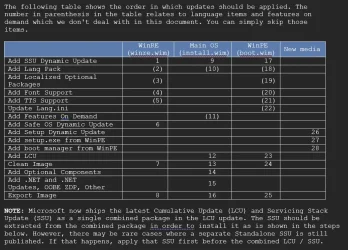
I could rewrite the code to be able to accommodate the installation of both a checkpoint and differential update using DISM rather than 7-Zip. This may sound easy, but as I look into the details of what is involved, I realize that there are a few challenges. First, when installing an LCU, whether that be a checkpoint or a differential update, other updates should be installed along with it. For example, the safe OS dynamic update, setup dynamic update, and more should be installed along with that update. This means that not only will the installation of the checkpoint or differential update itself have to be completely rearchitected, but pretty much the rest will have to be redesigned around those changes. Those are major changes that introduce some big risks of breaking things so it would require some pretty serious testing and debugging. Still, if the juice is worth the squeeze, I would have no problem doing that.
Option 2 - Literally change nothing
Right now, the way the program stands you could update from a Windows build earlier than a checkpoint by simply running the program as is, supplying the latest checkpoint update and all of the other updates appropriate for that build. Then, simply run it a second time but with the latest differential update and associated updates. Now consider the fact that Microsoft has only ever published a single checkpoint update way back in September of 2024 and NEVER followed up with another one. This means that once you are working with any build of Windows 11 24H2 newer than 26100.1742 or ANY build of 25H2, you only need to update one time since only the differential update needs to be installed. In other words, installing the checkpoint update should be an exceedingly rare event.
Batch file vs WIM Tools program
With the WIM tools program, making these changes becomes a lot more complex. WIM Tools can upgrade not only a single edition of Windows, but as many different editions of Windows as you want all in one shot. For example, if you have a Windows 11 Consumer Editions ISO image for US English, this actually contains 11 different editions of Windows. I can select any combination of editions, a single edition, all editions, I can even combine editions from different ISO editions all in one operation. The end result is that updating WIM tools is going to take a huge effort when compared to the batch file. The reason that this is an issue for me is that I try to keep the core logic between the batch file and WIM Tools program as similar as possible. This means that when I make a change to one, I can adapt it fairly easily to the other. With the changes needed for the batch file, it would require some rather major changes to WIM Tools.
Finally, the use of 7-Zip is far less of an issue with WIM Tools because I can embed this into the program which means that it is 100% invisible to the end user without a need to install 7-Zip on the system. Yes, technically, it is possible to embed an executable into a batch file as well, but that is something that I still need to investigate.
Conclusion
As a result of this analysis, I just don't find the value proposition to be there. For the moment, I think that I am content with the changes I already made (using 7-Zip) and will leave well enough alone.
Yesterday I provided a version of the batch file that has 7z.exe and 7z.dll embedded into so that 7-zip does not need to be installed. Hopefully that will meet your requirements.