General Search in Windows 11 File Explorer


Search_Options_banner.png

This tutorial will show you how to use advanced search options and filters while searching for files in Windows 11 File Explorer.

The Search Box in File Explorer allows you to find and view all your files and folders in one place.

As you type in the Search Box, Windows Search will automatically start a simple search through the index by default to match your typed text with folder names, files names, the contents of files, and file properties. It will then display the search results in File Explorer.

You can then use advanced search options and filters to narrow your search results how you want.

Improved Windows Search experiences, powered by AI models that take advantage of the on-board neural processing unit (NPU) on Copilot+ PCs are coming soon to File Explorer, Windows Search, and Settings. With improved Windows Search, people will be able to find the right files using associated words and phrases, without needing to remember exact file names or content. This is currently applicable for local files and active OneDrive files. And, thanks to the power of the 40+ TOPS NPU onboard Copilot+ PCs, it works even if you’re not connected to the internet.

You can search for documents and photos by describing their contents. For example, a document about cars, buses, and airplanes can be found by searching for “modes of transport.” For images, you can search by image content, including any text found in an image. Removing the need for keyword matching in file names or content makes it more intuitive and efficient for everyone to find the files, information, or settings that they need.

Improved Windows Search will be available through the Windows Insider Program in early 2025. There will be no new IT controls; instead, existing controls that govern Windows Search will continue to be honored. These controls include policies that manage which folders and file extensions are searchable or indexable.


Reference:


Here's How:

1 Open File Explorer (Win+E).

2 Navigate to and either select or open the drive or folder location you want to search in. (see screenshot below)

Search_in_File_Explorer-1.png

3 Type what you want to search for in the Search Box at the top right corner of File Explorer. (see screenshot below)

For some advanced search query syntax usage, see:



Search_in_File_Explorer-2.png

4 If wanted, you can change the Sort and Group by views you want for the search results. (see screenshot below)

Search_in_File_Explorer-3.png

5 If wanted, you can change the layout View you want for the search results. (see screenshot below)

Search_in_File_Explorer-4.png

6 You can now select to change and use any of the Search options below:

Search options will only appear on the command bar in File Explorer after you type something into the Search Box.


 Select to search all subfolders or only current folder in search results

A) Click/tap on Search options on the command bar. (see screenshot below)​

B) Click/tap on All subfolders (default) or Current folder to select (dot) which you want searched in.​

Search_in_File_Explorer-5.png


 Select to include "System files", "Zipped (compressed) folders", and/or "File contents" in search results

A) Click/tap on Search options on the command bar. (see screenshot below)​

B) Click/tap on System files (default), Zipped (compressed) folders, and/or File contents to check (include) or uncheck (not include) what you want included in search results.​

Search_in_File_Explorer-6.png


 Select to only include file "Date modified" range in search results

A) Click/tap on Search options on the command bar. (see screenshot below)​

B) Click/tap on Date modified, and click/tap on an available date range to select (dot) which file date modified range you only want included in search results.​

You can also manually clear or modify any added "datemodified" filters in the Search Box if needed.

Search_in_File_Explorer-8.png


Search_in_File_Explorer-7.png


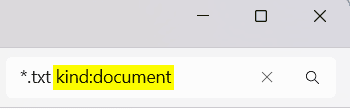
 Select to only include file "Kind" in search results

A) Click/tap on Search options on the command bar. (see screenshot below)​

B) Click/tap on Kind, and click/tap on an available kind of file to select (dot) which which one you only want included in search results.​

You can also manually clear or modify any added "kind" filters in the Search Box if needed.
Search_in_File_Explorer-10.png


Search_in_File_Explorer-9.png


 Select to only include file "size" range in search results

A) Click/tap on Search options on the command bar. (see screenshot below)​

B) Click/tap on Size, and click/tap on an available file size range to select (dot) which size you only want included in search results.​

You can also manually clear or modify any added "size" filters in the Search Box if needed.

Search_in_File_Explorer-12.png


Search_in_File_Explorer-11.png


That's it,
Shawn Brink


Last edited:
Hey.
File explorer is super slow. "Everything" for ..... ever !
 

My Computer My Computer

At a glance

Windows 11 ProIntel 113700H16GBNVIDIA RTX 3050 ti
OS
Windows 11 Pro
Computer type
Laptop
Manufacturer/Model
HP Pavilion 17 cd2205nw
CPU
Intel 113700H
Memory
16GB
Graphics Card(s)
NVIDIA RTX 3050 ti
Screen Resolution
1980x1020
Hard Drives
Micron 512GB
Mouse
Logitech
Internet Speed
100Mbs
Browser
Vivaldi , Edge
Antivirus
Windows defender
How do I search for "starting with" ? XYZZY* does not seem to work !

AND

DO NOT search file contents !
 

My Computer My Computer

At a glance

windows 11AMD 8700G2 - DDR5-6000 8GB Kinston KF560C35-8none
OS
windows 11
Computer type
PC/Desktop
Manufacturer/Model
Self built
CPU
AMD 8700G
Motherboard
ASRock B650I Lightning
Memory
2 - DDR5-6000 8GB Kinston KF560C35-8
Graphics Card(s)
none
Sound Card
none
Monitor(s) Displays
SAMSUNG SyncMaster 220WM
Screen Resolution
1680 x 1050
Hard Drives
Samsung SSD 990 Pro 1TB
PSU
PicoPSU-160-XT
Case
MITXPC MX500-USB3 Compact Mini-ITX Case
Cooling
Noctua NH-L9a-AM5, Chromax.Black, Low-Profile
Browser
Chrome

My Computer My Computer

At a glance

Windows 11 ProIntel 113700H16GBNVIDIA RTX 3050 ti
OS
Windows 11 Pro
Computer type
Laptop
Manufacturer/Model
HP Pavilion 17 cd2205nw
CPU
Intel 113700H
Memory
16GB
Graphics Card(s)
NVIDIA RTX 3050 ti
Screen Resolution
1980x1020
Hard Drives
Micron 512GB
Mouse
Logitech
Internet Speed
100Mbs
Browser
Vivaldi , Edge
Antivirus
Windows defender
Just use wild cards eg. System*.* or System*.sys or System.*
Does not work ! Note, I had no period in the search string and do NOT want one in the resultant list of filenames !
 

My Computer My Computer

At a glance

windows 11AMD 8700G2 - DDR5-6000 8GB Kinston KF560C35-8none
OS
windows 11
Computer type
PC/Desktop
Manufacturer/Model
Self built
CPU
AMD 8700G
Motherboard
ASRock B650I Lightning
Memory
2 - DDR5-6000 8GB Kinston KF560C35-8
Graphics Card(s)
none
Sound Card
none
Monitor(s) Displays
SAMSUNG SyncMaster 220WM
Screen Resolution
1680 x 1050
Hard Drives
Samsung SSD 990 Pro 1TB
PSU
PicoPSU-160-XT
Case
MITXPC MX500-USB3 Compact Mini-ITX Case
Cooling
Noctua NH-L9a-AM5, Chromax.Black, Low-Profile
Browser
Chrome
Does not work ! Note, I had no period in the search string and do NOT want one in the resultant list of filenames !
How you do the search ? With File Explorer or with Everything ?
What string you want to search for ? Ex. contains power in the name ? Is exactly power in the name ? Other ?
 

My Computer My Computer

At a glance

Windows 11 ProIntel 113700H16GBNVIDIA RTX 3050 ti
OS
Windows 11 Pro
Computer type
Laptop
Manufacturer/Model
HP Pavilion 17 cd2205nw
CPU
Intel 113700H
Memory
16GB
Graphics Card(s)
NVIDIA RTX 3050 ti
Screen Resolution
1980x1020
Hard Drives
Micron 512GB
Mouse
Logitech
Internet Speed
100Mbs
Browser
Vivaldi , Edge
Antivirus
Windows defender
Starting here ...

Screenshot 2024-03-23 172723.png

This is the kind of results I get, with or without the asterisk ...

Screenshot 2024-03-23 172750.png
 

My Computer My Computer

At a glance

windows 11AMD 8700G2 - DDR5-6000 8GB Kinston KF560C35-8none
OS
windows 11
Computer type
PC/Desktop
Manufacturer/Model
Self built
CPU
AMD 8700G
Motherboard
ASRock B650I Lightning
Memory
2 - DDR5-6000 8GB Kinston KF560C35-8
Graphics Card(s)
none
Sound Card
none
Monitor(s) Displays
SAMSUNG SyncMaster 220WM
Screen Resolution
1680 x 1050
Hard Drives
Samsung SSD 990 Pro 1TB
PSU
PicoPSU-160-XT
Case
MITXPC MX500-USB3 Compact Mini-ITX Case
Cooling
Noctua NH-L9a-AM5, Chromax.Black, Low-Profile
Browser
Chrome
Starting here ...

View attachment 91262
This is the kind of results I get, with or without the asterisk ...

View attachment 91263

1) File explorer generally isnt the better option for searching.
Even if the user has create a search index with all the disk.
2) Try Everything for faster results.
3) The search string at file explorer must contain a period. Eg : host*.* or host.* or host*.sys or *service*.*.
You can see the use of wild cards and here.
4) Anyway i recommend you to create the search indexer of windows with all your drive (C:\).
Secondary you can set at witch file types , what search you want (with contents or not).
1711229987952.png


Tell want you want to search to tell you the syntax of search string.
 

My Computer My Computer

At a glance

Windows 11 ProIntel 113700H16GBNVIDIA RTX 3050 ti
OS
Windows 11 Pro
Computer type
Laptop
Manufacturer/Model
HP Pavilion 17 cd2205nw
CPU
Intel 113700H
Memory
16GB
Graphics Card(s)
NVIDIA RTX 3050 ti
Screen Resolution
1980x1020
Hard Drives
Micron 512GB
Mouse
Logitech
Internet Speed
100Mbs
Browser
Vivaldi , Edge
Antivirus
Windows defender
@theoldwizard1 If you are searching for your hosts file,, your have to set explorer options to show hidden files and folders before you will find it in c:\Windows\System32\drivers\etc
 

My Computers My Computers

  • At a glance

    Windows 11 Pro 25H2 26200.8875i9-10900 10 core 20 threads32 gbnone-Intel UHD Graphics 630
    OS
    Windows 11 Pro 25H2 26200.8875
    Computer type
    PC/Desktop
    Manufacturer/Model
    Dell Optiplex 7080
    CPU
    i9-10900 10 core 20 threads
    Motherboard
    DELL 0J37VM
    Memory
    32 gb
    Graphics Card(s)
    none-Intel UHD Graphics 630
    Sound Card
    Integrated Realtek
    Monitor(s) Displays
    Benq 27
    Screen Resolution
    2560x1440
    Hard Drives
    2x1tb Solidigm m.2 nvme /External drives 512gb Samsung m.2 sata+2tb Kingston m2.nvme
    PSU
    500w
    Case
    MT
    Cooling
    Dell Premium
    Keyboard
    Logitech wired
    Mouse
    Logitech wireless
    Internet Speed
    so slow I'm too embarrassed to tell
    Browser
    #1 Edge #2 Firefox
    Antivirus
    Defender+MWB Premium
  • At a glance

    Windows 11 Pro 24H2 26200.8875AMD Ryzen 7 6800U32 gbintegrated
    Operating System
    Windows 11 Pro 24H2 26200.8875
    Computer type
    PC/Desktop
    Manufacturer/Model
    Beelink Mini PC SER5
    CPU
    AMD Ryzen 7 6800U
    Memory
    32 gb
    Graphics card(s)
    integrated
    Sound Card
    integrated
    Monitor(s) Displays
    Benq 27
    Screen Resolution
    2560x1440
    Hard Drives
    1TB Crucial nvme
    Keyboard
    Logitech wired
    Mouse
    Logitech wireless
    Internet Speed
    still too embarrassed to tell
    Browser
    Firefox
    Antivirus
    Defender
    Other Info
    System 3 is non compliant Dell 9020 i7-4770/24gb ram Win11 PRO 26200.8875

My Computer My Computer

At a glance

Windows 11 ProIntel 113700H16GBNVIDIA RTX 3050 ti
OS
Windows 11 Pro
Computer type
Laptop
Manufacturer/Model
HP Pavilion 17 cd2205nw
CPU
Intel 113700H
Memory
16GB
Graphics Card(s)
NVIDIA RTX 3050 ti
Screen Resolution
1980x1020
Hard Drives
Micron 512GB
Mouse
Logitech
Internet Speed
100Mbs
Browser
Vivaldi , Edge
Antivirus
Windows defender
3) The search string at file explorer must contain a period. Eg : host*.* or host.* or host*.sys or *service*.*.
Great ! The file "hosts" has no period !!
 

My Computer My Computer

At a glance

windows 11AMD 8700G2 - DDR5-6000 8GB Kinston KF560C35-8none
OS
windows 11
Computer type
PC/Desktop
Manufacturer/Model
Self built
CPU
AMD 8700G
Motherboard
ASRock B650I Lightning
Memory
2 - DDR5-6000 8GB Kinston KF560C35-8
Graphics Card(s)
none
Sound Card
none
Monitor(s) Displays
SAMSUNG SyncMaster 220WM
Screen Resolution
1680 x 1050
Hard Drives
Samsung SSD 990 Pro 1TB
PSU
PicoPSU-160-XT
Case
MITXPC MX500-USB3 Compact Mini-ITX Case
Cooling
Noctua NH-L9a-AM5, Chromax.Black, Low-Profile
Browser
Chrome
So no one knows what syntax to use to tell File Explorer you only want FILES/FOLDERS "starting with
..." ??
 

My Computer My Computer

At a glance

windows 11AMD 8700G2 - DDR5-6000 8GB Kinston KF560C35-8none
OS
windows 11
Computer type
PC/Desktop
Manufacturer/Model
Self built
CPU
AMD 8700G
Motherboard
ASRock B650I Lightning
Memory
2 - DDR5-6000 8GB Kinston KF560C35-8
Graphics Card(s)
none
Sound Card
none
Monitor(s) Displays
SAMSUNG SyncMaster 220WM
Screen Resolution
1680 x 1050
Hard Drives
Samsung SSD 990 Pro 1TB
PSU
PicoPSU-160-XT
Case
MITXPC MX500-USB3 Compact Mini-ITX Case
Cooling
Noctua NH-L9a-AM5, Chromax.Black, Low-Profile
Browser
Chrome
Type System.FileName:~<"host"
 

My Computer My Computer

At a glance

Windows 11 ProIntel 113700H16GBNVIDIA RTX 3050 ti
OS
Windows 11 Pro
Computer type
Laptop
Manufacturer/Model
HP Pavilion 17 cd2205nw
CPU
Intel 113700H
Memory
16GB
Graphics Card(s)
NVIDIA RTX 3050 ti
Screen Resolution
1980x1020
Hard Drives
Micron 512GB
Mouse
Logitech
Internet Speed
100Mbs
Browser
Vivaldi , Edge
Antivirus
Windows defender

My Computer My Computer

At a glance

windows 11AMD 8700G2 - DDR5-6000 8GB Kinston KF560C35-8none
OS
windows 11
Computer type
PC/Desktop
Manufacturer/Model
Self built
CPU
AMD 8700G
Motherboard
ASRock B650I Lightning
Memory
2 - DDR5-6000 8GB Kinston KF560C35-8
Graphics Card(s)
none
Sound Card
none
Monitor(s) Displays
SAMSUNG SyncMaster 220WM
Screen Resolution
1680 x 1050
Hard Drives
Samsung SSD 990 Pro 1TB
PSU
PicoPSU-160-XT
Case
MITXPC MX500-USB3 Compact Mini-ITX Case
Cooling
Noctua NH-L9a-AM5, Chromax.Black, Low-Profile
Browser
Chrome
So no one knows what syntax to use to tell File Explorer you only want FILES/FOLDERS "starting with
..." ??
Also try this file:~"host?" and this
file:~"hos*"
 

My Computer My Computer

At a glance

Windows 11 ProIntel 113700H16GBNVIDIA RTX 3050 ti
OS
Windows 11 Pro
Computer type
Laptop
Manufacturer/Model
HP Pavilion 17 cd2205nw
CPU
Intel 113700H
Memory
16GB
Graphics Card(s)
NVIDIA RTX 3050 ti
Screen Resolution
1980x1020
Hard Drives
Micron 512GB
Mouse
Logitech
Internet Speed
100Mbs
Browser
Vivaldi , Edge
Antivirus
Windows defender

My Computer My Computer

At a glance

Windows 11 ProIntel 113700H16GBNVIDIA RTX 3050 ti
OS
Windows 11 Pro
Computer type
Laptop
Manufacturer/Model
HP Pavilion 17 cd2205nw
CPU
Intel 113700H
Memory
16GB
Graphics Card(s)
NVIDIA RTX 3050 ti
Screen Resolution
1980x1020
Hard Drives
Micron 512GB
Mouse
Logitech
Internet Speed
100Mbs
Browser
Vivaldi , Edge
Antivirus
Windows defender
Also try this file:~"host?" and this
file:~"hos*"
Learned a couple of things today (not bad for a Septuagenarian !)

First, this is "Windows Advanced Query Syntax (AQS)" !
Second, those to queries also worked !

Now, where do I find a "cheat sheet" (preferably in PDF) that shows all of this ?
 

My Computer My Computer

At a glance

windows 11AMD 8700G2 - DDR5-6000 8GB Kinston KF560C35-8none
OS
windows 11
Computer type
PC/Desktop
Manufacturer/Model
Self built
CPU
AMD 8700G
Motherboard
ASRock B650I Lightning
Memory
2 - DDR5-6000 8GB Kinston KF560C35-8
Graphics Card(s)
none
Sound Card
none
Monitor(s) Displays
SAMSUNG SyncMaster 220WM
Screen Resolution
1680 x 1050
Hard Drives
Samsung SSD 990 Pro 1TB
PSU
PicoPSU-160-XT
Case
MITXPC MX500-USB3 Compact Mini-ITX Case
Cooling
Noctua NH-L9a-AM5, Chromax.Black, Low-Profile
Browser
Chrome
Also try this file:~"host?" and this
file:~"hos*"
None of the documentation I have found defines the use of "~" (tilde).

Does it mean "staring with" ?
 

My Computer My Computer

At a glance

windows 11AMD 8700G2 - DDR5-6000 8GB Kinston KF560C35-8none
OS
windows 11
Computer type
PC/Desktop
Manufacturer/Model
Self built
CPU
AMD 8700G
Motherboard
ASRock B650I Lightning
Memory
2 - DDR5-6000 8GB Kinston KF560C35-8
Graphics Card(s)
none
Sound Card
none
Monitor(s) Displays
SAMSUNG SyncMaster 220WM
Screen Resolution
1680 x 1050
Hard Drives
Samsung SSD 990 Pro 1TB
PSU
PicoPSU-160-XT
Case
MITXPC MX500-USB3 Compact Mini-ITX Case
Cooling
Noctua NH-L9a-AM5, Chromax.Black, Low-Profile
Browser
Chrome
None of the documentation I have found defines the use of "~" (tilde).

Does it mean "staring with" ?
Quotation marks allow characters such as -. ~, [, ], (, ) to be interpreted as literals, whereas the initial ':~ ' tells Search to allow wildcards within the quoted string

You can refer to the examples in the following documentation. Personally, it all does my head in and my head only has the capacity to explode 3 times per day:

Advanced Query Syntax

There are a few superusers debating wildcards (tilde ~ etc) in this thread. Note it is for Windows 7 but I believe the wildcard useage is still the same or effective?
However Bug locker obviously knows what the go is.

 
Last edited:

My Computers My Computers

  • At a glance

    Windows 11 Pro 25H2 Build 26200.8894Intel(R) Core(TM) i7-4770K CPU @ 3.50GHz32.0 GB of I forget and the box is in storage.Gigabyte nVidia GeForce GTX 1660 Super OC 6GB
    OS
    Windows 11 Pro 25H2 Build 26200.8894
    Computer type
    PC/Desktop
    Manufacturer/Model
    Sin-built 2013
    CPU
    Intel(R) Core(TM) i7-4770K CPU @ 3.50GHz
    Motherboard
    ASUS ROG Maximus VI Formula
    Memory
    32.0 GB of I forget and the box is in storage.
    Graphics Card(s)
    Gigabyte nVidia GeForce GTX 1660 Super OC 6GB
    Sound Card
    ROG SupremeFX Formula 8-Channel High Definition Audio
    Monitor(s) Displays
    5 x LG 25MS500-B - 1 x 24MK430H-B - 1 x Wacom Pro 22" Touch Screen Tablet
    Screen Resolution
    All over the place
    Hard Drives
    Too many to list. OS on Samsung 1TB 870 QVO SATA
    PSU
    Silverstone 1500
    Case
    NZXT Phantom 820 Full-Tower Case
    Cooling
    Noctua NH-D15 Elite Class Dual Tower CPU Cooler / 6 x EziDIY 120mm / 2 x Corsair 140mm somethings / 1 x 140mm Thermaltake something / 2 x 200mm Corsair.
    Keyboard
    Corsair K95 / Logitech diNovo Edge Wireless
    Mouse
    Logitech: G402 / G502 / Mx Masters / Mx Air Cordless
    Internet Speed
    2000/500Mbps
    Browser
    All sorts
    Antivirus
    Kaspersky Premium
    Other Info
    ㅤㅤㅤㅤㅤㅤㅤㅤㅤㅤㅤㅤㅤㅤㅤㅤㅤㅤㅤㅤㅤㅤㅤㅤㅤㅤㅤㅤㅤㅤㅤㅤㅤㅤㅤㅤㅤㅤㅤㅤ⠀⠀⠀⠀⠀⠀⠀⠀⠀⠀
    TP-Link BE9300 WiFi 7 Bluetooth 5.4 (Archer TBE550E)
    TP-Link TX201 V1 2.5GB Lan

    Grandstream HT812 - VoIP
    ASUS DSL-AX82U - Mesh
    ASUS RT-AC68U - Mesh
    ASUS RT-BE88U Router

    Brother MFC-L2880DW Printer

    I’m on a horse.
  • At a glance

    Windows 11 Pro 25H2 Build 26200.8894 (Wifes)13th Generation Intel® Core™ i5-1340P Process...16GB LPDDR5-52001x Intel® Iris® Xe Graphics
    Operating System
    Windows 11 Pro 25H2 Build 26200.8894 (Wifes)
    Computer type
    Laptop
    Manufacturer/Model
    LENOVO Yoga 7 14IRL8 - Type 82YL
    CPU
    13th Generation Intel® Core™ i5-1340P Processor(Core™ i5-1340P)
    Memory
    16GB LPDDR5-5200
    Graphics card(s)
    1x Intel® Iris® Xe Graphics
    Sound Card
    Optimized with Dolby Atmos®
    Screen Resolution
    QHD 2880 x 1800 OLED
    Hard Drives
    M.2 512 GB SSD PCIe
    Mouse
    Logiteck MX Master 3S
    Internet Speed
    2000/500
    Antivirus
    Defender / Malwarebytes
    Other Info
    …still on a horse.


    Wireless Network: Wi-Fi 6E 2x2 AX; Bluetooth® 5.1 or above
    Ports: 1x 1 Novo button; 2 in 1 Audio Combo jack; Micro SD Card Reader; HDMI 1.4b; 2 x USB Type-C (TBT4)
    USB 3.2 Gen 2 DP 1.4a
    PD 3.0); 1 x USB 3.2 Gen1 Type A
    Camera
    1x 1080P FHD IR/RGB Hybrid with Privacy Shutter and Dual Array Microphone
    Graphics
    1x Intel® Iris® Xe Graphics
    Monitor
    14" WUXGA
    Form Factor
    Convertible Notebook
  • Windows 11 Pro 25H2 Build 26200.8894 (Wifes)

    Yoga 7 2-in-1 14IML9 - Type 83DJ

    Processor: Intel® Core™ Ultra 7 155H Processor(Core™ Ultra 7 155H)

    Memory: 32GB LPD5X-7467

    Hard Drive: 1 TB SSD PCIe

    Wireless Network: 1x Wi-Fi 6E 2x2 AX; Bluetooth® 5.1 or above

    Ports: 1 x HDMI 2.1 TMDS; 1 x Novo Button; 1 x Combo Audio Jack
    2 x USB-C (USB 4.0)
    1 x USB-A 3.2 Gen 1

    Camera: 1080P FHD IR Hybrid with Dual Microphone

    Graphics: Intel® Arc™ Graphics

    Monitor: 14" 2.8K

    ...Where's my horse?

My Computer My Computer

At a glance

Windows 11 ProIntel 113700H16GBNVIDIA RTX 3050 ti
OS
Windows 11 Pro
Computer type
Laptop
Manufacturer/Model
HP Pavilion 17 cd2205nw
CPU
Intel 113700H
Memory
16GB
Graphics Card(s)
NVIDIA RTX 3050 ti
Screen Resolution
1980x1020
Hard Drives
Micron 512GB
Mouse
Logitech
Internet Speed
100Mbs
Browser
Vivaldi , Edge
Antivirus
Windows defender
Back
Top Bottom