Solved Search problem in Edge


jw05

Member
Local time
8:20 PM
Posts
23
OS
Windows 11 Home 24H2 OS build 26100.7623
Home Edition W11.25H2, latest builds 2600.6725 KB5065789 - 2610.6725 KB5065426

Bought an HP SSD W11 desktop some months ago, not used a great deal such is my dislike of W11 continued using W10 desktop. Basically just kept it current with Windows and NIS updates. 14 October now just around the corner.

Come to use W11 today, get the Edge news page, but enter a search either in address bar or search box and I see W11 attachment. Do the “I’m not a robot” thing andW11.webpW11.webp can do a search. Close the window and open a new window and back to Captcha. Is this to do with the AI garbage installed in the 2 named updates?

Any help to remove this irritation would be much appreciated. Is there any way of disabling or preferably removing the AI garbage?

Thanks for any help.
 

My Computer

System One

  • OS
    Windows 11 Home 24H2 OS build 26100.7623
    Computer type
    PC/Desktop
    Manufacturer/Model
    HP
Is this to do with the AI garbage installed in the 2 named updates?
No. It's a Google thing, not Edge or Windows.

One way to avoid it would be to stop using Google.
 

My Computer

System One

  • OS
    Windows 11
    Computer type
    Laptop
Or..., stop using Edge!!! :cool:
 

My Computers

System One System Two

  • OS
    Windows 11 Pro
    Computer type
    PC/Desktop
    Manufacturer/Model
    ASUS ROG Strix
  • Operating System
    Windows 11 Pro
    Computer type
    Laptop
    Manufacturer/Model
    ASUS VivoBook
Any help to remove this irritation would be much appreciated.
Google clearly doesn't like your current public IP address because it's been used for activities that are making Google very suspicious. The fix is to get yourself a different public IP address.

Are you using a VPN connection? If you are then select a different server. If you're not using a VPN, and your ISP uses dynamic IP address allocation, then turn your modem/router off for a couple of hours (or ideally overnight) to guarantee an address change.

You can check your before-and-after IP addresses here. Restart Edge after making any changes then try Google again.
 

My Computer

System One

  • OS
    Windows 11
Logging into Google account might help. Also not cleaning history, which is used to determine, if it is a bot.
 

My Computer

System One

  • OS
    Home26H2Can
    Computer type
    PC/Desktop
    CPU
    AMD Ryzen 5 8600G (07/24)
    Motherboard
    ASROCK B650M-HDV/M.2 (07/24) BIOS 4.21 AGESA ComboAM5 1.3.0.1 (04/26)
    Memory
    2x32GB Kingston FURY DDR5 5600 MHz CL36 @5200 CL36 (07/24)
    Graphics Card(s)
    ASROCK Radeon RX 6600 Challenger D 8G @48FPS (08/24)
    Sound Card
    Creative Sound BlasterX AE-5 Plus (05/24)
    Monitor(s) Displays
    24" Philips 24M1N3200ZS/00 (05/24)
    Screen Resolution
    1920×1080@165Hz via DP1.4
    Hard Drives
    Kingston KC3000 NVMe 2TB (05/24)
    ADATA XPG GAMMIX S11 Pro 512GB (07/19)
    PSU
    Seasonic Core GM 550 Gold (04/24)
    Case
    Fractal Design Define 7 Mini with 3x Noctua NF-P14s/12@555rpm (04/24)
    Cooling
    Noctua NH-U12S with Noctua NF-P12 (04/24)
    Keyboard
    HP Pavilion Wired Keyboard 300 (07/24) + Rabalux 76017 Parker (01/24)
    Mouse
    Logitech M330 Silent Plus (01/26)
    Internet Speed
    500/100 Mbps via RouterOS (05/21) & TCP Optimizer
    Browser
    Edge, Brave for YouTube, LibreWolf for FB
    Antivirus
    NextDNS blocking 1/3 Traffic
    Other Info
    Phone: Motorola Moto G86 (02/26)
    Backup: Hasleo Backup Suite (PreOS)
    Headphones: Sennheiser RS170 (09/10)
    Chair: Huzaro Force 4.4 Grey Mesh (05/24)
    Notifier: Xiaomi Mi Band 9 Milanese (10/24)
    FlexCore USB-C 3.2 Gen 1 (M) to LAN (F) (08/25)
Many thanks for your replies. Norton VPN was turned off. First checked What Is My IP Address? IP Address Tools and More and found IPV4 the same for both W10 and W11 desktops. Next checked browser setting W10 vs W11. W10 default is Edge. W11 shows default as Edge, but showed I.E. compatibility allowed, now Turned Off. New search (Favourites no problem) still shows the www.google.com Captcha, so I’ll try turning router off O/N and report back.
 

My Computer

System One

  • OS
    Windows 11 Home 24H2 OS build 26100.7623
    Computer type
    PC/Desktop
    Manufacturer/Model
    HP
Switched off for 3 hours, then overnight with change of IP address each time, but still got Captcha when searching. Copy&paste url into address bar works. Does switching PC off, then back on after 3hrs and overnight count as restarting Edge or should I have done: edge://restart in new tab?

History is removed when Edge is closed, use WDC after online session.

Thanks again.
 

My Computer

System One

  • OS
    Windows 11 Home 24H2 OS build 26100.7623
    Computer type
    PC/Desktop
    Manufacturer/Model
    HP
I have seen this behavior only when opening Google in Opera Browser for which I have built-in VPN enabled. All my other browsers, including my default MS Edge, don't show that. It might be due to a lot of redirecting when using a VPN. You said you disabled the VPN and fixed. Maybe you can just exclude Google from the VPN, not disable that entirely.

PS: I also have excluded Google from Opera's build-in VPN, so I don't get this warning anymore.
 

My Computers

System One System Two

  • OS
    Windows 11 Pro 23H2 (5699), 25H2 (8457)
    Computer type
    Laptop
    Manufacturer/Model
    Acer Extensa 5630EZ
    CPU
    Mobile DualCore Intel Core 2 Duo T7250, 2000 MHz
    Motherboard
    Acer Extensa 5630
    Memory
    4GB
    Graphics Card(s)
    Mobile Intel(R) GMA 4500M (Mobile 4 series)
    Sound Card
    Realtek ALC268 @ Intel 82801IB ICH9 - High Definition Audio Controller
    Monitor(s) Displays
    1
    Screen Resolution
    1280x800
    Hard Drives
    Samsung SSD 850 EVO 250GB SATA Device (250 GB, SATA-III)
    Internet Speed
    VDSL 50 Mbps
    Browser
    MICROSOFT EDGE
    Antivirus
    WINDOWS DEFENDER
    Other Info
    Legacy MBR installation, no TPM, no Secure Boot, no WDDM 2.0 graphics drivers, no SSE4.2, cannot get more unsupported ;) This is only my test laptop. I had installed Windows 11 here before upgrading my main PC. For my main PC I use everyday see my 2nd system specs.
  • Operating System
    Windows 11 Pro v25H2 (build 26200.8457)
    Computer type
    PC/Desktop
    Manufacturer/Model
    Custom-built PC
    CPU
    Intel Core-i7 3770 3.40GHz s1155 (3rd generation)
    Motherboard
    Asus P8H61 s1155 ATX
    Memory
    2x Kingston Hyper-X Blu 8GB DDR3-1600
    Graphics card(s)
    GIGABYTE GeForce RTX 3050 WINDFORCE OC V2 6GB (GV-N3050WF2OCV2-6GD)
    Sound Card
    Realtek HD audio (ALC887)
    Monitor(s) Displays
    Sony Bravia KDL-19L4000 19" LCD TV via VGA
    Screen Resolution
    1440x900 32-bit 60Hz
    Hard Drives
    WD Blue SA510 2.5 1000GB SSD as system disk, Western Digital Caviar Purple 4TB SATA III (WD40PURZ) as second
    PSU
    Thermaltake Litepower RGB 550W Full Wired
    Case
    SUPERCASE MIDI-TOWER
    Cooling
    Deepcool Gamma Archer CPU cooler, 1x 8cm fan at the back
    Keyboard
    Mitsumi 101-key PS/2
    Mouse
    Sunnyline OptiEye PS/2
    Internet Speed
    100Mbps
    Browser
    Microsoft Edge, Mozilla Firefox
    Antivirus
    Microsoft Windows Defender
    Other Info
    Legacy BIOS (MBR) installation, no TPM, no Secure Boot, WDDM 3.0 graphics drivers, WEI score 7.4
WDC, Wise Disk Cleaner. As far as I can tell got the same set up W10 and W11 for browser and using WDC removing all cookies, W10 works no problem!

In my case it may be “a little knowledge is dangerous”. Could I have turned something on/ off in Privacy and Settings causing the problem? Looking in there, Device Encryption is ON*, but shows “Sign in with MS A/C” to finish encrypting this device? W11 set up for me, as requested, as a Local Account, so should I turn this* off?
 

My Computer

System One

  • OS
    Windows 11 Home 24H2 OS build 26100.7623
    Computer type
    PC/Desktop
    Manufacturer/Model
    HP
Discovered something purely by chance when looking in Edge Privacy & Security. Search engine is Google by default and found Search on Search Box or Address Bar is set to Address Bar. Changed to Search Box (Recommended) and at least I can now do a search, but it is on Bing, not Google which is supposedly the Default! Why?
 

My Computer

System One

  • OS
    Windows 11 Home 24H2 OS build 26100.7623
    Computer type
    PC/Desktop
    Manufacturer/Model
    HP
1) turn your vpn on... does it allow search without captcha?
2) does this happen with another browser... Chrome, Brave, etc?
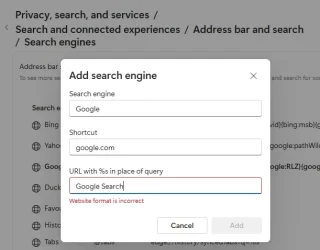
3) Edge > Settings > Privacy, search and services > Search and connected experiences > Address bar search > Search Engines > DELETE Google > Add new:
Engine = Google
Shortcut = google.com
URL = Google Search

try again
1) VPN is on - No
2) Only use one browser, trying to keep life simple
3) Think I have done what you suggested, but cannot proceed
1) turn your vpn on... does it allow search without captcha?
2) does this happen with another browser... Chrome, Brave, etc?
3) Edge > Settings > Privacy, search and services > Search and connected experiences > Address bar search > Search Engines > DELETE Google > Add new:
Engine = Google
Shortcut = google.com
URL = Google Search

try again
 

Attachments

  • Add search engine.webp
    Add search engine.webp
    20.9 KB · Views: 1

My Computer

System One

  • OS
    Windows 11 Home 24H2 OS build 26100.7623
    Computer type
    PC/Desktop
    Manufacturer/Model
    HP
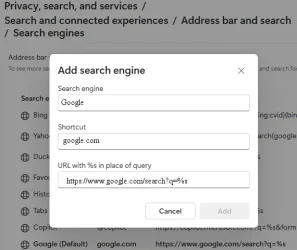
Google Search is www . google . com
(without the spaces).
 

My Computers

System One System Two

  • OS
    Windows 11 Pro 23H2 (5699), 25H2 (8457)
    Computer type
    Laptop
    Manufacturer/Model
    Acer Extensa 5630EZ
    CPU
    Mobile DualCore Intel Core 2 Duo T7250, 2000 MHz
    Motherboard
    Acer Extensa 5630
    Memory
    4GB
    Graphics Card(s)
    Mobile Intel(R) GMA 4500M (Mobile 4 series)
    Sound Card
    Realtek ALC268 @ Intel 82801IB ICH9 - High Definition Audio Controller
    Monitor(s) Displays
    1
    Screen Resolution
    1280x800
    Hard Drives
    Samsung SSD 850 EVO 250GB SATA Device (250 GB, SATA-III)
    Internet Speed
    VDSL 50 Mbps
    Browser
    MICROSOFT EDGE
    Antivirus
    WINDOWS DEFENDER
    Other Info
    Legacy MBR installation, no TPM, no Secure Boot, no WDDM 2.0 graphics drivers, no SSE4.2, cannot get more unsupported ;) This is only my test laptop. I had installed Windows 11 here before upgrading my main PC. For my main PC I use everyday see my 2nd system specs.
  • Operating System
    Windows 11 Pro v25H2 (build 26200.8457)
    Computer type
    PC/Desktop
    Manufacturer/Model
    Custom-built PC
    CPU
    Intel Core-i7 3770 3.40GHz s1155 (3rd generation)
    Motherboard
    Asus P8H61 s1155 ATX
    Memory
    2x Kingston Hyper-X Blu 8GB DDR3-1600
    Graphics card(s)
    GIGABYTE GeForce RTX 3050 WINDFORCE OC V2 6GB (GV-N3050WF2OCV2-6GD)
    Sound Card
    Realtek HD audio (ALC887)
    Monitor(s) Displays
    Sony Bravia KDL-19L4000 19" LCD TV via VGA
    Screen Resolution
    1440x900 32-bit 60Hz
    Hard Drives
    WD Blue SA510 2.5 1000GB SSD as system disk, Western Digital Caviar Purple 4TB SATA III (WD40PURZ) as second
    PSU
    Thermaltake Litepower RGB 550W Full Wired
    Case
    SUPERCASE MIDI-TOWER
    Cooling
    Deepcool Gamma Archer CPU cooler, 1x 8cm fan at the back
    Keyboard
    Mitsumi 101-key PS/2
    Mouse
    Sunnyline OptiEye PS/2
    Internet Speed
    100Mbps
    Browser
    Microsoft Edge, Mozilla Firefox
    Antivirus
    Microsoft Windows Defender
    Other Info
    Legacy BIOS (MBR) installation, no TPM, no Secure Boot, WDDM 3.0 graphics drivers, WEI score 7.4
Thanks spapakons, but I'm afraid I have messed up. Only succeeded in losing the Google option, Bing is set as the default, it works so I'll go with that.
 

My Computer

System One

  • OS
    Windows 11 Home 24H2 OS build 26100.7623
    Computer type
    PC/Desktop
    Manufacturer/Model
    HP
Thanks spapakons, for the prompt. Had another go today and got Google search engine back after deleting. Did a search and got the page with Google.com url. However, close the window and new search, I get the Captcha thing. I have tried all combinations of VPN On and Off combined with selecting address bar or search box. The only thing that seems to work is using Bing!
 

My Computer

System One

  • OS
    Windows 11 Home 24H2 OS build 26100.7623
    Computer type
    PC/Desktop
    Manufacturer/Model
    HP
Thanks spapakons, for the prompt. Had another go today and got Google search engine back after deleting. Did a search and got the page with Google.com url. However, close the window and new search, I get the Captcha thing. I have tried all combinations of VPN On and Off combined with selecting address bar or search box. The only thing that seems to work is using Bing!
Use Bing to search for Google. Click on Google and then search with Google. just kidding of course... :-)
 

My Computers

System One System Two

  • OS
    Windows 11 Pro 23H2 (5699), 25H2 (8457)
    Computer type
    Laptop
    Manufacturer/Model
    Acer Extensa 5630EZ
    CPU
    Mobile DualCore Intel Core 2 Duo T7250, 2000 MHz
    Motherboard
    Acer Extensa 5630
    Memory
    4GB
    Graphics Card(s)
    Mobile Intel(R) GMA 4500M (Mobile 4 series)
    Sound Card
    Realtek ALC268 @ Intel 82801IB ICH9 - High Definition Audio Controller
    Monitor(s) Displays
    1
    Screen Resolution
    1280x800
    Hard Drives
    Samsung SSD 850 EVO 250GB SATA Device (250 GB, SATA-III)
    Internet Speed
    VDSL 50 Mbps
    Browser
    MICROSOFT EDGE
    Antivirus
    WINDOWS DEFENDER
    Other Info
    Legacy MBR installation, no TPM, no Secure Boot, no WDDM 2.0 graphics drivers, no SSE4.2, cannot get more unsupported ;) This is only my test laptop. I had installed Windows 11 here before upgrading my main PC. For my main PC I use everyday see my 2nd system specs.
  • Operating System
    Windows 11 Pro v25H2 (build 26200.8457)
    Computer type
    PC/Desktop
    Manufacturer/Model
    Custom-built PC
    CPU
    Intel Core-i7 3770 3.40GHz s1155 (3rd generation)
    Motherboard
    Asus P8H61 s1155 ATX
    Memory
    2x Kingston Hyper-X Blu 8GB DDR3-1600
    Graphics card(s)
    GIGABYTE GeForce RTX 3050 WINDFORCE OC V2 6GB (GV-N3050WF2OCV2-6GD)
    Sound Card
    Realtek HD audio (ALC887)
    Monitor(s) Displays
    Sony Bravia KDL-19L4000 19" LCD TV via VGA
    Screen Resolution
    1440x900 32-bit 60Hz
    Hard Drives
    WD Blue SA510 2.5 1000GB SSD as system disk, Western Digital Caviar Purple 4TB SATA III (WD40PURZ) as second
    PSU
    Thermaltake Litepower RGB 550W Full Wired
    Case
    SUPERCASE MIDI-TOWER
    Cooling
    Deepcool Gamma Archer CPU cooler, 1x 8cm fan at the back
    Keyboard
    Mitsumi 101-key PS/2
    Mouse
    Sunnyline OptiEye PS/2
    Internet Speed
    100Mbps
    Browser
    Microsoft Edge, Mozilla Firefox
    Antivirus
    Microsoft Windows Defender
    Other Info
    Legacy BIOS (MBR) installation, no TPM, no Secure Boot, WDDM 3.0 graphics drivers, WEI score 7.4
spapakons, it turns out I didn't follow you instructions correctly. When I do what you actually said, it works. The 'Add' did light up, but press that and the 'box' disappears and cannot get a screenshot. Repeated searches are now on Google.
Many thanks
 

Attachments

  • Add search engine in Edge.webp
    Add search engine in Edge.webp
    23.9 KB · Views: 1

My Computer

System One

  • OS
    Windows 11 Home 24H2 OS build 26100.7623
    Computer type
    PC/Desktop
    Manufacturer/Model
    HP

Latest Support Threads

Back
Top Bottom