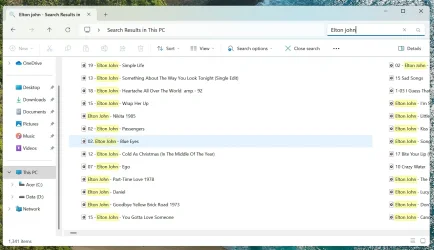
Search results in computer. The list view looks wrong.


BladeSteve67

Member
Local time
10:55 AM
Posts
5
OS
Windows 11
When I search computer for items, the list view doesn't show correctly. Other views are ok (details, tiles etc)
As you can see in the screenshot the results are not in a proper list and spacing is wide.
I could use the details view of course, but I prefer the list view.
I've only noticed this change in the last two days. I'm using Windows 11 25H2.
Thanks for any ideas / help with this.
 

Attachments
  • Untitled.webp
    Untitled.webp
    33.1 KB · Views: 2

My Computer

System One

  • OS
    Windows 11
    Computer type
    PC/Desktop
    Manufacturer/Model
    Acer Aspire TC-1785
If you use WinSetView to set your folder view preferences, it should clear up the problem. If the problem persists, run the script ResetWindowMetrics.cmd which is included in the Tools subfolder of WinSetView.
 

My Computer

System One

  • OS
    Windows 10/11
    Computer type
    Laptop
    Manufacturer/Model
    Acer
If you use WinSetView to set your folder view preferences, it should clear up the problem. If the problem persists, run the script ResetWindowMetrics.cmd which is included in the Tools subfolder of WinSetView.
Thanks for helping, but your suggestions didn't work. I'm wondering if a recent update might have caused this.
It's never happened with any other PC I've had before (this is my fourth)

I could still just use the details view as I said before but I prefer the list view. Unless you or anyone else has any more ideas what to do.
 

My Computer

System One

  • OS
    Windows 11
    Computer type
    PC/Desktop
    Manufacturer/Model
    Acer Aspire TC-1785
Test with another local account so we can be sure it's an issue specific to your user profile and not system wide.
 

My Computer

System One

  • OS
    Windows 10/11
    Computer type
    Laptop
    Manufacturer/Model
    Acer
Test with another local account so we can be sure it's an issue specific to your user profile and not system wide.
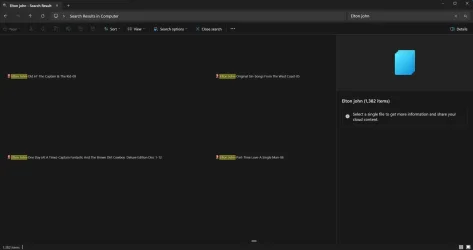
Tried a new 'test' account and the list view is fine (see attached screenshot) so it's my profile then. What now?
 

Attachments

  • elton john search with new test user.webp
    elton john search with new test user.webp
    116.7 KB · Views: 2

My Computer

System One

  • OS
    Windows 11
    Computer type
    PC/Desktop
    Manufacturer/Model
    Acer Aspire TC-1785
Tried a new 'test' account and the list view is fine (see attached screenshot) so it's my profile then. What now?
When it's an Explorer view issue, that's specific to a user account, what I suggested in post #2 usually works.

When you run WinSetView and click Submit do any errors appear in the PowerShell window? And does it successfully set all your preferred default views? If all that looks fine, I wonder if there's an app running for your account, that could affect Explorer views, that's not running for your test user.
 

My Computer

System One

  • OS
    Windows 10/11
    Computer type
    Laptop
    Manufacturer/Model
    Acer
Back
Top Bottom