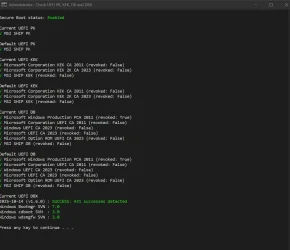
OK... so maybe I know how I have this scenario.If you request the Secure Boot task to perform some of the revoke actions, but not all of them, it will comply. As long as you have a compliant boot manager (matching the highest Windows BootMgr SVN), your system will still boot. But you weren't supposed to bump SVN up before banning the DBX.
It's one of those "you can get away with it, but that's not the intended workflow". Why? Because applying an SVN is a form of revocation. Having a SVN enforces a minimum version on the boot manager.
I updated BIOS to get the 2023 certs as defaults, then ran MOSBY to create a unique PK, get all three DB certs and get rid of Gigabyte's completely unnecessary DB certs. I think it also updated DBX to the latest SVN, but I know I did not let it put the 2011 PCA cert into DBX thus revoking it.
I admit I'm (now) a little nervous about bypassing MS's workflow for the updates, which is the reason I'm waiting for them to revoke the 2011 PCA. I probably didn't think it could matter and assumed it was "normal and expected" at the time!
But, will having this SVN already interfere in any way with Microsoft's methodology for revoking DBX? I could go into BIOS and reset to defaults (it has the 2023 keys as defaults and I can live with the Gigabyte keys for a while) then wait for Microsoft to do its thing before re-running MOSBY to get the configuration I want. Not sure that would matter or help in any way, especially if I don't currently have any problems.
Or might should I go ahead and revoke the 2011 cert. That scares me, mainly because of the unknown-unknown aspect. But if the worst should happen I can always reset defaults to recover from that... and I have my BitLocker key for recovery of that too.
Last edited:
My Computers
-
At a glance
Windows 11 ProRyzen 7 5800XGSkill 3200, 2x8GBMSI RX 6800 XT Gaming Z- OS
- Windows 11 Pro
- Computer type
- PC/Desktop
- Manufacturer/Model
- DIY
- CPU
- Ryzen 7 5800X
- Motherboard
- Gigabyte B550M Aorus Pro
- Memory
- GSkill 3200, 2x8GB
- Graphics Card(s)
- MSI RX 6800 XT Gaming Z
- Sound Card
- on-board Realtek
- Monitor(s) Displays
- MSI 180hz
- Screen Resolution
- 1440p
- Hard Drives
- Samsung 980 Pro, Samsung 870 Evo, generic PCIe NVME, WD 1TB 2.5" laptop spinner
- PSU
- Corsair RM 650
- Case
- mATX
- Cooling
- BeQuiet 240mm AIO and a bunch of case fans
- Keyboard
- one that clacks softly
- Mouse
- logitech
- Internet Speed
- bunches of bps
- Browser
- Firefox
- Antivirus
- Windows' own
-
At a glance
Win11 ProRyzen 7 170016GB DDR4RX 5700 xFlashed to 5700XT- Operating System
- Win11 Pro
- Computer type
- PC/Desktop
- Manufacturer/Model
- DIY
- CPU
- Ryzen 7 1700
- Motherboard
- GA-AB350M G-3
- Memory
- 16GB DDR4
- Graphics card(s)
- RX 5700 xFlashed to 5700XT
- Sound Card
- In-Built Realtek
- Monitor(s) Displays
- Samsung
- Screen Resolution
- 1080p
- Hard Drives
- NVME/SSD's
- PSU
- Thermaltake BX1 550W
- Case
- Some junky thing
- Cooling
- ThermalTake Assassin(?)
- Browser
- FF/Edge
- Antivirus
- Whatever Windows does
- Other Info
- Secure Boot enabled updated to 2023 CA keys, TPM2.0 enabled with system drive Bitlocker'd.