Solved Secure Boot keys need updating. TPM-WMI Event Log Error 1801


thecaretaker

Well-known member
Member
VIP
Local time
7:24 AM
Posts
371
Location
1066 Country
OS
Windows 11 Pro 25H2 26200.7922
I keep getting the following error in event log. I went to the BIOS and reset the keys to the default keys and checked that secure boot was active. But still getting the error.

Code:
Secure Boot CA/keys need to be updated. This device signature information is included here.
DeviceAttributes: BaseBoardManufacturer:Gigabyte Technology Co., Ltd.;FirmwareManufacturer:American Megatrends International, LLC.;FirmwareVersion:F32;OEMModelNumber:Z690 GAMING X;OEMModelBaseBoard:Z690 GAMING X;OEMModelSystemFamily:Z690 MB;OEMManufacturerName:Gigabyte Technology Co., Ltd.;OEMModelSKU:Default string;OSArchitecture:amd64;
BucketId: f198014fa69b82c6c5b12383fc6fa96d41835d5fb4df51d3e8cd673702d92107
BucketConfidenceLevel:
UpdateType: 0
HResult: The operation completed successfully.

I previously updated the keys as per THIS THREAD and doing the check again it still says 'true'.

Any ideas what I need to do?

Screenshot 2025-10-19 002704.webp
 
Windows Build/Version
26200.6899

My Computer

System One

  • OS
    Windows 11 Pro 25H2 26200.7922
    Computer type
    PC/Desktop
    Manufacturer/Model
    Local shop built (KC Computers Ltd)
    CPU
    Intel Core i9 13900F
    Motherboard
    Gigabyte Z690 Gaming X (rev. 1.0/1.1) - (BIOS: F32 09 18 2025)
    Memory
    2 x Kingston Fury 32gb DDR5 5600 Beast
    Graphics Card(s)
    Gigabyte Eagle (Nvidia) RTX 3060
    Sound Card
    Chord Async USB 44.1kHz - 384kHz 2Qute DAC
    Monitor(s) Displays
    Gigabyte AORUS FO32U2 32” OLED Flat Gaming Monitor, 0.03ms, KVM, 250 cd/m2, FreeSync Premium Pro, HDR True Black 400
    Screen Resolution
    3840 x 2160 (UHD), 240Hz
    Hard Drives
    1 x KINGSTON NVMe M.2 SSDSKC3000D2048G 2TB
    1 x Samsung SSD 870 EVO 250GB
    2 x Crucial CT4000MX500SSD1 4TB
    2 x Crucial CT2000MX500SSD1 2TB
    1 x Crucial CT250MX500SSD1 250.0 GB
    PSU
    Gigabyte 750w
    Case
    Fractal Torrent
    Cooling
    Stock Intel CPU, 2 x Fractal 180mm PWM (front), 3 x Fractal 140mm PWM (bottom)
    Keyboard
    Logitech MX Mechanical Wireless Illuminated Performance Keyboard
    Mouse
    Logitech MX Master 3S Wireless Performance Mouse
    Internet Speed
    900 Mbps/900 Mbps Trooli FTTP
    Browser
    Firefox
    Antivirus
    Eset Nod32
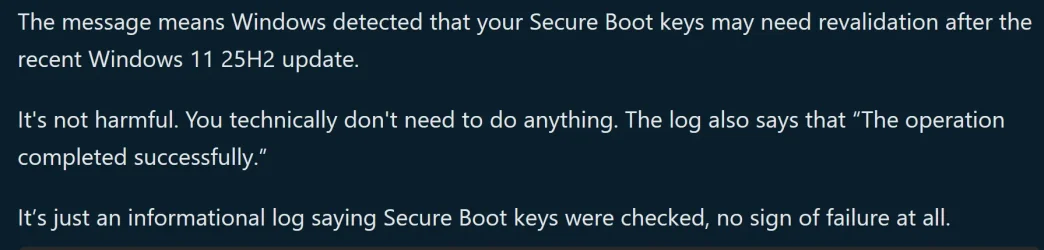
OK, I found an answer on THIS MICROSOFT WEBSITE It looks like a Windows 11 25H2 issue. Guess I don't need to worry about it.

Screenshot 2025-10-19 005228.webp
 

My Computer

System One

  • OS
    Windows 11 Pro 25H2 26200.7922
    Computer type
    PC/Desktop
    Manufacturer/Model
    Local shop built (KC Computers Ltd)
    CPU
    Intel Core i9 13900F
    Motherboard
    Gigabyte Z690 Gaming X (rev. 1.0/1.1) - (BIOS: F32 09 18 2025)
    Memory
    2 x Kingston Fury 32gb DDR5 5600 Beast
    Graphics Card(s)
    Gigabyte Eagle (Nvidia) RTX 3060
    Sound Card
    Chord Async USB 44.1kHz - 384kHz 2Qute DAC
    Monitor(s) Displays
    Gigabyte AORUS FO32U2 32” OLED Flat Gaming Monitor, 0.03ms, KVM, 250 cd/m2, FreeSync Premium Pro, HDR True Black 400
    Screen Resolution
    3840 x 2160 (UHD), 240Hz
    Hard Drives
    1 x KINGSTON NVMe M.2 SSDSKC3000D2048G 2TB
    1 x Samsung SSD 870 EVO 250GB
    2 x Crucial CT4000MX500SSD1 4TB
    2 x Crucial CT2000MX500SSD1 2TB
    1 x Crucial CT250MX500SSD1 250.0 GB
    PSU
    Gigabyte 750w
    Case
    Fractal Torrent
    Cooling
    Stock Intel CPU, 2 x Fractal 180mm PWM (front), 3 x Fractal 140mm PWM (bottom)
    Keyboard
    Logitech MX Mechanical Wireless Illuminated Performance Keyboard
    Mouse
    Logitech MX Master 3S Wireless Performance Mouse
    Internet Speed
    900 Mbps/900 Mbps Trooli FTTP
    Browser
    Firefox
    Antivirus
    Eset Nod32
Just a final update, I re-ran Sheikh's key updater and I don't seem to be getting the 1801 error show up anymore.
 

My Computer

System One

  • OS
    Windows 11 Pro 25H2 26200.7922
    Computer type
    PC/Desktop
    Manufacturer/Model
    Local shop built (KC Computers Ltd)
    CPU
    Intel Core i9 13900F
    Motherboard
    Gigabyte Z690 Gaming X (rev. 1.0/1.1) - (BIOS: F32 09 18 2025)
    Memory
    2 x Kingston Fury 32gb DDR5 5600 Beast
    Graphics Card(s)
    Gigabyte Eagle (Nvidia) RTX 3060
    Sound Card
    Chord Async USB 44.1kHz - 384kHz 2Qute DAC
    Monitor(s) Displays
    Gigabyte AORUS FO32U2 32” OLED Flat Gaming Monitor, 0.03ms, KVM, 250 cd/m2, FreeSync Premium Pro, HDR True Black 400
    Screen Resolution
    3840 x 2160 (UHD), 240Hz
    Hard Drives
    1 x KINGSTON NVMe M.2 SSDSKC3000D2048G 2TB
    1 x Samsung SSD 870 EVO 250GB
    2 x Crucial CT4000MX500SSD1 4TB
    2 x Crucial CT2000MX500SSD1 2TB
    1 x Crucial CT250MX500SSD1 250.0 GB
    PSU
    Gigabyte 750w
    Case
    Fractal Torrent
    Cooling
    Stock Intel CPU, 2 x Fractal 180mm PWM (front), 3 x Fractal 140mm PWM (bottom)
    Keyboard
    Logitech MX Mechanical Wireless Illuminated Performance Keyboard
    Mouse
    Logitech MX Master 3S Wireless Performance Mouse
    Internet Speed
    900 Mbps/900 Mbps Trooli FTTP
    Browser
    Firefox
    Antivirus
    Eset Nod32

My Computer

System One

  • OS
    Windows 11 25H2 Home
    Computer type
    Laptop
    Manufacturer/Model
    HP ENVY Laptop 17m-ch1xxx
    CPU
    11th Generation Intel Core i7
    Memory
    12GB
    Monitor(s) Displays
    17.3” FHD Display
OK, I found an answer on THIS MICROSOFT WEBSITE It looks like a Windows 11 25H2 issue. Guess I don't need to worry about it.

View attachment 149655
This answer is not from a Microsoft employee. It's just someone's interpretation. I have not found an official Microsoft explanation yet. However, the first sentence clearly states, "Secure Boot CA/keys need to be updated." The last sentence that states the operation completed successfully probably refers to the operation that tests the keys to see if they need to be updated.
 

My Computer

System One

  • OS
    Windows 11
    Computer type
    PC/Desktop
funny thing. i saw this in win10.
W10 22H2 and W11 share the same processes for managing the Secure Boot migration, and will see the same logged warnings.

For W10 ESU users, it's clear that next year's mandatory migration will happen for them. For non-ESU users, it's not clear if they're being left behind. But there are still steps that can be done to force the update process without MS's help.
 

My Computer

System One

  • OS
    Windows 7
Back
Top Bottom