Solved Secure boot update HowTo


0x5944 is add 2023 certs and boot manager, but don't revoke any 2011 certs. It may a few minutes to complete all the tasks.

Code:
reg add HKEY_LOCAL_MACHINE\SYSTEM\CurrentControlSet\Control\Secureboot /v AvailableUpdates /t REG_DWORD /d 0x5944
Start-ScheduledTask -TaskName "\Microsoft\Windows\PI\Secure-Boot-Update"
 

My Computer

System One

  • OS
    Windows 7
0x5944 is add 2023 certs and boot manager, but don't revoke any 2011 certs. It may a few minutes to complete all the tasks.

Code:
reg add HKEY_LOCAL_MACHINE\SYSTEM\CurrentControlSet\Control\Secureboot /v AvailableUpdates /t REG_DWORD /d 0x5944
Start-ScheduledTask -TaskName "\Microsoft\Windows\PI\Secure-Boot-Update"
OK, I'm back to where I was 2 weeks ago. I hope I have better luck this time. 😉
 

My Computer

System One

  • OS
    Windows 11 Pro 25H2
    Computer type
    PC/Desktop
    Manufacturer/Model
    Dell XPS 8930
    CPU
    Intel I9-9900K
    Memory
    64GB
    Graphics Card(s)
    NVIDIA RTX 2060
    Sound Card
    NVIDIA High Definition Audio
    Monitor(s) Displays
    4k Samsung
    Screen Resolution
    3840 x 2160
    Hard Drives
    512GB NVMe, ADATA SU 800, 2TB HDD
0x5944 is add 2023 certs and boot manager, but don't revoke any 2011 certs. It may a few minutes to complete all the tasks.

Code:
reg add HKEY_LOCAL_MACHINE\SYSTEM\CurrentControlSet\Control\Secureboot /v AvailableUpdates /t REG_DWORD /d 0x5944
Start-ScheduledTask -TaskName "\Microsoft\Windows\PI\Secure-Boot-Update"
Now this?

1765514768000.webp

1765514715596.webp
 

My Computer

System One

  • OS
    Windows 11 Pro 25H2
    Computer type
    PC/Desktop
    Manufacturer/Model
    Dell XPS 8930
    CPU
    Intel I9-9900K
    Memory
    64GB
    Graphics Card(s)
    NVIDIA RTX 2060
    Sound Card
    NVIDIA High Definition Audio
    Monitor(s) Displays
    4k Samsung
    Screen Resolution
    3840 x 2160
    Hard Drives
    512GB NVMe, ADATA SU 800, 2TB HDD
This command will confirm you still have the Secure-Boot-Update task:
Code:
Get-ScheduledTask | Get-ScheduledTaskInfo | where { $_.TaskName -match 'Secure' }

Code:
LastRunTime        : 12/11/2025 9:03:21 PM
LastTaskResult     : 0
NextRunTime        :
NumberOfMissedRuns : 0
TaskName           : Secure-Boot-Update
TaskPath           : \Microsoft\Windows\PI\
PSComputerName     :
 

My Computer

System One

  • OS
    Windows 7
This command will confirm you still have the Secure-Boot-Update task:
Code:
Get-ScheduledTask | Get-ScheduledTaskInfo | where { $_.TaskName -match 'Secure' }

Code:
LastRunTime        : 12/11/2025 9:03:21 PM
LastTaskResult     : 0
NextRunTime        :
NumberOfMissedRuns : 0
TaskName           : Secure-Boot-Update
TaskPath           : \Microsoft\Windows\PI\
PSComputerName     :
I think it was deleted on some previous step instead of just ending it. 😵‍💫
How can we recreate that task?

1765516246074.webp
 

My Computer

System One

  • OS
    Windows 11 Pro 25H2
    Computer type
    PC/Desktop
    Manufacturer/Model
    Dell XPS 8930
    CPU
    Intel I9-9900K
    Memory
    64GB
    Graphics Card(s)
    NVIDIA RTX 2060
    Sound Card
    NVIDIA High Definition Audio
    Monitor(s) Displays
    4k Samsung
    Screen Resolution
    3840 x 2160
    Hard Drives
    512GB NVMe, ADATA SU 800, 2TB HDD
Try this:
1. Extract the XML file inside this ZIP file.
2. schtasks.exe /Create /XML task.xml /tn Secure-Boot-Update
 

Attachments

My Computer

System One

  • OS
    Windows 7
You don't. Restore from a previous backup, or perform an in-place repair install using a MediaCreationTool ISO of 25H2.
I was afraid of that.
I started a reinstall with repair version from Recovery, I hope that will fix it. 🤞

1765517222999.webp


If I restore from a backup, I would be back with the secure boot issue. 🤬🤷‍♂️
 

My Computer

System One

  • OS
    Windows 11 Pro 25H2
    Computer type
    PC/Desktop
    Manufacturer/Model
    Dell XPS 8930
    CPU
    Intel I9-9900K
    Memory
    64GB
    Graphics Card(s)
    NVIDIA RTX 2060
    Sound Card
    NVIDIA High Definition Audio
    Monitor(s) Displays
    4k Samsung
    Screen Resolution
    3840 x 2160
    Hard Drives
    512GB NVMe, ADATA SU 800, 2TB HDD
@garlin
thank you and well done

@fg2001gf11F
looks like you will have to go to post #1 and start again.

best of luck Steve ..
 

My Computers

System One System Two

  • OS
    Windows 11 Home
    Computer type
    PC/Desktop
    Manufacturer/Model
    HP 24" AiO
    CPU
    Ryzen 7 5825u
    Motherboard
    HP
    Memory
    64GB DDR4 3200
    Graphics Card(s)
    Ryzen 7 5825u
    Sound Card
    RealTek
    Monitor(s) Displays
    24" HP AiO
    Screen Resolution
    1920 x 1080 @60 Hz
    Hard Drives
    1TB WD Blue SN580 M2 SSD Partitioned.
    2x 1TB USB HDD External Backup/Storage.
    PSU
    90W external power brick
    Case
    24" All in One
    Cooling
    Default Air Cooling
    Keyboard
    HP WiFi UK extended
    Mouse
    HP WiFi 3 Button
    Internet Speed
    1GB full fibre
    Browser
    Edge & Firefox
    Antivirus
    AVG Internet Security/Windows Defender
    Other Info
    Mainly Open Source Software
  • Operating System
    Ubuntu 22.04.5 LTS
    Computer type
    Laptop
    Manufacturer/Model
    Dell 13" Latitude 2017
    CPU
    i5 7200u
    Motherboard
    Dell
    Memory
    16GB DDR4
    Graphics card(s)
    Intel
    Sound Card
    Intel
    Monitor(s) Displays
    13" Dell Laptop
    Hard Drives
    250GB Crucial 2.5" SSD
    Mouse
    Generic WiFi 3 button
    Internet Speed
    WiFi only
    Browser
    Firefox
    Antivirus
    ClamAV TK
    Other Info
    Mainly Open Source Software
@garlin
thank you and well done

@fg2001gf11F
looks like you will have to go to post #1 and start again.

best of luck Steve ..
Waiting for the Repair version to complete I hope it fixes the Update task. If that works, I'll be back to your Post #1. 🤞

1765518983165.webp
I sure wasted a lot of time on this. 🤬🤷‍♂️
 
Last edited:

My Computer

System One

  • OS
    Windows 11 Pro 25H2
    Computer type
    PC/Desktop
    Manufacturer/Model
    Dell XPS 8930
    CPU
    Intel I9-9900K
    Memory
    64GB
    Graphics Card(s)
    NVIDIA RTX 2060
    Sound Card
    NVIDIA High Definition Audio
    Monitor(s) Displays
    4k Samsung
    Screen Resolution
    3840 x 2160
    Hard Drives
    512GB NVMe, ADATA SU 800, 2TB HDD
Try this:
1. Extract the XML file inside this ZIP file.
2. schtasks.exe /Create /XML task.xml /tn Secure-Boot-Update
Where do I put the task.xml file if I have to try that command on line 2?
 

My Computer

System One

  • OS
    Windows 11 Pro 25H2
    Computer type
    PC/Desktop
    Manufacturer/Model
    Dell XPS 8930
    CPU
    Intel I9-9900K
    Memory
    64GB
    Graphics Card(s)
    NVIDIA RTX 2060
    Sound Card
    NVIDIA High Definition Audio
    Monitor(s) Displays
    4k Samsung
    Screen Resolution
    3840 x 2160
    Hard Drives
    512GB NVMe, ADATA SU 800, 2TB HDD
This command will confirm you still have the Secure-Boot-Update task:
Code:
Get-ScheduledTask | Get-ScheduledTaskInfo | where { $_.TaskName -match 'Secure' }

Code:
LastRunTime        : 12/11/2025 9:03:21 PM
LastTaskResult     : 0
NextRunTime        :
NumberOfMissedRuns : 0
TaskName           : Secure-Boot-Update
TaskPath           : \Microsoft\Windows\PI\
PSComputerName     :
I have the Task back after reinstalling with the repair version. One step forward. 😉
1765520649920.webp
 
Last edited:

My Computer

System One

  • OS
    Windows 11 Pro 25H2
    Computer type
    PC/Desktop
    Manufacturer/Model
    Dell XPS 8930
    CPU
    Intel I9-9900K
    Memory
    64GB
    Graphics Card(s)
    NVIDIA RTX 2060
    Sound Card
    NVIDIA High Definition Audio
    Monitor(s) Displays
    4k Samsung
    Screen Resolution
    3840 x 2160
    Hard Drives
    512GB NVMe, ADATA SU 800, 2TB HDD
@garlin, @XxXxX,

Looks like I'm back where I was earlier today, just by doing the reinstall with the Repair version. 🤞
I did not do anything else after the repair version completed. 🤷‍♂️

1765522604945.webp


1765522879897.webp

I don't see InProgress on the servicing registry anymore, and it shows 2 on UEFICA2023Capable.
It is not showing Updated either, I think because CA 2023 is not stored in the UEFI KEK Certs in this BIOS 1.1.31 of this DELL XPS 8930. 😵‍💫
1765522755348.webp


1765523337304.webp
 

My Computer

System One

  • OS
    Windows 11 Pro 25H2
    Computer type
    PC/Desktop
    Manufacturer/Model
    Dell XPS 8930
    CPU
    Intel I9-9900K
    Memory
    64GB
    Graphics Card(s)
    NVIDIA RTX 2060
    Sound Card
    NVIDIA High Definition Audio
    Monitor(s) Displays
    4k Samsung
    Screen Resolution
    3840 x 2160
    Hard Drives
    512GB NVMe, ADATA SU 800, 2TB HDD
@garlin, @XxXxX,

Looks like I'm back where I was earlier today, just by doing the reinstall with the Repair version. 🤞
I did not do anything else after the repair version completed. 🤷‍♂️

View attachment 156636


View attachment 156639

I don't see InProgress on the servicing registry anymore, and it shows 2 on UEFICA2023Capable.
It is not showing Updated either, I think because CA 2023 is not stored in the UEFI KEK Certs in this BIOS 1.1.31 of this DELL XPS 8930. 😵‍💫
View attachment 156638


View attachment 156641

now please leave the KEK certs alone please. until MS update them.
well done and best of luck Steve ..
 

My Computers

System One System Two

  • OS
    Windows 11 Home
    Computer type
    PC/Desktop
    Manufacturer/Model
    HP 24" AiO
    CPU
    Ryzen 7 5825u
    Motherboard
    HP
    Memory
    64GB DDR4 3200
    Graphics Card(s)
    Ryzen 7 5825u
    Sound Card
    RealTek
    Monitor(s) Displays
    24" HP AiO
    Screen Resolution
    1920 x 1080 @60 Hz
    Hard Drives
    1TB WD Blue SN580 M2 SSD Partitioned.
    2x 1TB USB HDD External Backup/Storage.
    PSU
    90W external power brick
    Case
    24" All in One
    Cooling
    Default Air Cooling
    Keyboard
    HP WiFi UK extended
    Mouse
    HP WiFi 3 Button
    Internet Speed
    1GB full fibre
    Browser
    Edge & Firefox
    Antivirus
    AVG Internet Security/Windows Defender
    Other Info
    Mainly Open Source Software
  • Operating System
    Ubuntu 22.04.5 LTS
    Computer type
    Laptop
    Manufacturer/Model
    Dell 13" Latitude 2017
    CPU
    i5 7200u
    Motherboard
    Dell
    Memory
    16GB DDR4
    Graphics card(s)
    Intel
    Sound Card
    Intel
    Monitor(s) Displays
    13" Dell Laptop
    Hard Drives
    250GB Crucial 2.5" SSD
    Mouse
    Generic WiFi 3 button
    Internet Speed
    WiFi only
    Browser
    Firefox
    Antivirus
    ClamAV TK
    Other Info
    Mainly Open Source Software
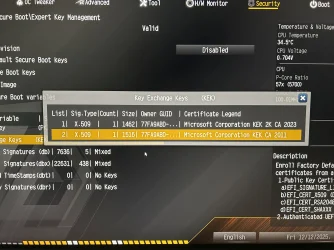
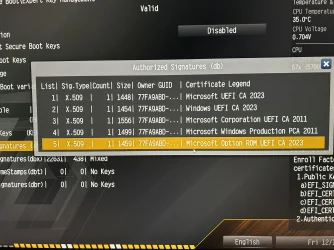
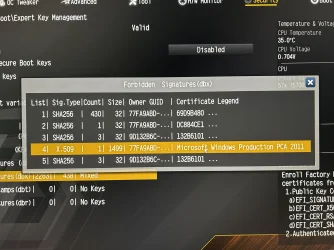
I followed MS instructions for the full revocations including revoke CA 2011 on both boards. The Asrock is the only board to show what’s in the KEK, DB and DBX. Asus not so informative . If you ever do a Bios flashback it will remove the settings as all added keys are gone and you have to set the keys back to factory default.
 

Attachments

  • IMG_0886.webp
    IMG_0886.webp
    1 MB · Views: 3
  • IMG_0887.webp
    IMG_0887.webp
    1.2 MB · Views: 2
  • IMG_0888.webp
    IMG_0888.webp
    1 MB · Views: 2
Last edited:

My Computers

System One System Two

  • OS
    Win 11 Pro 25H2
    Computer type
    PC/Desktop
    Manufacturer/Model
    User Built
    CPU
    Intel Ultra i7 270K Plus
    Motherboard
    Asrock Taichi Z890 OCF
    Memory
    Kingston Fury Renegrade 2x24 8400 M/tu
    Graphics Card(s)
    MSI - GeForce RTX 5070 12 GB GAMING TRIO OC
    Sound Card
    Headphone DAC
    Monitor(s) Displays
    AOC QD OLED 4K 32" + Eizo 32" FlexScan 4K
    Screen Resolution
    3840x2160
    Hard Drives
    1x 9100 Pro 2TB Nvme 1x 990 Pro 2TB 1X 1TB 990 Pro
    PSU
    Be Quiet Pure Power 13 1K Watt ATX 3.1
    Case
    Corsair 5000T Air Flow
    Cooling
    Arctic Freezer 3 360 Pro
    Keyboard
    Cherry G80-3000N
    Mouse
    Corsair
    Internet Speed
    500Mbps
    Browser
    Firefox x64
    Antivirus
    Defender
    Other Info
    Backup software MR ver 10
  • Operating System
    Win 11 Pro 25H2
    Computer type
    PC/Desktop
    Manufacturer/Model
    User Built
    CPU
    Ultra i7 270K Plus
    Motherboard
    Asus Z890 Strix - F
    Memory
    Kingston Fury 2x16 7200 M/tu
    Graphics card(s)
    MSI RTX 4070 Super OC 12 GB
    Sound Card
    Onboard
    Monitor(s) Displays
    KVM switch to AOC 4K 32" QD OLED
    Screen Resolution
    3840x2160
    Hard Drives
    Samsung 990 Pro 4TB+990 Pro 2TB +990 Pro 1TB
    PSU
    Super Flower Ledex 3 ATX 3.1 850 Watts
    Case
    Corsair 500d
    Cooling
    Noctua D15 Cromax
Run this script as Admin, ignore the fact that's named Lenovo.ps1. If you get a named .bin file, then your DELL will be supported.

My Lenovo Y50-70 laptop (for example) returns:
Lenovo/KEKUpdate_Lenovo_PK255.bin

Anytime you get a named file, then your vendor is working with MS to compile a database of eligible KEK's to use for update purposes. The online database might be newer than what the SecureBootUpdates folder has on your PC. I don't know if the scheduled task reads from the repo, or only checks the local Windows folder (which I suspect).
I'm not a wizard at PowerShell, when I right click on it, my option is to " Run with PowerShell " ( not as a Administrator ), it then momentarily opens the PS windows and quickly closes. Sorry if this is a stupid question and the answer is obvious.
 

My Computer

System One

  • OS
    Windows 11

My Computer

System One

  • OS
    Windows 11 Pro 25H2
    Computer type
    PC/Desktop
    Manufacturer/Model
    Dell XPS 8930
    CPU
    Intel I9-9900K
    Memory
    64GB
    Graphics Card(s)
    NVIDIA RTX 2060
    Sound Card
    NVIDIA High Definition Audio
    Monitor(s) Displays
    4k Samsung
    Screen Resolution
    3840 x 2160
    Hard Drives
    512GB NVMe, ADATA SU 800, 2TB HDD
We'll have to wait and see if Dell provides a KEK, otherwise, use Mosby. My Dell won't have a BIOS, and I'm waiting...
 

My Computer

System One

  • OS
    windows 11
I'm not a wizard at PowerShell, when I right click on it, my option is to " Run with PowerShell " ( not as a Administrator ), it then momentarily opens the PS windows and quickly closes. Sorry if this is a stupid question and the answer is obvious.
When you use File Explorer's context menu to run a PS script, it runs the script inside a PS window. But when the script is done, the default behavior is to close the window. This is fine if all the script does is to perform a task without you needing to see it.

But this script outputs something, then it doesn't help you.

So you can just open Terminal or PowerShell, and run the script so you can see the final output.
 

My Computer

System One

  • OS
    Windows 7
Here is what I get from this machine Dell XPS 8930.
That's what I thought. Dell hasn't yet (or never will) post a signed KEK for this generation of BIOS.

As @itsme1 noted, you can use Mosby or manually add the KEK CA 2023.der (certificate file) from the UEFI setup menu. Now I don't have this Dell (since there's so many generations of Dell's out there) to know how difficult it is to navigate the UEFI menus.
 

My Computer

System One

  • OS
    Windows 7
Back
Top Bottom