Solved Secure boot update HowTo


That doesn't make sense. The overall byte length of the PK is really determined by how many characters it takes to encode the Issuer's (cert owner) name. Even the longest shouldn't be larger than roughly 1 KB.

If the byte sizes don't match, it means a different PK was used. Generally an OEM won't replace the PK from the one that was originally provided in the very first BIOS version. They stick to the same PK over the system's lifetime. The one exception will be for any BIOS'es that issued a "DO NOT SHIP" PK by accident. Those would be replaced by a proper issuer's name instead of "DO NOT SHIP".

On updated systems, they probably rewrote parts of the BIOS and by coincidence they switched the PK. But the PK itself does nothing to determine whether adding too many DBX entries will mess up the cert validations.
 

My Computer My Computer

At a glance

Windows 7
OS
Windows 7
On page 35 #697, If you look at @Monika1491 post. There bios picture has a load more Windows OEM Device PK's, that is the only difference I can see, yet not tested..

From what I read its due to a key conflict, why enrolling the efi of the USB works I guess.

​


My Computer My Computer

At a glance

Windows 11 ProIntel i7 9700k OC 5.0ghz32gb Gskill 3200mhz OC 3600mhzNvidia RTX 4070 Super FE
OS
Windows 11 Pro
Computer type
PC/Desktop
Manufacturer/Model
Self built
CPU
Intel i7 9700k OC 5.0ghz
Motherboard
Gigabyte Z390 Master, Rev1.0, F13f GF
Memory
32gb Gskill 3200mhz OC 3600mhz
Graphics Card(s)
Nvidia RTX 4070 Super FE
Sound Card
Onboard ESS Saber
Monitor(s) Displays
QHD LG 27" 165hz, OC 180hz, Asus 27" 144hz
Screen Resolution
2k
Hard Drives
Nvme SSD Samsung 990 Pro 2TB, 970 echo plus 1tb + 970 echo 256gb.
PSU
EVGA SuperNova platinum 800w
Case
NZXT H500 sweat box, modified.
Cooling
NZXT Kraken x63.
Keyboard
Logitech G810
Mouse
Logitech G403
Internet Speed
1.1gb down 110mb up
Go into your script directory and select the script you want to run. Right click, Properties, Unblock, Apply, Ok. This only needs
to be done once..

After unblocking

.\Check_Bootmedia.ps1 -verbose

Notice the DOT and Backslash before the script name?

I always unblock all of them when he gives us a new set of scripts.
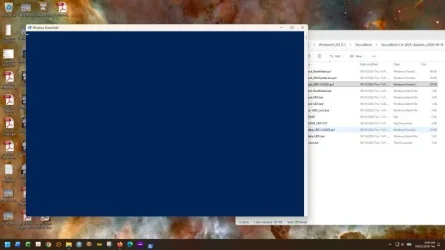
Strange. After unblocking the script, I left click on the script again and then right click on "Run with PowerShell." I get a quick flash of a blank blue window which closes in less than a second. Am I doing something wrong?

Image1.webp
 
Last edited:

My Computers My Computers

  • At a glance

    Windows 11 Pro 25H2i7-8565U16GBIntel UHD Graphics 620
    OS
    Windows 11 Pro 25H2
    Computer type
    Laptop
    Manufacturer/Model
    Lenovo T490 (2020 Hardware)
    CPU
    i7-8565U
    Motherboard
    20N20028US
    Memory
    16GB
    Graphics Card(s)
    Intel UHD Graphics 620
    Sound Card
    Realtec Audio
    Monitor(s) Displays
    ASUS VE248
    Screen Resolution
    1920 X 1080
    Hard Drives
    Samsung SSD 970 PRO 512GB NVMe
    Internet Speed
    Frontier fiber 1GB
    Browser
    Chrome, Firefox, Edge
    Antivirus
    Norton 360 Deluxe Plus
    Other Info
    Supported hardware, upgraded from Windows 10 Pro to Windows 11 Pro version 24H2 on 06/01/2025 using the Windows 11 ISO file. Used the enablement package to upgrade to version 25H2 on 10/07/2025. Secure boot enabled. Secure Boot CA 2023 updated.
  • At a glance

    Windows 11 Pro 25H2i7-4770 (with SSE4.2, and POPCNT)16GBIntel HD Graphics 4600
    Operating System
    Windows 11 Pro 25H2
    Computer type
    PC/Desktop
    Manufacturer/Model
    Lenovo ThinkCentre M83 (2014 Hardware)
    CPU
    i7-4770 (with SSE4.2, and POPCNT)
    Motherboard
    10AL000GUS
    Memory
    16GB
    Graphics card(s)
    Intel HD Graphics 4600
    Sound Card
    Realtec High Definition Audio
    Monitor(s) Displays
    ASUS VE248
    Screen Resolution
    1920 X 1080
    Hard Drives
    Samsung SSD 860 PRO 1TB SATA
    Internet Speed
    Frontier fiber 1GB
    Browser
    Chrome, Firefox, Edge
    Antivirus
    Norton 360 Deluxe Plus
    Other Info
    Unsupported hardware, upgraded from Windows 10 Pro (TPM 1.2 & unsupported CPU, but does have SSE4.2, and POPCNT) to Windows 11 Pro version 24H2 on 06/15/2025. Added Registry Key HKEY_LOCAL_MACHINE\SYSTEM\Setup\MoSetup – AllowUpgradesWithUnsupportedTPMOrCPU=1 to allow installation using the Windows 11 ISO file. Used the enablement package to upgrade to version 25H2 on 10/08/2025. Secure boot enabled. Secure Boot CA 2023 updated.
@nikki605 Use the Check-BootMedia.bat file
 
Last edited:

My Computer My Computer

At a glance

Windows 11 ProIntel i7 9700k OC 5.0ghz32gb Gskill 3200mhz OC 3600mhzNvidia RTX 4070 Super FE
OS
Windows 11 Pro
Computer type
PC/Desktop
Manufacturer/Model
Self built
CPU
Intel i7 9700k OC 5.0ghz
Motherboard
Gigabyte Z390 Master, Rev1.0, F13f GF
Memory
32gb Gskill 3200mhz OC 3600mhz
Graphics Card(s)
Nvidia RTX 4070 Super FE
Sound Card
Onboard ESS Saber
Monitor(s) Displays
QHD LG 27" 165hz, OC 180hz, Asus 27" 144hz
Screen Resolution
2k
Hard Drives
Nvme SSD Samsung 990 Pro 2TB, 970 echo plus 1tb + 970 echo 256gb.
PSU
EVGA SuperNova platinum 800w
Case
NZXT H500 sweat box, modified.
Cooling
NZXT Kraken x63.
Keyboard
Logitech G810
Mouse
Logitech G403
Internet Speed
1.1gb down 110mb up
Strange. After unblocking the script, I left click on the script again and then right click on "Run with PowerShell." I get a quick flash of a blank blue window which closes in less than a second. Am I doing something wrong?

Did you try typing it in as I wrote above?

.\Check_Bootmedia.ps1 -verbose
 

My Computers My Computers

  • At a glance

    Win 11 Pro 26H2 26300.9550Intel® Core™ i7-14700KG.SKILL Ripjaws S5 Series 64GB (2 x 32GB) DDR5ASUS GeForce RTX 4070 Super 12GB
    OS
    Win 11 Pro 26H2 26300.9550
    Computer type
    PC/Desktop
    Manufacturer/Model
    Self Built
    CPU
    Intel® Core™ i7-14700K
    Motherboard
    ASUS TUF Z690-PLUS WIFI (BIOS 4505)
    Memory
    G.SKILL Ripjaws S5 Series 64GB (2 x 32GB) DDR5
    Graphics Card(s)
    ASUS GeForce RTX 4070 Super 12GB
    Sound Card
    Sound Blaster AE-5 Plus
    Monitor(s) Displays
    ASUS TUF Gaming 27" 2K HDR Gaming
    Screen Resolution
    2560 x 1440
    Hard Drives
    Samsung 990 Pro 1TB NVMe (Win 11 25H2)
    SK hynix P41 500GB NVMe
    SK hynix P41 2TB NVMe (x3)
    Crucial P3 Plus 4TB
    PSU
    Corsair RM850x Shift
    Case
    Antec Dark Phantom DP502 FLUX
    Cooling
    Corsair Nautilus 360 RS AIO
    Keyboard
    Logitech MK 320
    Mouse
    Razer Basilisk V3
    Internet Speed
    750Mbs
    Browser
    Firefox
    Antivirus
    Winows Security
    Other Info
    MR 8.1 Home
  • At a glance

    Win 11 Pro 25H2 26300.9550Intel Core i5-1140064 GB DDR4MSI GeForce RTX 3060 Ventus 2X 12GB
    Operating System
    Win 11 Pro 25H2 26300.9550
    Computer type
    PC/Desktop
    Manufacturer/Model
    Self Built
    CPU
    Intel Core i5-11400
    Motherboard
    Asus TUF Gaming Z590 Plus WiFi (BIOS 2803)
    Memory
    64 GB DDR4
    Graphics card(s)
    MSI GeForce RTX 3060 Ventus 2X 12GB
    Sound Card
    SoundBlaster Audigy Fx V2
    Monitor(s) Displays
    Samsung F27T350
    Screen Resolution
    1920x1080
    Hard Drives
    Samsung 980 Pro 1TB
    Samsung 970 EVO Plus 2TB
    Samsung 870 EVO 500GB SSD
    PSU
    Corsair HX750
    Case
    Cougar MX330-G Window
    Cooling
    Thermalright Frozen Edge 240 Black AIO
    Internet Speed
    350Mbps
    Browser
    Firefox
    Antivirus
    Windows Security
  • System Three
    Win 11 Pro 25H2 26300.9550
    ASUS PRIME Z370-P II BIOS 3004 7/12/21
    Intel Core i7-8700 CPU @ 3.20GHz
    32GB DDR4 RAM (4x8)
    Samsung 980 Pro 500 GB
    SK hynix P41 1 TB
    EVGA RTX 2060 (used)
    iGPU Intel UHD Graphics 630 (backup)
    Cooler Master Hyper 212
    Mid-Tower Desktop
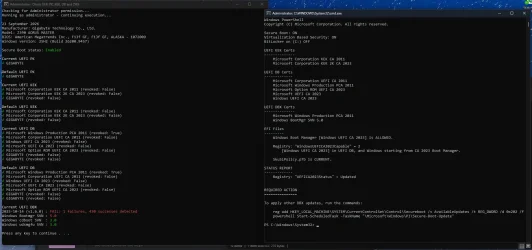
So I have played some more with secure boot, its as soon as I revoke the 2011pca keys. I did it this time so i only revoked that and never updated the other parts of the keys.

1790163580747.webp

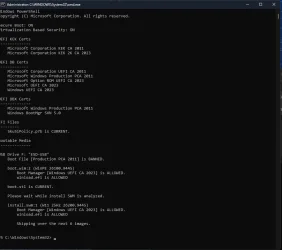
Also no the USB with rufus did not work.
1790164589026.webp

Yet with it fully updated apart from the Install USB / ISO issue, everything system side is working fine.

Enrolling the EFI of the install USB did not work, the only way it seems is by 1 not revoking the 2011 PCA or 2 factory reset of secure boot/ disable to use a install USB/ISO.
 
Last edited:

My Computer My Computer

At a glance

Windows 11 ProIntel i7 9700k OC 5.0ghz32gb Gskill 3200mhz OC 3600mhzNvidia RTX 4070 Super FE
OS
Windows 11 Pro
Computer type
PC/Desktop
Manufacturer/Model
Self built
CPU
Intel i7 9700k OC 5.0ghz
Motherboard
Gigabyte Z390 Master, Rev1.0, F13f GF
Memory
32gb Gskill 3200mhz OC 3600mhz
Graphics Card(s)
Nvidia RTX 4070 Super FE
Sound Card
Onboard ESS Saber
Monitor(s) Displays
QHD LG 27" 165hz, OC 180hz, Asus 27" 144hz
Screen Resolution
2k
Hard Drives
Nvme SSD Samsung 990 Pro 2TB, 970 echo plus 1tb + 970 echo 256gb.
PSU
EVGA SuperNova platinum 800w
Case
NZXT H500 sweat box, modified.
Cooling
NZXT Kraken x63.
Keyboard
Logitech G810
Mouse
Logitech G403
Internet Speed
1.1gb down 110mb up
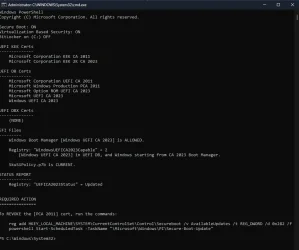
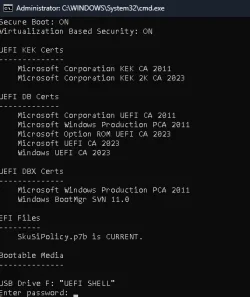
So I just Re-flashed the bios, went in to secure boot set to custom then back to user, rebooted to windows and i have this.
1790166889766.webp

Notice this time I have NO UEFI DBX Certs. when I normally do on custom factory reset I get them certs.

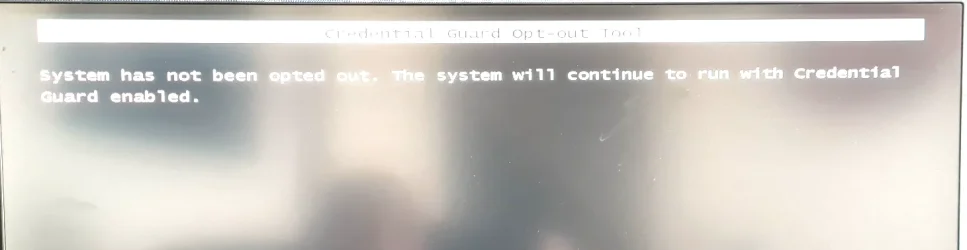
So i run the above Reg key etc then shutdown the pc on restarting i got some pop up.
1790167953004.webp

Were i was taking a picture i tock some time it did give me the option of opting out.

p.s i did run your clear-uefi_lock.bat wanted to see what poped up if related, think it was down to that yet not seen before. as what pops up exits so fast when i run the clear uefi lock.

It did not sort the USB/ISO issue

I will pass all this on to gigabyte, I just need more people to test there gigabyte boards to see if they have the same problem too, if not what series motherboard works, and post back, I've only had one other person try.
 
Last edited:

My Computer My Computer

At a glance

Windows 11 ProIntel i7 9700k OC 5.0ghz32gb Gskill 3200mhz OC 3600mhzNvidia RTX 4070 Super FE
OS
Windows 11 Pro
Computer type
PC/Desktop
Manufacturer/Model
Self built
CPU
Intel i7 9700k OC 5.0ghz
Motherboard
Gigabyte Z390 Master, Rev1.0, F13f GF
Memory
32gb Gskill 3200mhz OC 3600mhz
Graphics Card(s)
Nvidia RTX 4070 Super FE
Sound Card
Onboard ESS Saber
Monitor(s) Displays
QHD LG 27" 165hz, OC 180hz, Asus 27" 144hz
Screen Resolution
2k
Hard Drives
Nvme SSD Samsung 990 Pro 2TB, 970 echo plus 1tb + 970 echo 256gb.
PSU
EVGA SuperNova platinum 800w
Case
NZXT H500 sweat box, modified.
Cooling
NZXT Kraken x63.
Keyboard
Logitech G810
Mouse
Logitech G403
Internet Speed
1.1gb down 110mb up
Also no the USB with rufus did not work.
Your USB drive won't boot because you've banned PCA 2011, and the boot file is still PCA 2011. From Rufus, choose the "Use CA 2023 boot" option from the customization menu.

p.s i did run your clear-uefi_lock.bat wanted to see what poped up if related, think it was down to that yet not seen before. as what pops up exits so fast when i run the clear uefi lock.
Clear-UEFI_Lock.bat is a tool to clear an UEFI-level setting for SkuSiPolicy enforcement. It shouldn't matter in this particular case.
 

My Computer My Computer

At a glance

Windows 7
OS
Windows 7
Hmm that's strange, that was the newly created windows install USB made by the windows media creation tool.

Rufus when I try to get it askes for a password.
1790182060438.webp
 

My Computer My Computer

At a glance

Windows 11 ProIntel i7 9700k OC 5.0ghz32gb Gskill 3200mhz OC 3600mhzNvidia RTX 4070 Super FE
OS
Windows 11 Pro
Computer type
PC/Desktop
Manufacturer/Model
Self built
CPU
Intel i7 9700k OC 5.0ghz
Motherboard
Gigabyte Z390 Master, Rev1.0, F13f GF
Memory
32gb Gskill 3200mhz OC 3600mhz
Graphics Card(s)
Nvidia RTX 4070 Super FE
Sound Card
Onboard ESS Saber
Monitor(s) Displays
QHD LG 27" 165hz, OC 180hz, Asus 27" 144hz
Screen Resolution
2k
Hard Drives
Nvme SSD Samsung 990 Pro 2TB, 970 echo plus 1tb + 970 echo 256gb.
PSU
EVGA SuperNova platinum 800w
Case
NZXT H500 sweat box, modified.
Cooling
NZXT Kraken x63.
Keyboard
Logitech G810
Mouse
Logitech G403
Internet Speed
1.1gb down 110mb up
Hmm that's strange, that was the newly created windows install USB made by the windows media creation tool.

OK. If you're using MCT, then run:
Code:
Update-UEFI.bat -BootMedia

This should replace the CA 2011 boot file with a CA 2023 version. Not sure about the Rufus error, unless 7z.exe can't properly read the boot.wim and thinks it's a password-protected file.
 

My Computer My Computer

At a glance

Windows 7
OS
Windows 7
@garlin

That worked.

So the issue is that the media creation tool is still using PCA 2011 keys, even thought there revoked when doing the MCT setting up.

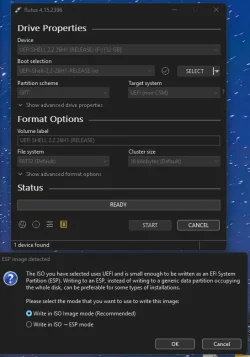
Yet the rufus USB failed, maybe I am setting it up wrong, I am using the latest version of rufus 4.15.
1790184898347.webp

Its like that way its trying to install mosby. another secure-boot tool.
 

My Computer My Computer

At a glance

Windows 11 ProIntel i7 9700k OC 5.0ghz32gb Gskill 3200mhz OC 3600mhzNvidia RTX 4070 Super FE
OS
Windows 11 Pro
Computer type
PC/Desktop
Manufacturer/Model
Self built
CPU
Intel i7 9700k OC 5.0ghz
Motherboard
Gigabyte Z390 Master, Rev1.0, F13f GF
Memory
32gb Gskill 3200mhz OC 3600mhz
Graphics Card(s)
Nvidia RTX 4070 Super FE
Sound Card
Onboard ESS Saber
Monitor(s) Displays
QHD LG 27" 165hz, OC 180hz, Asus 27" 144hz
Screen Resolution
2k
Hard Drives
Nvme SSD Samsung 990 Pro 2TB, 970 echo plus 1tb + 970 echo 256gb.
PSU
EVGA SuperNova platinum 800w
Case
NZXT H500 sweat box, modified.
Cooling
NZXT Kraken x63.
Keyboard
Logitech G810
Mouse
Logitech G403
Internet Speed
1.1gb down 110mb up
MCT has a 50/50 chance of getting it right.
While you cannot specify which boot file to use, check the "Use the recommended options for this PC".
 

My Computer My Computer

At a glance

Windows 7
OS
Windows 7
Yep tried that option, still did the same issue, was one of the first things I tried.
 

My Computer My Computer

At a glance

Windows 11 ProIntel i7 9700k OC 5.0ghz32gb Gskill 3200mhz OC 3600mhzNvidia RTX 4070 Super FE
OS
Windows 11 Pro
Computer type
PC/Desktop
Manufacturer/Model
Self built
CPU
Intel i7 9700k OC 5.0ghz
Motherboard
Gigabyte Z390 Master, Rev1.0, F13f GF
Memory
32gb Gskill 3200mhz OC 3600mhz
Graphics Card(s)
Nvidia RTX 4070 Super FE
Sound Card
Onboard ESS Saber
Monitor(s) Displays
QHD LG 27" 165hz, OC 180hz, Asus 27" 144hz
Screen Resolution
2k
Hard Drives
Nvme SSD Samsung 990 Pro 2TB, 970 echo plus 1tb + 970 echo 256gb.
PSU
EVGA SuperNova platinum 800w
Case
NZXT H500 sweat box, modified.
Cooling
NZXT Kraken x63.
Keyboard
Logitech G810
Mouse
Logitech G403
Internet Speed
1.1gb down 110mb up

Latest Support Threads

Back
Top Bottom