Security alert popup


Mickmac

Member
Local time
10:09 AM
Posts
21
OS
Windows 11
This security alert keeps appearing on my desktop, like about every hour.
How can I stop it ?
It's become very annoying -
Thanks.....

Screenshot 2024-07-02 044222.png
 

My Computer My Computer

At a glance

Windows 1112th Gen Intel(R) Core(TM) i5-12500H 2.50 GHz16.0 GB (15.7 GB usable)
OS
Windows 11
Computer type
Laptop
Manufacturer/Model
ASUS Vivobook
CPU
12th Gen Intel(R) Core(TM) i5-12500H 2.50 GHz
Memory
16.0 GB (15.7 GB usable)
what site are you leaving open or what connection (rdp, etc) is running?.. view the cert to find out the source
 

My Computer My Computer

At a glance

Windows 11 Pro
OS
Windows 11 Pro
Try to reset internet Security Settings to Default Levels.

Open the Control Panel.

Open Internet Options.

Select the Security tab at the top of Internet Options.

Choose Reset all zones to default level, located toward the bottom of the Internet Options window.

  1. Select OK.

You can now reopen Internet browser. Try again to visit the websites that were causing your problems to see if resetting the security settings helped.
 

My Computer My Computer

At a glance

Windows 11AMD Ryzen 7 5700GMicron Technology DDR4-3200 16GBNVIDIA GeForce RTX 3060
OS
Windows 11
Computer type
PC/Desktop
Manufacturer/Model
HP Pavilion
CPU
AMD Ryzen 7 5700G
Motherboard
Erica6
Memory
Micron Technology DDR4-3200 16GB
Graphics Card(s)
NVIDIA GeForce RTX 3060
Sound Card
Realtek ALC671
Monitor(s) Displays
Samsung SyncMaster U28E590
Screen Resolution
3840 x 2160
Hard Drives
SAMSUNG MZVLQ1T0HALB-000H1
what site are you leaving open or what connection (rdp, etc) is running?.. view the cert to find out the source
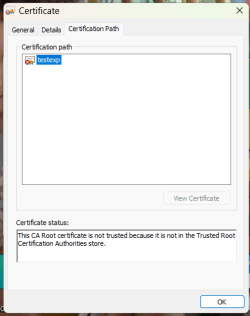
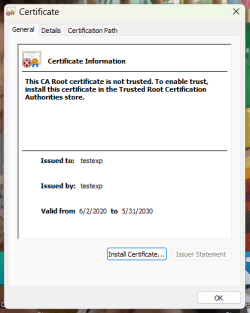
I just opened Google Search and it popped up again.
When I clicked on General and Certification Path tabs this came up, looks suss to me........
 

Attachments

  • Screenshot 2024-07-03 072505.png
    Screenshot 2024-07-03 072505.png
    9.8 KB · Views: 2
  • Screenshot 2024-07-03 072538.png
    Screenshot 2024-07-03 072538.png
    13.6 KB · Views: 2

My Computer My Computer

At a glance

Windows 1112th Gen Intel(R) Core(TM) i5-12500H 2.50 GHz16.0 GB (15.7 GB usable)
OS
Windows 11
Computer type
Laptop
Manufacturer/Model
ASUS Vivobook
CPU
12th Gen Intel(R) Core(TM) i5-12500H 2.50 GHz
Memory
16.0 GB (15.7 GB usable)

Try to reset internet Security Settings to Default Levels.

Open the Control Panel.

Open Internet Options.

Select the Security tab at the top of Internet Options.

Choose Reset all zones to default level, located toward the bottom of the Internet Options window.

  1. Select OK.

You can now reopen Internet browser. Try again to visit the websites that were causing your problems to see if resetting the security settings helped.
Thanks, will do that, but why would that suddenly start happening ?
I have been using Windows for about 20 years now and I don't remember ever seeing it before......
 

My Computer My Computer

At a glance

Windows 1112th Gen Intel(R) Core(TM) i5-12500H 2.50 GHz16.0 GB (15.7 GB usable)

OS
Windows 11
Computer type
Laptop
Manufacturer/Model
ASUS Vivobook
CPU
12th Gen Intel(R) Core(TM) i5-12500H 2.50 GHz
Memory
16.0 GB (15.7 GB usable)

If Google produced that, scan your pc and see if anything shows up:


My Computer My Computer

At a glance

Windows 11 Pro
OS
Windows 11 Pro
Also, go to Internet Options > Content > Certificates and remove that cert. See if it repopulates.
 

My Computer My Computer

At a glance

Windows 11 Pro
OS
Windows 11 Pro
Also, go to Internet Options > Content > Certificates and remove that cert. See if it repopulates.
Ok, did that, so far so good, thanks again.....
 

My Computer My Computer

At a glance

Windows 1112th Gen Intel(R) Core(TM) i5-12500H 2.50 GHz16.0 GB (15.7 GB usable)

OS
Windows 11
Computer type
Laptop
Manufacturer/Model
ASUS Vivobook
CPU
12th Gen Intel(R) Core(TM) i5-12500H 2.50 GHz
Memory
16.0 GB (15.7 GB usable)

Back
Top Bottom