Solved Security Intelligence Updates for Microsoft Defender Antivirus


IanMosley

Windows Insider
Power User
VIP
Local time
6:48 AM
Posts
1,228
Location
UK
OS
Windows 11 Pro 25H2 (Build 26200.8728)
Is it possible to stop receiving these updates? If so, how?
 

My Computer My Computer

At a glance

Windows 11 Pro 25H2 (Build 26200.8728)Intel Core Ultra 9 285 5.6 GHz32.00 GBIntel Integrated Graphics (128 MB)
OS
Windows 11 Pro 25H2 (Build 26200.8728)
Computer type
PC/Desktop
Manufacturer/Model
Dell Pro Max Tower T2 FCT2250
CPU
Intel Core Ultra 9 285 5.6 GHz
Motherboard
64-bit operating system, x64-based processor
Memory
32.00 GB
Graphics Card(s)
Intel Integrated Graphics (128 MB)
Sound Card
Realtek Audio
Monitor(s) Displays
Dell P2714H Monitor
Screen Resolution
1920 x 1080
Hard Drives
1 x 512GB M.2 XG10d SED KIOXIA PCIe solid state drive (Internal)
1 x 2TB Seagate ST2000DM008-2UB102 HDD (Internal)
1 x 1TB Seagate STGX4000400 External HDD
1 x 4TB Seagate STGX4000400 External HDD
1 x 6TB WD Elements AE 2689 External HDD
PSU
500 Watts
Cooling
Air
Keyboard
Microsoft Wired Keyboard 600
Mouse
Microsoft USB Basic Optical Mouse v2.0
Browser
Firefox
Antivirus
Windows Defender + Malwarebytes Premium
Other Info
BaseBoard Manufacturer Dell Inc.
BaseBoard Product 022RY57
BaseBoard Version A01
Installed on my system -
OS: Windows 11 Pro v 22H2 (Build 22621.382)
AV: Malwarebytes Premium v 4.5.13.208

I've been told this on another community website -

To stop receiving Security Intelligence Updates in WIndows 11 install another antivirus. This should turn off Defender and stop the definitions from being downloaded.

and

Malwarebytes is not an antivirus and will not shut off Windows Defender like an antivirus will. It is a malware scanner which is classed differently.

So is Malwarebytes an antivirus program??
 

My Computer My Computer

At a glance

Windows 11 Pro 25H2 (Build 26200.8728)Intel Core Ultra 9 285 5.6 GHz32.00 GBIntel Integrated Graphics (128 MB)
OS
Windows 11 Pro 25H2 (Build 26200.8728)
Computer type
PC/Desktop
Manufacturer/Model
Dell Pro Max Tower T2 FCT2250
CPU
Intel Core Ultra 9 285 5.6 GHz
Motherboard
64-bit operating system, x64-based processor
Memory
32.00 GB
Graphics Card(s)
Intel Integrated Graphics (128 MB)
Sound Card
Realtek Audio
Monitor(s) Displays
Dell P2714H Monitor
Screen Resolution
1920 x 1080
Hard Drives
1 x 512GB M.2 XG10d SED KIOXIA PCIe solid state drive (Internal)
1 x 2TB Seagate ST2000DM008-2UB102 HDD (Internal)
1 x 1TB Seagate STGX4000400 External HDD
1 x 4TB Seagate STGX4000400 External HDD
1 x 6TB WD Elements AE 2689 External HDD
PSU
500 Watts
Cooling
Air
Keyboard
Microsoft Wired Keyboard 600
Mouse
Microsoft USB Basic Optical Mouse v2.0
Browser
Firefox
Antivirus
Windows Defender + Malwarebytes Premium
Other Info
BaseBoard Manufacturer Dell Inc.
BaseBoard Product 022RY57
BaseBoard Version A01
Installed on my system -
OS: Windows 11 Pro v 22H2 (Build 22621.382)
AV: Malwarebytes Premium v 4.5.13.208

I've been told this on another community website -

To stop receiving Security Intelligence Updates in WIndows 11 install another antivirus. This should turn off Defender and stop the definitions from being downloaded.

and

Malwarebytes is not an antivirus and will not shut off Windows Defender like an antivirus will. It is a malware scanner which is classed differently.

So is Malwarebytes an antivirus program??
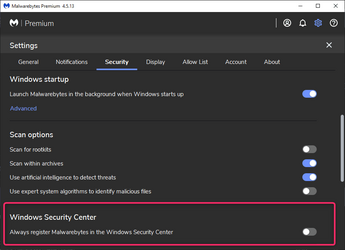
In Malwarebytes, go to Settings->Security. Under Windows Security Center, enabling "Always register Malwarebytes in the Windows Security Center" will cause Malwarebytes to be your active AV/malware program, essentially "disabling" Defender. Defender will still be able to do scans but it will behave passively.

Rob
 

My Computer My Computer

At a glance

Windows 11 Professional 25H2Intel Core i9 11900K64GBNVIDIA GeForce GTX 1650
OS
Windows 11 Professional 25H2
Computer type
PC/Desktop
Manufacturer/Model
Digital Storm VELOX
CPU
Intel Core i9 11900K
Motherboard
ASUS PRIME Z590-P
Memory
64GB
Graphics Card(s)
NVIDIA GeForce GTX 1650
Sound Card
Realtek onboard
Monitor(s) Displays
Acer R221Q 21.5"
Screen Resolution
1920 x 1080
Hard Drives
2 x Samsung SSD 990 EVO Plus (1 TB)
2 x Seagate ST4000NE001 (4 TB)
PSU
None
Case
VELOX
Cooling
Cooler Master
Keyboard
Logitech
Mouse
Kensington trackball
Browser
Firefox, Chrome
Antivirus
Windows Defender, Malwarebytes
Installed on my system -
OS: Windows 11 Pro v 22H2 (Build 22621.382)
AV: Malwarebytes Premium v 4.5.13.208

I've been told this on another community website -

To stop receiving Security Intelligence Updates in WIndows 11 install another antivirus. This should turn off Defender and stop the definitions from being downloaded.

and

Malwarebytes is not an antivirus and will not shut off Windows Defender like an antivirus will. It is a malware scanner which is classed differently.

So is Malwarebytes an antivirus program??
Malwarebytes is an AV replacement but I would recommend running them alongside each other if you have Malwarebytes premium.
The reason I recommend Keeping Defender on is the following.

Malwarebytes does not target script files during a scan... That means MB will not target; JS, HTML, VBS, .CLASS, SWF, BAT, CMD, PDF, PHP, etc.

It also does not target documents such as; PDF, DOC, DOCx, XLS, XLSx, PPT, PPS, ODF, etc.

It also does not target media files; MP3, WMV, JPG, GIF, etc.

Malwarebytes will block files like these if malicious on execution-only.

And,

Malwarebytes is not designed to function like normal AV scanners and uses a new kind of scan engine that relies mostly on heuristics detection techniques rather than traditional threat signatures. Malwarebytes is also designed to look in all the locations where malware is known to install itself/hide, so a full or custom scan shouldn't be necessary, especially on any sort of frequent basis (like daily), especially since the default Threat Scan/Quick Scan checks all loading points/startup locations, the registry, all running processes and threads in memory, along with all system folders, program folders, and data folders as well as any installed browsers, caches, and temp locations. This also means that if a threat were active from a non-standard location because Malwarebytes checks all threads and processes in memory, it should still be detected. The only threat it *might* miss would be a dormant/inactive threat that is not actively running/installed on a secondary drive, however, if the threat were executed then Malwarebytes should detect it. Additionally, whenever a new location is discovered to be used by malware the Malwarebytes Research team adds that location dynamically to the outgoing database updates so the locations that are checked by the default Threat/Quick Scan in Malwarebytes can be changed on the fly by Research without requiring any engine or program version updates/upgrades.

An AV will catch the file just by downloading it or just opening a folder with a detected file in it.

For example, if you get an email with an infected attachment, Malwarebytes will not even blink until you run it yet Defender will detect it if it is in their database without even actually clicking on it. Remember the list of files Malwarebytes does not target.

Then I will leave you with this.

As good as Malwarebytes is, it is just a layer of protection.

Using a browser that has Ublock Origin and the Malwarebytes Browser guard enabled is also a layer of protection.

Not opening attachments from an email unless you were expecting it from a specific user during a specific time period.

Do not use Torrents. Do not install every free software you find. Do not click links in an unknown email. Go directly to the site listed in the email.

Having a monthly image of your computer on an external drive that is only connected during the backup is actually better than any protective software ever made. Macrium Reflect free is the program I use and place on every computer I service

 

My Computer My Computer

At a glance

Windows 10
OS
Windows 10
In Malwarebytes, go to Settings->Security. Under Windows Security Center, enabling "Always register Malwarebytes in the Windows Security Center" will cause Malwarebytes to be your active AV/malware program, essentially "disabling" Defender. Defender will still be able to do scans but it will behave passively.

Rob
I've already done this. But I still receive these updates - the latest as I reply to your post!

Thanks anyway for your reply in confirming that MBW is an AV product.
 

My Computer My Computer

At a glance

Windows 11 Pro 25H2 (Build 26200.8728)Intel Core Ultra 9 285 5.6 GHz32.00 GBIntel Integrated Graphics (128 MB)
OS
Windows 11 Pro 25H2 (Build 26200.8728)
Computer type
PC/Desktop
Manufacturer/Model
Dell Pro Max Tower T2 FCT2250
CPU
Intel Core Ultra 9 285 5.6 GHz
Motherboard
64-bit operating system, x64-based processor
Memory
32.00 GB
Graphics Card(s)
Intel Integrated Graphics (128 MB)
Sound Card
Realtek Audio
Monitor(s) Displays
Dell P2714H Monitor
Screen Resolution
1920 x 1080
Hard Drives
1 x 512GB M.2 XG10d SED KIOXIA PCIe solid state drive (Internal)
1 x 2TB Seagate ST2000DM008-2UB102 HDD (Internal)
1 x 1TB Seagate STGX4000400 External HDD
1 x 4TB Seagate STGX4000400 External HDD
1 x 6TB WD Elements AE 2689 External HDD
PSU
500 Watts
Cooling
Air
Keyboard
Microsoft Wired Keyboard 600
Mouse
Microsoft USB Basic Optical Mouse v2.0
Browser
Firefox
Antivirus
Windows Defender + Malwarebytes Premium
Other Info
BaseBoard Manufacturer Dell Inc.
BaseBoard Product 022RY57
BaseBoard Version A01
Malwarebytes is an AV replacement but I would recommend running them alongside each other if you have Malwarebytes premium.
The reason I recommend Keeping Defender on is the following.

Having a monthly image of your computer on an external drive that is only connected during the backup is actually better than any protective software ever made. Macrium Reflect free is the program I use and place on every computer I service
Thanks for the comprehensive & informative explanation.
At the moment I'm taking daily images with MR Home and, together with the excellent information you have provided. I'll be running Defender alongside MBW from now on.
 

My Computer My Computer

At a glance

Windows 11 Pro 25H2 (Build 26200.8728)Intel Core Ultra 9 285 5.6 GHz32.00 GBIntel Integrated Graphics (128 MB)
OS
Windows 11 Pro 25H2 (Build 26200.8728)
Computer type
PC/Desktop
Manufacturer/Model
Dell Pro Max Tower T2 FCT2250
CPU
Intel Core Ultra 9 285 5.6 GHz
Motherboard
64-bit operating system, x64-based processor
Memory
32.00 GB
Graphics Card(s)
Intel Integrated Graphics (128 MB)
Sound Card
Realtek Audio
Monitor(s) Displays
Dell P2714H Monitor
Screen Resolution
1920 x 1080
Hard Drives
1 x 512GB M.2 XG10d SED KIOXIA PCIe solid state drive (Internal)
1 x 2TB Seagate ST2000DM008-2UB102 HDD (Internal)
1 x 1TB Seagate STGX4000400 External HDD
1 x 4TB Seagate STGX4000400 External HDD
1 x 6TB WD Elements AE 2689 External HDD
PSU
500 Watts
Cooling
Air
Keyboard
Microsoft Wired Keyboard 600
Mouse
Microsoft USB Basic Optical Mouse v2.0
Browser
Firefox
Antivirus
Windows Defender + Malwarebytes Premium
Other Info
BaseBoard Manufacturer Dell Inc.
BaseBoard Product 022RY57
BaseBoard Version A01

My Computer My Computer

At a glance

Windows 11 Pro 25H2 (Build 26200.8728)Intel Core Ultra 9 285 5.6 GHz32.00 GBIntel Integrated Graphics (128 MB)
OS
Windows 11 Pro 25H2 (Build 26200.8728)
Computer type
PC/Desktop
Manufacturer/Model
Dell Pro Max Tower T2 FCT2250
CPU
Intel Core Ultra 9 285 5.6 GHz
Motherboard
64-bit operating system, x64-based processor
Memory
32.00 GB
Graphics Card(s)
Intel Integrated Graphics (128 MB)
Sound Card
Realtek Audio
Monitor(s) Displays
Dell P2714H Monitor
Screen Resolution
1920 x 1080
Hard Drives
1 x 512GB M.2 XG10d SED KIOXIA PCIe solid state drive (Internal)
1 x 2TB Seagate ST2000DM008-2UB102 HDD (Internal)
1 x 1TB Seagate STGX4000400 External HDD
1 x 4TB Seagate STGX4000400 External HDD
1 x 6TB WD Elements AE 2689 External HDD
PSU
500 Watts
Cooling
Air
Keyboard
Microsoft Wired Keyboard 600
Mouse
Microsoft USB Basic Optical Mouse v2.0
Browser
Firefox
Antivirus
Windows Defender + Malwarebytes Premium
Other Info
BaseBoard Manufacturer Dell Inc.
BaseBoard Product 022RY57
BaseBoard Version A01

Latest Support Threads

Back
Top Bottom