Solved Seeking advice re: best, easiest way to move everything from old Win 10 to new Win 11 PC


11Dude

Member
Local time
2:02 AM
Posts
38
OS
Windows 11 Pro (25H2)
I am planning to replace an old Win 10 Pro PC with a new Win 11 Pro PC (OOTB). Both computers are AIO (All In One) desktops. The computers are not connected by any kind of network. I do not use any kind of cloud backup (and don't want to). And I want to do it using only local accounts.

--I have heard about PC transfer/data migration software, which supposedly takes basically everything from the old computer (files, apps, settings, etc) and moves them all to the new one. Is this true? If so, what's a good one?

--I have also heard this can be done with some types of drive image creation software. True?

--Any other ideas would be helpful as well.

Thanks!
 
Last edited:

My Computer My Computer

At a glance

Windows 11 Pro (25H2)
OS
Windows 11 Pro (25H2)
Computer type
PC/Desktop
Hello, :alien:

You might also check out if using the Windows Backup app to transfer your PC like in the tutorial below may work for your situation.

It does require both to use an internet connection though.


My Computers My Computers

  • At a glance

    Windows 11 Pro for WorkstationsIntel i7-8700K 5 GHz64 GB (4x16GB) G.SKILL TridentZ RGB DDR4 3600...ASUS ROG-STRIX-GTX1080TI-O11G-GAMING (11GB GD...
    OS
    Windows 11 Pro for Workstations
    Computer type
    PC/Desktop
    Manufacturer/Model
    Custom self build
    CPU
    Intel i7-8700K 5 GHz
    Motherboard
    ASUS ROG Maximus XI Formula Z390
    Memory
    64 GB (4x16GB) G.SKILL TridentZ RGB DDR4 3600 MHz (F4-3600C18D-32GTZR)
    Graphics Card(s)
    ASUS ROG-STRIX-GTX1080TI-O11G-GAMING (11GB GDDR5X)
    Sound Card
    Integrated Digital Audio (S/PDIF)
    Monitor(s) Displays
    2 x Samsung Odyssey G75 27"
    Screen Resolution
    2560x1440
    Hard Drives
    1TB Samsung 990 PRO M.2,
    4TB Samsung 990 PRO M.2,
    TerraMaster F8 SSD Plus NAS
    PSU
    Seasonic Prime Titanium 850W
    Case
    Thermaltake Core P3 wall mounted
    Cooling
    Corsair Hydro H115i
    Keyboard
    Amazon Basics Wired Full Keyboard MD005
    Mouse
    Logitech MX Master 4
    Internet Speed
    2 Gbps Download and 100 Mbps Upload
    Browser
    Chrome and Edge
    Antivirus
    Microsoft Defender
    Other Info
    Logitech Z625 speaker system,
    Logitech BRIO 4K Pro webcam,
    HP Color LaserJet Pro MFP M477fdn,
    CyberPower CP1500PFCLCD
    Galaxy S23 Plus phone
  • At a glance

    Windows 11 ProSnapdragon X Elite (12 core) 3.42 GHz16 GB LPDDR5x-7467 MHz
    Operating System
    Windows 11 Pro
    Computer type
    Laptop
    Manufacturer/Model
    Surface Laptop 7 Copilot+ PC
    CPU
    Snapdragon X Elite (12 core) 3.42 GHz
    Memory
    16 GB LPDDR5x-7467 MHz
    Monitor(s) Displays
    15" HDR
    Screen Resolution
    2496 x 1664
    Hard Drives
    1 TB SSD
    Internet Speed
    Wi-Fi 7 and Bluetooth 5.4
    Browser
    Chrome and Edge
    Antivirus
    Microsoft Defender
If I buy a brand new computer, I don't want all the junk that has accumulated over the years in my old one to move over to my new one. I backup my personal files from my old one(you can copy & paste files/folders to an external drive.) I On my new one, I install just the apps I use (not the stuff I don't), copy my files from the external drive into my new user account folders and move on fresh and clean. There are several things I don't believe in when it come to my computer....shortcutting and having a lot of junk.
 

My Computers My Computers

  • At a glance

    Windows 11 Pro 25H2 26200.8875i9-10900 10 core 20 threads32 gbnone-Intel UHD Graphics 630
    OS
    Windows 11 Pro 25H2 26200.8875
    Computer type
    PC/Desktop
    Manufacturer/Model
    Dell Optiplex 7080
    CPU
    i9-10900 10 core 20 threads
    Motherboard
    DELL 0J37VM
    Memory
    32 gb
    Graphics Card(s)
    none-Intel UHD Graphics 630
    Sound Card
    Integrated Realtek
    Monitor(s) Displays
    Benq 27
    Screen Resolution
    2560x1440
    Hard Drives
    2x1tb Solidigm m.2 nvme /External drives 512gb Samsung m.2 sata+2tb Kingston m2.nvme
    PSU
    500w
    Case
    MT
    Cooling
    Dell Premium
    Keyboard
    Logitech wired
    Mouse
    Logitech wireless
    Internet Speed
    so slow I'm too embarrassed to tell
    Browser
    #1 Edge #2 Firefox
    Antivirus
    Defender+MWB Premium
  • At a glance

    Windows 11 Pro 24H2 26200.8875AMD Ryzen 7 6800U32 gbintegrated
    Operating System
    Windows 11 Pro 24H2 26200.8875
    Computer type
    PC/Desktop
    Manufacturer/Model
    Beelink Mini PC SER5
    CPU
    AMD Ryzen 7 6800U
    Memory
    32 gb
    Graphics card(s)
    integrated
    Sound Card
    integrated
    Monitor(s) Displays
    Benq 27
    Screen Resolution
    2560x1440
    Hard Drives
    1TB Crucial nvme
    Keyboard
    Logitech wired
    Mouse
    Logitech wireless
    Internet Speed
    still too embarrassed to tell
    Browser
    Firefox
    Antivirus
    Defender
    Other Info
    System 3 is non compliant Dell 9020 i7-4770/24gb ram Win11 PRO 26200.8875
You didn't mentioned what kind of computers (Laptop or desktop) you have and what are the specs of them (old and new).

There are many ways to do it.
- If the old computer main drive is EFI - GPT, on the new computer generate all drivers backup and a main drive image backup.
Then the easiest way is to take the old computer drive and install on the new computer and then clone the old computer drive on the new computer drive. Remove the old drive and then let it upgrade to Win 11. I don't like this method as glasskuter already said, you transfer all trash from old computer to the new one.

- I agree with glasskuter that a new computer deserve a fresh install. If the new computer has no OS do a Win 11 Clean install as EFI - GPT. If it already came with Win 11 keep it. Take the old computer drive and install on the new computer and then copy the old computer data files to the new computer drive. Remove the old drive and then install the programs and applications you wish to have.
 

My Computers My Computers

  • At a glance

    Windows 11 Pro - Windows 7 HP 64 - Lubuntui5 6600K - 800MHz to 4400MHz4+4G GSkill DDR4 3000IG - Intel 530
    OS
    Windows 11 Pro - Windows 7 HP 64 - Lubuntu
    Computer type
    PC/Desktop
    Manufacturer/Model
    custom build
    CPU
    i5 6600K - 800MHz to 4400MHz
    Motherboard
    GA-Z170-HD3P
    Memory
    4+4G GSkill DDR4 3000
    Graphics Card(s)
    IG - Intel 530
    Monitor(s) Displays
    Samsung 226BW
    Screen Resolution
    1680x1050
    Hard Drives
    (1) -1 SM951 – 128GB M.2 AHCI PCIe SSD drive for Win 11
    (2) -1 WD SATA 3 - 1T for Data
    (3) -1 WD SATA 3 - 1T for backup
    (4) -1 BX500 SSD - 256G for Windows 7 and Lubuntu
    PSU
    Thermaltake 450W TR2 gold
    Keyboard
    Old and good Chicony mechanical keyboard
    Mouse
    Logitech mX performance - 9 buttons (had to disable some)
    Internet Speed
    500 Mb/s
    Browser
    Firefox 64
  • At a glance

    Windows 11 Proi7-4500U 800- 3000MHz(4+4)G DDR3 1600IG intel 4400 + NVIDIA GeForce GT 745M
    Operating System
    Windows 11 Pro
    Computer type
    Laptop
    Manufacturer/Model
    Asus Q550LF
    CPU
    i7-4500U 800- 3000MHz
    Motherboard
    Asus Q550LF
    Memory
    (4+4)G DDR3 1600
    Graphics card(s)
    IG intel 4400 + NVIDIA GeForce GT 745M
    Sound Card
    Realtek
    Monitor(s) Displays
    LG Display LP156WF4-SPH1
    Screen Resolution
    1920 x 1080
    Hard Drives
    BX500 120G SSD for Windows and programs
    & 1T HDD for data
    Internet Speed
    500 Mb/s
    Browser
    Firefox 64
If I buy a brand new computer, I don't want all the junk that has accumulated over the years in my old one to move over to my new one. I backup my personal files from my old one(you can copy & paste files/folders to an external drive.) I On my new one, I install just the apps I use (not the stuff I don't), copy my files from the external drive into my new user account folders and move on fresh and clean. There are several things I don't believe in when it come to my computer....shortcutting and having a lot of junk.
Absolutely agree!

The only difference here is that I'm a Microsoft 365 subscriber. The moment I log in to my new computer all my data and photos are instantly there in my 1TB of OneDrive and the latest Microsoft Office is there ready to work.
 

My Computers My Computers

  • At a glance

    Windows 11 ProIntel Series 3 Core Ultra X9 388H64GB LPDDR5x 9600 MT/sIntel Arc graphics B390 Panther Lake
    OS
    Windows 11 Pro
    Computer type
    Laptop
    Manufacturer/Model
    Dell XPS 16 DA16260
    CPU
    Intel Series 3 Core Ultra X9 388H
    Memory
    64GB LPDDR5x 9600 MT/s
    Graphics Card(s)
    Intel Arc graphics B390 Panther Lake
    Monitor(s) Displays
    16" 3.2K Tandem OLED Infinity Edge
    Screen Resolution
    3200 x 2000 16:10 236 PPI
    Hard Drives
    1 Terabyte M.2 PCIe NVMe SSD
    Case
    Black Anodized Aluminum
    Cooling
    Vapor Chamber Cooling
    Mouse
    None
    Internet Speed
    942 Mbps Netgear Mesh + 2 Satellites
    Browser
    Microsoft Edge (Chromium)
    Antivirus
    Windows Security (Defender)
    Other Info
    NPU delivering 67 TOPS
    Microsoft 365 subscription
    Microsoft Office 365
    Microsoft OneDrive 1TB Cloud
    Microsoft Visual Studio
    Microsoft Visual Studio Code
    Microsoft Sysinternals Suite
    Microsoft BitLocker
    Microsoft Copilot
    Dell Support Assist
    Dell Command | Update
    Macrium Reflect X subscription
    1Password Password Manager
    Amazon Kindle for PC
    Lightroom/Photoshop subscription
    Interactive Brokers Trader Workstation
  • At a glance

    Windows 11 ProSnapdragon® X Elite (12 Core) with Hexagon NP...32GB LPDDR5x 8448 MT/sIntegrated Adreno GPU
    Operating System
    Windows 11 Pro
    Computer type
    Laptop
    Manufacturer/Model
    Microsoft Surface Laptop 7
    CPU
    Snapdragon® X Elite (12 Core) with Hexagon NPU delivering 45 TOPS
    Memory
    32GB LPDDR5x 8448 MT/s
    Graphics card(s)
    Integrated Adreno GPU
    Sound Card
    Omnisonic speakers with Dolby Atmos spatial sound
    Monitor(s) Displays
    13.8″ PixelSense Flow touchscreen 120 Hz 600 NIT
    Screen Resolution
    2304 × 1536 (201 PPI), 3:2 aspect ratio
    Hard Drives
    1 TB PCIe NVMe Gen 4 SSD
    Case
    Black Anodized Aluminum
    Cooling
    Vapor Chamber Cooling
    Mouse
    None
    Internet Speed
    942 Mbps Netgear Mesh + 2 Satellites
    Browser
    Microsoft Edge (Chromium)
    Antivirus
    Windows Security (Defender)
    Other Info
    Microsoft 365 subscription (Office)
    Microsoft Office 365
    Microsoft OneDrive 1TB Cloud
    Microsoft Visual Studio 2026
    Microsoft Visual Studio Code
    Interactive Brokers Trader Workstation
    Lightroom/Photoshop subscription
    1Password Password Manager
    Microsoft Sysinternals
    Amazon Kindle for PC
    Microsoft BitLocker
    Microsoft Copilot
I also agree with @glasskuter leave the dust bunnies on the Win 10 computer.

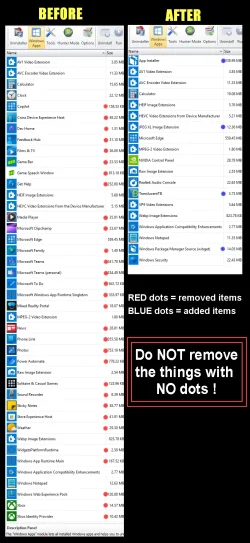
1st thing I do is use REVO Uninstaller free, to remove all the Microsoft bloat.
Then install the things I want and tweak as necessary.
Then make a fresh backup.

What is bloat and what isn't is a personal choice. This is usually what I remove....

00000 REVO Junk Removal.webp


Here's some other things that you may find useful...


My Computers My Computers

  • At a glance

    Win 11 Home ♦♦♦26200.8875 ♦♦♦♦♦♦♦25H2AMD Ryzen 7 3700XG.Skill (F4-3200C14D-16GTZKW)EVGA RTX 2070 (08G-P4-2171-KR)
    OS
    Win 11 Home ♦♦♦26200.8875 ♦♦♦♦♦♦♦25H2
    Computer type
    PC/Desktop
    Manufacturer/Model
    Built by Ghot® [May 2020]
    CPU
    AMD Ryzen 7 3700X
    Motherboard
    Asus Pro WS X570-ACE (BIOS 5302)
    Memory
    G.Skill (F4-3200C14D-16GTZKW)
    Graphics Card(s)
    EVGA RTX 2070 (08G-P4-2171-KR)
    Sound Card
    Realtek ALC1220P / ALC S1220A
    Monitor(s) Displays
    Dell U3011 30"
    Screen Resolution
    2560 x 1600
    Hard Drives
    2x Samsung 860 EVO 500GB,
    WD 4TB Black FZBX - SATA III,
    WD 8TB Black FZBX - SATA III,
    DRW-24B1ST CD/DVD Burner
    PSU
    PC Power & Cooling 750W Quad EPS12V
    Case
    Cooler Master ATCS 840 Tower
    Cooling
    CM Hyper 212 EVO (push/pull)
    Keyboard
    Ducky DK9008 Shine II Blue LED
    Mouse
    Logitech Optical M-100
    Internet Speed
    300/300
    Browser
    Firefox (latest)
    Antivirus
    Bitdefender Total Security
    Other Info
    Speakers: Klipsch Pro Media 2.1
  • At a glance

    Windows XP Pro 32bit w/SP3AMD Athlon 64 X2 5000+ (OC'd @ 3.2Ghz)TWIN2X2048-6400C4DHX (2 x 1GB, DDR2 800)EVGA 256-P2-N758-TR GeForce 8600GT SSC
    Operating System
    Windows XP Pro 32bit w/SP3
    Computer type
    PC/Desktop
    Manufacturer/Model
    Built by Ghot® (not in use)
    CPU
    AMD Athlon 64 X2 5000+ (OC'd @ 3.2Ghz)
    Motherboard
    ASUS M2N32-SLI Deluxe Wireless Edition
    Memory
    TWIN2X2048-6400C4DHX (2 x 1GB, DDR2 800)
    Graphics card(s)
    EVGA 256-P2-N758-TR GeForce 8600GT SSC
    Sound Card
    Onboard
    Monitor(s) Displays
    ViewSonic G90FB Black 19" Professional (CRT)
    Screen Resolution
    up to 2048 x 1536
    Hard Drives
    WD 36GB 10,000rpm Raptor SATA
    Seagate 80GB 7200rpm SATA
    Lite-On LTR-52246S CD/RW
    Lite-On LH-18A1P CD/DVD Burner
    PSU
    PC Power & Cooling Silencer 750 Quad EPS12V
    Case
    Generic Beige case, 80mm fans
    Cooling
    ZALMAN 9500A 92mm CPU Cooler
    Keyboard
    Logitech Classic Keybooard 200
    Mouse
    Logitech Optical M-BT96a
    Internet Speed
    300/300
    Browser
    Firefox 3.x ??
    Antivirus
    Symantec (Norton)
    Other Info
    Still assembled, still runs. Haven't turned it on for 15 years?
--I have also heard this can be done with some types of drive image creation software. True?
That is true.

While everyone else has praised the virtues of a clean install, then copying over all your user data (certainly the cleanest approach) there can be an argument for the opposite case, a warts and all migration of the original machine's OS drive to the new one.

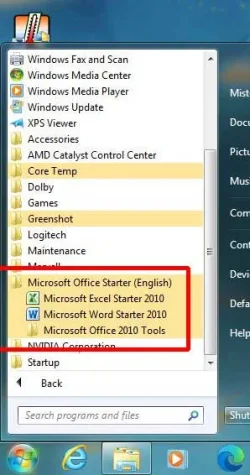
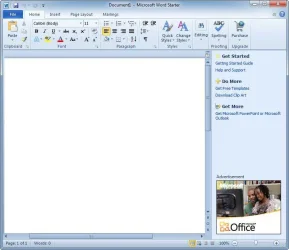
In my case the overriding argument was that I wanted to keep the installed MS Office Starter 2010, a free version of MS Office that was only available on OEM Windows 7 machines, and cannot be reinstalled - not even on Windows 7 (only OEMs could do that) and certainly not on Windows 10/11 where its install would be blocked by the OS.

So, for a long time my 'main machine' was a Win7 laptop (Legacy BIOS and MBR disk) that had taken the free upgrade to Windows 10 when it was first released. With the approach of Windows 11 I wanted to upgrade to a UEFI/GPT W11-compliant laptop as my 'main machine', but I also wanted to continue using all installed software I already had. I would also have to convert from a Legacy/MBR install to a UEFI/GPT one in order to be offered the upgrade to Windows 11. The answer was to use Macrium Reflect Free to image the old machine and restore to the new one.

I used Reflect to restore the C: partition from a system image of my old Legacy/MBR machine to replace the C: partition of a clean install of the same version of Win10 on a new UEFI/GPT machine. Then used the Reflect recovery usb's 'fix Windows boot problems' option to rebuild the BCD. The end result was a transfer of my complete system to a new machine, not just my user files but all my installed software and configurations.

I have effectively got exactly the same PC as I had before, just with every part of its hardware upgraded.
Onboarding to Windows 11 is easy - post #8

In the process I had also moved from an Intel-based machine to an AMD-based one. Windows happily sorted out all the new drivers required for basic functionality, then when on the internet Windows Update upgraded a few more.

Yes, a lot of unnecessary OEM crud came over with the OS, in particular some Toshiba OEM utilities than were about as useful as a chocolate teapot on the new Acer hardware. But Revo Uninstaller cleaned up most of that, and DriverStoreExplorer dealt with the rest. The Acer (System One below) then became my 'main machine' for the next 5 years until its lid hinges started to give way. I've not found it to be any different from any of my other machines with their clean installs. Cumulative and Feature updates have installed cleanly and it's been as responsive as a clean install would have been.

Now that the Acer had started to fall apart I had no hesitation in migrating the OS for a second time to its current hardware, my System Seven below. An easier migration this time as they are both UEFI/GPT machines (and going back from AMD to Intel hardware in the process).
 

My Computers My Computers

  • At a glance

    Windows 11 HomeAMD Athlon Silver 3050U8GBRadeon Graphics
    OS
    Windows 11 Home
    Computer type
    Laptop
    Manufacturer/Model
    Acer Aspire 3 A315-23-R9VY
    CPU
    AMD Athlon Silver 3050U
    Memory
    8GB
    Graphics Card(s)
    Radeon Graphics
    Monitor(s) Displays
    laptop screen
    Screen Resolution
    1366x768 native resolution, up to 2560x1440 with Radeon Virtual Super Resolution
    Hard Drives
    1TB Samsung EVO 870 SSD (from April 2026: 250GB EVO 850)
    Internet Speed
    150 Mbps
    Browser
    Edge, Firefox
    Antivirus
    Defender
    Other Info
    fully 'Windows 11 ready' laptop. Windows 10 C: partition migrated from my old unsupported 'main machine' then upgraded to 11. A test migration ran Insider builds for 2 months. When 11 was released on 5th October 2021 it was re-imaged back to 10 and was offered the upgrade in Windows Update on 20th October. Windows Update offered the 22H2 Feature Update on 20th September 2022. It got the 23H2 Feature Update on 4th November 2023 through Windows Update, 24H2 on 3rd October 2024 through Windows Update by setting the Target Release Version for 24H2, and 25H2 on 30th September 2025 through Windows Update by setting the Target Release Version for 25H2.

    UPDATE - 11 April 2026: due to mechanical deterioration this PC has been retired from active duty. The OS with all software and files has been migrated to my System Seven in 'Other systems' to carry on as my general purpose 'main machine'.

    I've now clean installed 25H2 and used Garlin's scripts to update Secure Boot to CA 2023 and revoke the PCA 2011 certificates. It's new role is to test secure boot issues.
  • At a glance

    Windows 11 ProIntel® Core™ i5-520M8GB(integrated graphics) Intel HD Graphics
    Operating System
    Windows 11 Pro
    Computer type
    Laptop
    Manufacturer/Model
    Dell Latitude E4310
    CPU
    Intel® Core™ i5-520M
    Motherboard
    0T6M8G
    Memory
    8GB
    Graphics card(s)
    (integrated graphics) Intel HD Graphics
    Screen Resolution
    1366x768
    Hard Drives
    500GB Crucial MX500 SSD
    Browser
    Firefox, Edge
    Antivirus
    Defender
    Other Info
    unsupported machine: Legacy bios, MBR, TPM 1.2, upgraded from W10 to W11 using W10/W11 hybrid install media workaround.

    In-place upgrade to 22H2 using ISO and a workaround.
    Feature Update to 23H2 by manually installing the Enablement Package.
    In-place upgrade to 24H2 using hybrid 23H2/24H2 install media.
    Upgraded to 25H2 by Enablement Package.

    Also running Insider Dev, and Canary builds and Windows 10 as native boot .vhdx.
  • My SYSTEM THREE is a Dell Latitude 5410, i7-10610U, 32GB RAM, 512GB NVMe ssd, supported device running Windows 11 Pro.

    My SYSTEM FOUR is a 2-in-1 convertible Lenovo Yoga 11e 20DA, Celeron N2930, 8GB RAM, 256GB ssd. Unsupported device: currently running Win10 Pro, plus Win11 Pro RTM and Insider Dev, Beta, and RP 24H2 as native boot vhdx.

    My SYSTEM FIVE is a Dell Latitude 3190 2-in-1, Pentium Silver N5030, 8GB RAM, 1TB NVMe ssd, supported device running Windows 11 Pro, plus Insider Beta, Dev, and Canary builds (and a few others) as a native boot .vhdx.

    My SYSTEM SIX is a Dell Latitude 5550, Core Ultra 7 165H, 64GB RAM, 1TB NVMe SSD, supported device, Windows 11 Pro 24H2, Hyper-V host machine. Updated to 25H2 on 30th September 2025.

    My SYSTEM SEVEN is a Lenovo Thinkpad T580, Intel Core i7-8650U, 16GB RAM, 512GB NVMe SSD + 2nd 512GB NVMe SSD, a supported device for Windows 11. This is my current general purpose 'main machine'. The installed Windows 11 Home from my System One has been migrated to this machine.
  • Like
Reactions: HTA
The only difference here is that I'm a Microsoft 365 subscriber. The moment I log in to my new computer all my data and photos are instantly there in my 1TB of OneDrive and the latest Microsoft Office is there ready to work.
Really?? I didn't know that. Why haven't you told us before? (Just bee essing you Gary.) Luv ya and your OD bunches. :cool:;-)
 

My Computers My Computers

  • At a glance

    Windows 11 Pro 25H2 26200.8875i9-10900 10 core 20 threads32 gbnone-Intel UHD Graphics 630
    OS
    Windows 11 Pro 25H2 26200.8875
    Computer type
    PC/Desktop
    Manufacturer/Model
    Dell Optiplex 7080
    CPU
    i9-10900 10 core 20 threads
    Motherboard
    DELL 0J37VM
    Memory
    32 gb
    Graphics Card(s)
    none-Intel UHD Graphics 630
    Sound Card
    Integrated Realtek
    Monitor(s) Displays
    Benq 27
    Screen Resolution
    2560x1440
    Hard Drives
    2x1tb Solidigm m.2 nvme /External drives 512gb Samsung m.2 sata+2tb Kingston m2.nvme
    PSU
    500w
    Case
    MT
    Cooling
    Dell Premium
    Keyboard
    Logitech wired
    Mouse
    Logitech wireless
    Internet Speed
    so slow I'm too embarrassed to tell
    Browser
    #1 Edge #2 Firefox
    Antivirus
    Defender+MWB Premium
  • At a glance

    Windows 11 Pro 24H2 26200.8875AMD Ryzen 7 6800U32 gbintegrated
    Operating System
    Windows 11 Pro 24H2 26200.8875
    Computer type
    PC/Desktop
    Manufacturer/Model
    Beelink Mini PC SER5
    CPU
    AMD Ryzen 7 6800U
    Memory
    32 gb
    Graphics card(s)
    integrated
    Sound Card
    integrated
    Monitor(s) Displays
    Benq 27
    Screen Resolution
    2560x1440
    Hard Drives
    1TB Crucial nvme
    Keyboard
    Logitech wired
    Mouse
    Logitech wireless
    Internet Speed
    still too embarrassed to tell
    Browser
    Firefox
    Antivirus
    Defender
    Other Info
    System 3 is non compliant Dell 9020 i7-4770/24gb ram Win11 PRO 26200.8875
Really?? I didn't know that. Why haven't you told us before? (Just bee essing you Gary.) Luv ya and your OD bunches. :cool:;-)
You've heard that before? :wink: I thought I'd make the comment just in case a thread reader might not know. :cool:
 

My Computers My Computers

  • At a glance

    Windows 11 ProIntel Series 3 Core Ultra X9 388H64GB LPDDR5x 9600 MT/sIntel Arc graphics B390 Panther Lake
    OS
    Windows 11 Pro
    Computer type
    Laptop
    Manufacturer/Model
    Dell XPS 16 DA16260
    CPU
    Intel Series 3 Core Ultra X9 388H
    Memory
    64GB LPDDR5x 9600 MT/s
    Graphics Card(s)
    Intel Arc graphics B390 Panther Lake
    Monitor(s) Displays
    16" 3.2K Tandem OLED Infinity Edge
    Screen Resolution
    3200 x 2000 16:10 236 PPI
    Hard Drives
    1 Terabyte M.2 PCIe NVMe SSD
    Case
    Black Anodized Aluminum
    Cooling
    Vapor Chamber Cooling
    Mouse
    None
    Internet Speed
    942 Mbps Netgear Mesh + 2 Satellites
    Browser
    Microsoft Edge (Chromium)
    Antivirus
    Windows Security (Defender)
    Other Info
    NPU delivering 67 TOPS
    Microsoft 365 subscription
    Microsoft Office 365
    Microsoft OneDrive 1TB Cloud
    Microsoft Visual Studio
    Microsoft Visual Studio Code
    Microsoft Sysinternals Suite
    Microsoft BitLocker
    Microsoft Copilot
    Dell Support Assist
    Dell Command | Update
    Macrium Reflect X subscription
    1Password Password Manager
    Amazon Kindle for PC
    Lightroom/Photoshop subscription
    Interactive Brokers Trader Workstation
  • At a glance

    Windows 11 ProSnapdragon® X Elite (12 Core) with Hexagon NP...32GB LPDDR5x 8448 MT/sIntegrated Adreno GPU
    Operating System
    Windows 11 Pro
    Computer type
    Laptop
    Manufacturer/Model
    Microsoft Surface Laptop 7
    CPU
    Snapdragon® X Elite (12 Core) with Hexagon NPU delivering 45 TOPS
    Memory
    32GB LPDDR5x 8448 MT/s
    Graphics card(s)
    Integrated Adreno GPU
    Sound Card
    Omnisonic speakers with Dolby Atmos spatial sound
    Monitor(s) Displays
    13.8″ PixelSense Flow touchscreen 120 Hz 600 NIT
    Screen Resolution
    2304 × 1536 (201 PPI), 3:2 aspect ratio
    Hard Drives
    1 TB PCIe NVMe Gen 4 SSD
    Case
    Black Anodized Aluminum
    Cooling
    Vapor Chamber Cooling
    Mouse
    None
    Internet Speed
    942 Mbps Netgear Mesh + 2 Satellites
    Browser
    Microsoft Edge (Chromium)
    Antivirus
    Windows Security (Defender)
    Other Info
    Microsoft 365 subscription (Office)
    Microsoft Office 365
    Microsoft OneDrive 1TB Cloud
    Microsoft Visual Studio 2026
    Microsoft Visual Studio Code
    Interactive Brokers Trader Workstation
    Lightroom/Photoshop subscription
    1Password Password Manager
    Microsoft Sysinternals
    Amazon Kindle for PC
    Microsoft BitLocker
    Microsoft Copilot
While everyone else has praised the virtues of a clean install, then copying over all your user data (certainly the cleanest approach) there can be an argument for the opposite case, a warts and all migration of the original machine's OS drive to the new one.

You've been putting up with difficult operations in Widows for years now. You have the chance to put that behind you. Just curious what are the augments to mess up your brand new install and continue with more years of self-inflicted issues?

Sure you might save several hours now but then you're going to miss the opportunity to have a good working system that runs faster, smoother than what you've been running.
 

My Computer My Computer

At a glance

Windows 11 Pro build 25H2 x64Intel i9-13900K64GBNvidia GeForce RTX-3090 Ti
OS
Windows 11 Pro build 25H2 x64
Computer type
PC/Desktop
Manufacturer/Model
ASUS Custom build
CPU
Intel i9-13900K
Motherboard
Asus ROG STRIX Z790 E GAMING WIFI 11
Memory
64GB
Graphics Card(s)
Nvidia GeForce RTX-3090 Ti
Internet Speed
1 Gbps
Browser
Firefox
Antivirus
Malwarebytes
Hi, once again, here's the way I did it.

1. Clean install Win 11 on the new PC.
2. Create clone of old Win 10 on a USB drive.
3. Install a (giveaway) copy of Easesus ToDo PC Trans on Win 11.
4. Connect clone and run Easesus ToDo PC Trans
5. Have it scan the clone- it then lists the programs installed etc.

Thus you can transfer entire accounts, complete programs (selectively) to the new O/S.

A huge time save if you've lots of progs.
In some cases licenses are transferred.

Probably not recommended for huge complicated programs (better to install an Office suite or large game manually).
And certainly not for security progs.

Works extremely well.
 

My Computer My Computer

At a glance

Windows 11 Proi7-8650U16GBIntel UHD 620
OS
Windows 11 Pro
Computer type
Laptop
Manufacturer/Model
Lenovo t480s
CPU
i7-8650U
Memory
16GB
Graphics Card(s)
Intel UHD 620
Screen Resolution
1920x1080
Hard Drives
C SN810 SDCPNRY-512G-1006
Browser
Edge, Firefox
Antivirus
Defender
In my case the overriding argument was that I wanted to keep the installed MS Office Starter 2010, a free version of MS Office that was only available on OEM Windows 7 machines, and cannot be reinstalled - not even on Windows 7 (only OEMs could do that) and certainly not on Windows 10/11 where its install would be blocked by the OS.
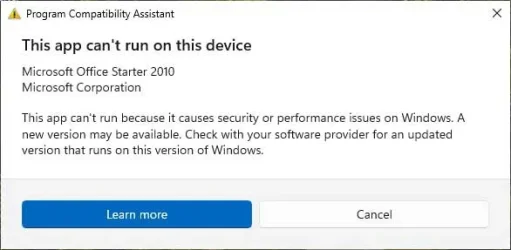
Microsoft might want you to believe that but I was just able to install it in Windows 7.
All I needed was the setup program "setupconsumerc2rolw.exe". However, there is a gotcha. In order to get the setup to run you have to temporarily disable the IPV6 protocol.

O1.webp

O2.webp

It will also install in Windows 10 and 11. Unfortunately, Windows 10 & 11 block the program from running.

O3.webp

O4.webp
 

My Computers My Computers

  • At a glance

    Windows 11 Pro 25H2 (26200.6901)AMD Ryzen 7 6800H with Radeon 680M GPU (486MB...Crucial DDR5-4800 (2400MHz) 32GB (2 x 16GB)NVIDIA RTX 3060 Laptop (6GB RAM)
    OS
    Windows 11 Pro 25H2 (26200.6901)
    Computer type
    Laptop
    Manufacturer/Model
    ASUS TUF Gaming A15 (2022)
    CPU
    AMD Ryzen 7 6800H with Radeon 680M GPU (486MB RAM)
    Memory
    Crucial DDR5-4800 (2400MHz) 32GB (2 x 16GB)
    Graphics Card(s)
    NVIDIA RTX 3060 Laptop (6GB RAM)
    Sound Card
    n/a
    Monitor(s) Displays
    15.6-inch
    Screen Resolution
    1920x1080 300Hz
    Hard Drives
    2 x Samsung 990 Evo Plus (2TB M.2 NVME SSD)
    PSU
    n/a
    Mouse
    Wireless Mouse M510
    Internet Speed
    2100Mbps/300Mbps
    Browser
    Firefox
    Antivirus
    Malwarebytes
  • At a glance

    Windows 11 Pro 25H2 (26200.8246)AMD Ryzen 7 5700X3DG.SKILL Flare X 32GB (2x16GB) DDR4ASUS ROG-STRIX-RTX3060TI-08G-V2-GAMING (RTX 3...
    Operating System
    Windows 11 Pro 25H2 (26200.8246)
    Computer type
    PC/Desktop
    Manufacturer/Model
    Custom build
    CPU
    AMD Ryzen 7 5700X3D
    Motherboard
    ASUS ROG Strix B550-F Gaming WiFi II
    Memory
    G.SKILL Flare X 32GB (2x16GB) DDR4
    Graphics card(s)
    ASUS ROG-STRIX-RTX3060TI-08G-V2-GAMING (RTX 3060-Ti, 8GB RAM)
    Monitor(s) Displays
    Samsung G50D IPS 27"
    Screen Resolution
    1440p/180Hz
    Hard Drives
    SAMSUNG 990 EVO Plus (2TB] M.2 NVME SSD
    SAMSUNG 990 EVO Plus (4TB) M.2 NVME SSD
    PSU
    Corsair RM750x (750 watts)
    Case
    Cooler Master MasterCase 5
    Cooling
    Scythe Mugen 6
    Keyboard
    Logitech K520 (MK540 keyboard/mouse combo)
    Mouse
    Logitech M310 (MK540 keyboard/mouse combo)
    Internet Speed
    2100 Mbps down / 300 Mbps up
    Browser
    Firefox, Edge, Chrome
    Antivirus
    Malwarebytes (Premium)
    Other Info
    ASUS Blu-ray Burner BW-16D1HT (SATA) || Western Digital Easystore 20TB USB 3.0 external hard drive used with Acronis True Image 2025 backup software || HP OfficeJet Pro 6975 Printer/Scanner
Just curious what are the augments to mess up your brand new install and continue with more years of self-inflicted issues?

Sure you might save several hours now but then you're going to miss the opportunity to have a good working system that runs faster, smoother than what you've been running.
What self-inflicted issues? My other car is a Porsche my other laptops are all clean installs. I can see no performance difference between this migrated system and any of the others. It's not 'saving time' - it's saving software that cannot be reinstalled. If I want to keep it I have no choice.

Microsoft might want you to believe that but I was just able to install it in Windows 7.
All I needed was the setup program "setupconsumerc2rolw.exe". However, there is a gotcha. In order to get the setup to run you have to temporarily disable the IPV6 protocol.
It will also install in Windows 10 and 11. Unfortunately, Windows 10 & 11 block the program from running.

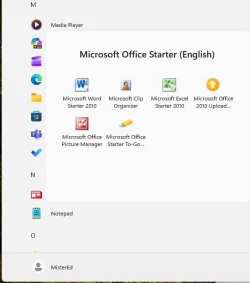
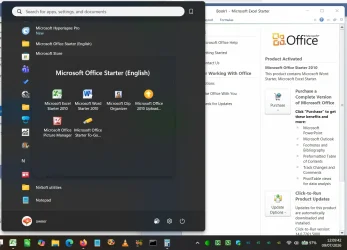
Microsoft's Windows 10 installer will uninstall Office Starter as being 'incompatible' if you try upgrading from Windows 7 to Windows 10. There is a loophole though, Starter was only added to the list of incompatible programs with W10 version 1511 (10586). This system got the free upgrade to the original version 10240 which left it installed. Incompatible programs are only checked for and removed when upgrading W7>W10, a W10 upgrade to the next version (or to W11) makes no such checks, so it remains there to this day.

.....Unfortunately, Windows 10 & 11 block the program from running.

Apparently my system didn't get the memo.....

1783596040359.webp
 

My Computers My Computers

  • At a glance

    Windows 11 HomeAMD Athlon Silver 3050U8GBRadeon Graphics
    OS
    Windows 11 Home
    Computer type
    Laptop
    Manufacturer/Model
    Acer Aspire 3 A315-23-R9VY
    CPU
    AMD Athlon Silver 3050U
    Memory
    8GB
    Graphics Card(s)
    Radeon Graphics
    Monitor(s) Displays
    laptop screen
    Screen Resolution
    1366x768 native resolution, up to 2560x1440 with Radeon Virtual Super Resolution
    Hard Drives
    1TB Samsung EVO 870 SSD (from April 2026: 250GB EVO 850)
    Internet Speed
    150 Mbps
    Browser
    Edge, Firefox
    Antivirus
    Defender
    Other Info
    fully 'Windows 11 ready' laptop. Windows 10 C: partition migrated from my old unsupported 'main machine' then upgraded to 11. A test migration ran Insider builds for 2 months. When 11 was released on 5th October 2021 it was re-imaged back to 10 and was offered the upgrade in Windows Update on 20th October. Windows Update offered the 22H2 Feature Update on 20th September 2022. It got the 23H2 Feature Update on 4th November 2023 through Windows Update, 24H2 on 3rd October 2024 through Windows Update by setting the Target Release Version for 24H2, and 25H2 on 30th September 2025 through Windows Update by setting the Target Release Version for 25H2.

    UPDATE - 11 April 2026: due to mechanical deterioration this PC has been retired from active duty. The OS with all software and files has been migrated to my System Seven in 'Other systems' to carry on as my general purpose 'main machine'.

    I've now clean installed 25H2 and used Garlin's scripts to update Secure Boot to CA 2023 and revoke the PCA 2011 certificates. It's new role is to test secure boot issues.
  • At a glance

    Windows 11 ProIntel® Core™ i5-520M8GB(integrated graphics) Intel HD Graphics
    Operating System
    Windows 11 Pro
    Computer type
    Laptop
    Manufacturer/Model
    Dell Latitude E4310
    CPU
    Intel® Core™ i5-520M
    Motherboard
    0T6M8G
    Memory
    8GB
    Graphics card(s)
    (integrated graphics) Intel HD Graphics
    Screen Resolution
    1366x768
    Hard Drives
    500GB Crucial MX500 SSD
    Browser
    Firefox, Edge
    Antivirus
    Defender
    Other Info
    unsupported machine: Legacy bios, MBR, TPM 1.2, upgraded from W10 to W11 using W10/W11 hybrid install media workaround.

    In-place upgrade to 22H2 using ISO and a workaround.
    Feature Update to 23H2 by manually installing the Enablement Package.
    In-place upgrade to 24H2 using hybrid 23H2/24H2 install media.
    Upgraded to 25H2 by Enablement Package.

    Also running Insider Dev, and Canary builds and Windows 10 as native boot .vhdx.
  • My SYSTEM THREE is a Dell Latitude 5410, i7-10610U, 32GB RAM, 512GB NVMe ssd, supported device running Windows 11 Pro.

    My SYSTEM FOUR is a 2-in-1 convertible Lenovo Yoga 11e 20DA, Celeron N2930, 8GB RAM, 256GB ssd. Unsupported device: currently running Win10 Pro, plus Win11 Pro RTM and Insider Dev, Beta, and RP 24H2 as native boot vhdx.

    My SYSTEM FIVE is a Dell Latitude 3190 2-in-1, Pentium Silver N5030, 8GB RAM, 1TB NVMe ssd, supported device running Windows 11 Pro, plus Insider Beta, Dev, and Canary builds (and a few others) as a native boot .vhdx.

    My SYSTEM SIX is a Dell Latitude 5550, Core Ultra 7 165H, 64GB RAM, 1TB NVMe SSD, supported device, Windows 11 Pro 24H2, Hyper-V host machine. Updated to 25H2 on 30th September 2025.

    My SYSTEM SEVEN is a Lenovo Thinkpad T580, Intel Core i7-8650U, 16GB RAM, 512GB NVMe SSD + 2nd 512GB NVMe SSD, a supported device for Windows 11. This is my current general purpose 'main machine'. The installed Windows 11 Home from my System One has been migrated to this machine.
It's not 'saving time' - it's saving software that cannot be reinstalled. If I want to keep it I have no choice.

True in some cases. But I've installed hundreds of apps that supposedly could not be reinstalled onto the new OS and it worked just fine. But that does require a very advanced understanding of Windows and the Registry.
 

My Computer My Computer

At a glance

Windows 11 Pro build 25H2 x64Intel i9-13900K64GBNvidia GeForce RTX-3090 Ti
OS
Windows 11 Pro build 25H2 x64
Computer type
PC/Desktop
Manufacturer/Model
ASUS Custom build
CPU
Intel i9-13900K
Motherboard
Asus ROG STRIX Z790 E GAMING WIFI 11
Memory
64GB
Graphics Card(s)
Nvidia GeForce RTX-3090 Ti
Internet Speed
1 Gbps
Browser
Firefox
Antivirus
Malwarebytes
Aside from conquering the annoyances of Windows (which can often be fun and rewarding) the LibreOffice is free open source and miles ahead of MS Office Starter edition capabilities. But if you're on a low powered system then MS Office Starter Edition will be a lot lower on resource usage.
 

My Computer My Computer

At a glance

Windows 11 Pro build 25H2 x64Intel i9-13900K64GBNvidia GeForce RTX-3090 Ti
OS
Windows 11 Pro build 25H2 x64
Computer type
PC/Desktop
Manufacturer/Model
ASUS Custom build
CPU
Intel i9-13900K
Motherboard
Asus ROG STRIX Z790 E GAMING WIFI 11
Memory
64GB
Graphics Card(s)
Nvidia GeForce RTX-3090 Ti
Internet Speed
1 Gbps
Browser
Firefox
Antivirus
Malwarebytes
That is true.

While everyone else has praised the virtues of a clean install, then copying over all your user data (certainly the cleanest approach) there can be an argument for the opposite case, a warts and all migration of the original machine's OS drive to the new one.

In my case the overriding argument was that I wanted to keep the installed MS Office Starter 2010, a free version of MS Office that was only available on OEM Windows 7 machines, and cannot be reinstalled - not even on Windows 7 (only OEMs could do that) and certainly not on Windows 10/11 where its install would be blocked by the OS.

So, for a long time my 'main machine' was a Win7 laptop (Legacy BIOS and MBR disk) that had taken the free upgrade to Windows 10 when it was first released. With the approach of Windows 11 I wanted to upgrade to a UEFI/GPT W11-compliant laptop as my 'main machine', but I also wanted to continue using all installed software I already had. I would also have to convert from a Legacy/MBR install to a UEFI/GPT one in order to be offered the upgrade to Windows 11. The answer was to use Macrium Reflect Free to image the old machine and restore to the new one.


Onboarding to Windows 11 is easy - post #8

In the process I had also moved from an Intel-based machine to an AMD-based one. Windows happily sorted out all the new drivers required for basic functionality, then when on the internet Windows Update upgraded a few more.

Yes, a lot of unnecessary OEM crud came over with the OS, in particular some Toshiba OEM utilities than were about as useful as a chocolate teapot on the new Acer hardware. But Revo Uninstaller cleaned up most of that, and DriverStoreExplorer dealt with the rest. The Acer (System One below) then became my 'main machine' for the next 5 years until its lid hinges started to give way. I've not found it to be any different from any of my other machines with their clean installs. Cumulative and Feature updates have installed cleanly and it's been as responsive as a clean install would have been.

Now that the Acer had started to fall apart I had no hesitation in migrating the OS for a second time to its current hardware, my System Seven below. An easier migration this time as they are both UEFI/GPT machines (and going back from AMD to Intel hardware in the process).

This has worked for me many times and I get the same results as you do. Saves me days and days of labor on our machines, and customers want their new computer to look and act just like the old one did. ;-)
 

My Computer My Computer

At a glance

Windows 11 25H212th Gen i9 -12900K64GBIntel UHD Graphics
OS
Windows 11 25H2
Computer type
PC/Desktop
Manufacturer/Model
Dell
CPU
12th Gen i9 -12900K
Memory
64GB
Graphics Card(s)
Intel UHD Graphics
Monitor(s) Displays
Dual Dell U2717D
Screen Resolution
2560x1440
Hard Drives
2TB Lexar SSD, 2TB Crucial SSD, 2TB Kingston SSD
If you and your customers are happy that's what counts. I take a different approach and in over 35 years now I do not recall ever doing an upgrade for a single customer. New, clean, fresh install, make the old software work. Not a money maker that's for sure but I don't do it for the money.
 

My Computer My Computer

At a glance

Windows 11 Pro build 25H2 x64Intel i9-13900K64GBNvidia GeForce RTX-3090 Ti
OS
Windows 11 Pro build 25H2 x64
Computer type
PC/Desktop
Manufacturer/Model
ASUS Custom build
CPU
Intel i9-13900K
Motherboard
Asus ROG STRIX Z790 E GAMING WIFI 11
Memory
64GB
Graphics Card(s)
Nvidia GeForce RTX-3090 Ti
Internet Speed
1 Gbps
Browser
Firefox
Antivirus
Malwarebytes
For some tasks there is more than one way and we're all different in the way we do them. The only thing I am OCD about is my computers and I practice a 'better safe than sorry' approach, but what I feel is right for me may not be right for the next guy who is not as OCD as I am. I say whatever floats one's boat, more power to them. All we can do is give our varying opinions when responding to a thread. In the end, the poster is going to choose to do what he wants to do anyway.
 

My Computers My Computers

  • At a glance

    Windows 11 Pro 25H2 26200.8875i9-10900 10 core 20 threads32 gbnone-Intel UHD Graphics 630
    OS
    Windows 11 Pro 25H2 26200.8875
    Computer type
    PC/Desktop
    Manufacturer/Model
    Dell Optiplex 7080
    CPU
    i9-10900 10 core 20 threads
    Motherboard
    DELL 0J37VM
    Memory
    32 gb
    Graphics Card(s)
    none-Intel UHD Graphics 630
    Sound Card
    Integrated Realtek
    Monitor(s) Displays
    Benq 27
    Screen Resolution
    2560x1440
    Hard Drives
    2x1tb Solidigm m.2 nvme /External drives 512gb Samsung m.2 sata+2tb Kingston m2.nvme
    PSU
    500w
    Case
    MT
    Cooling
    Dell Premium
    Keyboard
    Logitech wired
    Mouse
    Logitech wireless
    Internet Speed
    so slow I'm too embarrassed to tell
    Browser
    #1 Edge #2 Firefox
    Antivirus
    Defender+MWB Premium
  • At a glance

    Windows 11 Pro 24H2 26200.8875AMD Ryzen 7 6800U32 gbintegrated
    Operating System
    Windows 11 Pro 24H2 26200.8875
    Computer type
    PC/Desktop
    Manufacturer/Model
    Beelink Mini PC SER5
    CPU
    AMD Ryzen 7 6800U
    Memory
    32 gb
    Graphics card(s)
    integrated
    Sound Card
    integrated
    Monitor(s) Displays
    Benq 27
    Screen Resolution
    2560x1440
    Hard Drives
    1TB Crucial nvme
    Keyboard
    Logitech wired
    Mouse
    Logitech wireless
    Internet Speed
    still too embarrassed to tell
    Browser
    Firefox
    Antivirus
    Defender
    Other Info
    System 3 is non compliant Dell 9020 i7-4770/24gb ram Win11 PRO 26200.8875
For some tasks there is more than one way and we're all different in the way we do them. The only thing I am OCD about is my computers and I practice a 'better safe than sorry' approach, but what I feel is right for me may not be right for the next guy who is not as OCD as I am. I say whatever floats one's boat, more power to them. All we can do is give our varying opinions when responding to a thread. In the end, the poster is going to choose to do what he wants to do anyway.
I dont have OCD, but i have my own way of doing things that might be on the extreme side... even for other advanced power-users. 🤓 *lol* 😅
So i say as you say.... what is right for me is most likely not right for others. :cool:

But... (a post can never be complete without a but) *lol*.. But.... it can never go wrong with doing a clean install and then just sync/copy over the personal data from a backup drive. ;-)


oh.. and never forget...... Backup, backup and backup... so you never have to cry over lost data. (y)
 

My Computers My Computers

  • At a glance

    Linux: Debian, Kali-linux, Alma, Win:7,10IoT,...i3, i5 and i7 From 2gen to 9th gen... Server ...
    OS
    Linux: Debian, Kali-linux, Alma, Win:7,10IoT,2012R
    Manufacturer/Model
    HP Elitebook 840, AsusX53, Aspire E1-572. AsusUX32A, HP Pro3130mt+3010mt, HP Proliant ML150, 3xCustom-PC, i3, i5, i7
    CPU
    i3, i5 and i7 From 2gen to 9th gen... Server dual Xenon
    Hard Drives
    Sata, M.2, SAS
  • At a glance

    Retro: 2003server.XPpro, Win2000, Win98SE, Wi...Oldest intel 8088 up to P4 dual core
    Operating System
    Retro: 2003server.XPpro, Win2000, Win98SE, Win95, Win3.11, MS-DOS, IBM-DOS
    Manufacturer/Model
    Commodore, AST, Fujitsu, Compaq, etc etc. etc Around 15 desktops and 20 laptops in the collection
    CPU
    Oldest intel 8088 up to P4 dual core
    Hard Drives
    MFM, IDE, SCSI
Thanks to everyone for all the very helpful info! I am not a really a tech person and I appreciate everyone's wisdom. I am taking everything you've said into consideration.

In my original post I said: I have heard about PC transfer/data migration software, which supposedly takes basically everything from the old computer (files, apps, settings, etc) and moves them all to the new one. Is this true? If so, what's a good one?

I asked this because simplicity is very helpful for my non-tech brain.

Some of the apps available are: FastMove, EaseUS Todo PC Trans Free, PCMover, and Zinstall. Anyone used any of these successfully? (Also, if you've used something not listed, I would like to hear about that as well)
 

My Computer My Computer

At a glance

Windows 11 Pro (25H2)
OS
Windows 11 Pro (25H2)
Computer type
PC/Desktop

Latest Support Threads

Back
Top Bottom