Solved Setting a comma as list separator symbol in Windows with European language as display language


tidozonoada

Member
Member
Local time
10:53 AM
Posts
42
OS
Windows 11
In the Windows Settings menu Time and Language -> Language and Region -> Number Format it is possible to change various global formatting settings. This I've known for a long time. There is one setting for the symbol that is used as list separator. Even though I make use of an European language in which officially the list separator symbol is a semicolon, I've long since always used the comma instead. It never made much sense to me to for example generate a .csv file with semicolons as list separators inside when csv literally stands Comma-Separated Values.

When the display language of Windows is set to English I get the choice between semicolon and comma for the list separator symbol as I'm used to (see screenshot below).
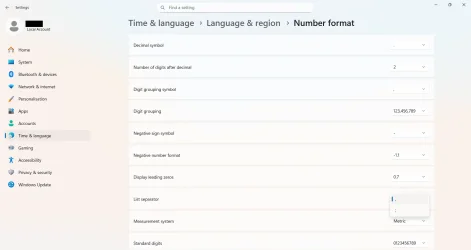
Screenshot 2026-03-04 164812.webp

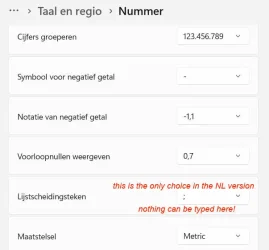
If however I switch the Windows display language to an European one that normally uses the semicolon as list separator symbol, then I get no choice anymore. The semicolon is set as list separator symbol, and this seemingly cannot be changed (see screenshot below).
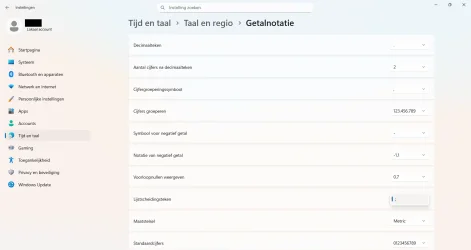
Schermafbeelding 2026-03-04 172350.webp

I don't think it used to be like this in the past. I distinctly remember being able to set a comma as list separator also when using this display language.

What could be the solution here? How could I get the option to set a comma as list separator symbol back?
 
Windows Build/Version
Windows 11, version 25H2, build 26200.7840

My Computer

System One

  • OS
    Windows 11
    Computer type
    Laptop
    Manufacturer/Model
    Lenovo
I did a test on that, found out that you have to change this registry value:
Location in the registry: HKEY_CURRENT_USER\Control Panel\International
Very many settings for the language are listed here.
Value to change for List separator: sList
default value for Dutch: ";"
changed value: ","

A registry file for the change I attached to this post.
The files have a .txt extra as extension.
Remove that to make it behave as normal registry files.

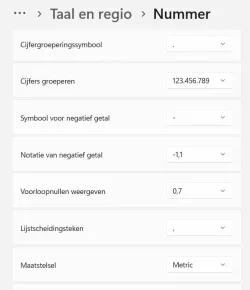
The language part will now look like this:

001161.webp
Be aware that if you change the 'lijstscheidingsteken' back to ";" via this settings menu, you need to run the registryfile again.

I did not test if this is really working in programs that use this option. Hopefully it does.

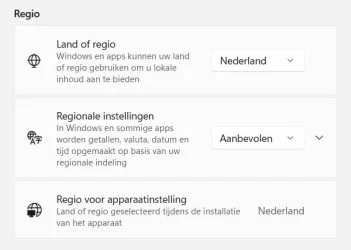
Another method would be to change the "Regionale instellingen" here:

001162.webp
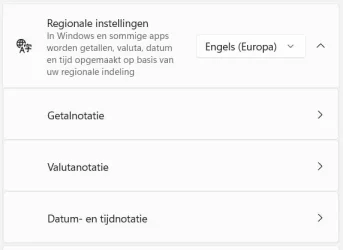
Change it from 'Aanbevolen' into (example) Engels Europa:

001164.webp
After that you'll have to click "Regionale Instellingen" and change all kinds of values (because now those are on English):

001165.webp
This may be a more user friendly way, but I did not look if all values can be set to what is normal for Dutch.
 

Attachments

My Computer

System One

  • OS
    Windows 11 Pro 25H2 26200.8457
    Computer type
    PC/Desktop
    Manufacturer/Model
    Build by vendor to my specs
    CPU
    AMD Ryzen 7 5700G
    Motherboard
    MSI PRO B550M-P Gen3
    Memory
    Kingston FURY Beast 2x16GB DIMM DDR4 2666 CL16
    Graphics Card(s)
    MSI GeForce GT 730 2GB LP V1
    Sound Card
    Creative Sound Blaster Audigy FX
    Monitor(s) Displays
    Samsung S24E450F 24"
    Screen Resolution
    1920 x 1080
    Hard Drives
    1. SSD Crucial P5 Plus 500GB PCIe M.2
    2. SSD-SATA Crucial MX500-2TB
    PSU
    Corsair CV650W
    Case
    Cooler Master Silencio S400
    Cooling
    Cooler Master Hyper H412R with Be Quiet Pure Wings 2 PWM BL038 fan
    Keyboard
    Cherry Stream (wired, scissor keys)
    Mouse
    Asus WT465 (wireless)
    Internet Speed
    70 Mbps down / 80 Mbps up
    Browser
    Firefox 130.0
    Antivirus
    F-Secure (Internetprovider version)
    Other Info
    Router: FRITZBox 7490
    Oracle VirtualBox 7 for testing software on Win 10 or 11
I did a test on that, found out that you have to change this registry value:
Location in the registry: HKEY_CURRENT_USER\Control Panel\International
Very many settings for the language are listed here.
Value to change for List separator: sList
default value for Dutch: ";"
changed value: ","
I'm going to try this as soon as I have a quiet moment again. Thanks a lot!

I guess I use a bit of a mix of region settings, which is why it's important for me to be able to configure all number and date/time format settings on an individual basis.

I have adopted the dot as decimal separator symbol and the comma as list separator from international English a long time ago (again, was really bothered by having semicolons in a file that is literally called a Comma-Separated Values file). On the other hand I don't ever see myself adopting for example the month-day-year format (which I'll never stop finding confusing) for dates.
 

My Computer

System One

  • OS
    Windows 11
    Computer type
    Laptop
    Manufacturer/Model
    Lenovo
The solution provided by Kees was successful in resolving the issue, so I'll annotate this thread with solved.
 

My Computer

System One

  • OS
    Windows 11
    Computer type
    Laptop
    Manufacturer/Model
    Lenovo
This will 100% fix this issue -

Steps:

Go to Control Panel -> Clock and Region -> Region -Under the Formats Tab, click "Additional Settings" -> Under the Numbers Tab, change List Separator from "," to "|" or whatever you want and click Apply and ok, as shown in the images. Close, reopen Excel and save the document. Notepad should now open the doc using | or whatever you set as the separator.

image


image
 

My Computer

System One

  • OS
    Windows
    Computer type
    PC/Desktop
This will 100% fix this issue -
My impression is that you did not understand the situation.
You have a solution for the English version of the system.
In the EN version, several options for List saparator are available.

But @tidozonoada wants to use the system in the NL language and in that version there are much less options for the List separator.
It seems to me that your description does not solve that problem!
 

My Computer

System One

  • OS
    Windows 11 Pro 25H2 26200.8457
    Computer type
    PC/Desktop
    Manufacturer/Model
    Build by vendor to my specs
    CPU
    AMD Ryzen 7 5700G
    Motherboard
    MSI PRO B550M-P Gen3
    Memory
    Kingston FURY Beast 2x16GB DIMM DDR4 2666 CL16
    Graphics Card(s)
    MSI GeForce GT 730 2GB LP V1
    Sound Card
    Creative Sound Blaster Audigy FX
    Monitor(s) Displays
    Samsung S24E450F 24"
    Screen Resolution
    1920 x 1080
    Hard Drives
    1. SSD Crucial P5 Plus 500GB PCIe M.2
    2. SSD-SATA Crucial MX500-2TB
    PSU
    Corsair CV650W
    Case
    Cooler Master Silencio S400
    Cooling
    Cooler Master Hyper H412R with Be Quiet Pure Wings 2 PWM BL038 fan
    Keyboard
    Cherry Stream (wired, scissor keys)
    Mouse
    Asus WT465 (wireless)
    Internet Speed
    70 Mbps down / 80 Mbps up
    Browser
    Firefox 130.0
    Antivirus
    F-Secure (Internetprovider version)
    Other Info
    Router: FRITZBox 7490
    Oracle VirtualBox 7 for testing software on Win 10 or 11
My impression is that you did not understand the situation.
You have a solution for the English version of the system.
In the EN version, several options for List saparator are available.

But @tidozonoada wants to use the system in the NL language and in that version there are much less options for the List separator.
It seems to me that your description does not solve that problem!
My EN version had only "," in the list separator, and we wanted to use "|". Using my method allows you to create and select any symbol for the list separator.

Meaning they can just input a comma and apply the config. When I say input, I mean type it with your keyboard, do not select from the dropdown. This then sets and allows the use of "," within the list separator.
 

My Computer

System One

  • OS
    Windows
    Computer type
    PC/Desktop
My EN version had only "," in the list separator, and we wanted to use "|". Using my method allows you to create and select any symbol for the list separator.
You can't use the EN version for telling what can de done in the NL version!

In the NL version, there is no option to type a character in the field of the list separator.
The only option is ";", all other characters have to be done via some way around!

001359.webp

Or would you force people in the Netherlands to use the English version, just because of this separator sign?
Why then did MS bring out a Dutch version?
 

My Computer

System One

  • OS
    Windows 11 Pro 25H2 26200.8457
    Computer type
    PC/Desktop
    Manufacturer/Model
    Build by vendor to my specs
    CPU
    AMD Ryzen 7 5700G
    Motherboard
    MSI PRO B550M-P Gen3
    Memory
    Kingston FURY Beast 2x16GB DIMM DDR4 2666 CL16
    Graphics Card(s)
    MSI GeForce GT 730 2GB LP V1
    Sound Card
    Creative Sound Blaster Audigy FX
    Monitor(s) Displays
    Samsung S24E450F 24"
    Screen Resolution
    1920 x 1080
    Hard Drives
    1. SSD Crucial P5 Plus 500GB PCIe M.2
    2. SSD-SATA Crucial MX500-2TB
    PSU
    Corsair CV650W
    Case
    Cooler Master Silencio S400
    Cooling
    Cooler Master Hyper H412R with Be Quiet Pure Wings 2 PWM BL038 fan
    Keyboard
    Cherry Stream (wired, scissor keys)
    Mouse
    Asus WT465 (wireless)
    Internet Speed
    70 Mbps down / 80 Mbps up
    Browser
    Firefox 130.0
    Antivirus
    F-Secure (Internetprovider version)
    Other Info
    Router: FRITZBox 7490
    Oracle VirtualBox 7 for testing software on Win 10 or 11
You can't use the EN version for telling what can de done in the NL version!

In the NL version, there is no option to type a character in the field of the list separator.
The only option is ";", all other characters have to be done via some way around!

View attachment 169373

Or would you force people in the Netherlands to use the English version, just because of this separator sign?
Why then did MS bring out a Dutch version?

I'm not sure you have read my instructions properly...

You're going through Windows settings, not through the Control Panel.

Go to Control Panel -> Clock and Region -> Region - Under the Formats Tab, click "Additional Settings" -> Under the Numbers Tab, change List Separator from "," to "|" or whatever you want and click Apply and ok, as shown in the images.

If you then go back to the settings section you're on you will see the new List seperator and it should be selected, might need a reboot if it's not there.
 

My Computer

System One

  • OS
    Windows
    Computer type
    PC/Desktop
Did try that and indeed: that's functioning.
Problem was that the Control Panel in Dutch is not a similar word: in Dutch it is 'Configuratiescherm'
Windows does not show the right options if 'Control Panel' is filled in in the search field of the start menu.
And the regular Windows menu does not show that panel anymore...

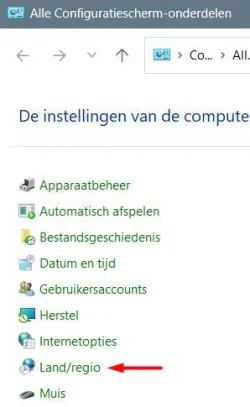
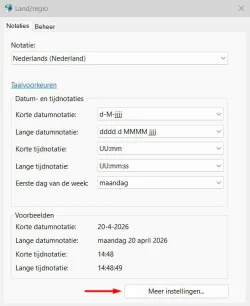
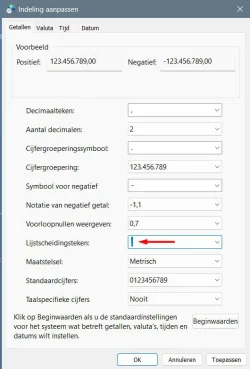
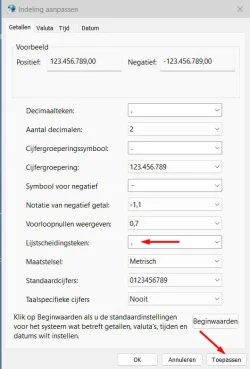
I now made a step by step instruction for it in Dutch.

Start 'Configuratiescherm' (can be reached by filling in that word in the search field in the start menu).

1.webp

Click 'Land/regio'

2.webp

Click 'Meer instellingen...'

3.webp

Click the semicolon in 'Lijstscheidingsteken'
Type a comma (or whatever character is wanted)

4.webp

Click 'Toepassen' or 'OK'

This will function as long as the 'Configuratiescherm' is available on Windows computers. Already for a long time MS is taking away functions from that panel.

And if you change it back via the normal settings, it will be gone again.

Thanks for the addition!
 

My Computer

System One

  • OS
    Windows 11 Pro 25H2 26200.8457
    Computer type
    PC/Desktop
    Manufacturer/Model
    Build by vendor to my specs
    CPU
    AMD Ryzen 7 5700G
    Motherboard
    MSI PRO B550M-P Gen3
    Memory
    Kingston FURY Beast 2x16GB DIMM DDR4 2666 CL16
    Graphics Card(s)
    MSI GeForce GT 730 2GB LP V1
    Sound Card
    Creative Sound Blaster Audigy FX
    Monitor(s) Displays
    Samsung S24E450F 24"
    Screen Resolution
    1920 x 1080
    Hard Drives
    1. SSD Crucial P5 Plus 500GB PCIe M.2
    2. SSD-SATA Crucial MX500-2TB
    PSU
    Corsair CV650W
    Case
    Cooler Master Silencio S400
    Cooling
    Cooler Master Hyper H412R with Be Quiet Pure Wings 2 PWM BL038 fan
    Keyboard
    Cherry Stream (wired, scissor keys)
    Mouse
    Asus WT465 (wireless)
    Internet Speed
    70 Mbps down / 80 Mbps up
    Browser
    Firefox 130.0
    Antivirus
    F-Secure (Internetprovider version)
    Other Info
    Router: FRITZBox 7490
    Oracle VirtualBox 7 for testing software on Win 10 or 11
I can confirm that the solution suggested by RandomUser12345 and expanded upon by Kees indeed works.
 

My Computer

System One

  • OS
    Windows 11
    Computer type
    Laptop
    Manufacturer/Model
    Lenovo
Back
Top Bottom