Solved Settings App - Crash - Graphics Settings


Anaksy

Well-known member
Member
Local time
5:00 AM
Posts
81
OS
Windows 11 Home
Hey Guys,

When I go to the Settings App -> System -> Graphics the app crashes and it closes.
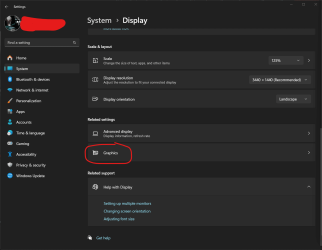
1729108969543.png

I was able to get the error log in the "Event Viewer", but I have no idea where to go from here.

1729109058726.png

You guys have any idea what it could be?
 
Windows Build/Version
Version 24H2 (OS Build 26100.2033)

My Computer

System One

  • OS
    Windows 11 Home
    Computer type
    PC/Desktop
    CPU
    AMD Ryzen 7 7700
    Motherboard
    ASUS TUF GAMING B650M-PLUS WIFI
    Memory
    Kingstone Fury 4x8 32GB DDR5 6000MT/s
    Graphics Card(s)
    XFX SPEEDSTER MERC 310 AMD Radeon™ RX 7900 XT
    Screen Resolution
    2k
    Hard Drives
    Samsung SSD 990 PRO
    SAMSUNG MZVLQ512HBLU-00B
    PSU
    CORSAIR RM750e
    Case
    LIAN LI & DAN A3-mATX

Probably a corrupted Windows files.

Win Key + X - > Terminal (as Admin) and run the following commands one by one:

Dism.exe /Online /Cleanup-image /Scanhealth

Dism.exe /Online /Cleanup-Image /CheckHealth

Dism.exe /Online /Cleanup-Image /RestoreHealth

sfc /scannow
 

My Computer

System One

  • OS
    WinDOS 25H2
    Computer type
    Laptop
    CPU
    Intel & AMD
    Memory
    SO-DIMM SK Hynix 15.8 GB Dual-Channel DDR4-2666 (2 x 8 GB) 1329MHz (19-19-19-43)
    Graphics Card(s)
    nVidia RTX 2060 6GB Mobile GPU (TU106M)
    Sound Card
    Onbord Realtek ALC1220
    Screen Resolution
    1920 x 1080
    Hard Drives
    1x Samsung PM981 NVMe PCIe M.2 512GB / 1x Seagate Expansion ST1000LM035 1TB
Probably a corrupted Windows files.

Win Key + X - > Terminal (as Admin) and run the following commands one by one:

Dism.exe /Online /Cleanup-image /Scanhealth

Dism.exe /Online /Cleanup-Image /CheckHealth

Dism.exe /Online /Cleanup-Image /RestoreHealth

sfc /scannow
I did this already. And the strangest thing is that running "sfc /scannow" returns this message below regardless of how many times I run it. I have even try doing safe mode, but it does not change. It always returns me this message. Any thoughts?

1729111523935.png
 

My Computer

System One

  • OS
    Windows 11 Home
    Computer type
    PC/Desktop
    CPU
    AMD Ryzen 7 7700
    Motherboard
    ASUS TUF GAMING B650M-PLUS WIFI
    Memory
    Kingstone Fury 4x8 32GB DDR5 6000MT/s
    Graphics Card(s)
    XFX SPEEDSTER MERC 310 AMD Radeon™ RX 7900 XT
    Screen Resolution
    2k
    Hard Drives
    Samsung SSD 990 PRO
    SAMSUNG MZVLQ512HBLU-00B
    PSU
    CORSAIR RM750e
    Case
    LIAN LI & DAN A3-mATX

My Computer

System One

  • OS
    Windows 11 Pro Insider 64 bit 25H2 26200.5742
    Computer type
    PC/Desktop
    Manufacturer/Model
    Gigabyte Z390 UD
    CPU
    Intel Core i7 9700K 3.60
    Motherboard
    Gigabyte Z390 UD
    Memory
    16 GB
    Graphics Card(s)
    nVidia GEForce RTX 2060 Super
    Sound Card
    onboard
    Monitor(s) Displays
    Two 27" Dell 4K monitors
    Screen Resolution
    3840 x 2160
    Hard Drives
    M.2 NVME SSD, 500 GB; Two 2TB Mechanical HDD's
    PSU
    850w PSU
    Case
    Cyberpower PC
    Cooling
    Water cooled
    Keyboard
    Backlit Cyberpower gaming keyboard
    Mouse
    Backlit Cyberpower gaming mouse
    Internet Speed
    1 GB mbps
    Browser
    Brave
    Antivirus
    Windows Security
I did this already. And the strangest thing is that running "sfc /scannow" returns this message below regardless of how many times I run it. I have even try doing safe mode, but it does not change. It always returns me this message. Any thoughts?

View attachment 112817
Checking the logs I found this:
You guys have any idea?

[l:31]'Microsoft.Web.WebView2.Core.dll' do not match.
Expected: {l:32 ml:33 b:a46788e94463899b6799304178a634643b20949cc7d378938db8abce8f69d17e}.
Actual: {l:32 b:50a5c14fd4da7116a2072d12cb94c258354d0237979d5d5afa979be740d118f5}.
2024-10-16 14:44:47, Info CSI 000001e4 [SR] Repairing file \??\C:\WINDOWS\SystemApps\Microsoft.WindowsAppRuntime.CBS_8wekyb3d8bbwe\\Microsoft.Web.WebView2.Core.dll from store
2024-10-16 14:44:47, Info CSI 000001e5 Hashes for file member
 

My Computer

System One

  • OS
    Windows 11 Home
    Computer type
    PC/Desktop
    CPU
    AMD Ryzen 7 7700
    Motherboard
    ASUS TUF GAMING B650M-PLUS WIFI
    Memory
    Kingstone Fury 4x8 32GB DDR5 6000MT/s
    Graphics Card(s)
    XFX SPEEDSTER MERC 310 AMD Radeon™ RX 7900 XT
    Screen Resolution
    2k
    Hard Drives
    Samsung SSD 990 PRO
    SAMSUNG MZVLQ512HBLU-00B
    PSU
    CORSAIR RM750e
    Case
    LIAN LI & DAN A3-mATX

I did this already. And the strangest thing is that running "sfc /scannow" returns this message below regardless of how many times I run it. I have even try doing safe mode, but it does not change. It always returns me this message. Any thoughts?

View attachment 112817
Those commands are an ointment for specific corrupted Windows files. If the issue goes deeper - an In-place upgrade could be the safest bet...


My Computer

System One

  • OS
    WinDOS 25H2
    Computer type
    Laptop
    CPU
    Intel & AMD
    Memory
    SO-DIMM SK Hynix 15.8 GB Dual-Channel DDR4-2666 (2 x 8 GB) 1329MHz (19-19-19-43)
    Graphics Card(s)
    nVidia RTX 2060 6GB Mobile GPU (TU106M)
    Sound Card
    Onbord Realtek ALC1220
    Screen Resolution
    1920 x 1080
    Hard Drives
    1x Samsung PM981 NVMe PCIe M.2 512GB / 1x Seagate Expansion ST1000LM035 1TB
Those commands are an ointment for specific corrupted Windows files. If the issue goes deeper - an In-place upgrade could be the safest bet...

I am already on the latest. 24H2 and the latest cumulative update.
 

My Computer

System One

  • OS
    Windows 11 Home
    Computer type
    PC/Desktop
    CPU
    AMD Ryzen 7 7700
    Motherboard
    ASUS TUF GAMING B650M-PLUS WIFI
    Memory
    Kingstone Fury 4x8 32GB DDR5 6000MT/s
    Graphics Card(s)
    XFX SPEEDSTER MERC 310 AMD Radeon™ RX 7900 XT
    Screen Resolution
    2k
    Hard Drives
    Samsung SSD 990 PRO
    SAMSUNG MZVLQ512HBLU-00B
    PSU
    CORSAIR RM750e
    Case
    LIAN LI & DAN A3-mATX

BTW which Windows Build are you using?! 🤔
 

My Computer

System One

  • OS
    WinDOS 25H2
    Computer type
    Laptop
    CPU
    Intel & AMD
    Memory
    SO-DIMM SK Hynix 15.8 GB Dual-Channel DDR4-2666 (2 x 8 GB) 1329MHz (19-19-19-43)
    Graphics Card(s)
    nVidia RTX 2060 6GB Mobile GPU (TU106M)
    Sound Card
    Onbord Realtek ALC1220
    Screen Resolution
    1920 x 1080
    Hard Drives
    1x Samsung PM981 NVMe PCIe M.2 512GB / 1x Seagate Expansion ST1000LM035 1TB

My Computer

System One

  • OS
    Windows 11 Home
    Computer type
    PC/Desktop
    CPU
    AMD Ryzen 7 7700
    Motherboard
    ASUS TUF GAMING B650M-PLUS WIFI
    Memory
    Kingstone Fury 4x8 32GB DDR5 6000MT/s
    Graphics Card(s)
    XFX SPEEDSTER MERC 310 AMD Radeon™ RX 7900 XT
    Screen Resolution
    2k
    Hard Drives
    Samsung SSD 990 PRO
    SAMSUNG MZVLQ512HBLU-00B
    PSU
    CORSAIR RM750e
    Case
    LIAN LI & DAN A3-mATX

Checking the logs I found this:
You guys have any idea?

[l:31]'Microsoft.Web.WebView2.Core.dll' do not match.
Expected: {l:32 ml:33 b:a46788e94463899b6799304178a634643b20949cc7d378938db8abce8f69d17e}.
Actual: {l:32 b:50a5c14fd4da7116a2072d12cb94c258354d0237979d5d5afa979be740d118f5}.
2024-10-16 14:44:47, Info CSI 000001e4 [SR] Repairing file \??\C:\WINDOWS\SystemApps\Microsoft.WindowsAppRuntime.CBS_8wekyb3d8bbwe\\Microsoft.Web.WebView2.Core.dll from store
2024-10-16 14:44:47, Info CSI 000001e5 Hashes for file member
It appears to be a 24H2 bug.


My Computer

System One

  • OS
    Windows 11 Home
    Computer type
    PC/Desktop
    CPU
    AMD Ryzen 7 7700
    Motherboard
    ASUS TUF GAMING B650M-PLUS WIFI
    Memory
    Kingstone Fury 4x8 32GB DDR5 6000MT/s
    Graphics Card(s)
    XFX SPEEDSTER MERC 310 AMD Radeon™ RX 7900 XT
    Screen Resolution
    2k
    Hard Drives
    Samsung SSD 990 PRO
    SAMSUNG MZVLQ512HBLU-00B
    PSU
    CORSAIR RM750e
    Case
    LIAN LI & DAN A3-mATX
I am already on the latest. 24H2 and the latest cumulative update.
That solution is also meant for troubleshooting.

Oh i see, you're on Windows Mess Build! If you look around - there's dozens of topics with all kinds of issues related to this update (24H2). Honestly, if i was you - i would go back to 23H2 - you still have 1 year of support for this build. At least wait till they release a major update - fixing the pile of issues introduced with 24H2. You're basically... beta testing a broken Windows build - even tho, technically - it's officially resealed to the public (in some parts - and the main image/ISO page).
 

My Computer

System One

  • OS
    WinDOS 25H2
    Computer type
    Laptop
    CPU
    Intel & AMD
    Memory
    SO-DIMM SK Hynix 15.8 GB Dual-Channel DDR4-2666 (2 x 8 GB) 1329MHz (19-19-19-43)
    Graphics Card(s)
    nVidia RTX 2060 6GB Mobile GPU (TU106M)
    Sound Card
    Onbord Realtek ALC1220
    Screen Resolution
    1920 x 1080
    Hard Drives
    1x Samsung PM981 NVMe PCIe M.2 512GB / 1x Seagate Expansion ST1000LM035 1TB
That solution is also meant for troubleshooting.

Oh i see, you're on Windows Mess Build! If you look around - there's dozens of topics with all kinds of issues related to this update (24H2). Honestly, if i was you - i would go back to 23H2 - you still have 1 year of support for this build. At least wait till they release a major update - fixing the pile of issues introduced with 24H2. You're basically... beta testing a broken Windows build - even tho, technically - it's officially resealed to the public (in some parts - and the main image/ISO page).
Oh rubbish.... :weary:
 

My Computer

System One

  • OS
    Windows 11 Home
    Computer type
    PC/Desktop
    CPU
    AMD Ryzen 7 7700
    Motherboard
    ASUS TUF GAMING B650M-PLUS WIFI
    Memory
    Kingstone Fury 4x8 32GB DDR5 6000MT/s
    Graphics Card(s)
    XFX SPEEDSTER MERC 310 AMD Radeon™ RX 7900 XT
    Screen Resolution
    2k
    Hard Drives
    Samsung SSD 990 PRO
    SAMSUNG MZVLQ512HBLU-00B
    PSU
    CORSAIR RM750e
    Case
    LIAN LI & DAN A3-mATX
That solution is also meant for troubleshooting.

Oh i see, you're on Windows Mess Build! If you look around - there's dozens of topics with all kinds of issues related to this update (24H2). Honestly, if i was you - i would go back to 23H2 - you still have 1 year of support for this build. At least wait till they release a major update - fixing the pile of issues introduced with 24H2. You're basically... beta testing a broken Windows build - even tho, technically - it's officially resealed to the public (in some parts - and the main image/ISO page).
Is it still possible to download Windows 11 23H2 from Microsoft?
Because when I go to their website, I only see 24H2 version available.
 

My Computer

System One

  • OS
    Windows 11 Home
    Computer type
    PC/Desktop
    CPU
    AMD Ryzen 7 7700
    Motherboard
    ASUS TUF GAMING B650M-PLUS WIFI
    Memory
    Kingstone Fury 4x8 32GB DDR5 6000MT/s
    Graphics Card(s)
    XFX SPEEDSTER MERC 310 AMD Radeon™ RX 7900 XT
    Screen Resolution
    2k
    Hard Drives
    Samsung SSD 990 PRO
    SAMSUNG MZVLQ512HBLU-00B
    PSU
    CORSAIR RM750e
    Case
    LIAN LI & DAN A3-mATX

My Computer

System One

  • OS
    Windows 11 Pro Insider 64 bit 25H2 26200.5742
    Computer type
    PC/Desktop
    Manufacturer/Model
    Gigabyte Z390 UD
    CPU
    Intel Core i7 9700K 3.60
    Motherboard
    Gigabyte Z390 UD
    Memory
    16 GB
    Graphics Card(s)
    nVidia GEForce RTX 2060 Super
    Sound Card
    onboard
    Monitor(s) Displays
    Two 27" Dell 4K monitors
    Screen Resolution
    3840 x 2160
    Hard Drives
    M.2 NVME SSD, 500 GB; Two 2TB Mechanical HDD's
    PSU
    850w PSU
    Case
    Cyberpower PC
    Cooling
    Water cooled
    Keyboard
    Backlit Cyberpower gaming keyboard
    Mouse
    Backlit Cyberpower gaming mouse
    Internet Speed
    1 GB mbps
    Browser
    Brave
    Antivirus
    Windows Security

My Computer

System One

  • OS
    Windows 11 Home
    Computer type
    PC/Desktop
    CPU
    AMD Ryzen 7 7700
    Motherboard
    ASUS TUF GAMING B650M-PLUS WIFI
    Memory
    Kingstone Fury 4x8 32GB DDR5 6000MT/s
    Graphics Card(s)
    XFX SPEEDSTER MERC 310 AMD Radeon™ RX 7900 XT
    Screen Resolution
    2k
    Hard Drives
    Samsung SSD 990 PRO
    SAMSUNG MZVLQ512HBLU-00B
    PSU
    CORSAIR RM750e
    Case
    LIAN LI & DAN A3-mATX
Is it still possible to download Windows 11 23H2 from Microsoft?
Because when I go to their website, I only see 24H2 version available.
From the public page No. But there's other ways to get it. Here, someone asked same question and many answered it not so long ago:


My Computer

System One

  • OS
    WinDOS 25H2
    Computer type
    Laptop
    CPU
    Intel & AMD
    Memory
    SO-DIMM SK Hynix 15.8 GB Dual-Channel DDR4-2666 (2 x 8 GB) 1329MHz (19-19-19-43)
    Graphics Card(s)
    nVidia RTX 2060 6GB Mobile GPU (TU106M)
    Sound Card
    Onbord Realtek ALC1220
    Screen Resolution
    1920 x 1080
    Hard Drives
    1x Samsung PM981 NVMe PCIe M.2 512GB / 1x Seagate Expansion ST1000LM035 1TB
From the public page No. But there's other ways to get it. Here, someone asked same question and many answered it not so long ago:

Thank you!
 

My Computer

System One

  • OS
    Windows 11 Home
    Computer type
    PC/Desktop
    CPU
    AMD Ryzen 7 7700
    Motherboard
    ASUS TUF GAMING B650M-PLUS WIFI
    Memory
    Kingstone Fury 4x8 32GB DDR5 6000MT/s
    Graphics Card(s)
    XFX SPEEDSTER MERC 310 AMD Radeon™ RX 7900 XT
    Screen Resolution
    2k
    Hard Drives
    Samsung SSD 990 PRO
    SAMSUNG MZVLQ512HBLU-00B
    PSU
    CORSAIR RM750e
    Case
    LIAN LI & DAN A3-mATX
Hi,

I was having the same issue and found it was the Asus Armoury Software. I looked in the registry and found this line showing GPUPreference=1 in

Code:
[HKEY_CURRENT_USER\Software\Microsoft\DirectX\UserGpuPreferences]
"C:\\Program Files (x86)\\ASUS\\ArmouryDevice\\asus_framework.exe"="GpuPreference=1;"

All my other game settings showed GPUPreference=2.

Code:
"C:\\Program Files (x86)\\Steam\\steamapps\\common\\OpenVR\\bin\\win64\\vrdashboard.exe"="GpuPreference=2;"
"C:\\Program Files (x86)\\Steam\\SteamApps\\common\\MicrosoftFlightSimulator\\FlightSimulator.exe"="AutoHDREnable=1;GpuPreference=2;"
"C:\\Program Files (x86)\\Steam\\SteamApps\\common\\Helldivers 2\\bin\\helldivers2.exe"="SwapEffectUpgradeEnable=1;GpuPreference=2;"

I deleted the Armoury reference in Regedit, rebooted and no problems since.

Hope this helps someone.
 

My Computer

System One

  • OS
    Windows 11
    Computer type
    PC/Desktop
    Manufacturer/Model
    Home made Intel
I have been struggling with this issue since I upgraded from 23H2 -> 24H2 a few days ago: 7/10 times Graphics panel freezed and crashed! So annoying...
Applied @Mac Mac solution deleting:
Code:
[HKEY_CURRENT_USER\Software\Microsoft\DirectX\UserGpuPreferences]
"C:\\Program Files (x86)\\ASUS\\ArmouryDevice\\asus_framework.exe"="GpuPreference=1;"
and it seems to have worked! Doesn't happen anymore!

Advanced Optiums ASUS laptop with i9-13980HX + 4090 laptop with Armoury Crate
 
Last edited:

My Computer

System One

  • OS
    Windows 11 Home
    Computer type
    Laptop
    Manufacturer/Model
    ASUS ROG SCAR 18
    CPU
    Intel i9-13980HX
    Memory
    32GB DDR5 5600MHz
    Graphics Card(s)
    NVidia GTX 4090 Laptop 256bit 16GB 175W
    Sound Card
    Realtek ALC285 + Dolby Atmos
    Monitor(s) Displays
    G-Sync NE180QDM-NZ2 18" 16:10, FreeSync Premium XiaoMi Mi 34" 21:9
    Screen Resolution
    2560x1600@240Hz (internal), 3440x1440@144Hz (external)
    Hard Drives
    NVMe Lexar NM790 1TB 6GB/s, NVMe Lexar NM790 4TB 6GB/s
    PSU
    330W (laptop PSU)
    Mouse
    ROG Strix Carry Wireless-BT mouse
    Other Info
    4K UHD USB Archgon Star Blu-Ray 4K UHD,
    8BitDo Arcade Stick,
    Vader 4 Pro controller
Hey Guys,

When I go to the Settings App -> System -> Graphics the app crashes and it closes.

View attachment 112813

I was able to get the error log in the "Event Viewer", but I have no idea where to go from here.

View attachment 112815

You guys have any idea what it could be?
Hi Friend!

I HAD this exact same issue!

If you uninstall Armoury Crate and Asus Framework it will fix this issue. It did for me at least. I don't know if I only needed to delete Armoury Crate though. Deleting framework may not be necessary but I deleted them both and all registry files and folders associated with them before I restarted and tested again. Zero issues since. I learned that deleting these could also fix other incompatibility issues with 24h2 as well. So far so good.

I did use REVO uninstaller program. After it uninstalls your chosen program via their native uninstaller, it searches out the registry keys and folders that are leftover in your system afterwards. I have been using the free version of REVO for over a decade with no problems. Look it up. Highly recommend. Just be careful when deleting the searched leftover registery etc... Just delete the search resulted bolded black files and never their "container above" as these containers may hold many other important files etc...

Hope this helps! Good Luck!

Best,
J
 

My Computer

System One

  • OS
    Windows 11
    Computer type
    PC/Desktop
Back
Top Bottom