JavaScript is disabled. For a better experience, please enable JavaScript in your browser before proceeding.
You are using an out of date browser. It may not display this or other websites correctly.
You should upgrade or use an
alternative browser .
ShareX vs Greenshot vs what else?
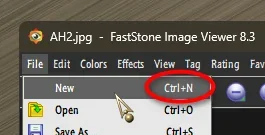
I cannot just close an Image and leave the program loaded
Ctrl+N...
Last edited: Jan 31, 2026
OS
Windows 11 Pro
Computer type
PC/Desktop
Manufacturer/Model
ASUS ROG Strix
Operating System
Windows 11 Pro
Computer type
Laptop
Manufacturer/Model
ASUS VivoBook
Jack of all trades
Power User
VIP
Thread Starter
You are the man . . .
I'm looking at a list of keyboard shortcuts from Google AI and Ctrl+N is not on it. So how did you find that out?
It's also not in the tutorial
OS
Windows 11 (up to date)
Computer type
PC/Desktop
Manufacturer/Model
Custom
CPU
Intel i5 12400
Motherboard
Gigabyte Z690 UA
Memory
Corsair Vengeance LPX 16GB
Graphics Card(s)
On Board the Z690
Sound Card
On Board
Monitor(s) Displays
43" Samsung tu7000
Screen Resolution
2560 x 1440
Hard Drives
SAMSUNG SSD 1TB NVMe M.2
PSU
Thermaltake smart 500w 80+
Case
LIAN LANCOOL_205M
Cooling
Bunch of fans . . . :o) (lights dont work)
Keyboard
Unicomp: Ultra Classic White Buckling Spring USB
Mouse
M510
Internet Speed
50mbps on Ethernet
Browser
Fire Fox
Antivirus
Windows
Other Info
Love this computer but I still prefer Win-7 like I love my old Lazy Boy Recliner . . . it just feels better.
Operating System
WIN-7-64BIT and Win-11 pro for testing on unsupported hardware
Computer type
PC/Desktop
Manufacturer/Model
Home built
CPU
i5-3570K CPU @ 3.40GHz, 3801 Mhz, 4 Core(s), 4 Logical Processor(s)
Motherboard
GA-Z77-HD3
Memory
16 GB - Crucial Ballistick 4GB PC3-14900 DDR3-1333 MHz
Graphics card(s)
NVIDIA GeForce GTX 1050
Sound Card
On Board
Monitor(s) Displays
ASUS VP278
Screen Resolution
1920 x 1080
Hard Drives
4 - internal Samsung 2.5" SSD, 1 WD HDD 7200 and some external drives
PSU
EVGA 550w
Case
Old Gygabyte Tower
Cooling
Yes
Keyboard
Unicomp - UNIOP4A USB (like the old IBM Model H that I started with)
Mouse
M510
Internet Speed
50mbps
Browser
Firefox
Antivirus
Windows
Other Info
The only thing it lack is USB-3.2 on the front face but it has 3.0 on the back
how did you find that out?
OS
Windows 11 Pro
Computer type
PC/Desktop
Manufacturer/Model
ASUS ROG Strix
Operating System
Windows 11 Pro
Computer type
Laptop
Manufacturer/Model
ASUS VivoBook
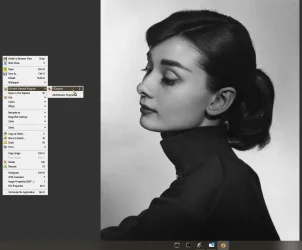
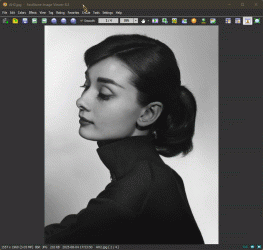
You can also use E, when viewing an image, to kick it over to FSCapture Draw Board...
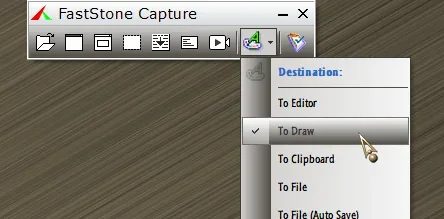
You have to have Draw Board as the default
Destination , though...
OS
Windows 11 Pro
Computer type
PC/Desktop
Manufacturer/Model
ASUS ROG Strix
Operating System
Windows 11 Pro
Computer type
Laptop
Manufacturer/Model
ASUS VivoBook
Jack of all trades
Power User
VIP
Thread Starter
Never would have guessed that
N ew would close what's open.
OS
Windows 11 (up to date)
Computer type
PC/Desktop
Manufacturer/Model
Custom
CPU
Intel i5 12400
Motherboard
Gigabyte Z690 UA
Memory
Corsair Vengeance LPX 16GB
Graphics Card(s)
On Board the Z690
Sound Card
On Board
Monitor(s) Displays
43" Samsung tu7000
Screen Resolution
2560 x 1440
Hard Drives
SAMSUNG SSD 1TB NVMe M.2
PSU
Thermaltake smart 500w 80+
Case
LIAN LANCOOL_205M
Cooling
Bunch of fans . . . :o) (lights dont work)
Keyboard
Unicomp: Ultra Classic White Buckling Spring USB
Mouse
M510
Internet Speed
50mbps on Ethernet
Browser
Fire Fox
Antivirus
Windows
Other Info
Love this computer but I still prefer Win-7 like I love my old Lazy Boy Recliner . . . it just feels better.
Operating System
WIN-7-64BIT and Win-11 pro for testing on unsupported hardware
Computer type
PC/Desktop
Manufacturer/Model
Home built
CPU
i5-3570K CPU @ 3.40GHz, 3801 Mhz, 4 Core(s), 4 Logical Processor(s)
Motherboard
GA-Z77-HD3
Memory
16 GB - Crucial Ballistick 4GB PC3-14900 DDR3-1333 MHz
Graphics card(s)
NVIDIA GeForce GTX 1050
Sound Card
On Board
Monitor(s) Displays
ASUS VP278
Screen Resolution
1920 x 1080
Hard Drives
4 - internal Samsung 2.5" SSD, 1 WD HDD 7200 and some external drives
PSU
EVGA 550w
Case
Old Gygabyte Tower
Cooling
Yes
Keyboard
Unicomp - UNIOP4A USB (like the old IBM Model H that I started with)
Mouse
M510
Internet Speed
50mbps
Browser
Firefox
Antivirus
Windows
Other Info
The only thing it lack is USB-3.2 on the front face but it has 3.0 on the back
Never would have guessed that N ew would close what's open.
Yeah, I'd expect a new window.
OS
Windows 11 Pro
Computer type
PC/Desktop
Manufacturer/Model
ASUS ROG Strix
Operating System
Windows 11 Pro
Computer type
Laptop
Manufacturer/Model
ASUS VivoBook
Well-known member
Pro User
VIP
You can also use E, when viewing an image, to kick it over to FSCapture Draw Board...
View attachment 161815
You have to have Draw Board as the default
Destination , though...
View attachment 161816
FastStone Image Viewer and FastStone Capture compliment each other well. The editors in both programs are very similar. Both are very intuitive and easy to use.
Some nice tips, by the way.
OS
Windows 11 Pro
Computer type
PC/Desktop
Manufacturer/Model
Stigg's Build
CPU
Intel Core i9-10900X
Motherboard
GIGABYTE X299X DESIGNARE 10G
Memory
Corsair 64 GB (4 x 16 GB) CMW64GX4M4C3000C15 Vengeance RGB Pro 3000Mhz DDR4
Graphics Card(s)
GIGABYTE GeForce GTX 1660 Super Mini ITX 6 GB OC
Sound Card
Realtek ALC1220
Monitor(s) Displays
Samsung 27" FHD LED FreeSync Gaming Monitor (LS27F350FHEXXY)
Screen Resolution
1920 x 1080
Hard Drives
Samsung 970 Pro Series 1TB M.2 2280 NVMe SSD
Western Digital Red Pro WD8003FFBX-68B9AN0 8 TB, 7200 RPM, SATA-III
PSU
Corsair HX1200 1200W 80 Plus Platinum
Case
Fractal Design Define 7 Black Solid Case
Cooling
Noctua NH-D15 Chromax Black
Keyboard
Razer Ornata V2
Mouse
Razer DeathAdder Essential
Internet Speed
FTTN 100Mbps / 40Mbps
Browser
Mozilla Firefox
Antivirus
N/A
Other Info
Logitech BRIO 4k Ultra HD USB-C Webcam
Operating System
Windows 10 Pro
Computer type
Laptop
Manufacturer/Model
ASUS ROG Zephyrus M GM501GS
CPU
Core i7-8750H
Motherboard
Zephyrus M GM501GS
Memory
SK Hynix 32 GB (2 x 16 GB) HMA82GS6CJR8N-VK 16 GB DDR4-2666 DDR4 SDRAM
Graphics card(s)
NVIDIA GeForce GTX 1070
Sound Card
Realtek ALC294
Monitor(s) Displays
AU Optronics B156HAN07.1 [15.6" LCD]
Screen Resolution
1920 x 1080
Hard Drives
Samsung MZVKW512HMJP-00000 512 GB, PCI-E 3.0 x4
Samsung SSD 860 QVO 4TB 4 TB, SATA-III
PSU
N/A
Case
N/A
Cooling
N/A
Keyboard
PC/AT Enhanced PS2 Keyboard (101/102-Key)
Mouse
Razer DeathAdder Essential
Internet Speed
FTTN 100Mbps / 40Mbps
Browser
Mozilla Firefox
Antivirus
N/A
Other Info
USB2.0 HD UVC Webcam
Both are very intuitive and easy to use.
And powerful! I don't think I've
ever had a $20 program this rich in features!
OS
Windows 11 Pro
Computer type
PC/Desktop
Manufacturer/Model
ASUS ROG Strix
Operating System
Windows 11 Pro
Computer type
Laptop
Manufacturer/Model
ASUS VivoBook
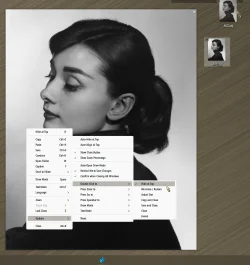
Quite often, I'll use
Pin To Screen , for various purposes, Side X Side compare, etc...,
and, there is a command line argument for it:
"C:\Program Files\ShareX\ShareX.exe" -PinToScreen "%1"
... right click to Escape...
However, FastStone has many more right click options in Pinned Mode...,
I wish there was a command line argument for it, but I haven't found it..., yet.
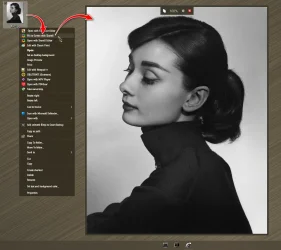
With FastStone, you simply drag the image to the Dock...
OS
Windows 11 Pro
Computer type
PC/Desktop
Manufacturer/Model
ASUS ROG Strix
Operating System
Windows 11 Pro
Computer type
Laptop
Manufacturer/Model
ASUS VivoBook