
- Local time
- 2:20 PM
- Posts
- 58
- OS
- Windows 11
In Edge Settings>System & Performance>System plus Edge Settings>System & Performance>Performance I have everything disabled. In Task Scheduler I have the two standard Edge scheduled tasks disabled. In Services I have the three standard Edge services disabled. There is nothing else to disable to stop Edge from running as a background processes.
After I disabled all of these things, yesterday when I started the PC, Edge did not start as a App and did not start running in the background as a process and Edge Gaming Assist was not running as a background process. Late in the morning I noticed that Edge and Edge Gaming Assist were running as background processes again.
Today I was able to figure it out, when you start the Elite Dangerous client from the Elite Dangerous launcher (press the "Play" button in the launcher) Edge and Edge Gaming assist starts running as background processes. See the below video. At time stamp 0:58 - 1:01 you can see that first Edge Gaming Assist starts and then Edge.
Personally I don't think Elite Dangerous should be starting Edge and Edge Gaming Assist running as a background processes. After I figured this out I also found out Edge and Edge Gaming Assist started running in the background from Steam launching my X Foundations game.
Below the video are screenshots of what has been disabled in Edge, Task Scheduler and Services.
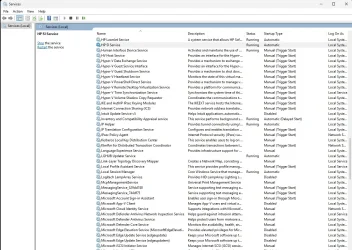
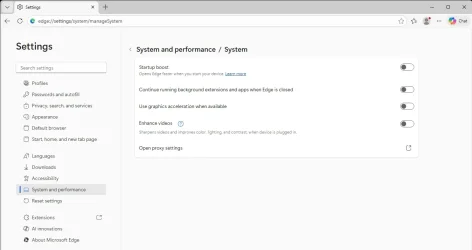
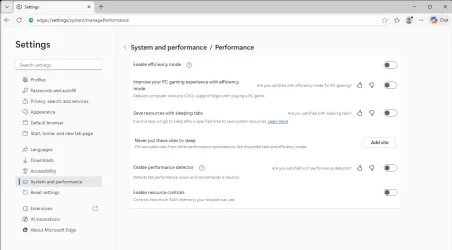
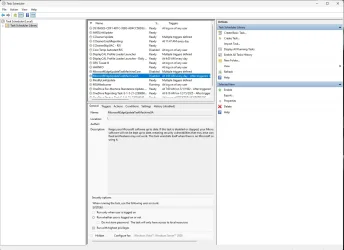
After I disabled all of these things, yesterday when I started the PC, Edge did not start as a App and did not start running in the background as a process and Edge Gaming Assist was not running as a background process. Late in the morning I noticed that Edge and Edge Gaming Assist were running as background processes again.
Today I was able to figure it out, when you start the Elite Dangerous client from the Elite Dangerous launcher (press the "Play" button in the launcher) Edge and Edge Gaming assist starts running as background processes. See the below video. At time stamp 0:58 - 1:01 you can see that first Edge Gaming Assist starts and then Edge.
Personally I don't think Elite Dangerous should be starting Edge and Edge Gaming Assist running as a background processes. After I figured this out I also found out Edge and Edge Gaming Assist started running in the background from Steam launching my X Foundations game.
Below the video are screenshots of what has been disabled in Edge, Task Scheduler and Services.
My Computer
At a glance
Windows 119800X3DGSkill Flare DDR5 64GB @ 30-40-40-96 @ 6000 MHzAsus TUF OC Edition RTX 5080
- OS
- Windows 11
- Computer type
- PC/Desktop
- Manufacturer/Model
- Custom
- CPU
- 9800X3D
- Motherboard
- Asus Crosshair X870E Hero
- Memory
- GSkill Flare DDR5 64GB @ 30-40-40-96 @ 6000 MHz
- Graphics Card(s)
- Asus TUF OC Edition RTX 5080
- Monitor(s) Displays
- Samsung Odyessy G9 49" DQHD (VA Panel)
- Screen Resolution
- 5120 * 1440
- Hard Drives
- Samsung 990Pro M.2 2280
- PSU
- Corsair HX 1000i
- Case
- Fractal Design Meshify 2XL
- Cooling
- Thermalright Peerless Assassin 140 Black
- Keyboard
- Corsair K100RGB
- Mouse
- Logitech G703
- Internet Speed
- 1 GB
- Browser
- Firefox
- Antivirus
- ESET NOD32






