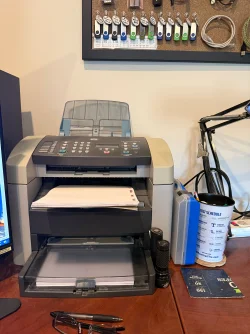
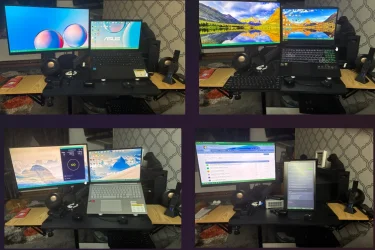
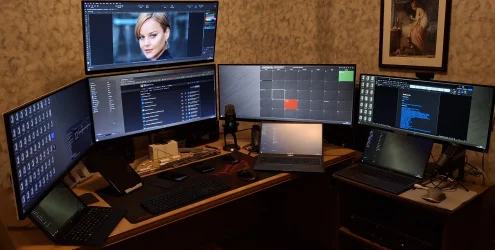
I'm not a gamer - I do computer repair. This is my downstairs basement home office. Most all equipment you see is inherited/salvaged/repurposed. The Dell Optiplex 3010 (i5) tower was part of an office cleanout/upgrade I did for a horse farm customer. Had good specs so I put a WD 500GB SSD in, installed Win10 (from 7), upgraded to 16MB RAM. It will probably run Windows 11 but I'm not in a hurry to do that. The two 27" ACER monitors I DID buy. The AIO printer is an HP LaserJet 3015 connected by USB. Also in the middle is a DiskStation DS215 (RAID1) password protected for temporary storage of customer data. Identical DiskStation unit is in upstairs office room with other two printers. That NAS holds my business and personal data.
Back to the picture... the station on the far right is a repair area and the single monitor is used to diagnose laptop video cards. The station on the far left is used for repair of desktop towers using the rollaway stand and cables to connect to the right-side monitor. The little monitor on the left is to test multi-display finctioning and also if I need to work on two desktop towers at the same time.
So nothing special or high-end - it's all very utility.
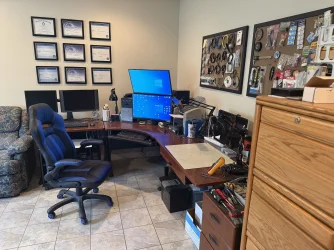
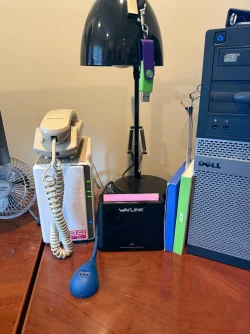
Back to the picture... the station on the far right is a repair area and the single monitor is used to diagnose laptop video cards. The station on the far left is used for repair of desktop towers using the rollaway stand and cables to connect to the right-side monitor. The little monitor on the left is to test multi-display finctioning and also if I need to work on two desktop towers at the same time.
So nothing special or high-end - it's all very utility.
My Computers
-
At a glance
Windows 11 25H2Intel Core™ i7-1165G7 (4C / 8T, 2.8 / 4.7GHz,...12GB Soldered DDR4-3200Integrated Intel® Iris® Xe Graphics- OS
- Windows 11 25H2
- Computer type
- Laptop
- Manufacturer/Model
- Lenovo Yoga 7 14ITL5 (82BH00DLUS)
- CPU
- Intel Core™ i7-1165G7 (4C / 8T, 2.8 / 4.7GHz, 12MB)
- Memory
- 12GB Soldered DDR4-3200
- Graphics Card(s)
- Integrated Intel® Iris® Xe Graphics
- Monitor(s) Displays
- 14" FHD (1920x1080) IPS 300nits Glossy, 72% NTSC, AGC Dragontrail™ Glass, Touch
- Screen Resolution
- 1920x1080
- Hard Drives
- 500 GB SSD
- Case
- Aluminum
- Cooling
- Single-fan
- Keyboard
- Backlit, internal
- Mouse
- Logitech M535
- Internet Speed
- With this laptop I usually test around 200/200 connected to UniFi UAP-AC-PRO ceiling units.
- Browser
- Chrome
- Antivirus
- Windows Security and my brain.
- Other Info
- I use this laptop mainly from my recliner. It's purpose is scheduling computer and TV services, closing TV work orders, remote customer support, research and recreation.
Printers in the office room on my main floor were both acquired from business customers who upgraded equipment, had me handle the upgrade and then haul away the replaced hardware. I have not purchased a printer for myself in 15 years.
Main: HP LaserJet P3010 (black & white, hardwired, networked)
Aux: HP Color LaserJet MFP M281fdw (color laser, fax, hardwired, networked)
Internet in my house is routed through a TP-Link AC3200 with radios disabled. Wireless access points are two (2) strategically-located UniFi UAP-AC-PRO ceiling units which cover my whole house including basement and front/back yards. Netgear gigabit switches and CAT6 cabling are used for wired purposes.
-
At a glance
Windows 10 22H2Intel(R) Core(TM) i5-3470 CPU @ 3.20GHz 3.20 GHz16 GB DDR3Intel(R) HD Graphics 2500- Operating System
- Windows 10 22H2
- Computer type
- PC/Desktop
- Manufacturer/Model
- Dell Optiplex 3010
- CPU
- Intel(R) Core(TM) i5-3470 CPU @ 3.20GHz 3.20 GHz
- Memory
- 16 GB DDR3
- Graphics card(s)
- Intel(R) HD Graphics 2500
- Sound Card
- Onboard
- Monitor(s) Displays
- ACER KG271 (x2)
- Screen Resolution
- 1920x1080
- Hard Drives
- WD 500GB SSD
- Keyboard
- Old Dell wireless
- Mouse
- Old Dell wired
- Internet Speed
- 500/500
- Browser
- Chrome
- Antivirus
- Windows Security and my brain
- Other Info
- This computer was acquired from a customer who cleaned out her office. I upgraded it and now use it in my downstairs computer-repair office.
My home office printer is an old HP LaserJet 3015. I acquired this after a customer passed away and his wife sold their house and downsized. She gave me all his equipment. I still help her with her tech issues.


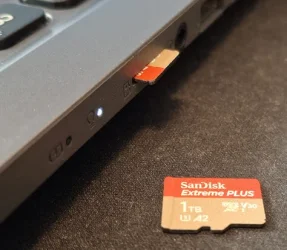






 (It's a thing.)