Solved Shut Down and Restart Computer with a File


linguaccia22

Well-known member
Member
Local time
5:34 PM
Posts
99
Location
Italy
OS
Windows 11 Pro 24H2
Hi everyone, can you help me create a file to turn off and restart the computer?
But I wanted to create a file that can also cancel me in case I change my mind about turning off or restarting the computer.

I created an icon for this operation but it immediately executes the command.
I wanted to create a command that takes 30 seconds to turn off the computer with the cancel button if in case I want to cancel the shutdown.
 
Windows Build/Version
Windows 11 Pro 23H2

My Computer My Computer

At a glance

Windows 11 Pro 24H2Intel Core i7-7700K 4.2GHzCorsair Vengeance (32 GB) DDR4, 3000 MHzMSI GeForce GTX 1080 Ti
OS
Windows 11 Pro 24H2
Computer type
PC/Desktop
CPU
Intel Core i7-7700K 4.2GHz
Motherboard
MSI Z270 Tomahawk
Memory
Corsair Vengeance (32 GB) DDR4, 3000 MHz
Graphics Card(s)
MSI GeForce GTX 1080 Ti
Sound Card
built-in Realtek HD audio
Monitor(s) Displays
LG 21:9
Screen Resolution
2560x1080 75Hz
Hard Drives
Samsung 980 PRO, 1 TB
Samsung 960 EVO, 250 GB
Western Digital Red 4TB
PSU
Evga Supernova 650 G3 Gold
Case
Kolink Unity Arena ARGB Case Mid-Tower
Cooling
Corsair Hydro H100i CW-9060025-WW
Keyboard
Logitech G512
Mouse
Logitech G G502 HERO
Internet Speed
1 Gigabit/s
Browser
Microsoft Edge
Antivirus
Windows Security
I created an icon for this operation but it immediately executes the command.
By default restart/shutdown command takes 60 secs to initiate, unless you specify the time.
Code:
shutdown /r /f /t 30
shutdown /s /f /t 30
Code:
shutdown /a
Switch /a aborts it. You could add pause between commands, so when you change your mind, ENTER will abort, like:
Code:
shutdown /s /f /t 30
pause
shutdown /a
 

My Computer My Computer

At a glance

Home2FH2CanAMD Ryzen 5 8600G (07/24)2x32GB Kingston FURY DDR5 5600 MHz CL36 @5200...ASROCK Radeon RX 6600 Challenger D 8G @48FPS ...
OS
Home2FH2Can
Computer type
PC/Desktop
CPU
AMD Ryzen 5 8600G (07/24)
Motherboard
ASROCK B650M-HDV/M.2 (07/24) BIOS 4.43 AGESA ComboAM5 1.3.0.1b Patch A (07/26)
Memory
2x32GB Kingston FURY DDR5 5600 MHz CL36 @5200 CL40 (07/24)
Graphics Card(s)
ASROCK Radeon RX 6600 Challenger D 8G @48FPS (08/24)
Sound Card
Creative Sound BlasterX AE-5 Plus (05/24)
Monitor(s) Displays
24" Philips 24M1N3200ZS/00 (05/24)
Screen Resolution
1920×1080@165Hz via DP1.4
Hard Drives
Kingston KC3000 NVMe 2TB (05/24)
ADATA XPG GAMMIX S11 Pro 512GB (07/19)
PSU
Seasonic Core GM 550 Gold (04/24)
Case
Fractal Design Define 7 Mini with 3x Noctua NF-P14s/12@555rpm (04/24)
Cooling
Noctua NH-U12S with Noctua NF-P12 (04/24)
Keyboard
HP Pavilion Wired Keyboard 300 (07/24) + Rabalux 76017 Parker (01/24)
Mouse
Logitech M330 Silent Plus (07/26)
Internet Speed
500/100 Mbps via RouterOS (05/21) & TCP Optimizer
Browser
Edge, Brave for YouTube, LibreWolf for FB
Antivirus
NextDNS blocking 1/3 Traffic
Other Info
Phone: Motorola Moto G86 (02/26)
Backup: Hasleo Backup Suite (PreOS)
Headphones: Sennheiser RS170 (09/10)
Chair: Huzaro Force 4.4 Grey Mesh (05/24)
Notifier: Xiaomi Mi Band 9 Milanese (10/24)
FlexCore USB-C 3.2 Gen 1 (M) to LAN (F) (08/25)
I created an icon for this operation but it immediately executes the command.
I wanted to create a command that takes 30 seconds to turn off the computer with the cancel button if in case I want to cancel the shutdown.
Not quite, but you can set a 30 second time out shutdown /r /t 30

And you can create another icon to abort the shutdown with the command shutdown /a

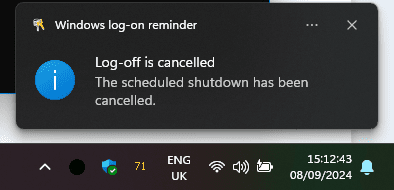
1725804806482.png

Type shutdown /? for more details.

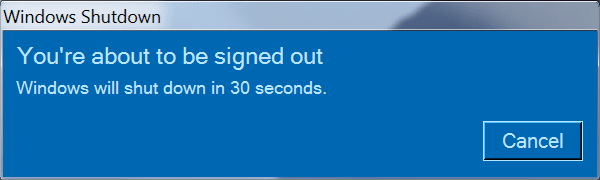
1725804623459.png

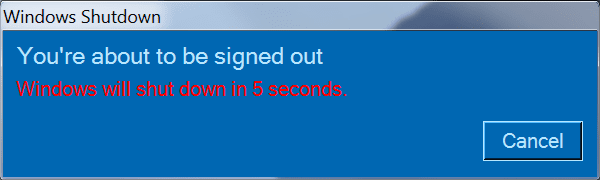
1725804633483.png
 

My Computers My Computers

  • At a glance

    Windows 11 HomeAMD Athlon Silver 3050U8GBRadeon Graphics
    OS
    Windows 11 Home
    Computer type
    Laptop
    Manufacturer/Model
    Acer Aspire 3 A315-23-R9VY
    CPU
    AMD Athlon Silver 3050U
    Memory
    8GB
    Graphics Card(s)
    Radeon Graphics
    Monitor(s) Displays
    laptop screen
    Screen Resolution
    1366x768 native resolution, up to 2560x1440 with Radeon Virtual Super Resolution
    Hard Drives
    1TB Samsung EVO 870 SSD (from April 2026: 250GB EVO 850)
    Internet Speed
    150 Mbps
    Browser
    Edge, Firefox
    Antivirus
    Defender
    Other Info
    UPDATE - 11 April 2026: due to lid hinges starting to break up this laptop has been retired from active duty. The OS with all software and files has been migrated to my System Seven in 'Other systems' to carry on as my general purpose 'main machine'.

    I've now clean installed 25H2 and used Garlin's scripts to update Secure Boot to CA 2023 and revoke the PCA 2011 certificates. It's new role is to test secure boot issues.

    Info for 2021-2026:
    fully 'Windows 11 ready' laptop. Windows 10 C: partition migrated from my old unsupported 'main machine' then upgraded to 11. A test migration ran Insider builds for 2 months. When 11 was released on 5th October 2021 it was re-imaged back to 10 and was offered the upgrade in Windows Update on 20th October. Windows Update offered the 22H2 Feature Update on 20th September 2022. It got the 23H2 Feature Update on 4th November 2023 through Windows Update, 24H2 on 3rd October 2024 through Windows Update by setting the Target Release Version for 24H2, and 25H2 on 30th September 2025 through Windows Update by setting the Target Release Version for 25H2.
  • At a glance

    Windows 11 ProIntel® Core™ i5-520M8GB(integrated graphics) Intel HD Graphics
    Operating System
    Windows 11 Pro
    Computer type
    Laptop
    Manufacturer/Model
    Dell Latitude E4310
    CPU
    Intel® Core™ i5-520M
    Motherboard
    0T6M8G
    Memory
    8GB
    Graphics card(s)
    (integrated graphics) Intel HD Graphics
    Screen Resolution
    1366x768
    Hard Drives
    500GB Crucial MX500 SSD
    Browser
    Firefox, Edge
    Antivirus
    Defender
    Other Info
    unsupported machine: Legacy bios, MBR, TPM 1.2, upgraded from W10 to W11 using W10/W11 hybrid install media workaround.

    In-place upgrade to 22H2 using ISO and a workaround.
    Feature Update to 23H2 by manually installing the Enablement Package.
    In-place upgrade to 24H2 using hybrid 23H2/24H2 install media.
    Upgraded to 25H2 by Enablement Package.

    Also running Insider Experimental 263xx and 29xxx builds and Windows 10 as native boot .vhdx.
  • My SYSTEM THREE is a Dell Latitude 5410, i7-10610U, 32GB RAM, 512GB NVMe ssd, supported device running Windows 11 Pro.

    My SYSTEM FOUR was a 2-in-1 convertible Lenovo Yoga 11e (1st gen) type 20DA, Celeron N2930, 8GB RAM, 256GB ssd. Unsupported device. This has now been sold. It has been replaced by my System Eight.

    My SYSTEM FIVE is a Dell Latitude 3190 2-in-1, Pentium Silver N5030, 8GB RAM, 1TB NVMe ssd, supported device running Windows 11 Pro, plus Insider Beta, Experimental 263xx and 29xxx builds (and a few others) as a native boot .vhdx.

    My SYSTEM SIX is a Dell Latitude 5550, Core Ultra 7 165H, 64GB RAM, 1TB NVMe SSD, supported device, Windows 11 Pro, Hyper-V host machine. Updated to 25H2 on 30th September 2025.

    My SYSTEM SEVEN is a Lenovo Thinkpad T580, 1920x1080 touchscreen, Intel Core i7-8650U, 16GB RAM, 512GB NVMe SSD + 2nd 512GB NVMe SSD, a supported device for Windows 11. This is my current general purpose 'main machine'. The installed Windows 11 Home from my System One has been migrated to this machine. As its new home has an existing digital licence for Pro I've been able to upgrade the migrated OS from Home to Pro.

    My SYSTEM EIGHT is a 2-in-1 convertible Lenovo Yoga 11e (5th gen) type 20LN, Celeron N4120, 8GB RAM, 512GB NVMe ssd, a supported device for Windows 11. Currently running Windows 11 Pro, plus Insider Beta, Experimental 263xx and 29xxx builds as native boot vhdx.
it is not very practical to create two icons to execute and cancel the command :(
it was faster and convenient if in the table of the warning that the computer will turn off after less than a minute there was also the cancel button :(

is there a code that makes you give the confirmation first if you really want to turn off the computer? if by chance one accidentally clicks the button to turn off the computer.

Why I intend to set the command turn off and restart computer via key combination on the keyboard
 

My Computer My Computer

At a glance

Windows 11 Pro 24H2Intel Core i7-7700K 4.2GHzCorsair Vengeance (32 GB) DDR4, 3000 MHzMSI GeForce GTX 1080 Ti
OS
Windows 11 Pro 24H2
Computer type
PC/Desktop
CPU
Intel Core i7-7700K 4.2GHz
Motherboard
MSI Z270 Tomahawk
Memory
Corsair Vengeance (32 GB) DDR4, 3000 MHz
Graphics Card(s)
MSI GeForce GTX 1080 Ti
Sound Card
built-in Realtek HD audio
Monitor(s) Displays
LG 21:9
Screen Resolution
2560x1080 75Hz
Hard Drives
Samsung 980 PRO, 1 TB
Samsung 960 EVO, 250 GB
Western Digital Red 4TB
PSU
Evga Supernova 650 G3 Gold
Case
Kolink Unity Arena ARGB Case Mid-Tower
Cooling
Corsair Hydro H100i CW-9060025-WW
Keyboard
Logitech G512
Mouse
Logitech G G502 HERO
Internet Speed
1 Gigabit/s
Browser
Microsoft Edge
Antivirus
Windows Security
can you also create one for reboot?
 

My Computer My Computer

At a glance

Windows 11 Pro 24H2Intel Core i7-7700K 4.2GHzCorsair Vengeance (32 GB) DDR4, 3000 MHzMSI GeForce GTX 1080 Ti
OS
Windows 11 Pro 24H2
Computer type
PC/Desktop
CPU
Intel Core i7-7700K 4.2GHz
Motherboard
MSI Z270 Tomahawk
Memory
Corsair Vengeance (32 GB) DDR4, 3000 MHz
Graphics Card(s)
MSI GeForce GTX 1080 Ti
Sound Card
built-in Realtek HD audio
Monitor(s) Displays
LG 21:9
Screen Resolution
2560x1080 75Hz
Hard Drives
Samsung 980 PRO, 1 TB
Samsung 960 EVO, 250 GB
Western Digital Red 4TB
PSU
Evga Supernova 650 G3 Gold
Case
Kolink Unity Arena ARGB Case Mid-Tower
Cooling
Corsair Hydro H100i CW-9060025-WW
Keyboard
Logitech G512
Mouse
Logitech G G502 HERO
Internet Speed
1 Gigabit/s
Browser
Microsoft Edge
Antivirus
Windows Security

"shutdown /r /t /d 0" will reboot the PC immediately. You don't need a timeout period, since the script gave you 30 seconds to decide.
"shutdown /s /t /d 0" will shutdown the PC (no reboot).

Code:
if (-not $Cancelled) {
    & shutdown /r /t /d 0
}

The "&" character before the command instructs PowerShell not to change the command, and run it exactly as written. This script reboots your PC.
 
Last edited:

My Computer My Computer

At a glance

Windows 7
OS
Windows 7
Has it's own built in protection against accidental clicks.
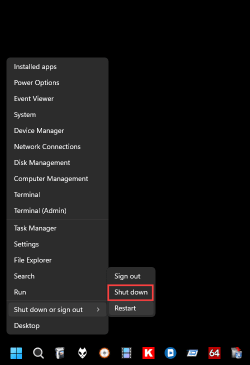
Takes a right and two left clicks to Shutdown.
Has a built in user variable delay too. :-)


Image1.png
 

My Computers My Computers

  • At a glance

    Win 11 Home ♦♦♦26300.9550 ♦♦♦♦♦♦♦26H2AMD Ryzen 7 3700XG.Skill (F4-3200C14D-16GTZKW)EVGA RTX 2070 (08G-P4-2171-KR)
    OS
    Win 11 Home ♦♦♦26300.9550 ♦♦♦♦♦♦♦26H2
    Computer type
    PC/Desktop
    Manufacturer/Model
    Built by Ghot® [May 2020]
    CPU
    AMD Ryzen 7 3700X
    Motherboard
    Asus Pro WS X570-ACE (BIOS 5302)
    Memory
    G.Skill (F4-3200C14D-16GTZKW)
    Graphics Card(s)
    EVGA RTX 2070 (08G-P4-2171-KR)
    Sound Card
    Realtek ALC1220P / ALC S1220A
    Monitor(s) Displays
    Dell U3011 30"
    Screen Resolution
    2560 x 1600
    Hard Drives
    2x Samsung 860 EVO 500GB,
    WD 4TB Black FZBX - SATA III,
    WD 8TB Black FZBX - SATA III,
    DRW-24B1ST CD/DVD Burner
    PSU
    PC Power & Cooling 750W Quad EPS12V
    Case
    Cooler Master ATCS 840 Tower
    Cooling
    CM Hyper 212 EVO (push/pull)
    Keyboard
    Ducky DK9008 Shine II Blue LED
    Mouse
    Logitech Optical M-100
    Internet Speed
    300/300
    Browser
    Firefox (latest)
    Antivirus
    Bitdefender Total Security
    Other Info
    Speakers: Klipsch Pro Media 2.1
  • At a glance

    Windows XP Pro 32bit w/SP3AMD Athlon 64 X2 5000+ (OC'd @ 3.2Ghz)TWIN2X2048-6400C4DHX (2 x 1GB, DDR2 800)EVGA 256-P2-N758-TR GeForce 8600GT SSC
    Operating System
    Windows XP Pro 32bit w/SP3
    Computer type
    PC/Desktop
    Manufacturer/Model
    Built by Ghot® (not in use)
    CPU
    AMD Athlon 64 X2 5000+ (OC'd @ 3.2Ghz)
    Motherboard
    ASUS M2N32-SLI Deluxe Wireless Edition
    Memory
    TWIN2X2048-6400C4DHX (2 x 1GB, DDR2 800)
    Graphics card(s)
    EVGA 256-P2-N758-TR GeForce 8600GT SSC
    Sound Card
    Onboard
    Monitor(s) Displays
    ViewSonic G90FB Black 19" Professional (CRT)
    Screen Resolution
    up to 2048 x 1536
    Hard Drives
    WD 36GB 10,000rpm Raptor SATA
    Seagate 80GB 7200rpm SATA
    Lite-On LTR-52246S CD/RW
    Lite-On LH-18A1P CD/DVD Burner
    PSU
    PC Power & Cooling Silencer 750 Quad EPS12V
    Case
    Generic Beige case, 80mm fans
    Cooling
    ZALMAN 9500A 92mm CPU Cooler
    Keyboard
    Logitech Classic Keybooard 200
    Mouse
    Logitech Optical M-BT96a
    Internet Speed
    300/300
    Browser
    Firefox 3.x ??
    Antivirus
    Symantec (Norton)
    Other Info
    Still assembled, still runs. Haven't turned it on for 15 years?
@Ghot thanks Ghot I was looking for a faster solution to execute the two restart and shutdown commands as by customizing two keyboard keys, but with extra caution if you accidentally click the combination on the keyboard.

@garlin I'm having a bit of trouble understanding you because I don't understand the commands for powershell very well.

You attached a file that I thought was already ready to use.
actually trying it the message to cancel the command comes out. but if you don't cancel it doesn't do anything.

Can you kindly create the two separate ready-made files for these two operations? to shut down and restart the computer with the timer before executing the command? you would do me a big favor, I would be really grateful.
 

My Computer My Computer

At a glance

Windows 11 Pro 24H2Intel Core i7-7700K 4.2GHzCorsair Vengeance (32 GB) DDR4, 3000 MHzMSI GeForce GTX 1080 Ti
OS
Windows 11 Pro 24H2
Computer type
PC/Desktop
CPU
Intel Core i7-7700K 4.2GHz
Motherboard
MSI Z270 Tomahawk
Memory
Corsair Vengeance (32 GB) DDR4, 3000 MHz
Graphics Card(s)
MSI GeForce GTX 1080 Ti
Sound Card
built-in Realtek HD audio
Monitor(s) Displays
LG 21:9
Screen Resolution
2560x1080 75Hz
Hard Drives
Samsung 980 PRO, 1 TB
Samsung 960 EVO, 250 GB
Western Digital Red 4TB
PSU
Evga Supernova 650 G3 Gold
Case
Kolink Unity Arena ARGB Case Mid-Tower
Cooling
Corsair Hydro H100i CW-9060025-WW
Keyboard
Logitech G512
Mouse
Logitech G G502 HERO
Internet Speed
1 Gigabit/s
Browser
Microsoft Edge
Antivirus
Windows Security

I just Win+X, U, U to shutdown, and Win+X, U, R to reboot. It's highly unlikely I'll hit those three-key combos by accident.
 

My Computer My Computer

At a glance

Windows 11 Enterprise 25H2
OS
Windows 11 Enterprise 25H2

My Computers My Computers

  • At a glance

    Win 11 Home ♦♦♦26300.9550 ♦♦♦♦♦♦♦26H2AMD Ryzen 7 3700XG.Skill (F4-3200C14D-16GTZKW)EVGA RTX 2070 (08G-P4-2171-KR)
    OS
    Win 11 Home ♦♦♦26300.9550 ♦♦♦♦♦♦♦26H2
    Computer type
    PC/Desktop
    Manufacturer/Model
    Built by Ghot® [May 2020]
    CPU
    AMD Ryzen 7 3700X
    Motherboard
    Asus Pro WS X570-ACE (BIOS 5302)
    Memory
    G.Skill (F4-3200C14D-16GTZKW)
    Graphics Card(s)
    EVGA RTX 2070 (08G-P4-2171-KR)
    Sound Card
    Realtek ALC1220P / ALC S1220A
    Monitor(s) Displays
    Dell U3011 30"
    Screen Resolution
    2560 x 1600
    Hard Drives
    2x Samsung 860 EVO 500GB,
    WD 4TB Black FZBX - SATA III,
    WD 8TB Black FZBX - SATA III,
    DRW-24B1ST CD/DVD Burner
    PSU
    PC Power & Cooling 750W Quad EPS12V
    Case
    Cooler Master ATCS 840 Tower
    Cooling
    CM Hyper 212 EVO (push/pull)
    Keyboard
    Ducky DK9008 Shine II Blue LED
    Mouse
    Logitech Optical M-100
    Internet Speed
    300/300
    Browser
    Firefox (latest)
    Antivirus
    Bitdefender Total Security
    Other Info
    Speakers: Klipsch Pro Media 2.1
  • At a glance

    Windows XP Pro 32bit w/SP3AMD Athlon 64 X2 5000+ (OC'd @ 3.2Ghz)TWIN2X2048-6400C4DHX (2 x 1GB, DDR2 800)EVGA 256-P2-N758-TR GeForce 8600GT SSC
    Operating System
    Windows XP Pro 32bit w/SP3
    Computer type
    PC/Desktop
    Manufacturer/Model
    Built by Ghot® (not in use)
    CPU
    AMD Athlon 64 X2 5000+ (OC'd @ 3.2Ghz)
    Motherboard
    ASUS M2N32-SLI Deluxe Wireless Edition
    Memory
    TWIN2X2048-6400C4DHX (2 x 1GB, DDR2 800)
    Graphics card(s)
    EVGA 256-P2-N758-TR GeForce 8600GT SSC
    Sound Card
    Onboard
    Monitor(s) Displays
    ViewSonic G90FB Black 19" Professional (CRT)
    Screen Resolution
    up to 2048 x 1536
    Hard Drives
    WD 36GB 10,000rpm Raptor SATA
    Seagate 80GB 7200rpm SATA
    Lite-On LTR-52246S CD/RW
    Lite-On LH-18A1P CD/DVD Burner
    PSU
    PC Power & Cooling Silencer 750 Quad EPS12V
    Case
    Generic Beige case, 80mm fans
    Cooling
    ZALMAN 9500A 92mm CPU Cooler
    Keyboard
    Logitech Classic Keybooard 200
    Mouse
    Logitech Optical M-BT96a
    Internet Speed
    300/300
    Browser
    Firefox 3.x ??
    Antivirus
    Symantec (Norton)
    Other Info
    Still assembled, still runs. Haven't turned it on for 15 years?
There is only one script needed, because the script's logic is very simple. Have you tried it?

Let's compare the two models for scheduling a reboot.

Default Method:
1. Run "shutdown /r /t /d 30" to schedule a restart 30 seconds from now.
2. You have 30 seconds to run a "shutdown /a" to cancel the pending shutdown. You must hurry and open a CMD shell as Administrator.
3. If you do nothing, 30 seconds will expire and the scheduled restart happens.

Cleaner Method:
1. Don't run a "shutdown /r /t /d 30" command in advance.
2. Display a dialog with a countdown timer. Wait until the user chooses to cancels in the next 30 seconds, or the timer ends.
3. If the user cancelled, we don't need to run "shutdown /a" because we NEVER registered the "shutdown /r /t /d 30".
4. If the timer expires, then we run "shutdown /r /t d 0" with no timeout. 30 seconds has elapsed from the countdown, so we don't need a delay.

The Default Method always assumes you want to reboot, and forces you to stop it.

The Cleaner Method doesn't assume you want to reboot, and only does it if you don't object. If you don't stop the script, it assumes you agree to the reboot. Since the user can't CTRL-C or close the window, you can't cancel the countdown other than by clicking the button. The results are the same, but we can do everything in ONE SCRIPT.
 
Last edited:

My Computer My Computer

At a glance

Windows 7
OS
Windows 7
OK.... is the use of the words "shutdown" confusing you? Would you feel better if it said "Restarting Windows"?
I'm just copying the words from what Windows writes onscreen.
 

My Computer My Computer

At a glance

Windows 7
OS
Windows 7
Why not just search your pc for “slide to shutdown” and make a shortcut to it. Then you have to click and hold the pull-down and slide it to shutdown or it’ll timeout and cancel the request itself
 

My Computer My Computer

At a glance

Windows 11 Pro
OS
Windows 11 Pro
Ok I wanted a quickest possible solution from the keyboard without clicking a complicated combination.

Thanks guys for all the help, I really appreciate it
Regards everyone
 

My Computer My Computer

At a glance

Windows 11 Pro 24H2Intel Core i7-7700K 4.2GHzCorsair Vengeance (32 GB) DDR4, 3000 MHzMSI GeForce GTX 1080 Ti
OS
Windows 11 Pro 24H2
Computer type
PC/Desktop
CPU
Intel Core i7-7700K 4.2GHz
Motherboard
MSI Z270 Tomahawk
Memory
Corsair Vengeance (32 GB) DDR4, 3000 MHz
Graphics Card(s)
MSI GeForce GTX 1080 Ti
Sound Card
built-in Realtek HD audio
Monitor(s) Displays
LG 21:9
Screen Resolution
2560x1080 75Hz
Hard Drives
Samsung 980 PRO, 1 TB
Samsung 960 EVO, 250 GB
Western Digital Red 4TB
PSU
Evga Supernova 650 G3 Gold
Case
Kolink Unity Arena ARGB Case Mid-Tower
Cooling
Corsair Hydro H100i CW-9060025-WW
Keyboard
Logitech G512
Mouse
Logitech G G502 HERO
Internet Speed
1 Gigabit/s
Browser
Microsoft Edge
Antivirus
Windows Security

So, @linguaccia22, what did you end up doing? Just curious. I stick to the keyboard as much as possible, but I thought garlin's solution was pretty nice.
 

My Computer My Computer

At a glance

Windows 11 Enterprise 25H2
OS
Windows 11 Enterprise 25H2
So, @linguaccia22, what did you end up doing? Just curious. I stick to the keyboard as much as possible, but I thought garlin's solution was pretty nice.
inclusion I used the method of @TairikuOkami
and through the Clavier+ program I set the key combination of my choice to execute the desired command.
 

My Computer My Computer

At a glance

Windows 11 Pro 24H2Intel Core i7-7700K 4.2GHzCorsair Vengeance (32 GB) DDR4, 3000 MHzMSI GeForce GTX 1080 Ti
OS
Windows 11 Pro 24H2
Computer type
PC/Desktop
CPU
Intel Core i7-7700K 4.2GHz
Motherboard
MSI Z270 Tomahawk
Memory
Corsair Vengeance (32 GB) DDR4, 3000 MHz
Graphics Card(s)
MSI GeForce GTX 1080 Ti
Sound Card
built-in Realtek HD audio
Monitor(s) Displays
LG 21:9
Screen Resolution
2560x1080 75Hz
Hard Drives
Samsung 980 PRO, 1 TB
Samsung 960 EVO, 250 GB
Western Digital Red 4TB
PSU
Evga Supernova 650 G3 Gold
Case
Kolink Unity Arena ARGB Case Mid-Tower
Cooling
Corsair Hydro H100i CW-9060025-WW
Keyboard
Logitech G512
Mouse
Logitech G G502 HERO
Internet Speed
1 Gigabit/s
Browser
Microsoft Edge
Antivirus
Windows Security

Latest Support Threads

Back
Top Bottom