shutdown query


conrail

Well-known member
Member
Local time
2:02 AM
Posts
38
OS
windows 11 pro
hi all, Asus Vivobook laptop,
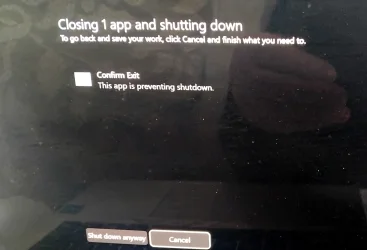
recently when trying to shut down I get the message that I need to close the shutdown app before shutting down,
I can click Shutdown Anyway and my laptop closes, this message has only recently appreard,
anybody explain it to me please,
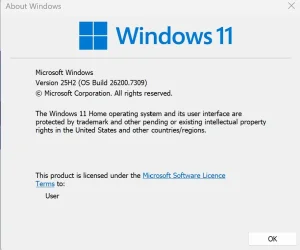
error and windows version .jpg's attached
all help and advice appreciated
 

Attachments
  • shutdown.webp
    shutdown.webp
    301.6 KB · Views: 1
  • winver.webp
    winver.webp
    42.8 KB · Views: 1

My Computer

System One

  • OS
    windows 11 pro
    Computer type
    Laptop
    Manufacturer/Model
    ASUS Vivobook
    Memory
    1TB
    Screen Resolution
    1920 x 1080
    Hard Drives
    1 Tb SSD
    Mouse
    hp wireless
    Browser
    brave
    Antivirus
    bitdefender
hi all, Asus Vivobook laptop,
recently when trying to shut down I get the message that I need to close the shutdown app before shutting down,
I can click Shutdown Anyway and my laptop closes, this message has only recently appreard,
anybody explain it to me please,
error and windows version .jpg's attached
all help and advice appreciated
Hi Asus Vivobook laptop,

Please, instead of pressing Shutdown anyway, press Cancel to see what is still running via Task Manager.
We'll get a clearer picture of what holding the shutdown.
 

My Computers

System One System Two

  • OS
    All Branches but Release
    Computer type
    Laptop
    Manufacturer/Model
    Acer Nitro ANV15-51
    CPU
    AMD Ryzen 7 7735HS 3200-4500 Mhz 8 cores x 2
    Motherboard
    Sportage_RBH
    Memory
    32 GB DDR5
    Graphics Card(s)
    Radeon Graphic / NVIDIA GeForce RTX 4060 8 GB GDDR6
    Sound Card
    AMD/Realtek(R) Audio
    Monitor(s) Displays
    Integrated Monitor (15.3"vis)
    Screen Resolution
    FHD 1920X1080 16:9 144Hz
    Hard Drives
    KINGSTON OM8SEP4512Q-AA 1TB
    Western Digital 256GB
    PSU
    19V DC 6.32 A 120 W
    Cooling
    Dual Fans
    Mouse
    MS Bluetooth
    Internet Speed
    Fiber 1GB Cox -us & 1GB Orange-fr
    Browser
    Edge Canary- Firefox Nightly-Chrome Dev-Chrome Dev
    Antivirus
    Windows Defender
  • Operating System
    Windows 11 Beta
    Computer type
    Laptop
    Manufacturer/Model
    Asus X751BP
    CPU
    AMD A9-9420
    Memory
    8 GB of DDR4
    Graphics card(s)
    AMD Radeon R5
    Screen Resolution
    1600x900
    Hard Drives
    Seagate 1 TB
hi all, Asus Vivobook laptop,
recently when trying to shut down I get the message that I need to close the shutdown app before shutting down,
I can click Shutdown Anyway and my laptop closes, this message has only recently appreard,
anybody explain it to me please,
error and windows version .jpg's attached
all help and advice appreciated
did you try a cold shutdown?
Code:
shutdown /s /f /t 0
 
Last edited:

My Computers

System One System Two

  • OS
    Windows 11 Pro x64 26H1 29531.1000
    Computer type
    Laptop
    Manufacturer/Model
    HP ProBook 650 G1
    CPU
    Intel(R) Core(TM) i5-4300M CPU @ 2.60GHz, 2 Core(s) 4T
    Motherboard
    Hewlett-Packard 1993
    Memory
    16GB DDR3
    Graphics Card(s)
    Intel(R) HD Graphics 4600
    Sound Card
    IDT High Definition Audio
    Screen Resolution
    1366x768
    Hard Drives
    Lexar 512GB SSD SATA III
    PSU
    HP 90W Adapter
    Case
    Magnesium
    Keyboard
    Spill-Resistant
    Mouse
    Microsoft Wireless Mobile Mouse 1850
    Browser
    Edge Canary
    Antivirus
    Windows Security
    Other Info
    BIOS Version/Date Hewlett-Packard L77 Ver. 01.50, 2/24/2020
  • Operating System
    Windows 11 Home
    Computer type
    Laptop
    Manufacturer/Model
    HP Laptop 15-dy000x
    CPU
    Intel(R) Core(TM) i5-8265U CPU @ 1.60GHz, 1800 Mhz, 4 Core(s), 8 Logical Processor(s)
    Memory
    12GB DDR4
    Graphics card(s)
    Intel UHD Graphics 620
    Sound Card
    Realtek High Definition Audio
    Screen Resolution
    1366x768
    Hard Drives
    INTEL HBRPEKNX0101AH
    Mouse
    Microsoft Wireless Mobile Mouse 1850
    Browser
    Edge
    Antivirus
    Windows Security
Here's how I fix the problem with all my PC's
Copy and paste into a file, change the extension to .reg, double click to merge into the registry:

Windows Registry Editor Version 5.00

[HKEY_CURRENT_USER\Control Panel\Desktop]
"AutoEndTasks"="1"
[HKEY_CURRENT_USER\Control Panel\Desktop]
"WaitToKillAppTimeout"="1000"
 

My Computers

System One System Two

  • OS
    Windows 11 Pro 25H2, Linux Mint 21.3
    Computer type
    PC/Desktop
    Manufacturer/Model
    Self Build Feb.2024
    CPU
    Intel Core i9-14900K @5.8GHZ
    Motherboard
    MSI MAG Z790 Tomahawk Max WiFi 7
    Memory
    64GB (2XG Skill F5-6400J3239G32G) @6800
    Graphics Card(s)
    Radeon (TM) RX 480 Graphics (8 GB)
    Sound Card
    Intergrated Realtek
    Monitor(s) Displays
    Samsung
    Screen Resolution
    3840x2160
    Hard Drives
    1 - Crucial 705 1TB GEN5
    1 - Crucial 705 2TB GEN5
    2 - Crucial T500 2TB Gen4
    PSU
    750W EVGA-G3
    Case
    Antec NX410
    Cooling
    H2O Thermalright
    Keyboard
    Logitech K800
    Mouse
    Logitech Master 2S
    Internet Speed
    600 Mbps
    Browser
    Chrome
    Antivirus
    WD
  • Operating System
    Windows 11 Pro & Linux Mint X64
    Computer type
    PC/Desktop
    Manufacturer/Model
    MSI Z77 MPower (MS-7751)
    CPU
    Intel(R) Core(TM) i7-3770K CPU @ 4.20 GHz
    Motherboard
    Z77 MPower (MS-7751)
    Memory
    32.0GB Dual-Channel CMY16GX3M2A1600C9
    Graphics card(s)
    NVIDIA GeForce GT 740
    Monitor(s) Displays
    40" Samsung
    Screen Resolution
    1920X1080
    Hard Drives
    WIN10 - 111GB Samsung SSD 840 Series
    WIN11 - 223GB Crucial CT240BX500SSD
    2X931GB Crucial CT1000BX500SSD1
    PSU
    Antec 850W
    Case
    Antec 900
    Cooling
    H20
    Keyboard
    Logitech K800 Wireless
    Mouse
    Logitech MX Master 2S
    Internet Speed
    100 Mbps
    Browser
    Chrome
    Antivirus
    Windows Defender
thank you OAT, I will give that a try
thank you Vegeta Tarble, not sire what a cold shutdown is,
thank youTopgundcp, will look into that, never touched the registry before
 

My Computer

System One

  • OS
    windows 11 pro
    Computer type
    Laptop
    Manufacturer/Model
    ASUS Vivobook
    Memory
    1TB
    Screen Resolution
    1920 x 1080
    Hard Drives
    1 Tb SSD
    Mouse
    hp wireless
    Browser
    brave
    Antivirus
    bitdefender
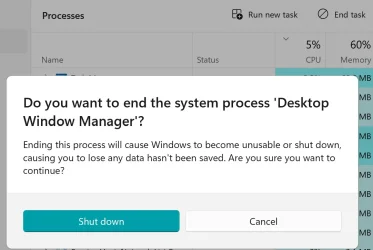
Ho OAT, the only application running is Desktop Window Manager, doing a search shows that it deals with animations and visual effects
 

Attachments

  • Screenshot 2025-12-06 183925.webp
    Screenshot 2025-12-06 183925.webp
    41.3 KB · Views: 1

My Computer

System One

  • OS
    windows 11 pro
    Computer type
    Laptop
    Manufacturer/Model
    ASUS Vivobook
    Memory
    1TB
    Screen Resolution
    1920 x 1080
    Hard Drives
    1 Tb SSD
    Mouse
    hp wireless
    Browser
    brave
    Antivirus
    bitdefender
Ho OAT, the only application running is Desktop Window Manager, doing a search shows that it deals with animations and visual effects
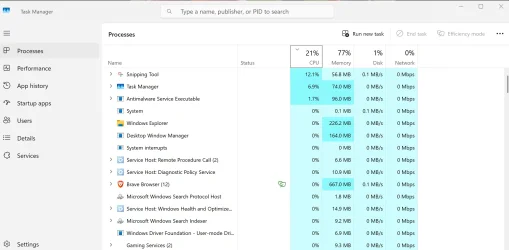
OK, I hate to contradict you but it is not possible that the only thing left running is DWM.
Please take a screenshot without the dialog box masking Task Manager if you could.
(this after initiating shutdown and launching screen capture of course)

The suggestion by @Topgundcp is what I use as well as this is a rather frequent occurrence.
Some apps/programs/services are sometimes slower to shutdown than the system itself resulting in the warning you are getting.
Do you recall how & when it started happening?

In order to merge the file as suggested above:

1- Right click on the desktop, select New then Text Document (you might need More before that for standard Win 11)
2- Open (by double clicking) that newly created text file which will be empty., Put it aside.
3- Copy what's in the code box below.

Code:
Windows Registry Editor Version 5.00

[HKEY_CURRENT_USER\Control Panel\Desktop]
"AutoEndTasks"="1"
[HKEY_CURRENT_USER\Control Panel\Desktop]
"WaitToKillAppTimeout"="1000"

4 - Go back to the text file and paste the content you just copied into that file.
5- Save then that text file.
6- Highlight (single clicking) the name of the text file and press F2 to rename it.
7- Change the extension of the file from .txt to .reg , it will ask for Are you sure.... , select Yes
8- Right click on that now reg file and select Merge, answer Yes a few times until you get confirmation that the merge was successful.
9- Reboot and next time you shutdown your system, the error will be gone.
 
Last edited:

My Computers

System One System Two

  • OS
    All Branches but Release
    Computer type
    Laptop
    Manufacturer/Model
    Acer Nitro ANV15-51
    CPU
    AMD Ryzen 7 7735HS 3200-4500 Mhz 8 cores x 2
    Motherboard
    Sportage_RBH
    Memory
    32 GB DDR5
    Graphics Card(s)
    Radeon Graphic / NVIDIA GeForce RTX 4060 8 GB GDDR6
    Sound Card
    AMD/Realtek(R) Audio
    Monitor(s) Displays
    Integrated Monitor (15.3"vis)
    Screen Resolution
    FHD 1920X1080 16:9 144Hz
    Hard Drives
    KINGSTON OM8SEP4512Q-AA 1TB
    Western Digital 256GB
    PSU
    19V DC 6.32 A 120 W
    Cooling
    Dual Fans
    Mouse
    MS Bluetooth
    Internet Speed
    Fiber 1GB Cox -us & 1GB Orange-fr
    Browser
    Edge Canary- Firefox Nightly-Chrome Dev-Chrome Dev
    Antivirus
    Windows Defender
  • Operating System
    Windows 11 Beta
    Computer type
    Laptop
    Manufacturer/Model
    Asus X751BP
    CPU
    AMD A9-9420
    Memory
    8 GB of DDR4
    Graphics card(s)
    AMD Radeon R5
    Screen Resolution
    1600x900
    Hard Drives
    Seagate 1 TB
@OAT
Do you recall how & when it started happening?
It happens even on a fresh install of windows but the more apps users install with background processes, it will happen more often.
While Windows is running, there's lots of processes running in the background from both Windows and third party software as shown 53 processes running in the background doing nothing until needed.
a.webp
AutoEndTasks: this tells Windows to force-close apps rather than waiting for user confirmation.
WaitToKillServiceTimeout: The default value is 5000, ie. 5 seconds which is too long, so i set to 1 sec.
 

My Computers

System One System Two

  • OS
    Windows 11 Pro 25H2, Linux Mint 21.3
    Computer type
    PC/Desktop
    Manufacturer/Model
    Self Build Feb.2024
    CPU
    Intel Core i9-14900K @5.8GHZ
    Motherboard
    MSI MAG Z790 Tomahawk Max WiFi 7
    Memory
    64GB (2XG Skill F5-6400J3239G32G) @6800
    Graphics Card(s)
    Radeon (TM) RX 480 Graphics (8 GB)
    Sound Card
    Intergrated Realtek
    Monitor(s) Displays
    Samsung
    Screen Resolution
    3840x2160
    Hard Drives
    1 - Crucial 705 1TB GEN5
    1 - Crucial 705 2TB GEN5
    2 - Crucial T500 2TB Gen4
    PSU
    750W EVGA-G3
    Case
    Antec NX410
    Cooling
    H2O Thermalright
    Keyboard
    Logitech K800
    Mouse
    Logitech Master 2S
    Internet Speed
    600 Mbps
    Browser
    Chrome
    Antivirus
    WD
  • Operating System
    Windows 11 Pro & Linux Mint X64
    Computer type
    PC/Desktop
    Manufacturer/Model
    MSI Z77 MPower (MS-7751)
    CPU
    Intel(R) Core(TM) i7-3770K CPU @ 4.20 GHz
    Motherboard
    Z77 MPower (MS-7751)
    Memory
    32.0GB Dual-Channel CMY16GX3M2A1600C9
    Graphics card(s)
    NVIDIA GeForce GT 740
    Monitor(s) Displays
    40" Samsung
    Screen Resolution
    1920X1080
    Hard Drives
    WIN10 - 111GB Samsung SSD 840 Series
    WIN11 - 223GB Crucial CT240BX500SSD
    2X931GB Crucial CT1000BX500SSD1
    PSU
    Antec 850W
    Case
    Antec 900
    Cooling
    H20
    Keyboard
    Logitech K800 Wireless
    Mouse
    Logitech MX Master 2S
    Internet Speed
    100 Mbps
    Browser
    Chrome
    Antivirus
    Windows Defender
thank you Topgundcp & OAT, followed instructions for registry file, created ok? something missing, I cannot get the merge option
 

Attachments

My Computer

System One

  • OS
    windows 11 pro
    Computer type
    Laptop
    Manufacturer/Model
    ASUS Vivobook
    Memory
    1TB
    Screen Resolution
    1920 x 1080
    Hard Drives
    1 Tb SSD
    Mouse
    hp wireless
    Browser
    brave
    Antivirus
    bitdefender
The file you attached is New Text Document.reg.txt, remove .txt extension
so it'll be like this: New Text Document.reg
Then just double click it to merge
 

Attachments

My Computers

System One System Two

  • OS
    Windows 11 Pro 25H2, Linux Mint 21.3
    Computer type
    PC/Desktop
    Manufacturer/Model
    Self Build Feb.2024
    CPU
    Intel Core i9-14900K @5.8GHZ
    Motherboard
    MSI MAG Z790 Tomahawk Max WiFi 7
    Memory
    64GB (2XG Skill F5-6400J3239G32G) @6800
    Graphics Card(s)
    Radeon (TM) RX 480 Graphics (8 GB)
    Sound Card
    Intergrated Realtek
    Monitor(s) Displays
    Samsung
    Screen Resolution
    3840x2160
    Hard Drives
    1 - Crucial 705 1TB GEN5
    1 - Crucial 705 2TB GEN5
    2 - Crucial T500 2TB Gen4
    PSU
    750W EVGA-G3
    Case
    Antec NX410
    Cooling
    H2O Thermalright
    Keyboard
    Logitech K800
    Mouse
    Logitech Master 2S
    Internet Speed
    600 Mbps
    Browser
    Chrome
    Antivirus
    WD
  • Operating System
    Windows 11 Pro & Linux Mint X64
    Computer type
    PC/Desktop
    Manufacturer/Model
    MSI Z77 MPower (MS-7751)
    CPU
    Intel(R) Core(TM) i7-3770K CPU @ 4.20 GHz
    Motherboard
    Z77 MPower (MS-7751)
    Memory
    32.0GB Dual-Channel CMY16GX3M2A1600C9
    Graphics card(s)
    NVIDIA GeForce GT 740
    Monitor(s) Displays
    40" Samsung
    Screen Resolution
    1920X1080
    Hard Drives
    WIN10 - 111GB Samsung SSD 840 Series
    WIN11 - 223GB Crucial CT240BX500SSD
    2X931GB Crucial CT1000BX500SSD1
    PSU
    Antec 850W
    Case
    Antec 900
    Cooling
    H20
    Keyboard
    Logitech K800 Wireless
    Mouse
    Logitech MX Master 2S
    Internet Speed
    100 Mbps
    Browser
    Chrome
    Antivirus
    Windows Defender
thank you Topgundcp & OAT for your help, advice and especially your patience, it is greatly appreciated, problem all sorted
thank you Vegeta Tarble for your imput 🙌👍
 

My Computer

System One

  • OS
    windows 11 pro
    Computer type
    Laptop
    Manufacturer/Model
    ASUS Vivobook
    Memory
    1TB
    Screen Resolution
    1920 x 1080
    Hard Drives
    1 Tb SSD
    Mouse
    hp wireless
    Browser
    brave
    Antivirus
    bitdefender
  • Like
Reactions: OAT
Back
Top Bottom