Significant difference between "Size" and "Size on disk"?


Levitate11

Well-known member
Power User
VIP
Local time
6:02 AM
Posts
475
OS
Windows 11 Pro 24H2
There's a serious size difference between the Size of this folder and the "Size on disk". See below. I expect minor difference, but this is around a 1:3 ratio, 764mb vs 2.27GB.

The folder was copied from to a Flash / USB drive. On my C: drive, it's 772mb actual / 785mb on disk.

There is another folder on the Flash Drive that is similar and the measurement is very accurate. But while that one is 16gb, it's only 1500 files. This one, OTOH, does have a lot of files (16,000). Is each one gobbling some predefined chuck of Flash on this drive?

Thoughts?
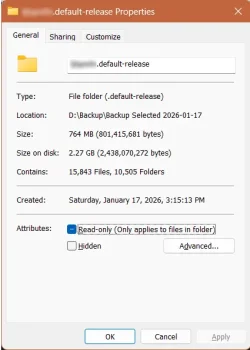
1768693778630.webp
 

My Computer

System One

  • OS
    Windows 11 Pro 24H2
    Computer type
    Laptop
    Manufacturer/Model
    HP
    CPU
    Intel Ultra 7 155H
    Memory
    16gb
    Graphics Card(s)
    Intel Arc integrated
    Hard Drives
    SSD
You probably have a lot of files which are smaller than the filesystem's block size.

Say your filesystem's block size is 4K. A 1024, 2048 or 4096 byte file will equally consume a single block in order to store the file. The remaining unused space inside the block cannot be assigned to a different file. So even if a file is smaller than 4K, it will consume a minimum of 4K. There are minor exceptions when the file is a tiny number of bytes when NTFS will keep the data inside a directory block (and not take a 4K block).

If you have a number of massive files (ie. movie files), then the "wasted space" is very small relative to the entire file's overall length. But if you have lots of tiny files, a lot more half-filled blocks will be consumed on-disk. So your usable disk space gets drained really fast.

One solution is to reformat your drive with a smaller block size. Therefore, whenever the filesystem has to use a half-full block, you'll have more blocks left to use because they're sized closer to the most likely file size. The tradeoff is a smaller block size leads to a slower transfer rate, because it takes more reads or writes to pull the same total amount of data (more overhead).
 

My Computer

System One

  • OS
    Windows 7
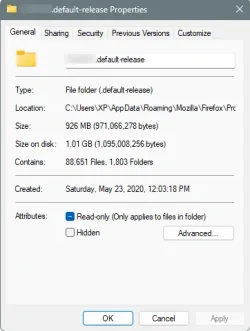
Here's mine... no extensions, no email client, and my drive is set at 4K

Image1.webp


C:\Users\user name\AppData\Roaming\Mozilla\Firefox\Profiles\xxxxxxxx.default-release
 

My Computers

System One System Two

  • OS
    Win 11 Home ♦♦♦26200.8457 ♦♦♦♦♦♦♦25H2
    Computer type
    PC/Desktop
    Manufacturer/Model
    Built by Ghot® [May 2020]
    CPU
    AMD Ryzen 7 3700X
    Motherboard
    Asus Pro WS X570-ACE (BIOS 5302)
    Memory
    G.Skill (F4-3200C14D-16GTZKW)
    Graphics Card(s)
    EVGA RTX 2070 (08G-P4-2171-KR)
    Sound Card
    Realtek ALC1220P / ALC S1220A
    Monitor(s) Displays
    Dell U3011 30"
    Screen Resolution
    2560 x 1600
    Hard Drives
    2x Samsung 860 EVO 500GB,
    WD 4TB Black FZBX - SATA III,
    WD 8TB Black FZBX - SATA III,
    DRW-24B1ST CD/DVD Burner
    PSU
    PC Power & Cooling 750W Quad EPS12V
    Case
    Cooler Master ATCS 840 Tower
    Cooling
    CM Hyper 212 EVO (push/pull)
    Keyboard
    Ducky DK9008 Shine II Blue LED
    Mouse
    Logitech Optical M-100
    Internet Speed
    300/300
    Browser
    Firefox (latest)
    Antivirus
    Bitdefender Total Security
    Other Info
    Speakers: Klipsch Pro Media 2.1
  • Operating System
    Windows XP Pro 32bit w/SP3
    Computer type
    PC/Desktop
    Manufacturer/Model
    Built by Ghot® (not in use)
    CPU
    AMD Athlon 64 X2 5000+ (OC'd @ 3.2Ghz)
    Motherboard
    ASUS M2N32-SLI Deluxe Wireless Edition
    Memory
    TWIN2X2048-6400C4DHX (2 x 1GB, DDR2 800)
    Graphics card(s)
    EVGA 256-P2-N758-TR GeForce 8600GT SSC
    Sound Card
    Onboard
    Monitor(s) Displays
    ViewSonic G90FB Black 19" Professional (CRT)
    Screen Resolution
    up to 2048 x 1536
    Hard Drives
    WD 36GB 10,000rpm Raptor SATA
    Seagate 80GB 7200rpm SATA
    Lite-On LTR-52246S CD/RW
    Lite-On LH-18A1P CD/DVD Burner
    PSU
    PC Power & Cooling Silencer 750 Quad EPS12V
    Case
    Generic Beige case, 80mm fans
    Cooling
    ZALMAN 9500A 92mm CPU Cooler
    Keyboard
    Logitech Classic Keybooard 200
    Mouse
    Logitech Optical M-BT96a
    Internet Speed
    300/300
    Browser
    Firefox 3.x ??
    Antivirus
    Symantec (Norton)
    Other Info
    Still assembled, still runs. Haven't turned it on for 15 years?
Thanks. I'll see if I can see the formatting and/or just reformat to a smaller block size. This is just backup, so speed isn't that much of an issue.
 

My Computer

System One

  • OS
    Windows 11 Pro 24H2
    Computer type
    Laptop
    Manufacturer/Model
    HP
    CPU
    Intel Ultra 7 155H
    Memory
    16gb
    Graphics Card(s)
    Intel Arc integrated
    Hard Drives
    SSD
Thanks. I'll see if I can see the formatting and/or just reformat to a smaller block size. This is just backup, so speed isn't that much of an issue.

What is the block size? It looks fine on your C drive so if it is block size on the USB flash drive. It must be very large blocks. Typically, from what I know, USB flash drives don't have that big of a block size. It is probably that your flash drive has fragmented blocks. This can happen on flash since the blocks can contain partial data.

What is the capacity of the flash drive? If it is formatted as NTFS, you can TRIM it and that should take care of it. But it shouls have already. If this is what is happening and it is not NTFS, then garbage collection should eventually take care of it.
 

My Computers

System One System Two

  • OS
    Windows 11 Pro x64
    Computer type
    PC/Desktop
    Manufacturer/Model
    📷🔈🎧 🪛 DIY Photoshop/Audio/Game/tinker
    CPU
    i9 14900K P/E 5.8/4.5 GHz, cache 5.0 GHz
    Motherboard
    Asus ROG Maximus Z790 Dark Hero
    Memory
    🐏 96GB (2x48) G.skill Ripjaws 6800 MT/s
    Graphics Card(s)
    Asus ROG Strix 4070 Ti OC
    Sound Card
    🔊Bowers & Wilkins 606 S3 speakers; Audiolabs 7000a integrated amp; RSL 10S Mk2 sub; Creative Pebble Pro Minimilist
    Monitor(s) Displays
    🖥️🖥️ Eizo CG2730 ColorEdge, ViewSonic VP2768
    Screen Resolution
    🖥️🖥️ 2560 x 1440p x 2
    Hard Drives
    💾 WDC SN850X 4TB nvme, SN850 1TB nvme, SK-Hynix 2 TB P41 nvme,. Sabrent USB-C DS-SC5B 5-bay docking station: 6TB WDC Black, 6TB Ironwolf Pro; 2x 2TB WDC Black HDD
    PSU
    ⚡️ 850W Seasonic Vertex PX-850 ATX 3.0/PCI-E 5.0
    Case
    Fractal Design North XL Mesh, Black Walnut
    Cooling
    ❄️ EK Nucleus black 360 AIO w/Phanteks T30-120 fans, 2 Noctua NF-A14 Chromax case fan, 1 T30-120 fan cooling memory
    Keyboard
    ⌨️ Keychron Q3 Max TKL with custom GMK Redsuns Red Samuri keycaps, TX Stabs
    Mouse
    🖱️ Logitech G305 wireless gaming
    Internet Speed
    ⬇️ 500 Mb/s ⬆️ 12 Mb/s
    Browser
    🔥🦊 Firefox
    Antivirus
    🦺 Defender, Macrium Reflect X 🏆
    Other Info
    Phangkey Amaterasu V2 Desk Mat
  • Computer type
    Laptop
    Manufacturer/Model
    💻 Apple 13" Macbook Pro 2020 (m1)
    CPU
    Apple M1
    Screen Resolution
    2560x1600
    Browser
    Firefox
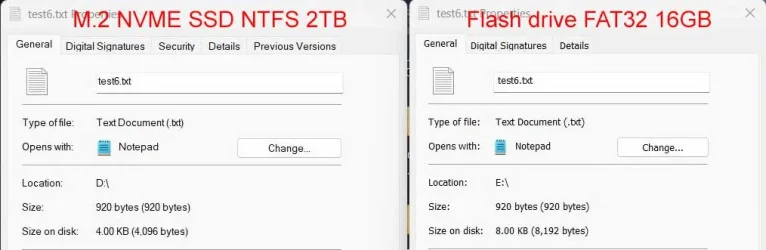
The cluster size of the SSD with NTFS (4KB) is different than the flash drive with FAT32 (8KB).

cluster-size-3.webp

Default Cluster Sizes:
NTFS
* Up to ~2 TB: 4 KB (default)
* 16 TB to 32 TB: 8 KB
* 32 TB to 64 TB: 16 KB
* 64 TB to 128 TB: 32 KB
* 128 TB to 256 TB: 64 KB

FAT32
* < 8 GB: 4 KB (4096 bytes)
* 8 GB - 16 GB: 8 KB (8192 bytes)
* 16 GB - 32 GB: 16 KB (16384 bytes)
* > 32 GB: 32 KB (32768 bytes
I tried other flash drives. Despite what the information above says the cluster size for all my flash drives (1GB, 16GB, 32GB, 64GB, 128GB) (all FAT32) was 8KB. Even the really small flash drive 32MB (FAT) has a 8KB cluster size.
 

My Computers

System One System Two

  • OS
    Windows 11 Pro 25H2 (26200.6901)
    Computer type
    Laptop
    Manufacturer/Model
    ASUS TUF Gaming A15 (2022)
    CPU
    AMD Ryzen 7 6800H with Radeon 680M GPU (486MB RAM)
    Memory
    Crucial DDR5-4800 (2400MHz) 32GB (2 x 16GB)
    Graphics Card(s)
    NVIDIA RTX 3060 Laptop (6GB RAM)
    Sound Card
    n/a
    Monitor(s) Displays
    15.6-inch
    Screen Resolution
    1920x1080 300Hz
    Hard Drives
    2 x Samsung 990 Evo Plus (2TB M.2 NVME SSD)
    PSU
    n/a
    Mouse
    Wireless Mouse M510
    Internet Speed
    2100Mbps/300Mbps
    Browser
    Firefox
    Antivirus
    Malwarebytes
  • Operating System
    Windows 11 Pro 25H2 (26200.8246)
    Computer type
    PC/Desktop
    Manufacturer/Model
    Custom build
    CPU
    AMD Ryzen 7 5700X3D
    Motherboard
    ASUS ROG Strix B550-F Gaming WiFi II
    Memory
    G.SKILL Flare X 32GB (2x16GB) DDR4
    Graphics card(s)
    ASUS ROG-STRIX-RTX3060TI-08G-V2-GAMING (RTX 3060-Ti, 8GB RAM)
    Monitor(s) Displays
    Samsung G50D IPS 27"
    Screen Resolution
    1440p/180Hz
    Hard Drives
    SAMSUNG 990 EVO Plus (2TB] M.2 NVME SSD
    SAMSUNG 990 EVO Plus (4TB) M.2 NVME SSD
    PSU
    Corsair RM750x (750 watts)
    Case
    Cooler Master MasterCase 5
    Cooling
    Scythe Mugen 6
    Keyboard
    Logitech K520 (MK540 keyboard/mouse combo)
    Mouse
    Logitech M310 (MK540 keyboard/mouse combo)
    Internet Speed
    2100 Mbps down / 300 Mbps up
    Browser
    Firefox, Edge, Chrome
    Antivirus
    Malwarebytes (Premium)
    Other Info
    ASUS Blu-ray Burner BW-16D1HT (SATA) || Western Digital Easystore 20TB USB 3.0 external hard drive used with Acronis True Image 2025 backup software || HP OfficeJet Pro 6975 Printer/Scanner
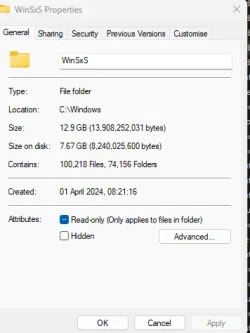
My WinSxS directory is the other way round in terms of space usage.

Screenshot 2026-01-20 091029.webp
 

My Computers

System One System Two

  • OS
    Windows 11 Home 24H2 RP
    Computer type
    PC/Desktop
    Manufacturer/Model
    Self-build
    CPU
    Intel I3-10100
    Motherboard
    MSI H410M-PRO
    Memory
    16 GB
    Graphics Card(s)
    Nvidia GT 1030
    Sound Card
    Motherboard default
    Monitor(s) Displays
    Philips 27 inch
    Screen Resolution
    1920x1080
    Hard Drives
    Samsung EVO 970 NVMe SSD 256 Gb
    Samsung QVO 870 SATA SSD 2 Tb
    PSU
    ATX 450W
    Keyboard
    Logitech
    Mouse
    Logitech Wireless
    Internet Speed
    930 Mb down / 120 Mb up
    Browser
    Edge
    Antivirus
    Windows Defender
    Other Info
    Microsoft Office 2021 Plus
  • Operating System
    Windows 11 Home
    Computer type
    PC/Desktop
    Manufacturer/Model
    Self-build
    CPU
    Intel i3-8100
    Motherboard
    Gigabyte Z370 D3
    Memory
    16 Gb
    Graphics card(s)
    Nvidia GT 720
    Sound Card
    Motherboard default
    Monitor(s) Displays
    Philips 27-inch
    Screen Resolution
    1920x1080
    Hard Drives
    Samsung 960 NVMe SSD 256 Gb
    Seagate 2 Tb HDD
    PSU
    ATX 450W
    Keyboard
    Microsoft
    Mouse
    Logitech Wireless
    Internet Speed
    930 Mb down / 120 Mb up
    Browser
    Edge
    Antivirus
    Windows Defender
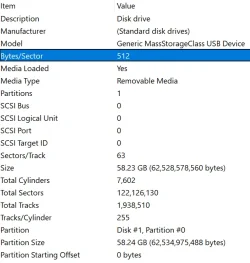
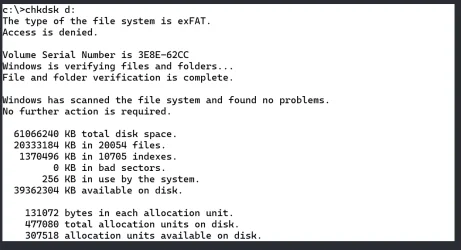
Finally getting back to this:

1770681821387.webp

1770681890251.webp

Any ideas?
 

My Computer

System One

  • OS
    Windows 11 Pro 24H2
    Computer type
    Laptop
    Manufacturer/Model
    HP
    CPU
    Intel Ultra 7 155H
    Memory
    16gb
    Graphics Card(s)
    Intel Arc integrated
    Hard Drives
    SSD
Default cluster size for a exFAT volume is determined by a sliding scale. For a 64 GB drive, it's normally 128K(!)

But you can check with PowerShell (block size reported in bytes):
Code:
powershell "(Get-CimInstance Win32_Volume | Where-Object { $_.DriveLetter -eq 'D:' }).BlockSize"
 

My Computer

System One

  • OS
    Windows 7
Back
Top Bottom