Solved Simplest way to make MP3 playlist?


RhinoCan

Member
Member
Local time
1:17 PM
Posts
65
OS
Win 11 Pro
Is there anything built into Windows 11 that would enable me to make a playlist of MP3s quickly and easily? I have a folder full of favourite tunes that I'd like to play without having to click on each subsequent title to start it.
 
Windows Build/Version
24H2

My Computer

System One

  • OS
    Win 11 Pro
    Computer type
    Laptop
    Manufacturer/Model
    HP Elitebook 665 G11
    CPU
    AMD Ryzen 7 7735U
    Memory
    16GB
    Graphics Card(s)
    AMD Radeon™ 680M Graphics
    Monitor(s) Displays
    1920 x 1200
    Hard Drives
    512GB SSD
    Browser
    Brave, Chrome
    Other Info
    Windows version: 24H2

Fire up Windows Media Player: Just click on it in your Start menu, and you're ready to roll. Head to the Library: This is where all your music and videos live. Hit 'Create playlist': You'll find this option in the left-hand pane under the 'Playlists' section.
 

My Computer

System One

  • OS
    Windows 11
    Computer type
    PC/Desktop
    Manufacturer/Model
    HP Pavilion
    CPU
    AMD Ryzen 7 5700G
    Motherboard
    Erica6
    Memory
    Micron Technology DDR4-3200 16GB
    Graphics Card(s)
    NVIDIA GeForce RTX 3060
    Sound Card
    Realtek ALC671
    Monitor(s) Displays
    Samsung SyncMaster U28E590
    Screen Resolution
    3840 x 2160
    Hard Drives
    SAMSUNG MZVLQ1T0HALB-000H1
Is there anything built into Windows 11 that would enable me to make a playlist of MP3s quickly and easily? I have a folder full of favourite tunes that I'd like to play without having to click on each subsequent title to start it.


Depends on what "player" you're using.

For most... just select and drag ALL your music to the player's library or playlist window.

Foobar2000 is a great player (music only).
 

My Computers

System One System Two

  • OS
    Win 11 Home ♦♦♦26200.8457 ♦♦♦♦♦♦♦25H2
    Computer type
    PC/Desktop
    Manufacturer/Model
    Built by Ghot® [May 2020]
    CPU
    AMD Ryzen 7 3700X
    Motherboard
    Asus Pro WS X570-ACE (BIOS 5302)
    Memory
    G.Skill (F4-3200C14D-16GTZKW)
    Graphics Card(s)
    EVGA RTX 2070 (08G-P4-2171-KR)
    Sound Card
    Realtek ALC1220P / ALC S1220A
    Monitor(s) Displays
    Dell U3011 30"
    Screen Resolution
    2560 x 1600
    Hard Drives
    2x Samsung 860 EVO 500GB,
    WD 4TB Black FZBX - SATA III,
    WD 8TB Black FZBX - SATA III,
    DRW-24B1ST CD/DVD Burner
    PSU
    PC Power & Cooling 750W Quad EPS12V
    Case
    Cooler Master ATCS 840 Tower
    Cooling
    CM Hyper 212 EVO (push/pull)
    Keyboard
    Ducky DK9008 Shine II Blue LED
    Mouse
    Logitech Optical M-100
    Internet Speed
    300/300
    Browser
    Firefox (latest)
    Antivirus
    Bitdefender Total Security
    Other Info
    Speakers: Klipsch Pro Media 2.1
  • Operating System
    Windows XP Pro 32bit w/SP3
    Computer type
    PC/Desktop
    Manufacturer/Model
    Built by Ghot® (not in use)
    CPU
    AMD Athlon 64 X2 5000+ (OC'd @ 3.2Ghz)
    Motherboard
    ASUS M2N32-SLI Deluxe Wireless Edition
    Memory
    TWIN2X2048-6400C4DHX (2 x 1GB, DDR2 800)
    Graphics card(s)
    EVGA 256-P2-N758-TR GeForce 8600GT SSC
    Sound Card
    Onboard
    Monitor(s) Displays
    ViewSonic G90FB Black 19" Professional (CRT)
    Screen Resolution
    up to 2048 x 1536
    Hard Drives
    WD 36GB 10,000rpm Raptor SATA
    Seagate 80GB 7200rpm SATA
    Lite-On LTR-52246S CD/RW
    Lite-On LH-18A1P CD/DVD Burner
    PSU
    PC Power & Cooling Silencer 750 Quad EPS12V
    Case
    Generic Beige case, 80mm fans
    Cooling
    ZALMAN 9500A 92mm CPU Cooler
    Keyboard
    Logitech Classic Keybooard 200
    Mouse
    Logitech Optical M-BT96a
    Internet Speed
    300/300
    Browser
    Firefox 3.x ??
    Antivirus
    Symantec (Norton)
    Other Info
    Still assembled, still runs. Haven't turned it on for 15 years?
Fire up Windows Media Player: Just click on it in your Start menu, and you're ready to roll. Head to the Library: This is where all your music and videos live. Hit 'Create playlist': You'll find this option in the left-hand pane under the 'Playlists' section.
It wasn't obvious how to get to the Library but when I couldn't find a menu icon, I right-clicked on the main part of the screen once Media Player had been launched and found an option for making a playlist. That meets my immediate need so thanks a lot!
 

My Computer

System One

  • OS
    Win 11 Pro
    Computer type
    Laptop
    Manufacturer/Model
    HP Elitebook 665 G11
    CPU
    AMD Ryzen 7 7735U
    Memory
    16GB
    Graphics Card(s)
    AMD Radeon™ 680M Graphics
    Monitor(s) Displays
    1920 x 1200
    Hard Drives
    512GB SSD
    Browser
    Brave, Chrome
    Other Info
    Windows version: 24H2
Depends on what "player" you're using.

For most... just select and drag ALL your music to the player's library or playlist window.

Foobar2000 is a great player (music only).
Thank you for an alternative in case Windows Media Player doesn't meet all my future needs!
 

My Computer

System One

  • OS
    Win 11 Pro
    Computer type
    Laptop
    Manufacturer/Model
    HP Elitebook 665 G11
    CPU
    AMD Ryzen 7 7735U
    Memory
    16GB
    Graphics Card(s)
    AMD Radeon™ 680M Graphics
    Monitor(s) Displays
    1920 x 1200
    Hard Drives
    512GB SSD
    Browser
    Brave, Chrome
    Other Info
    Windows version: 24H2
It wasn't obvious how to get to the Library but when I couldn't find a menu icon, I right-clicked on the main part of the screen once Media Player had been launched and found an option for making a playlist. That meets my immediate need so thanks a lot!
You are very welcome!
 

My Computer

System One

  • OS
    Windows 11
    Computer type
    PC/Desktop
    Manufacturer/Model
    HP Pavilion
    CPU
    AMD Ryzen 7 5700G
    Motherboard
    Erica6
    Memory
    Micron Technology DDR4-3200 16GB
    Graphics Card(s)
    NVIDIA GeForce RTX 3060
    Sound Card
    Realtek ALC671
    Monitor(s) Displays
    Samsung SyncMaster U28E590
    Screen Resolution
    3840 x 2160
    Hard Drives
    SAMSUNG MZVLQ1T0HALB-000H1

My Computers

System One System Two

  • OS
    Windows 11 Pro
    Computer type
    PC/Desktop
    Manufacturer/Model
    Stigg's Build
    CPU
    Intel Core i9-10900X
    Motherboard
    GIGABYTE X299X DESIGNARE 10G
    Memory
    Corsair 64 GB (4 x 16 GB) CMW64GX4M4C3000C15 Vengeance RGB Pro 3000Mhz DDR4
    Graphics Card(s)
    GIGABYTE GeForce GTX 1660 Super Mini ITX 6 GB OC
    Sound Card
    Realtek ALC1220
    Monitor(s) Displays
    Samsung 27" FHD LED FreeSync Gaming Monitor (LS27F350FHEXXY)
    Screen Resolution
    1920 x 1080
    Hard Drives
    Samsung 970 Pro Series 1TB M.2 2280 NVMe SSD
    Western Digital Red Pro WD8003FFBX-68B9AN0 8 TB, 7200 RPM, SATA-III
    Western Digital Red Pro WD8003FFBX-68B9AN0 8 TB, 7200 RPM, SATA-III
    PSU
    Corsair HX1200 1200W 80 Plus Platinum
    Case
    Fractal Design Define 7 Black Solid Case
    Cooling
    Noctua NH-D15 Chromax Black
    Keyboard
    Razer Ornata V2
    Mouse
    Razer DeathAdder Essential
    Internet Speed
    FTTN 100Mbps / 40Mbps
    Browser
    Mozilla Firefox
    Antivirus
    N/A
    Other Info
    Logitech BRIO 4k Ultra HD USB-C Webcam
  • Operating System
    Windows 10 Pro
    Computer type
    Laptop
    Manufacturer/Model
    ASUS ROG Zephyrus M GM501GS
    CPU
    Core i7-8750H
    Motherboard
    Zephyrus M GM501GS
    Memory
    SK Hynix 32 GB (2 x 16 GB) HMA82GS6CJR8N-VK 16 GB DDR4-2666 DDR4 SDRAM
    Graphics card(s)
    NVIDIA GeForce GTX 1070
    Sound Card
    Realtek ALC294
    Monitor(s) Displays
    AU Optronics B156HAN07.1 [15.6" LCD]
    Screen Resolution
    1920 x 1080
    Hard Drives
    Samsung MZVKW512HMJP-00000 512 GB, PCI-E 3.0 x4
    Samsung SSD 860 QVO 4TB 4 TB, SATA-III
    PSU
    N/A
    Case
    N/A
    Cooling
    N/A
    Keyboard
    PC/AT Enhanced PS2 Keyboard (101/102-Key)
    Mouse
    Razer DeathAdder Essential
    Internet Speed
    FTTN 100Mbps / 40Mbps
    Browser
    Mozilla Firefox
    Antivirus
    N/A
    Other Info
    USB2.0 HD UVC Webcam
SS_20251112_11503947.webpSS_20251112_11522682.webp

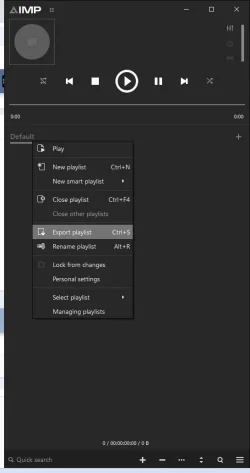
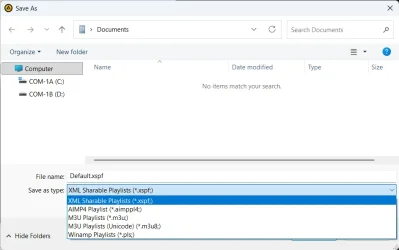
I use AIMP to listen to music, you can just add your songs to the list then export them as several playlist formats.
 

My Computer

System One

  • OS
    Windows 11 25H2 Home Single Language (26200.8037)
    Computer type
    Laptop
    Manufacturer/Model
    LENOVO IdeaPad 5 15ITL05
    CPU
    Intel Core i3-1115G4
    Motherboard
    There is no such a God, I only know mother-Earth
    Memory
    8GB
    Graphics Card(s)
    on-board
    Sound Card
    on-board
    Monitor(s) Displays
    (s) is too ambitious for me
    Screen Resolution
    1920*1080
    Hard Drives
    256GB (SSD)
    PSU
    I was very young when I last saw a PSU
    Case
    ...
    Cooling
    My coldness is enough to cool the computer
    Keyboard
    A broken and very clean keyboard
    Mouse
    Rat
    Internet Speed
    Slowest internet connection in Europe
    Browser
    ChromePortable / FirefoxPortable / TorBrowser
    Antivirus
    G-Virus
    Other Info
    I can simply say that I took the red pill and I am not happy with it.
+ 1 for foobar...,
Middle click any folder from the Library window, Playlist created!!!

10976.gif
 

My Computers

System One System Two

  • OS
    Windows 11 Pro
    Computer type
    PC/Desktop
    Manufacturer/Model
    ASUS ROG Strix
  • Operating System
    Windows 11 Pro
    Computer type
    Laptop
    Manufacturer/Model
    ASUS VivoBook
With the proper plugins WinAmp can play any audio file, including vintage formats from old computers and consoles. It's also very easy to create a playlist and save it so you can listen to it anytime.


My Computers

System One System Two

  • OS
    Windows 11 Pro 23H2 (5699), 25H2 (8457)
    Computer type
    Laptop
    Manufacturer/Model
    Acer Extensa 5630EZ
    CPU
    Mobile DualCore Intel Core 2 Duo T7250, 2000 MHz
    Motherboard
    Acer Extensa 5630
    Memory
    4GB
    Graphics Card(s)
    Mobile Intel(R) GMA 4500M (Mobile 4 series)
    Sound Card
    Realtek ALC268 @ Intel 82801IB ICH9 - High Definition Audio Controller
    Monitor(s) Displays
    1
    Screen Resolution
    1280x800
    Hard Drives
    Samsung SSD 850 EVO 250GB SATA Device (250 GB, SATA-III)
    Internet Speed
    VDSL 50 Mbps
    Browser
    MICROSOFT EDGE
    Antivirus
    WINDOWS DEFENDER
    Other Info
    Legacy MBR installation, no TPM, no Secure Boot, no WDDM 2.0 graphics drivers, no SSE4.2, cannot get more unsupported ;) This is only my test laptop. I had installed Windows 11 here before upgrading my main PC. For my main PC I use everyday see my 2nd system specs.
  • Operating System
    Windows 11 Pro v25H2 (build 26200.8457)
    Computer type
    PC/Desktop
    Manufacturer/Model
    Custom-built PC
    CPU
    Intel Core-i7 3770 3.40GHz s1155 (3rd generation)
    Motherboard
    Asus P8H61 s1155 ATX
    Memory
    2x Kingston Hyper-X Blu 8GB DDR3-1600
    Graphics card(s)
    GIGABYTE GeForce RTX 3050 WINDFORCE OC V2 6GB (GV-N3050WF2OCV2-6GD)
    Sound Card
    Realtek HD audio (ALC887)
    Monitor(s) Displays
    Sony Bravia KDL-19L4000 19" LCD TV via VGA
    Screen Resolution
    1440x900 32-bit 60Hz
    Hard Drives
    WD Blue SA510 2.5 1000GB SSD as system disk, Western Digital Caviar Purple 4TB SATA III (WD40PURZ) as second
    PSU
    Thermaltake Litepower RGB 550W Full Wired
    Case
    SUPERCASE MIDI-TOWER
    Cooling
    Deepcool Gamma Archer CPU cooler, 1x 8cm fan at the back
    Keyboard
    Mitsumi 101-key PS/2
    Mouse
    Sunnyline OptiEye PS/2
    Internet Speed
    100Mbps
    Browser
    Microsoft Edge, Mozilla Firefox
    Antivirus
    Microsoft Windows Defender
    Other Info
    Legacy BIOS (MBR) installation, no TPM, no Secure Boot, WDDM 3.0 graphics drivers, WEI score 7.4
Media Player had been launched and found an option for making a playlist

WMP's playlists can be edited in Notepad or similar.
- You'll see the pattern when you look at one of them.​
- WMP's playlists are created in your Music folder's sub-folder Playlists. You can right-click on a playlist in WMP & select Open file location to get straight there.​
- WMP's playlists use strange codes for such things as ' and & in paths-names.​
- You can replace the \..\ entries with full paths whenever you want. The \..\ entries generally indicate relative folder paths from your Music folder.​


Denis
 
Last edited:

My Computer

System One

  • OS
    Windows 11 Home x64 Version 25H2 Build 26200.8037
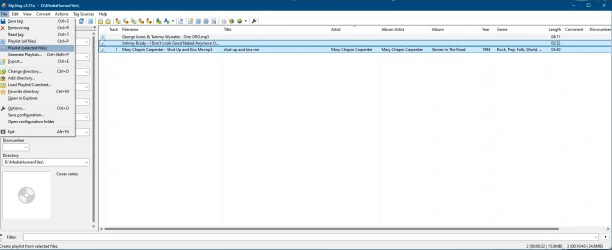
I like MP3Tag. Open the folder, select the files you want in the list then click File and Playlist (Selected Files). The playlists made with MP3Tag are the only play list that work on my Challengers car stereo.

1762956068800.webp
 

My Computer

System One

  • OS
    Windows 11 Pro 23H2
    Computer type
    PC/Desktop
    Manufacturer/Model
    MinisForum
    CPU
    Intel(R) Core(TM) i9-12900HK
    Memory
    32gb
    Graphics Card(s)
    Intel(R) Iris(R) Xe Graphics
    Sound Card
    Realtek 888
    Monitor(s) Displays
    Acer
    Screen Resolution
    1920x1080
    Hard Drives
    1TB SSD
    Keyboard
    Logitech
    Mouse
    Logitech MX Master 2X
    Internet Speed
    1GB
    Browser
    Firefox
    Antivirus
    Windows Defender
I have used this little app for years.

OneClickPlay
_______________________________________

Developer’s Description
By czech-ware.net
Generate a randomized playlist from audio files found in different folders on your hard drive.
OneClickPlay is a fast and tiny utility that scans, creates, and launches a randomized playlist of all MP3, WMA, and MIDI files found in the folder it was installed in and all subfolders. You can scan for any audio files by using switches. This will create a OneClickPlay.ini file. Once this file is created, you don't have to use switches again. Should you want to make changes, just use the switches or edit OneClickPlay.ini. All music files in the playlist will be played by the player associated with M3U playlists. OneClickPlay is especially suitable for users who have content in music folders that is constantly changing.

Version 2.0 is completely rewritten in C++, no longer needs extra libraries, and is even smaller. It offers several new switches for varioius options such as random file selections, subfolder exclusion, and the capability of running in hidden or in high-priority mode. It also offers an improved graphical user interface featuring ""files found"" and ""seconds elapsed"" counters.
 

My Computer

System One

  • OS
    Windows 11-Version 23H2 (OS Build 22631.4460)
    Computer type
    PC/Desktop
    Manufacturer/Model
    Dell
    Other Info
    Windows 11-Version 23H2 (OS Build 22631.4460)
Back
Top Bottom