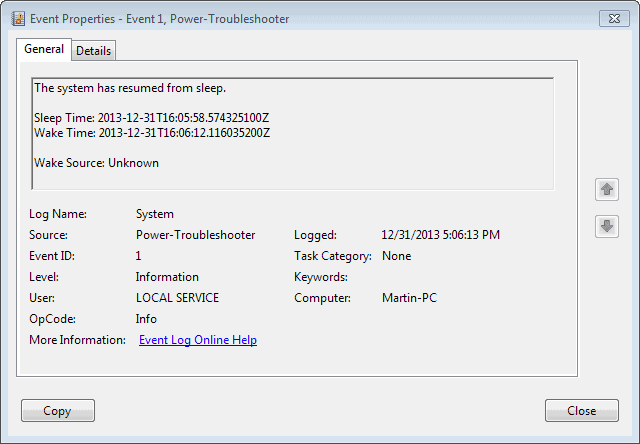
Since the recent Update a couple of days ago My pc wont stay asleep for more than a few seconds


DaftVadersDad

Member
Local time
10:15 PM
Posts
3
Location
Cambridgeshire
OS
windows 11
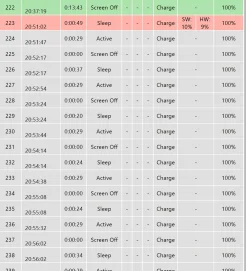
I put into sleep by pressing my sleep button on my keyboard as I always have and the screen blanks and the a few seconds later it lights up again. my only option at the moment is to turn it off! Has anyone else had this problem? any ideas what to do ?

Thanks

Mike
 
Windows Build/Version
Version 10.0.26100 Build 26100

Attachments
  • Screenshot 2025-02-20 .webp
    Screenshot 2025-02-20 .webp
    81.6 KB · Views: 1

My Computer My Computer

At a glance

windows 11AMD Ryzen 9 7940HS w/ Radeon 780M Graphics32gbRadeon 780M Graphics
OS
windows 11
Computer type
PC/Desktop
Manufacturer/Model
Geekom A7
CPU
AMD Ryzen 9 7940HS w/ Radeon 780M Graphics
Motherboard
unknown
Memory
32gb
Graphics Card(s)
Radeon 780M Graphics
Internet Speed
43gps
Browser
Vivaldi
A lot of things can keep your computer from going to sleep, like downloading a file, opening a file on the network, or even a disconnected printer with an open job. Windows O/S have an easy method for finding out what the problem is.


1. Click Start button.
2. Type Cmd.exe, right click "Cmd.exe", select Run as administrator


Within the Command Prompt type:

Code:
Powercfg  -requests


It'll let you know if anything is keeping the computer awake.
 

My Computer My Computer

At a glance

Windows 11AMD Ryzen 7 5700GMicron Technology DDR4-3200 16GBNVIDIA GeForce RTX 3060
OS
Windows 11
Computer type
PC/Desktop
Manufacturer/Model
HP Pavilion
CPU
AMD Ryzen 7 5700G
Motherboard
Erica6
Memory
Micron Technology DDR4-3200 16GB
Graphics Card(s)
NVIDIA GeForce RTX 3060
Sound Card
Realtek ALC671
Monitor(s) Displays
Samsung SyncMaster U28E590
Screen Resolution
3840 x 2160
Hard Drives
SAMSUNG MZVLQ1T0HALB-000H1

My Computer My Computer

At a glance

Windows 11AMD Ryzen 7 5700GMicron Technology DDR4-3200 16GBNVIDIA GeForce RTX 3060
OS
Windows 11
Computer type
PC/Desktop
Manufacturer/Model
HP Pavilion
CPU
AMD Ryzen 7 5700G
Motherboard
Erica6
Memory
Micron Technology DDR4-3200 16GB
Graphics Card(s)
NVIDIA GeForce RTX 3060
Sound Card
Realtek ALC671
Monitor(s) Displays
Samsung SyncMaster U28E590
Screen Resolution
3840 x 2160
Hard Drives
SAMSUNG MZVLQ1T0HALB-000H1
A lot of things can keep your computer from going to sleep, like downloading a file, opening a file on the network, or even a disconnected printer with an open job. Windows O/S have an easy method for finding out what the problem is.


1. Click Start button.
2. Type Cmd.exe, right click "Cmd.exe", select Run as administrator


Within the Command Prompt type:

Code:
Powercfg  -requests


It'll let you know if anything is keeping the computer awake.
Thanks for your reply. It doesn't look like it's anything though.
DISPLAY:
None.

SYSTEM:
None.

AWAYMODE:
None.

EXECUTION:
None.

PERFBOOST:
None.

ACTIVELOCKSCREEN:
None.
 

My Computer My Computer

At a glance

windows 11AMD Ryzen 9 7940HS w/ Radeon 780M Graphics32gbRadeon 780M Graphics
OS
windows 11
Computer type
PC/Desktop
Manufacturer/Model
Geekom A7
CPU
AMD Ryzen 9 7940HS w/ Radeon 780M Graphics
Motherboard
unknown
Memory
32gb
Graphics Card(s)
Radeon 780M Graphics
Internet Speed
43gps
Browser
Vivaldi
Try powercfg -lastwake command.
 

My Computer My Computer

At a glance

Windows 11AMD Ryzen 7 5700GMicron Technology DDR4-3200 16GBNVIDIA GeForce RTX 3060
OS
Windows 11
Computer type
PC/Desktop
Manufacturer/Model
HP Pavilion
CPU
AMD Ryzen 7 5700G
Motherboard
Erica6
Memory
Micron Technology DDR4-3200 16GB
Graphics Card(s)
NVIDIA GeForce RTX 3060
Sound Card
Realtek ALC671
Monitor(s) Displays
Samsung SyncMaster U28E590
Screen Resolution
3840 x 2160
Hard Drives
SAMSUNG MZVLQ1T0HALB-000H1
Thanks
I tried that. this is what it returned.
Wake History Count -1
Wake History [0]
Wake scource Count - 0
 

My Computer My Computer

At a glance

windows 11AMD Ryzen 9 7940HS w/ Radeon 780M Graphics32gbRadeon 780M Graphics
OS
windows 11
Computer type
PC/Desktop
Manufacturer/Model
Geekom A7
CPU
AMD Ryzen 9 7940HS w/ Radeon 780M Graphics
Motherboard
unknown
Memory
32gb
Graphics Card(s)
Radeon 780M Graphics
Internet Speed
43gps
Browser
Vivaldi
Back
Top Bottom