SirCleaner Released - New Powerful Junk File Cleaner


v3.0.0

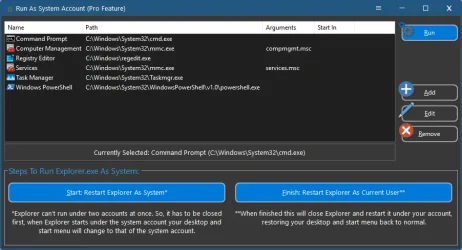
Added new pro feature run as system account. This allows you to run any program under the system account, including computer management, explorer, regedit and more. Giving you more privileges and access to the system without dealing with permissions. This also allows you to see registry keys hidden to all users and only visible to the system account.

Fixed bug where icons where larger than they should be when the system dpi was above 100%. This was because the resizing was being done twice. This is now fixed and icons show proper size again.

Fixed bug where if there was a program update and the first run wizard had not been shown yet the update would close the first run wizard and think it had been completed. This has now been fixed.

Updated cleaning windows recycle bin to include all fixed and removable drives and not just the Windows drive.

Updated help file both in the program and on the website.

Many code improvements, changes and code being added for upcoming new features in upcoming updates.

Interface tweaks and small changes.

Multiple bug fixes and tweaks throughout the program.
run_as_system_account.webp
 

My Computer

System One

  • OS
    Windows 11
    Computer type
    PC/Desktop
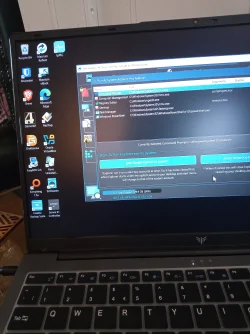
If I click on Restart Explorer as System, the wallpaper changes but the task bar never appears. If I click on Run, the command prompt appears but as Administrator, not system.IMG_20260213_154913_253.webp
 

My Computers

System One System Two

  • OS
    Windows 11 Pro 25H2 26200.8524
    Computer type
    Laptop
    Manufacturer/Model
    Acemagic LX15PRO
    CPU
    AMD Ryzen 7 5825U with Radeon Graphics
    Memory
    16GB
    Screen Resolution
    1920 x 1080
    Hard Drives
    SSD 2TB
    Internet Speed
    30 Mbps
    Browser
    Brave
    Antivirus
    Webroot Secure Anywhere
    Other Info
    System 3

    Acer Swift SF114-34 laptop
    OS Windows 11 Pro 26200.8524
    CPU Pentium Silver N6000
    RAM 4GB
    SSD Samsung 970 EVO Plus SSD 2TB (an upgrade)
  • Operating System
    Windows 11 Pro 23H2 22631.2506
    Computer type
    Laptop
    Manufacturer/Model
    HP Mini 210-1090NR PC (bought in late 2009!)
    CPU
    Atom N450 1.66GHz
    Memory
    2GB
    Browser
    Brave
    Antivirus
    Webroot
If I click on Restart Explorer as System, the wallpaper changes but the task bar never appears. If I click on Run, the command prompt appears but as Administrator, not system.
That's interesting. I had tested on Windows 7 and 10.
I just tried on my Windows 11, same thing happens as it did to you. Then after about 10 sec or so explorer closes and reopens like normal under my account.
Not sure if this is some block in Windows 11, or a bug where explorer doesn't work under the system account. I'm going to dig in and see if there is something different that has to be done. Also going to grab a couple of older versions of Windows 11 and load them up in vmware and see if they do the same thing.
 

My Computer

System One

  • OS
    Windows 11
    Computer type
    PC/Desktop
I did find this. Which if it is true I will need to either remove the explorer option or have it only work for windows 10 and older. I will see if there is a way around it, but if it is a security measure there probably wont be a way around it.

Windows 11 restricts running
explorer.exe under the SYSTEM account due to increased security measures, unlike Windows 10 which allowed it more freely. This change is designed to prevent malware from hijacking the desktop shell, often causing issues with scripts, scheduled tasks, or debugging, resulting in empty desktop screens or broken file management
 

My Computer

System One

  • OS
    Windows 11
    Computer type
    PC/Desktop
Well looks like I will update the program to state that the explorer option only works on Windows 10 and older.

You're right — in Windows 11, explorer.exe is much more tightly restricted than it was in Windows 10, and it’s no longer supported to run it interactively under the SYSTEM account the way you could before.


🔎 Why it no longer works​


Windows 11 introduced several security hardening changes:
  1. Explorer is tied to the logged-in user session
    • explorer.exe now expects a proper user profile and shell environment.
    • SYSTEM doesn’t have a normal interactive profile like a user account.
  2. Session 0 isolation
    • Services (including SYSTEM processes) run in Session 0.
    • Interactive desktops run in Session 1+.
    • Windows 11 enforces this separation more strictly.
  3. Shell & UWP integration
    • Explorer in Windows 11 relies more heavily on per-user components (Start menu, taskbar, immersive shell).
    • These break when launched under SYSTEM.
  4. Security hardening
    • Prevents privilege escalation tricks that worked in Windows 10.
    • Blocking interactive SYSTEM shells is intentional.

🚫 What Happens Now?​


If you try something like:

psexec -i -s explorer.exe

You’ll typically see:
  • Nothing opens
  • It crashes
  • It immediately exits
  • Or it launches in the wrong session invisibly

This is by design.
 

My Computer

System One

  • OS
    Windows 11
    Computer type
    PC/Desktop
Sir, ChatGPT tells me;

does Windows 11 prevent Explorer.exe from running under the SYSTEM account?

No, Windows 11 does not outright prevent Explorer.exe from running under the SYSTEM account, but there are significant practical limitations that make it tricky and generally unsupported. Here’s the breakdown:

  1. Explorer.exe Behavior:
    • Explorer is designed primarily as a user shell, running under a standard or administrative user account.
    • When launched under SYSTEM, it can start, but many user-dependent features fail:
      • Shell extensions may not load correctly.
      • User profile paths (%USERPROFILE%) point to SYSTEM (C:\Windows\System32\config\systemprofile) instead of a regular user.
      • Desktop, taskbar, and Start menu may not behave properly.
  2. Session 0 Isolation:
    • SYSTEM processes run in Session 0, whereas interactive users run in higher sessions (Session 1+).
    • Because of Session 0 Isolation (introduced in Vista and maintained in Windows 11), Explorer running as SYSTEM won’t have access to the interactive desktop by default, so you won’t see a usable GUI.
  3. Workarounds:
    • Tools like psexec -s -i can launch Explorer as SYSTEM interactively, but this is generally for testing or automation, not day-to-day use.
    • Even with this, some functionality (e.g., network drives, certain COM objects) may fail.
Conclusion: Windows 11 allows it technically, but Explorer under SYSTEM is mostly non-functional because of session isolation and user shell assumptions. Microsoft never intended Explorer to run as SYSTEM interactively.
 

My Computers

System One System Two

  • OS
    Windows 11 Pro 25H2 26200.8524
    Computer type
    Laptop
    Manufacturer/Model
    Acemagic LX15PRO
    CPU
    AMD Ryzen 7 5825U with Radeon Graphics
    Memory
    16GB
    Screen Resolution
    1920 x 1080
    Hard Drives
    SSD 2TB
    Internet Speed
    30 Mbps
    Browser
    Brave
    Antivirus
    Webroot Secure Anywhere
    Other Info
    System 3

    Acer Swift SF114-34 laptop
    OS Windows 11 Pro 26200.8524
    CPU Pentium Silver N6000
    RAM 4GB
    SSD Samsung 970 EVO Plus SSD 2TB (an upgrade)
  • Operating System
    Windows 11 Pro 23H2 22631.2506
    Computer type
    Laptop
    Manufacturer/Model
    HP Mini 210-1090NR PC (bought in late 2009!)
    CPU
    Atom N450 1.66GHz
    Memory
    2GB
    Browser
    Brave
    Antivirus
    Webroot
That's funny because what I posted was from chatgpt as well haha.

This is what I asked chatgpt. No wonder its hard to trust, it gives different answers based on how you ask it.

windows 11 explorer.exe cant run under the system account like it could in windows 10
 

My Computer

System One

  • OS
    Windows 11
    Computer type
    PC/Desktop
I have never needed to log in to the SYSTEM account. My antivirus, Webroot, has a right-click option in File Explorer to delete any file and it seems all powerful.
What would YOU use it for?
 

My Computers

System One System Two

  • OS
    Windows 11 Pro 25H2 26200.8524
    Computer type
    Laptop
    Manufacturer/Model
    Acemagic LX15PRO
    CPU
    AMD Ryzen 7 5825U with Radeon Graphics
    Memory
    16GB
    Screen Resolution
    1920 x 1080
    Hard Drives
    SSD 2TB
    Internet Speed
    30 Mbps
    Browser
    Brave
    Antivirus
    Webroot Secure Anywhere
    Other Info
    System 3

    Acer Swift SF114-34 laptop
    OS Windows 11 Pro 26200.8524
    CPU Pentium Silver N6000
    RAM 4GB
    SSD Samsung 970 EVO Plus SSD 2TB (an upgrade)
  • Operating System
    Windows 11 Pro 23H2 22631.2506
    Computer type
    Laptop
    Manufacturer/Model
    HP Mini 210-1090NR PC (bought in late 2009!)
    CPU
    Atom N450 1.66GHz
    Memory
    2GB
    Browser
    Brave
    Antivirus
    Webroot
I have never needed to log in to the SYSTEM account. My antivirus, Webroot, has a right-click option in File Explorer to delete any file and it seems all powerful.
What would YOU use it for?
At least for me, when I need to modify, replace, move files and its a pain to change the file permissions and then change the permissions back when done.

Such as like on my customers servers with remote desktop, there is a bug in Windows servers 2019 and newer that when in remote desktop if TabTip.exe is running it slows programs down horribly. Such us a broker app loading carriers, when TabTip.exe is running it would take 67 sec to load the list. Kill TabTip.exe and the list loads in 7 sec (40,000 items)

So I would go and rename TabTip.exe to TabTip.old so Windows wouldn't keep loading it when users logged in. I would just run explorer.exe as system and not have to deal with permissions and all that. So made things easier.

Other times it would be copying files from an old user profile to a new one and not wanting to mess with the permissions in order to get them to copy over.

Same with the registry, also though their are registry keys that are hidden to even admins and only system can see, normally the license sections and such.

With powershell and cmd if you have any scripts that normally would have to change permissions to work for any reason, you wouldn't need to do that if running under the system account.
 

My Computer

System One

  • OS
    Windows 11
    Computer type
    PC/Desktop
Ok I lowered the prices and also updated every subscription so they renew at the new lower prices. Had to do that one by one lol

1 pc - From $19.95 to $12
5 pc - From $39.95 to $24
Tech - From $64.95 to $50
 

My Computer

System One

  • OS
    Windows 11
    Computer type
    PC/Desktop
@SirShane ,

I have just renewed my 5-PC SirCleaner Pro license for another year because of the new lower price. Here in Canada, with the $US/$CA exchange rate, a renewal at the old rate of 39.99 would have been more than I was willing to pay, having bought my first Pro license because of a 50%-off first year offer you made to Wilders Forum members.

I for one, am happy to see the lower subscription prices, but I would like to see a lifetime license with free version updates included in the Pro purchase options. I am not very keen on paying every year, but that's just my view.

Have a great day.

Regards,
Phil
 

My Computers

System One System Two

  • OS
    Windows 11 Pro Version 25H2 (Build 26200.8457
    Computer type
    PC/Desktop
    Manufacturer/Model
    Dell XPS8930 SE
    CPU
    Intel i7-9700K 4700 MHz
    Motherboard
    Dell XPS 8930
    Memory
    32 GB (4 x 8GB SK Hynix DDR4 @1333 MHz) (2666 MHz)
    Graphics Card(s)
    NVIDIA GeForce RTX 2060 (6 GB) GDDR6 300 MHz
    Sound Card
    None
    Monitor(s) Displays
    Dell UltraSharp U2518D 25"
    Screen Resolution
    2560 x 1440
    Hard Drives
    NVMe Intel 1024 TB
    Seagate 2 TB, SATA-III
    Western Digital Black 4TB
    PSU
    850 W Gold Standard
    Case
    Dell XPS 8930 Base (Special Edition)
    Cooling
    Air
    Keyboard
    Dell 0G4D2W
    Mouse
    Dell MOCZUL
    Internet Speed
    Download 553 Mbps, Upload 686 Mbps
    Browser
    Google Chrome
    Antivirus
    ESET Smart Security Premium, plus Malwarebytes Premium
    Other Info
    BIOS Version 1.1.31
  • Operating System
    Windows 11 Pro Version 25H2 (Build 26200.8457)
    Computer type
    Laptop
    Manufacturer/Model
    Dell XPS 15 7590
    CPU
    i7-9750H 4.5 GHz
    Motherboard
    Dell XPS 15 7590
    Memory
    16 GB (2 x 8GB @ 1333 MHz) DDR4-2666 MHz
    Graphics card(s)
    NVIDIA GeForce 1650 4 GB GDDR5
    Sound Card
    None
    Monitor(s) Displays
    Dell XPS 15 7590, 15.6" InfinityEdge Anti-Glare, Non-Touch
    Screen Resolution
    1920 x 1080
    Hard Drives
    512 GB M.2 PCle NVMe SK Hynix
    PSU
    130W Power Adapter
    Case
    Dell XPS 15 7590
    Cooling
    Air
    Keyboard
    Laptop
    Mouse
    Logitech M510
    Internet Speed
    Download: 400 Mbps, Upload: 203 Mbps
    Browser
    Google Chrome
    Antivirus
    ESET Smart Security Premium, plus Malwarebytes Premium
    Other Info
    BIOS Version 1.35.0
I think we would all like to pay once for a good program, but then the writer's revenue dries up even if he udates it for many years.
 

My Computers

System One System Two

  • OS
    Windows 11 Pro 25H2 26200.8524
    Computer type
    Laptop
    Manufacturer/Model
    Acemagic LX15PRO
    CPU
    AMD Ryzen 7 5825U with Radeon Graphics
    Memory
    16GB
    Screen Resolution
    1920 x 1080
    Hard Drives
    SSD 2TB
    Internet Speed
    30 Mbps
    Browser
    Brave
    Antivirus
    Webroot Secure Anywhere
    Other Info
    System 3

    Acer Swift SF114-34 laptop
    OS Windows 11 Pro 26200.8524
    CPU Pentium Silver N6000
    RAM 4GB
    SSD Samsung 970 EVO Plus SSD 2TB (an upgrade)
  • Operating System
    Windows 11 Pro 23H2 22631.2506
    Computer type
    Laptop
    Manufacturer/Model
    HP Mini 210-1090NR PC (bought in late 2009!)
    CPU
    Atom N450 1.66GHz
    Memory
    2GB
    Browser
    Brave
    Antivirus
    Webroot
To each their own. I am more concerned with my budget, which I must be, living on a half-pension after a divorce eight years ago, after I had retired. There is much to be said by both sides about this contentious issue, so I will it be.

I was simply expressing my personal views.

Have a great day.

Regards,
Phil
 

My Computers

System One System Two

  • OS
    Windows 11 Pro Version 25H2 (Build 26200.8457
    Computer type
    PC/Desktop
    Manufacturer/Model
    Dell XPS8930 SE
    CPU
    Intel i7-9700K 4700 MHz
    Motherboard
    Dell XPS 8930
    Memory
    32 GB (4 x 8GB SK Hynix DDR4 @1333 MHz) (2666 MHz)
    Graphics Card(s)
    NVIDIA GeForce RTX 2060 (6 GB) GDDR6 300 MHz
    Sound Card
    None
    Monitor(s) Displays
    Dell UltraSharp U2518D 25"
    Screen Resolution
    2560 x 1440
    Hard Drives
    NVMe Intel 1024 TB
    Seagate 2 TB, SATA-III
    Western Digital Black 4TB
    PSU
    850 W Gold Standard
    Case
    Dell XPS 8930 Base (Special Edition)
    Cooling
    Air
    Keyboard
    Dell 0G4D2W
    Mouse
    Dell MOCZUL
    Internet Speed
    Download 553 Mbps, Upload 686 Mbps
    Browser
    Google Chrome
    Antivirus
    ESET Smart Security Premium, plus Malwarebytes Premium
    Other Info
    BIOS Version 1.1.31
  • Operating System
    Windows 11 Pro Version 25H2 (Build 26200.8457)
    Computer type
    Laptop
    Manufacturer/Model
    Dell XPS 15 7590
    CPU
    i7-9750H 4.5 GHz
    Motherboard
    Dell XPS 15 7590
    Memory
    16 GB (2 x 8GB @ 1333 MHz) DDR4-2666 MHz
    Graphics card(s)
    NVIDIA GeForce 1650 4 GB GDDR5
    Sound Card
    None
    Monitor(s) Displays
    Dell XPS 15 7590, 15.6" InfinityEdge Anti-Glare, Non-Touch
    Screen Resolution
    1920 x 1080
    Hard Drives
    512 GB M.2 PCle NVMe SK Hynix
    PSU
    130W Power Adapter
    Case
    Dell XPS 15 7590
    Cooling
    Air
    Keyboard
    Laptop
    Mouse
    Logitech M510
    Internet Speed
    Download: 400 Mbps, Upload: 203 Mbps
    Browser
    Google Chrome
    Antivirus
    ESET Smart Security Premium, plus Malwarebytes Premium
    Other Info
    BIOS Version 1.35.0
I would happily pay $4 a year for a good program. I think the vendors or their bean counters are just greedy. What say you?
 

My Computers

System One System Two

  • OS
    Windows 11 Pro 25H2 26200.8524
    Computer type
    Laptop
    Manufacturer/Model
    Acemagic LX15PRO
    CPU
    AMD Ryzen 7 5825U with Radeon Graphics
    Memory
    16GB
    Screen Resolution
    1920 x 1080
    Hard Drives
    SSD 2TB
    Internet Speed
    30 Mbps
    Browser
    Brave
    Antivirus
    Webroot Secure Anywhere
    Other Info
    System 3

    Acer Swift SF114-34 laptop
    OS Windows 11 Pro 26200.8524
    CPU Pentium Silver N6000
    RAM 4GB
    SSD Samsung 970 EVO Plus SSD 2TB (an upgrade)
  • Operating System
    Windows 11 Pro 23H2 22631.2506
    Computer type
    Laptop
    Manufacturer/Model
    HP Mini 210-1090NR PC (bought in late 2009!)
    CPU
    Atom N450 1.66GHz
    Memory
    2GB
    Browser
    Brave
    Antivirus
    Webroot

Latest Support Threads

Back
Top Bottom