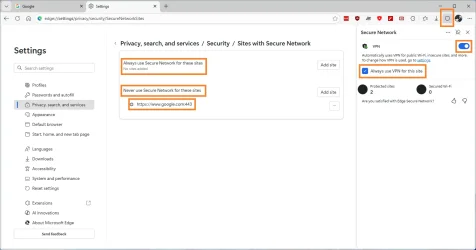
When "Always use VPN for this site" is checked in the Edge Secure Network dialog, the site name is added to the list "Never use Secure Network for these sites". Surely it would make more sense to add the site to "Always use Secure Network for these sites"??
In Edge in Windows 11 - to reproduce:
1. Enable the Edge Secure Network button at the top toolbar
2. Open a random web site
3. Click the Secure Network button
4. Check "Always use VPN for the site"
5. Click the underlined "settings" link to open edge://settings/privacy/security/SecureNetworkSites
6. Note that the web site has been added to "Never use Secure Network for these sites", but should have been added to "Always use Secure Network for these sites"
In Edge in Windows 11 - to reproduce:
1. Enable the Edge Secure Network button at the top toolbar
2. Open a random web site
3. Click the Secure Network button
4. Check "Always use VPN for the site"
5. Click the underlined "settings" link to open edge://settings/privacy/security/SecureNetworkSites
6. Note that the web site has been added to "Never use Secure Network for these sites", but should have been added to "Always use Secure Network for these sites"
Last edited:
My Computer
At a glance
Windows 11
- OS
- Windows 11