Small Taskbar icons


James

Well-known member
Power User
VIP
Local time
12:59 PM
Posts
917
Location
Wales, UK
OS
Windows 11 21H2
As I’m sure you are all aware, windows 11 at the moment does not allow for small taskbar icons, a feature possible in windows 10. I understand I can just hide away the taskbar when I’m not using it, or just use explorer patcher to have a windows 10 taskbar with small icons, but I want the stock windows 11 taskbar, just smaller.
 
Windows Build/Version
22H2

My Computers My Computers

  • At a glance

    Windows 11 21H2AMD Ryzen 3 3100Corsair 8GB x 2 (16GB)Asus Nvidia Geforce GTX 1650 Super
    OS
    Windows 11 21H2
    Computer type
    PC/Desktop
    Manufacturer/Model
    Chillblast
    CPU
    AMD Ryzen 3 3100
    Motherboard
    Asus ROG Strix b450-f
    Memory
    Corsair 8GB x 2 (16GB)
    Graphics Card(s)
    Asus Nvidia Geforce GTX 1650 Super
    Monitor(s) Displays
    Dell 27" 1440p
    Screen Resolution
    1440p
    Hard Drives
    Seagate Barracuda 1TB
    256GB NVME Seagate Barracuda
    Browser
    Firefox / Edge
    Antivirus
    Windows Defender
  • At a glance

    Windows 8.1Amd E24GB
    Operating System
    Windows 8.1
    Computer type
    Laptop
    Manufacturer/Model
    HP
    CPU
    Amd E2
    Memory
    4GB
    Hard Drives
    128GB SSD
If you're on the regular channel, just do Part B, here...


My Computers My Computers

  • At a glance

    Win 11 Home ♦♦♦26300.9550 ♦♦♦♦♦♦♦26H2AMD Ryzen 7 3700XG.Skill (F4-3200C14D-16GTZKW)EVGA RTX 2070 (08G-P4-2171-KR)
    OS
    Win 11 Home ♦♦♦26300.9550 ♦♦♦♦♦♦♦26H2
    Computer type
    PC/Desktop
    Manufacturer/Model
    Built by Ghot® [May 2020]
    CPU
    AMD Ryzen 7 3700X
    Motherboard
    Asus Pro WS X570-ACE (BIOS 5302)
    Memory
    G.Skill (F4-3200C14D-16GTZKW)
    Graphics Card(s)
    EVGA RTX 2070 (08G-P4-2171-KR)
    Sound Card
    Realtek ALC1220P / ALC S1220A
    Monitor(s) Displays
    Dell U3011 30"
    Screen Resolution
    2560 x 1600
    Hard Drives
    2x Samsung 860 EVO 500GB,
    WD 4TB Black FZBX - SATA III,
    WD 8TB Black FZBX - SATA III,
    DRW-24B1ST CD/DVD Burner
    PSU
    PC Power & Cooling 750W Quad EPS12V
    Case
    Cooler Master ATCS 840 Tower
    Cooling
    CM Hyper 212 EVO (push/pull)
    Keyboard
    Ducky DK9008 Shine II Blue LED
    Mouse
    Logitech Optical M-100
    Internet Speed
    300/300
    Browser
    Firefox (latest)
    Antivirus
    Bitdefender Total Security
    Other Info
    Speakers: Klipsch Pro Media 2.1
  • At a glance

    Windows XP Pro 32bit w/SP3AMD Athlon 64 X2 5000+ (OC'd @ 3.2Ghz)TWIN2X2048-6400C4DHX (2 x 1GB, DDR2 800)EVGA 256-P2-N758-TR GeForce 8600GT SSC
    Operating System
    Windows XP Pro 32bit w/SP3
    Computer type
    PC/Desktop
    Manufacturer/Model
    Built by Ghot® (not in use)
    CPU
    AMD Athlon 64 X2 5000+ (OC'd @ 3.2Ghz)
    Motherboard
    ASUS M2N32-SLI Deluxe Wireless Edition
    Memory
    TWIN2X2048-6400C4DHX (2 x 1GB, DDR2 800)
    Graphics card(s)
    EVGA 256-P2-N758-TR GeForce 8600GT SSC
    Sound Card
    Onboard
    Monitor(s) Displays
    ViewSonic G90FB Black 19" Professional (CRT)
    Screen Resolution
    up to 2048 x 1536
    Hard Drives
    WD 36GB 10,000rpm Raptor SATA
    Seagate 80GB 7200rpm SATA
    Lite-On LTR-52246S CD/RW
    Lite-On LH-18A1P CD/DVD Burner
    PSU
    PC Power & Cooling Silencer 750 Quad EPS12V
    Case
    Generic Beige case, 80mm fans
    Cooling
    ZALMAN 9500A 92mm CPU Cooler
    Keyboard
    Logitech Classic Keybooard 200
    Mouse
    Logitech Optical M-BT96a
    Internet Speed
    300/300
    Browser
    Firefox 3.x ??
    Antivirus
    Symantec (Norton)
    Other Info
    Still assembled, still runs. Haven't turned it on for 15 years?
You could use Stardock Start11, but it's not free (however not expensive).
With that you can choose to have small icons but further the taskbar can be used like the stock Windows 11 taskbar.
Although you can, if wished so, use some other facilities like never combine (which is planned to be included in a new Windows 11 version anyway).
 

My Computer My Computer

At a glance

Windows 11 Pro 25H2AMD Ryzen 7 5700GKingston FURY Beast 2x16GB DIMM DDR4 2666 CL16MSI GeForce GT 730 2GB LP V1
OS
Windows 11 Pro 25H2
Computer type
PC/Desktop
Manufacturer/Model
Build by vendor to my specs
CPU
AMD Ryzen 7 5700G
Motherboard
MSI PRO B550M-P Gen3
Memory
Kingston FURY Beast 2x16GB DIMM DDR4 2666 CL16
Graphics Card(s)
MSI GeForce GT 730 2GB LP V1
Sound Card
Creative Sound Blaster Audigy FX
Monitor(s) Displays
Samsung S24E450F 24"
Screen Resolution
1920 x 1080
Hard Drives
1. SSD Crucial P5 Plus 500GB PCIe M.2
2. SSD-SATA Crucial MX500-2TB
PSU
Corsair CV650W
Case
Cooler Master Silencio S400
Cooling
Cooler Master Hyper H412R with Be Quiet Pure Wings 2 PWM BL038 fan
Keyboard
Cherry Stream (wired, scissor keys)
Mouse
Asus WT465 (wireless)
Internet Speed
70 Mbps down / 80 Mbps up
Browser
Firefox 130.0
Antivirus
F-Secure (Internetprovider version)
Other Info
Router: FRITZBox 7490
Oracle VirtualBox 7 for testing software on Win 10 or 11
but I want the stock windows 11 taskbar, just smaller.
You and a lot of other people. It's one of the most requested features on feedback hub. Currently as far as I know a 3rd party tool is the only option you have other than increasing/decreasing the DPI scaling level. However, that affects everything you see so the tradeoff might not be worth it.
 

My Computers My Computers

  • At a glance

    Windows 11 Pro 25H2 26200.9457i9-10900 10 core 20 threads32 gbnone-Intel UHD Graphics 630
    OS
    Windows 11 Pro 25H2 26200.9457
    Computer type
    PC/Desktop
    Manufacturer/Model
    Dell Optiplex 7080
    CPU
    i9-10900 10 core 20 threads
    Motherboard
    DELL 0J37VM
    Memory
    32 gb
    Graphics Card(s)
    none-Intel UHD Graphics 630
    Sound Card
    Integrated Realtek
    Monitor(s) Displays
    Benq 27
    Screen Resolution
    2560x1440
    Hard Drives
    2x1tb Solidigm m.2 nvme /External drives 512gb Samsung m.2 sata+2tb Kingston m2.nvme
    PSU
    500w
    Case
    MT
    Cooling
    Dell Premium
    Keyboard
    Logitech wired
    Mouse
    Logitech wireless
    Internet Speed
    so slow I'm too embarrassed to tell
    Browser
    #1 Edge #2 Firefox
    Antivirus
    Defender+MWB Premium
  • At a glance

    Windows 11 Pro 24H2 26200.9457AMD Ryzen 7 6800U32 gbintegrated
    Operating System
    Windows 11 Pro 24H2 26200.9457
    Computer type
    PC/Desktop
    Manufacturer/Model
    Beelink Mini PC SER5
    CPU
    AMD Ryzen 7 6800U
    Memory
    32 gb
    Graphics card(s)
    integrated
    Sound Card
    integrated
    Monitor(s) Displays
    Benq 27
    Screen Resolution
    2560x1440
    Hard Drives
    1TB Crucial nvme
    Keyboard
    Logitech wired
    Mouse
    Logitech wireless
    Internet Speed
    still too embarrassed to tell
    Browser
    Firefox
    Antivirus
    Defender
  • System 3 is non compliant Dell 9020 i7-4770/24gb ram Win11 PRO 26200.9457
It was quite a logical step to increase the height of the taskbar compared to Windows 10, because more information was displayed. For example, the new double-row widgets would be unreadably small on the lower tray on a 1920 x 1080 dpi laptop screen.
This size is easy to read for me.
 

My Computer My Computer

At a glance

Windows 11 25H2Intel Core i5-7200U8,00 GBIntel HD Graphics 620, Radeon R5 M420
OS
Windows 11 25H2
Computer type
Laptop
Manufacturer/Model
DELL VOSTRO 15 3568
CPU
Intel Core i5-7200U
Memory
8,00 GB
Graphics Card(s)
Intel HD Graphics 620, Radeon R5 M420
Sound Card
Realtek Audio ALC3246
Monitor(s) Displays
BENQ PD3205UA
Screen Resolution
1920 X 1080
Hard Drives
SK HYNIX SC311 SATA 256 GB, SanDisk Extreme 510 external
Mouse
DELL MS700
Internet Speed
50/15 MB/s VDSL
Browser
Microsoft Edge
Antivirus
Microsoft Defender
You and a lot of other people. It's one of the most requested features on feedback hub. Currently as far as I know a 3rd party tool is the only option you have other than increasing/decreasing the DPI scaling level. However, that affects everything you see so the tradeoff might not be worth it.
Yes, thought it would be a highly requested feature, thanks. Hmm.. I’m on 100% scaling - and in Nvidia control panel I think I can reduce it. I’m on 1920x1080 however, so artificially lowering the size of everything is not something I’m prepared to do (especially with a 24” display)
 

My Computers My Computers

  • At a glance

    Windows 11 21H2AMD Ryzen 3 3100Corsair 8GB x 2 (16GB)Asus Nvidia Geforce GTX 1650 Super
    OS
    Windows 11 21H2
    Computer type
    PC/Desktop
    Manufacturer/Model
    Chillblast
    CPU
    AMD Ryzen 3 3100
    Motherboard
    Asus ROG Strix b450-f
    Memory
    Corsair 8GB x 2 (16GB)
    Graphics Card(s)
    Asus Nvidia Geforce GTX 1650 Super
    Monitor(s) Displays
    Dell 27" 1440p
    Screen Resolution
    1440p
    Hard Drives
    Seagate Barracuda 1TB
    256GB NVME Seagate Barracuda
    Browser
    Firefox / Edge
    Antivirus
    Windows Defender
  • At a glance

    Windows 8.1Amd E24GB
    Operating System
    Windows 8.1
    Computer type
    Laptop
    Manufacturer/Model
    HP
    CPU
    Amd E2
    Memory
    4GB
    Hard Drives
    128GB SSD
As I use dpi-scaling 125% (because my old eyes can't bear the minature icons of many apps), my taskbar would be rather big at normal height. I never use widgets and my taskbar is rather empty (if I have no windows open). So I use small icons, which makes the taskbar smaller.

My desktop (1920x1080 as well) looks like this (click the image for full size):

000888.jpg

As you can see it's a rather boring desktop. I don't like to be distracted from what I really need to do...
And it's rather old-fashioned, have that view already since Windows XP.
I hate having to get used to new User Interfaces just because the manufacturer of the software tells me to.
That's why I still use programs without this miserable ribbon including the old notepad.
I like menus, have used them since the first version of Window 3.x .

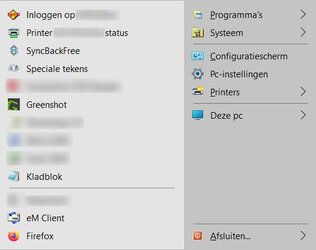
All the stuff that formerly was in the quick launch now is in the lower left part of my start menu:

000889.jpg

I did blend out some stuff I would not like to show and the language is Dutch, but many words are very close to the English equivalent.
 

My Computer My Computer

At a glance

Windows 11 Pro 25H2AMD Ryzen 7 5700GKingston FURY Beast 2x16GB DIMM DDR4 2666 CL16MSI GeForce GT 730 2GB LP V1
OS
Windows 11 Pro 25H2
Computer type
PC/Desktop
Manufacturer/Model
Build by vendor to my specs
CPU
AMD Ryzen 7 5700G
Motherboard
MSI PRO B550M-P Gen3
Memory
Kingston FURY Beast 2x16GB DIMM DDR4 2666 CL16
Graphics Card(s)
MSI GeForce GT 730 2GB LP V1
Sound Card
Creative Sound Blaster Audigy FX
Monitor(s) Displays
Samsung S24E450F 24"
Screen Resolution
1920 x 1080
Hard Drives
1. SSD Crucial P5 Plus 500GB PCIe M.2
2. SSD-SATA Crucial MX500-2TB
PSU
Corsair CV650W
Case
Cooler Master Silencio S400
Cooling
Cooler Master Hyper H412R with Be Quiet Pure Wings 2 PWM BL038 fan
Keyboard
Cherry Stream (wired, scissor keys)
Mouse
Asus WT465 (wireless)
Internet Speed
70 Mbps down / 80 Mbps up
Browser
Firefox 130.0
Antivirus
F-Secure (Internetprovider version)
Other Info
Router: FRITZBox 7490
Oracle VirtualBox 7 for testing software on Win 10 or 11

Latest Support Threads

Back
Top Bottom