
Snipping Tool Captures then Hides


But why does MS have 4 different ways to open the Documents?
Beats me..., I've never been able to fully grasp the File Explorer structure, it does seem convoluted and senseless at times! 🤷‍♂️
I guess that's why I use an alternative shell for Explorer.
 

My Computers My Computers

  • At a glance

    Windows 11 Pro
    OS
    Windows 11 Pro
    Computer type
    PC/Desktop
    Manufacturer/Model
    ASUS ROG Strix
  • At a glance

    Windows 11 Pro
    Operating System
    Windows 11 Pro
    Computer type
    Laptop
    Manufacturer/Model
    ASUS VivoBook
  • ASUS VivoBook 'Lite' ~ Windows 11 Home
Again, why do we need an alternative for Explorer? What is wrong with MS? Don't they ever read these forums? I could, and I'll bet y'all could too, list a huge bunch of idiotic things MS does. So I repeat. What do those programmers do? Dream up new things that no one can figure out how to use. Like ST? The old scan/paste was working. So what do they do, but create ST and then - to make matters worse, update it with more gimmicks.
 

My Computer My Computer

At a glance

Windows 11 Home 64-bitAMD K19 12 core2TB HDD + 238 SSDAMD Radeon
OS
Windows 11 Home 64-bit
Computer type
PC/Desktop
Manufacturer/Model
HP
CPU
AMD K19 12 core
Motherboard
HP 8906
Memory
2TB HDD + 238 SSD
Graphics Card(s)
AMD Radeon
Sound Card
Realtrek HD Audio
Monitor(s) Displays
Sceptre
Screen Resolution
1920x1080
Hard Drives
WDC WS20EZ..... & KBG50ZNV.....
Cooling
? has a fan!
Keyboard
Lenovo
Mouse
onn optical
Internet Speed
15
Browser
default Firefox back up Edge/instead of chrome
Antivirus
ESET
This latest fiasco with Snipping Tool is a prime example. It was working on Windows 10. So what do they do? Update Windows 11 so it "is different". When mine quit working. We found out it was the update that caused the problem. And the solution for me was to uninstall and reinstall the ST - and had to go to the Windows Store to do that. Any why? Because MS had to go and do an update that made this whole thing happen.
I had contact with MS and told them to get someone to read this forum. I was told they had a MS community forum. Yeah, sure! When I contacted that forum, I never got any truly good advice. It was on this "elevenforum" that I get normal humans like y'all. So to those of you who've been reading this. I simply thank you. I guess we all need to vent some. And learn as much as we can.
I just don't know why we all have to try to be gurus - just to operate a PC.
All the average public wants is a computer that we can plug in, turn on, and work. Not have to have a huge learning curve every time a new system comes out. MS creating this Windows 11 - after they said W 10 was the ultimate and would never have to be replaced, just updated.
So why when they update, do they create more problems?
And now, they will bring out W 12? Egads.
 

My Computer My Computer

At a glance

Windows 11 Home 64-bitAMD K19 12 core2TB HDD + 238 SSDAMD Radeon
OS
Windows 11 Home 64-bit
Computer type
PC/Desktop
Manufacturer/Model
HP
CPU
AMD K19 12 core
Motherboard
HP 8906
Memory
2TB HDD + 238 SSD
Graphics Card(s)
AMD Radeon
Sound Card
Realtrek HD Audio
Monitor(s) Displays
Sceptre
Screen Resolution
1920x1080
Hard Drives
WDC WS20EZ..... & KBG50ZNV.....
Cooling
? has a fan!
Keyboard
Lenovo
Mouse
onn optical
Internet Speed
15
Browser
default Firefox back up Edge/instead of chrome
Antivirus
ESET
This latest fiasco with Snipping Tool is a prime example. It was working on Windows 10. So what do they do? Update Windows 11 so it "is different".
I believe there is some other factor involved because for me it works exactly as it is supposed to. Tweak, software, something.
 

My Computers My Computers

  • At a glance

    Windows 11 Pro 25H2 Build 26200.9168Intel(R) Core(TM) i7-4770K CPU @ 3.50GHz32.0 GB of I forget and the box is in storage.Gigabyte nVidia GeForce GTX 1660 Super OC 6GB
    OS
    Windows 11 Pro 25H2 Build 26200.9168
    Computer type
    PC/Desktop
    Manufacturer/Model
    Sin-built 2013
    CPU
    Intel(R) Core(TM) i7-4770K CPU @ 3.50GHz
    Motherboard
    ASUS ROG Maximus VI Formula
    Memory
    32.0 GB of I forget and the box is in storage.
    Graphics Card(s)
    Gigabyte nVidia GeForce GTX 1660 Super OC 6GB
    Sound Card
    ROG SupremeFX Formula 8-Channel High Definition Audio
    Monitor(s) Displays
    5 x LG 25MS500-B - 1 x 24MK430H-B - 1 x Wacom Pro 22" Touch Screen Tablet
    Screen Resolution
    All over the place
    Hard Drives
    Too many to list. OS on Samsung 1TB 870 QVO SATA
    PSU
    Silverstone 1500
    Case
    NZXT Phantom 820 Full-Tower Case
    Cooling
    Noctua NH-D15 Elite Class Dual Tower CPU Cooler / 6 x EziDIY 120mm / 2 x Corsair 140mm somethings / 1 x 140mm Thermaltake something / 2 x 200mm Corsair.
    Keyboard
    Corsair K95 / Logitech diNovo Edge Wireless
    Mouse
    Logitech: G402 / G502 / Mx Masters / Mx Air Cordless
    Internet Speed
    2000/500Mbps
    Browser
    All sorts
    Antivirus
    Kaspersky Premium
    Other Info
    ㅤㅤㅤㅤㅤㅤㅤㅤㅤㅤㅤㅤㅤㅤㅤㅤㅤㅤㅤㅤㅤㅤㅤㅤㅤㅤㅤㅤㅤㅤㅤㅤㅤㅤㅤㅤㅤㅤㅤㅤ⠀⠀⠀⠀⠀⠀⠀⠀⠀⠀
    TP-Link BE9300 WiFi 7 Bluetooth 5.4 (Archer TBE550E)
    TP-Link TX201 V1 2.5GB Lan

    Grandstream HT812 - VoIP
    ASUS DSL-AX82U - Mesh
    ASUS RT-AC68U - Mesh
    ASUS RT-BE88U Router

    Brother MFC-L2880DW Printer

    I’m on a horse.
  • At a glance

    Windows 11 Pro 25H2 Build 26200.9168 (Wifes)13th Generation Intel® Core™ i5-1340P Process...16GB LPDDR5-52001x Intel® Iris® Xe Graphics
    Operating System
    Windows 11 Pro 25H2 Build 26200.9168 (Wifes)
    Computer type
    Laptop
    Manufacturer/Model
    LENOVO Yoga 7 14IRL8 - Type 82YL
    CPU
    13th Generation Intel® Core™ i5-1340P Processor(Core™ i5-1340P)
    Memory
    16GB LPDDR5-5200
    Graphics card(s)
    1x Intel® Iris® Xe Graphics
    Sound Card
    Optimized with Dolby Atmos®
    Screen Resolution
    QHD 2880 x 1800 OLED
    Hard Drives
    M.2 512 GB SSD PCIe
    Mouse
    Logiteck MX Master 3S
    Internet Speed
    2000/500
    Antivirus
    Defender / Malwarebytes
    Other Info
    …still on a horse.


    Wireless Network: Wi-Fi 6E 2x2 AX; Bluetooth® 5.1 or above
    Ports: 1x 1 Novo button; 2 in 1 Audio Combo jack; Micro SD Card Reader; HDMI 1.4b; 2 x USB Type-C (TBT4)
    USB 3.2 Gen 2 DP 1.4a
    PD 3.0); 1 x USB 3.2 Gen1 Type A
    Camera
    1x 1080P FHD IR/RGB Hybrid with Privacy Shutter and Dual Array Microphone
    Graphics
    1x Intel® Iris® Xe Graphics
    Monitor
    14" WUXGA
    Form Factor
    Convertible Notebook
  • Windows 11 Pro 25H2 Build 26200.9168 (Wifes)

    Yoga 7 2-in-1 14IML9 - Type 83DJ

    Processor: Intel® Core™ Ultra 7 155H Processor(Core™ Ultra 7 155H)

    Memory: 32GB LPD5X-7467

    Hard Drive: 1 TB SSD PCIe

    Wireless Network: 1x Wi-Fi 6E 2x2 AX; Bluetooth® 5.1 or above

    Ports: 1 x HDMI 2.1 TMDS; 1 x Novo Button; 1 x Combo Audio Jack
    2 x USB-C (USB 4.0)
    1 x USB-A 3.2 Gen 1

    Camera: 1080P FHD IR Hybrid with Dual Microphone

    Graphics: Intel® Arc™ Graphics

    Monitor: 14" 2.8K

    ...Where's my horse?
antspants: If you read back a bit. Others had the same problem I did. Plus the many other threads on this same subject.
And from what I read, there were more than one way to get ST images to save in Pictures. Remember the little window that opened in the bottom right corner? Well, not everyone had that - just as I didn't. That little window has now gone. And for me to save an image from ST, is a totally new way since: Windows 10, Windows 11 when I first got it, and in these last few months since then, ST got harder and harder to get it to save the image. And to make matters worse, my clipboard was no help whatsoever.
So whenever I try to get something saved in clipboard, that is now gone. This is what I get now. Totally useless.
 

Attachments

  • Clipboard.jpg
    Clipboard.jpg
    9.8 KB · Views: 1

My Computer My Computer

At a glance

Windows 11 Home 64-bitAMD K19 12 core2TB HDD + 238 SSDAMD Radeon
OS
Windows 11 Home 64-bit
Computer type
PC/Desktop
Manufacturer/Model
HP
CPU
AMD K19 12 core
Motherboard
HP 8906
Memory
2TB HDD + 238 SSD
Graphics Card(s)
AMD Radeon
Sound Card
Realtrek HD Audio
Monitor(s) Displays
Sceptre
Screen Resolution
1920x1080
Hard Drives
WDC WS20EZ..... & KBG50ZNV.....
Cooling
? has a fan!
Keyboard
Lenovo
Mouse
onn optical
Internet Speed
15
Browser
default Firefox back up Edge/instead of chrome
Antivirus
ESET
antspants: If you read back a bit. Others had the same problem I did. Plus the many other threads on this same subject.
And from what I read, there were more than one way to get ST images to save in Pictures. Remember the little window that opened in the bottom right corner? Well, not everyone had that - just as I didn't. That little window has now gone. And for me to save an image from ST, is a totally new way since: Windows 10, Windows 11 when I first got it, and in these last few months since then, ST got harder and harder to get it to save the image. And to make matters worse, my clipboard was no help whatsoever.
So whenever I try to get something saved in clipboard, that is now gone. This is what I get now. Totally useless.
Yes I remember reading that.
And don’t get me wrong, I am not saying it is anything you have done, but there must be variables other than Windows 11 changes if it can work for me (and others) and not for some.
 

My Computers My Computers

  • At a glance

    Windows 11 Pro 25H2 Build 26200.9168Intel(R) Core(TM) i7-4770K CPU @ 3.50GHz32.0 GB of I forget and the box is in storage.Gigabyte nVidia GeForce GTX 1660 Super OC 6GB
    OS
    Windows 11 Pro 25H2 Build 26200.9168
    Computer type
    PC/Desktop
    Manufacturer/Model
    Sin-built 2013
    CPU
    Intel(R) Core(TM) i7-4770K CPU @ 3.50GHz
    Motherboard
    ASUS ROG Maximus VI Formula
    Memory
    32.0 GB of I forget and the box is in storage.
    Graphics Card(s)
    Gigabyte nVidia GeForce GTX 1660 Super OC 6GB
    Sound Card
    ROG SupremeFX Formula 8-Channel High Definition Audio
    Monitor(s) Displays
    5 x LG 25MS500-B - 1 x 24MK430H-B - 1 x Wacom Pro 22" Touch Screen Tablet
    Screen Resolution
    All over the place
    Hard Drives
    Too many to list. OS on Samsung 1TB 870 QVO SATA
    PSU
    Silverstone 1500
    Case
    NZXT Phantom 820 Full-Tower Case
    Cooling
    Noctua NH-D15 Elite Class Dual Tower CPU Cooler / 6 x EziDIY 120mm / 2 x Corsair 140mm somethings / 1 x 140mm Thermaltake something / 2 x 200mm Corsair.
    Keyboard
    Corsair K95 / Logitech diNovo Edge Wireless
    Mouse
    Logitech: G402 / G502 / Mx Masters / Mx Air Cordless
    Internet Speed
    2000/500Mbps
    Browser
    All sorts
    Antivirus
    Kaspersky Premium
    Other Info
    ㅤㅤㅤㅤㅤㅤㅤㅤㅤㅤㅤㅤㅤㅤㅤㅤㅤㅤㅤㅤㅤㅤㅤㅤㅤㅤㅤㅤㅤㅤㅤㅤㅤㅤㅤㅤㅤㅤㅤㅤ⠀⠀⠀⠀⠀⠀⠀⠀⠀⠀
    TP-Link BE9300 WiFi 7 Bluetooth 5.4 (Archer TBE550E)
    TP-Link TX201 V1 2.5GB Lan

    Grandstream HT812 - VoIP
    ASUS DSL-AX82U - Mesh
    ASUS RT-AC68U - Mesh
    ASUS RT-BE88U Router

    Brother MFC-L2880DW Printer

    I’m on a horse.
  • At a glance

    Windows 11 Pro 25H2 Build 26200.9168 (Wifes)13th Generation Intel® Core™ i5-1340P Process...16GB LPDDR5-52001x Intel® Iris® Xe Graphics
    Operating System
    Windows 11 Pro 25H2 Build 26200.9168 (Wifes)
    Computer type
    Laptop
    Manufacturer/Model
    LENOVO Yoga 7 14IRL8 - Type 82YL
    CPU
    13th Generation Intel® Core™ i5-1340P Processor(Core™ i5-1340P)
    Memory
    16GB LPDDR5-5200
    Graphics card(s)
    1x Intel® Iris® Xe Graphics
    Sound Card
    Optimized with Dolby Atmos®
    Screen Resolution
    QHD 2880 x 1800 OLED
    Hard Drives
    M.2 512 GB SSD PCIe
    Mouse
    Logiteck MX Master 3S
    Internet Speed
    2000/500
    Antivirus
    Defender / Malwarebytes
    Other Info
    …still on a horse.


    Wireless Network: Wi-Fi 6E 2x2 AX; Bluetooth® 5.1 or above
    Ports: 1x 1 Novo button; 2 in 1 Audio Combo jack; Micro SD Card Reader; HDMI 1.4b; 2 x USB Type-C (TBT4)
    USB 3.2 Gen 2 DP 1.4a
    PD 3.0); 1 x USB 3.2 Gen1 Type A
    Camera
    1x 1080P FHD IR/RGB Hybrid with Privacy Shutter and Dual Array Microphone
    Graphics
    1x Intel® Iris® Xe Graphics
    Monitor
    14" WUXGA
    Form Factor
    Convertible Notebook
  • Windows 11 Pro 25H2 Build 26200.9168 (Wifes)

    Yoga 7 2-in-1 14IML9 - Type 83DJ

    Processor: Intel® Core™ Ultra 7 155H Processor(Core™ Ultra 7 155H)

    Memory: 32GB LPD5X-7467

    Hard Drive: 1 TB SSD PCIe

    Wireless Network: 1x Wi-Fi 6E 2x2 AX; Bluetooth® 5.1 or above

    Ports: 1 x HDMI 2.1 TMDS; 1 x Novo Button; 1 x Combo Audio Jack
    2 x USB-C (USB 4.0)
    1 x USB-A 3.2 Gen 1

    Camera: 1080P FHD IR Hybrid with Dual Microphone

    Graphics: Intel® Arc™ Graphics

    Monitor: 14" 2.8K

    ...Where's my horse?
Pressing WinKey+V is Clipboard turned on?

0005075.png
 

My Computers My Computers

  • At a glance

    Windows 11 Pro
    OS
    Windows 11 Pro
    Computer type
    PC/Desktop
    Manufacturer/Model
    ASUS ROG Strix
  • At a glance

    Windows 11 Pro
    Operating System
    Windows 11 Pro
    Computer type
    Laptop
    Manufacturer/Model
    ASUS VivoBook
  • ASUS VivoBook 'Lite' ~ Windows 11 Home
Edwin: I attached what I get. It's obviously not what you show. So - I don't have it. I didn't know it had to be installed. I thought the clipboard was part of Windows. Here's what I get in settings.
 

Attachments

  • clipboard settings.jpg
    clipboard settings.jpg
    40.7 KB · Views: 1

My Computer My Computer

At a glance

Windows 11 Home 64-bitAMD K19 12 core2TB HDD + 238 SSDAMD Radeon
OS
Windows 11 Home 64-bit
Computer type
PC/Desktop
Manufacturer/Model
HP
CPU
AMD K19 12 core
Motherboard
HP 8906
Memory
2TB HDD + 238 SSD
Graphics Card(s)
AMD Radeon
Sound Card
Realtrek HD Audio
Monitor(s) Displays
Sceptre
Screen Resolution
1920x1080
Hard Drives
WDC WS20EZ..... & KBG50ZNV.....
Cooling
? has a fan!
Keyboard
Lenovo
Mouse
onn optical
Internet Speed
15
Browser
default Firefox back up Edge/instead of chrome
Antivirus
ESET

My Computers My Computers

  • At a glance

    Windows 11 Pro
    OS
    Windows 11 Pro
    Computer type
    PC/Desktop
    Manufacturer/Model
    ASUS ROG Strix
  • At a glance

    Windows 11 Pro
    Operating System
    Windows 11 Pro
    Computer type
    Laptop
    Manufacturer/Model
    ASUS VivoBook
  • ASUS VivoBook 'Lite' ~ Windows 11 Home
Another thing, if you take a screenshot then open Paint, is the clipboard illuminated?

0005056.png
 

My Computers My Computers

  • At a glance

    Windows 11 Pro
    OS
    Windows 11 Pro
    Computer type
    PC/Desktop
    Manufacturer/Model
    ASUS ROG Strix
  • At a glance

    Windows 11 Pro
    Operating System
    Windows 11 Pro
    Computer type
    Laptop
    Manufacturer/Model
    ASUS VivoBook
  • ASUS VivoBook 'Lite' ~ Windows 11 Home
"If you press WinKey+V, doesn't the little window pop up in the bottom right corner?" YES. But I can't do anything with it. It shows the image that's so tiny it is useless. And I can't do anything with that little window. As soon as I try anything, it disappears.
"Another thing, if you take a screenshot then open Paint, is the clipboard illuminated?" ?? Every time I take a screenshot, it opens ST and then, I start all over.
And I can't make a copy or scan or ST the "little window" that shows everything I've copied. But as I said. I can't do anything with it. The "clipboard" remains little and I can't even read most of what's saved. Let alone copy it or save it or anything.
We are chasing a ghost. I'm going to forget this and quit. Wasting too much time on this now. It isn't worth the effort. Windows 11 is just a losing situation. MS should have kept W 10 and just kept on updating or upgrading. Not create this monster.
 

My Computer My Computer

At a glance

Windows 11 Home 64-bitAMD K19 12 core2TB HDD + 238 SSDAMD Radeon
OS
Windows 11 Home 64-bit
Computer type
PC/Desktop
Manufacturer/Model
HP
CPU
AMD K19 12 core
Motherboard
HP 8906
Memory
2TB HDD + 238 SSD
Graphics Card(s)
AMD Radeon
Sound Card
Realtrek HD Audio
Monitor(s) Displays
Sceptre
Screen Resolution
1920x1080
Hard Drives
WDC WS20EZ..... & KBG50ZNV.....
Cooling
? has a fan!
Keyboard
Lenovo
Mouse
onn optical
Internet Speed
15
Browser
default Firefox back up Edge/instead of chrome
Antivirus
ESET
It shows the image that's so tiny it is useless.
The clipboard wont show you full size images. As far as I know you need to paste them into paint. But if you found a way that works, stay with it.
 

My Computers My Computers

  • At a glance

    Windows 11 Pro 25H2 Build 26200.9168Intel(R) Core(TM) i7-4770K CPU @ 3.50GHz32.0 GB of I forget and the box is in storage.Gigabyte nVidia GeForce GTX 1660 Super OC 6GB
    OS
    Windows 11 Pro 25H2 Build 26200.9168
    Computer type
    PC/Desktop
    Manufacturer/Model
    Sin-built 2013
    CPU
    Intel(R) Core(TM) i7-4770K CPU @ 3.50GHz
    Motherboard
    ASUS ROG Maximus VI Formula
    Memory
    32.0 GB of I forget and the box is in storage.
    Graphics Card(s)
    Gigabyte nVidia GeForce GTX 1660 Super OC 6GB
    Sound Card
    ROG SupremeFX Formula 8-Channel High Definition Audio
    Monitor(s) Displays
    5 x LG 25MS500-B - 1 x 24MK430H-B - 1 x Wacom Pro 22" Touch Screen Tablet
    Screen Resolution
    All over the place
    Hard Drives
    Too many to list. OS on Samsung 1TB 870 QVO SATA
    PSU
    Silverstone 1500
    Case
    NZXT Phantom 820 Full-Tower Case
    Cooling
    Noctua NH-D15 Elite Class Dual Tower CPU Cooler / 6 x EziDIY 120mm / 2 x Corsair 140mm somethings / 1 x 140mm Thermaltake something / 2 x 200mm Corsair.
    Keyboard
    Corsair K95 / Logitech diNovo Edge Wireless
    Mouse
    Logitech: G402 / G502 / Mx Masters / Mx Air Cordless
    Internet Speed
    2000/500Mbps
    Browser
    All sorts
    Antivirus
    Kaspersky Premium
    Other Info
    ㅤㅤㅤㅤㅤㅤㅤㅤㅤㅤㅤㅤㅤㅤㅤㅤㅤㅤㅤㅤㅤㅤㅤㅤㅤㅤㅤㅤㅤㅤㅤㅤㅤㅤㅤㅤㅤㅤㅤㅤ⠀⠀⠀⠀⠀⠀⠀⠀⠀⠀
    TP-Link BE9300 WiFi 7 Bluetooth 5.4 (Archer TBE550E)
    TP-Link TX201 V1 2.5GB Lan

    Grandstream HT812 - VoIP
    ASUS DSL-AX82U - Mesh
    ASUS RT-AC68U - Mesh
    ASUS RT-BE88U Router

    Brother MFC-L2880DW Printer

    I’m on a horse.
  • At a glance

    Windows 11 Pro 25H2 Build 26200.9168 (Wifes)13th Generation Intel® Core™ i5-1340P Process...16GB LPDDR5-52001x Intel® Iris® Xe Graphics
    Operating System
    Windows 11 Pro 25H2 Build 26200.9168 (Wifes)
    Computer type
    Laptop
    Manufacturer/Model
    LENOVO Yoga 7 14IRL8 - Type 82YL
    CPU
    13th Generation Intel® Core™ i5-1340P Processor(Core™ i5-1340P)
    Memory
    16GB LPDDR5-5200
    Graphics card(s)
    1x Intel® Iris® Xe Graphics
    Sound Card
    Optimized with Dolby Atmos®
    Screen Resolution
    QHD 2880 x 1800 OLED
    Hard Drives
    M.2 512 GB SSD PCIe
    Mouse
    Logiteck MX Master 3S
    Internet Speed
    2000/500
    Antivirus
    Defender / Malwarebytes
    Other Info
    …still on a horse.


    Wireless Network: Wi-Fi 6E 2x2 AX; Bluetooth® 5.1 or above
    Ports: 1x 1 Novo button; 2 in 1 Audio Combo jack; Micro SD Card Reader; HDMI 1.4b; 2 x USB Type-C (TBT4)
    USB 3.2 Gen 2 DP 1.4a
    PD 3.0); 1 x USB 3.2 Gen1 Type A
    Camera
    1x 1080P FHD IR/RGB Hybrid with Privacy Shutter and Dual Array Microphone
    Graphics
    1x Intel® Iris® Xe Graphics
    Monitor
    14" WUXGA
    Form Factor
    Convertible Notebook
  • Windows 11 Pro 25H2 Build 26200.9168 (Wifes)

    Yoga 7 2-in-1 14IML9 - Type 83DJ

    Processor: Intel® Core™ Ultra 7 155H Processor(Core™ Ultra 7 155H)

    Memory: 32GB LPD5X-7467

    Hard Drive: 1 TB SSD PCIe

    Wireless Network: 1x Wi-Fi 6E 2x2 AX; Bluetooth® 5.1 or above

    Ports: 1 x HDMI 2.1 TMDS; 1 x Novo Button; 1 x Combo Audio Jack
    2 x USB-C (USB 4.0)
    1 x USB-A 3.2 Gen 1

    Camera: 1080P FHD IR Hybrid with Dual Microphone

    Graphics: Intel® Arc™ Graphics

    Monitor: 14" 2.8K

    ...Where's my horse?
Watch the Paste Clipboard in Paint automatically turn from grey to brown (live) when I take a screenshot...

0005058.gif

Likewise with the Clipboard itself, click on the item then paste it into whatever...

0005067.gif
 

My Computers My Computers

  • At a glance

    Windows 11 Pro
    OS
    Windows 11 Pro
    Computer type
    PC/Desktop
    Manufacturer/Model
    ASUS ROG Strix
  • At a glance

    Windows 11 Pro
    Operating System
    Windows 11 Pro
    Computer type
    Laptop
    Manufacturer/Model
    ASUS VivoBook
  • ASUS VivoBook 'Lite' ~ Windows 11 Home
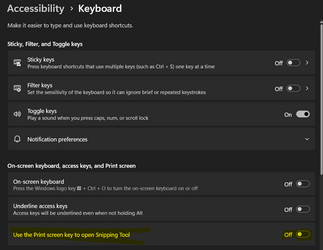
Maybe disable ST with print screen key.

1693881478101.png
 

My Computers My Computers

  • At a glance

    Win 11 Pro 25H2 26200.9168Intel® Core™ i7-14700KG.SKILL Ripjaws S5 Series 64GB (2 x 32GB) DDR5ASUS GeForce RTX 4070 Super 12GB
    OS
    Win 11 Pro 25H2 26200.9168
    Computer type
    PC/Desktop
    Manufacturer/Model
    Self Built
    CPU
    Intel® Core™ i7-14700K
    Motherboard
    ASUS TUF Z690-PLUS WIFI (BIOS 4505)
    Memory
    G.SKILL Ripjaws S5 Series 64GB (2 x 32GB) DDR5
    Graphics Card(s)
    ASUS GeForce RTX 4070 Super 12GB
    Sound Card
    Sound Blaster AE-5 Plus
    Monitor(s) Displays
    ASUS TUF Gaming 27" 2K HDR Gaming
    Screen Resolution
    2560 x 1440
    Hard Drives
    Samsung 990 Pro 1TB NVMe (Win 11 25H2)
    SK hynix P41 500GB NVMe
    SK hynix P41 2TB NVMe (x3)
    Crucial P3 Plus 4TB
    PSU
    Corsair RM850x Shift
    Case
    Antec Dark Phantom DP502 FLUX
    Cooling
    Corsair Nautilus 360 RS AIO
    Keyboard
    Logitech MK 320
    Mouse
    Razer Basilisk V3
    Internet Speed
    750Mbs
    Browser
    Firefox
    Antivirus
    Winows Security
    Other Info
    MR 8.1 Home
  • At a glance

    Win 11 Pro 25H2 26200.9168Intel Core i5-1140064 GB DDR4MSI GeForce RTX 3060 Ventus 2X 12GB
    Operating System
    Win 11 Pro 25H2 26200.9168
    Computer type
    PC/Desktop
    Manufacturer/Model
    Self Built
    CPU
    Intel Core i5-11400
    Motherboard
    Asus TUF Gaming Z590 Plus WiFi (BIOS 2803)
    Memory
    64 GB DDR4
    Graphics card(s)
    MSI GeForce RTX 3060 Ventus 2X 12GB
    Sound Card
    SoundBlaster Audigy Fx V2
    Monitor(s) Displays
    Samsung F27T350
    Screen Resolution
    1920x1080
    Hard Drives
    Samsung 980 Pro 1TB
    Samsung 970 EVO Plus 2TB
    Samsung 870 EVO 500GB SSD
    PSU
    Corsair HX750
    Case
    Cougar MX330-G Window
    Cooling
    Thermalright Frozen Edge 240 Black AIO
    Internet Speed
    350Mbps
    Browser
    Firefox
    Antivirus
    Windows Security
  • System Three
    Win 11 Pro 25H2 26200.9168
    ASUS PRIME Z370-P II BIOS 3004 7/12/21
    Intel Core i7-8700 CPU @ 3.20GHz
    32GB DDR4 RAM (4x8)
    iGPU Intel UHD Graphics 630
    Cooler Master Hyper 212
    Mid-Tower Desktop
Edwin: Your instructions are crystal clear. BUT: My PC don't show that. When I push WinKey & V, I get that little window. But it's blank. ? As it should be. If I then use the ST where the image simply disappears, and then do WinKey & V, that image does appear. Just like it should. BUT: I can't do anything with it, such as Paint or Pictures or ? Whoops. If I Enter that clipboard image, it appears here.
And please note, it lost the image. ?? So I still don't know what the heck is going on. And I can't type below this image.
1693928759577.png
 

My Computer My Computer

At a glance

Windows 11 Home 64-bitAMD K19 12 core2TB HDD + 238 SSDAMD Radeon
OS
Windows 11 Home 64-bit
Computer type
PC/Desktop
Manufacturer/Model
HP
CPU
AMD K19 12 core
Motherboard
HP 8906
Memory
2TB HDD + 238 SSD
Graphics Card(s)
AMD Radeon
Sound Card
Realtrek HD Audio
Monitor(s) Displays
Sceptre
Screen Resolution
1920x1080
Hard Drives
WDC WS20EZ..... & KBG50ZNV.....
Cooling
? has a fan!
Keyboard
Lenovo
Mouse
onn optical
Internet Speed
15
Browser
default Firefox back up Edge/instead of chrome
Antivirus
ESET
And here's another. I did ST on the email message from the group about yours. Same response. Copies here. No other options.1693929000822.png
 

My Computer My Computer

At a glance

Windows 11 Home 64-bitAMD K19 12 core2TB HDD + 238 SSDAMD Radeon
OS
Windows 11 Home 64-bit
Computer type
PC/Desktop
Manufacturer/Model
HP
CPU
AMD K19 12 core
Motherboard
HP 8906
Memory
2TB HDD + 238 SSD
Graphics Card(s)
AMD Radeon
Sound Card
Realtrek HD Audio
Monitor(s) Displays
Sceptre
Screen Resolution
1920x1080
Hard Drives
WDC WS20EZ..... & KBG50ZNV.....
Cooling
? has a fan!
Keyboard
Lenovo
Mouse
onn optical
Internet Speed
15
Browser
default Firefox back up Edge/instead of chrome
Antivirus
ESET
So how can I get it to offer me the option of where to save or send?
 

My Computer My Computer

At a glance

Windows 11 Home 64-bitAMD K19 12 core2TB HDD + 238 SSDAMD Radeon
OS
Windows 11 Home 64-bit
Computer type
PC/Desktop
Manufacturer/Model
HP
CPU
AMD K19 12 core
Motherboard
HP 8906
Memory
2TB HDD + 238 SSD
Graphics Card(s)
AMD Radeon
Sound Card
Realtrek HD Audio
Monitor(s) Displays
Sceptre
Screen Resolution
1920x1080
Hard Drives
WDC WS20EZ..... & KBG50ZNV.....
Cooling
? has a fan!
Keyboard
Lenovo
Mouse
onn optical
Internet Speed
15
Browser
default Firefox back up Edge/instead of chrome
Antivirus
ESET
Snipping Tool use to present the snip in a newly opened window. Now it captures, saves, and closes. Then I have to go looking for the Pictures\Screenshots folder.

I’ve confirmed that the Print Screen key is set to opening Snipping Tool.

I’ve tried:
  • Repairing Snipping Tool
  • Uninstalling Snipping Tool (Print Screen and the following capture behaves the same.)
  • Reinstalling Snipping Tool from the Microsoft Store (Didn’t notice any difference.)
Is there a way to get the popup Snipping Tool viewer back?
Is it possible to uninstall Snipping Tool?
If not, is there a way to assign the Print Screen key to another app? (Just "PrintScreen" without any simultaneous keys.)

I know its a bit late for a response, but I signed up to post here.
I was annoyed as well with the snipping tool window disappearing, but I did figure out what happened.

Settings > System > Notifications > Snipping Tool (turned on notifications, banners, allow through 'do not disturb', and normal priority.

Hope this helps someone! I gave up months ago but gave it another shot and its back to how it was.
CMD+SHIFT+S and all auto save/copy settings active.

1703190451960.png
 

My Computer My Computer

At a glance

Windows 11 Proi9-7960X CPU @ 2.80GHzG.Skill -DDR4-3200 (1600mh)z 128 GBNVIDIA GeForce RTX 3090
OS
Windows 11 Pro
Computer type
PC/Desktop
Manufacturer/Model
Gigabyte Technology Co. x64
CPU
i9-7960X CPU @ 2.80GHz
Motherboard
X299 AORUS Gaming 7
Memory
G.Skill -DDR4-3200 (1600mh)z 128 GB
Graphics Card(s)
NVIDIA GeForce RTX 3090
Sound Card
Focusrite USB Audio
Monitor(s) Displays
(2) Dell P2715Q 27" Ultra HD 4K Monitor
Screen Resolution
3840 x 2160
Hard Drives
(2) Samsung 990 Pro 2TB M.2
PSU
EVGA SuperNOVA 1000 P2
Case
Thermaltake View 37 ATX Mid Tower Case
Cooling
Thermaltake Floe Riing RGB 360 TT
Keyboard
Logitech K800
Mouse
Logitech MX Master
I know its a bit late for a response, but I signed up to post here.
I was annoyed as well with the snipping tool window disappearing, but I did figure out what happened.

Settings > System > Notifications > Snipping Tool (turned on notifications, banners, allow through 'do not disturb', and normal priority.

Hope this helps someone! I gave up months ago but gave it another shot and its back to how it was.
CMD+SHIFT+S and all auto save/copy settings active.

View attachment 81979

Hi HankChinaski, welcome to the Eleven Forums.

Good of you to join to give your advise. I hope you stick around. Cheers 🙏
 

My Computers My Computers

  • At a glance

    Windows 11 Pro 25H2 Build 26200.9168Intel(R) Core(TM) i7-4770K CPU @ 3.50GHz32.0 GB of I forget and the box is in storage.Gigabyte nVidia GeForce GTX 1660 Super OC 6GB
    OS
    Windows 11 Pro 25H2 Build 26200.9168
    Computer type
    PC/Desktop
    Manufacturer/Model
    Sin-built 2013
    CPU
    Intel(R) Core(TM) i7-4770K CPU @ 3.50GHz
    Motherboard
    ASUS ROG Maximus VI Formula
    Memory
    32.0 GB of I forget and the box is in storage.
    Graphics Card(s)
    Gigabyte nVidia GeForce GTX 1660 Super OC 6GB
    Sound Card
    ROG SupremeFX Formula 8-Channel High Definition Audio
    Monitor(s) Displays
    5 x LG 25MS500-B - 1 x 24MK430H-B - 1 x Wacom Pro 22" Touch Screen Tablet
    Screen Resolution
    All over the place
    Hard Drives
    Too many to list. OS on Samsung 1TB 870 QVO SATA
    PSU
    Silverstone 1500
    Case
    NZXT Phantom 820 Full-Tower Case
    Cooling
    Noctua NH-D15 Elite Class Dual Tower CPU Cooler / 6 x EziDIY 120mm / 2 x Corsair 140mm somethings / 1 x 140mm Thermaltake something / 2 x 200mm Corsair.
    Keyboard
    Corsair K95 / Logitech diNovo Edge Wireless
    Mouse
    Logitech: G402 / G502 / Mx Masters / Mx Air Cordless
    Internet Speed
    2000/500Mbps
    Browser
    All sorts
    Antivirus
    Kaspersky Premium
    Other Info
    ㅤㅤㅤㅤㅤㅤㅤㅤㅤㅤㅤㅤㅤㅤㅤㅤㅤㅤㅤㅤㅤㅤㅤㅤㅤㅤㅤㅤㅤㅤㅤㅤㅤㅤㅤㅤㅤㅤㅤㅤ⠀⠀⠀⠀⠀⠀⠀⠀⠀⠀
    TP-Link BE9300 WiFi 7 Bluetooth 5.4 (Archer TBE550E)
    TP-Link TX201 V1 2.5GB Lan

    Grandstream HT812 - VoIP
    ASUS DSL-AX82U - Mesh
    ASUS RT-AC68U - Mesh
    ASUS RT-BE88U Router

    Brother MFC-L2880DW Printer

    I’m on a horse.
  • At a glance

    Windows 11 Pro 25H2 Build 26200.9168 (Wifes)13th Generation Intel® Core™ i5-1340P Process...16GB LPDDR5-52001x Intel® Iris® Xe Graphics
    Operating System
    Windows 11 Pro 25H2 Build 26200.9168 (Wifes)
    Computer type
    Laptop
    Manufacturer/Model
    LENOVO Yoga 7 14IRL8 - Type 82YL
    CPU
    13th Generation Intel® Core™ i5-1340P Processor(Core™ i5-1340P)
    Memory
    16GB LPDDR5-5200
    Graphics card(s)
    1x Intel® Iris® Xe Graphics
    Sound Card
    Optimized with Dolby Atmos®
    Screen Resolution
    QHD 2880 x 1800 OLED
    Hard Drives
    M.2 512 GB SSD PCIe
    Mouse
    Logiteck MX Master 3S
    Internet Speed
    2000/500
    Antivirus
    Defender / Malwarebytes
    Other Info
    …still on a horse.


    Wireless Network: Wi-Fi 6E 2x2 AX; Bluetooth® 5.1 or above
    Ports: 1x 1 Novo button; 2 in 1 Audio Combo jack; Micro SD Card Reader; HDMI 1.4b; 2 x USB Type-C (TBT4)
    USB 3.2 Gen 2 DP 1.4a
    PD 3.0); 1 x USB 3.2 Gen1 Type A
    Camera
    1x 1080P FHD IR/RGB Hybrid with Privacy Shutter and Dual Array Microphone
    Graphics
    1x Intel® Iris® Xe Graphics
    Monitor
    14" WUXGA
    Form Factor
    Convertible Notebook
  • Windows 11 Pro 25H2 Build 26200.9168 (Wifes)

    Yoga 7 2-in-1 14IML9 - Type 83DJ

    Processor: Intel® Core™ Ultra 7 155H Processor(Core™ Ultra 7 155H)

    Memory: 32GB LPD5X-7467

    Hard Drive: 1 TB SSD PCIe

    Wireless Network: 1x Wi-Fi 6E 2x2 AX; Bluetooth® 5.1 or above

    Ports: 1 x HDMI 2.1 TMDS; 1 x Novo Button; 1 x Combo Audio Jack
    2 x USB-C (USB 4.0)
    1 x USB-A 3.2 Gen 1

    Camera: 1080P FHD IR Hybrid with Dual Microphone

    Graphics: Intel® Arc™ Graphics

    Monitor: 14" 2.8K

    ...Where's my horse?

Latest Support Threads

Back
Top Bottom




