Solved Snipping Tool problems. Not for the first time.


Mooly

Well-known member
Member
VIP
Local time
12:05 AM
Posts
787
OS
W11 Pro x64 ongoing Canary 29500 latest builds
I installed the latest Cumulative Update today and suddenly notice the Snipping Tool is not remember the last saved location and last saved file type. Checking the app and I see it got updated today. I'm guessing the app update rather than the Cumulative update is the issue.

Anyone else?
 

My Computer My Computer

At a glance

W11 Pro x64 ongoing Canary 29500 latest buildsIntel i58GbIntel HD Graphics
OS
W11 Pro x64 ongoing Canary 29500 latest builds
Computer type
Laptop
Manufacturer/Model
Dell 7760 Mobile Precision 17"
CPU
Intel i5
Motherboard
Unknown
Memory
8Gb
Graphics Card(s)
Intel HD Graphics
Sound Card
Realtek
Monitor(s) Displays
Internal
Hard Drives
2 x 256Gb SSD
PSU
Dell 240 watt
Mouse
Dell Premier Bluetooth
Internet Speed
50Mbps
Browser
Edge
Antivirus
Default Microsoft Security

Mine is fine & i updated 3 days ago !!
 

My Computer My Computer

At a glance

Windows11 23H2 (OS Build 22631.2428)2.90 gigahertz Intel Core i7-1070016214 Megabytes Usable Installed Memor
OS
Windows11 23H2 (OS Build 22631.2428)
Computer type
PC/Desktop
Manufacturer/Model
HP HP ENVY TE01
CPU
2.90 gigahertz Intel Core i7-10700
Motherboard
Board: HP 8767 A (SMVB)
Memory
16214 Megabytes Usable Installed Memor
Hard Drives
1511.52 Gigabytes Usable Hard Drive Capacity
1418.15 Gigabytes Hard Drive Free Space
Keyboard
Logitech wireless
Mouse
M 185 wireless
Internet Speed
12 ms Jitter 8 ms Download 10.5 Mbps Upload 1.7
Browser
Edge & FF
Antivirus
Windows Defender
That's odd then. I also had Windows Calendar app break today (as have others) with the latest app update. Seems to be affecting some users and not others.

Thanks though :)
 

My Computer My Computer

At a glance

W11 Pro x64 ongoing Canary 29500 latest buildsIntel i58GbIntel HD Graphics
OS
W11 Pro x64 ongoing Canary 29500 latest builds
Computer type
Laptop
Manufacturer/Model
Dell 7760 Mobile Precision 17"
CPU
Intel i5
Motherboard
Unknown
Memory
8Gb
Graphics Card(s)
Intel HD Graphics
Sound Card
Realtek
Monitor(s) Displays
Internal
Hard Drives
2 x 256Gb SSD
PSU
Dell 240 watt
Mouse
Dell Premier Bluetooth
Internet Speed
50Mbps
Browser
Edge
Antivirus
Default Microsoft Security

A bit more on this as I have used it a little more since the update. I'll expand on what I've found and the question really is whether you think this an improvement or not over the original.

My set up has a folder located in Documents that I call 'Working Files' and is just a convenient placeholder folder for stuff I'm working on. Previously with the Snipping Tool it would remember the location the last image was saved to and it also remembered the last file type used (JPG, PNG etc).

The latest update appears to have removed all those characteristics.

If I take a snip I now get told the snip has been copied and saved to the clipboard. I think thr previous versions did that. The image is now saved automatically at this point in 'Pictures' in a folder automatically created called 'Screenshots'. That's fine up this point.

If you click the snip it will open and allow you to do basic editing (just as in previous versions) and then you can select save and a window opens allowing you to choose the location and file type. In my case that was always my 'Working Files' folder.

In this latest version that 'save' only works as a one off. It does not seem to be remembered. Lets say I do save the image to 'Working Files'. It saves under the same default name as the one auto saved in 'Screen shots'.

The image now saved to newly specified location throws up an error message when you go to delete it. It was never moved or renamed, it was simply saved elsewhere and Windows saves it with the identical file name as the one in 'Screenshots'.

Even if I delete the one in Screenshots first I still see the warning meassage.


Screenshot 2023-03-05 102533.png
 

My Computer My Computer

At a glance

W11 Pro x64 ongoing Canary 29500 latest buildsIntel i58GbIntel HD Graphics
OS
W11 Pro x64 ongoing Canary 29500 latest builds
Computer type
Laptop
Manufacturer/Model
Dell 7760 Mobile Precision 17"
CPU
Intel i5
Motherboard
Unknown
Memory
8Gb
Graphics Card(s)
Intel HD Graphics
Sound Card
Realtek
Monitor(s) Displays
Internal
Hard Drives
2 x 256Gb SSD
PSU
Dell 240 watt
Mouse
Dell Premier Bluetooth
Internet Speed
50Mbps
Browser
Edge
Antivirus
Default Microsoft Security
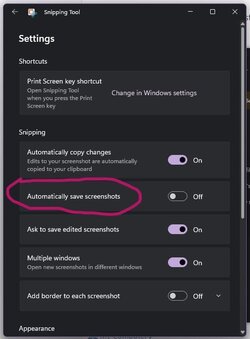
Hi Mooly. We had this issue until I adjusted settings so that screenshots weren't automatically saved (pic). Now when I click on save, the last used folder and format is retained.
Hope this helps.
 

Attachments

  • SnipSet.jpg
    SnipSet.jpg
    29.1 KB · Views: 2

My Computers My Computers

  • At a glance

    Windows 11 23H2, 24H2i7-12700K16GB (2 x 8)Intel(R) UHD Graphics 770 with shared graphic...
    OS
    Windows 11 23H2, 24H2
    Computer type
    PC/Desktop
    Manufacturer/Model
    Dell XPS8950, Vostro5620
    CPU
    i7-12700K
    Motherboard
    Z690 : 9D2HH Foxconn, R6PCT Foxconn 2nd (XPS)
    Memory
    16GB (2 x 8)
    Graphics Card(s)
    Intel(R) UHD Graphics 770 with shared graphics memory
    Sound Card
    Integrated
    Monitor(s) Displays
    Acer CBL282K Smiiprx
    Screen Resolution
    4K UHD (3840 x 2160) @ 60 Hz
    Hard Drives
    Western Digital PC SN810 512 GB M.2 NVMe SSD, PCIe
    PSU
    750W
    Cooling
    2G44F Asetek 125W CPU liquid cooler
    Keyboard
    Arteck Wireless
    Mouse
    Victsing-mm057 wireless
    Internet Speed
    Wi-Fi 6
    Browser
    Vivaldi
    Antivirus
    Windows Defender (native)
  • At a glance

    Win 23H212th Gen Intel Core i7-1260P2 x 8 GBIntel Iris Xe Graphics
    Operating System
    Win 23H2
    Computer type
    Laptop
    Manufacturer/Model
    Dell Vostro 5620
    CPU
    12th Gen Intel Core i7-1260P
    Memory
    2 x 8 GB
    Graphics card(s)
    Intel Iris Xe Graphics
    Screen Resolution
    1920 x 1200 @ 60 Hz
    Hard Drives
    NVMe 512 GB
    Case
    Aluminum
    Mouse
    Touchpad
    Browser
    Vivaldi
    Antivirus
    Windows Defender (native)
Oh brilliant, thank you :) Yes that works. Wonderful.
 

My Computer My Computer

At a glance

W11 Pro x64 ongoing Canary 29500 latest buildsIntel i58GbIntel HD Graphics
OS
W11 Pro x64 ongoing Canary 29500 latest builds
Computer type
Laptop
Manufacturer/Model
Dell 7760 Mobile Precision 17"
CPU
Intel i5
Motherboard
Unknown
Memory
8Gb
Graphics Card(s)
Intel HD Graphics
Sound Card
Realtek
Monitor(s) Displays
Internal
Hard Drives
2 x 256Gb SSD
PSU
Dell 240 watt
Mouse
Dell Premier Bluetooth
Internet Speed
50Mbps
Browser
Edge
Antivirus
Default Microsoft Security
You're very welcome! Glad it worked!
 

My Computers My Computers

  • At a glance

    Windows 11 23H2, 24H2i7-12700K16GB (2 x 8)Intel(R) UHD Graphics 770 with shared graphic...
    OS
    Windows 11 23H2, 24H2
    Computer type
    PC/Desktop
    Manufacturer/Model
    Dell XPS8950, Vostro5620
    CPU
    i7-12700K
    Motherboard
    Z690 : 9D2HH Foxconn, R6PCT Foxconn 2nd (XPS)
    Memory
    16GB (2 x 8)
    Graphics Card(s)
    Intel(R) UHD Graphics 770 with shared graphics memory
    Sound Card
    Integrated
    Monitor(s) Displays
    Acer CBL282K Smiiprx
    Screen Resolution
    4K UHD (3840 x 2160) @ 60 Hz
    Hard Drives
    Western Digital PC SN810 512 GB M.2 NVMe SSD, PCIe
    PSU
    750W
    Cooling
    2G44F Asetek 125W CPU liquid cooler
    Keyboard
    Arteck Wireless
    Mouse
    Victsing-mm057 wireless
    Internet Speed
    Wi-Fi 6
    Browser
    Vivaldi
    Antivirus
    Windows Defender (native)
  • At a glance

    Win 23H212th Gen Intel Core i7-1260P2 x 8 GBIntel Iris Xe Graphics
    Operating System
    Win 23H2
    Computer type
    Laptop
    Manufacturer/Model
    Dell Vostro 5620
    CPU
    12th Gen Intel Core i7-1260P
    Memory
    2 x 8 GB
    Graphics card(s)
    Intel Iris Xe Graphics
    Screen Resolution
    1920 x 1200 @ 60 Hz
    Hard Drives
    NVMe 512 GB
    Case
    Aluminum
    Mouse
    Touchpad
    Browser
    Vivaldi
    Antivirus
    Windows Defender (native)

Latest Support Threads

Back
Top Bottom