
Beachinmoney
Member
- Local time
- 6:26 AM
- Posts
- 3
- OS
- Windows 11
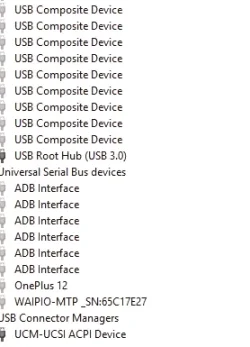
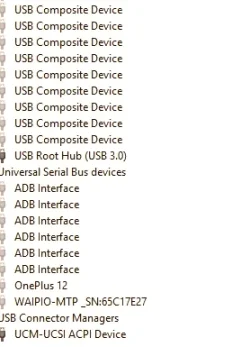
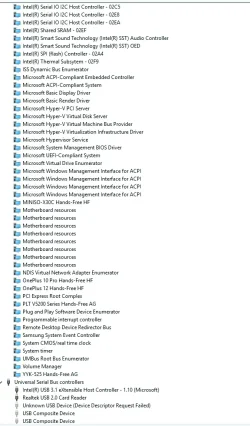
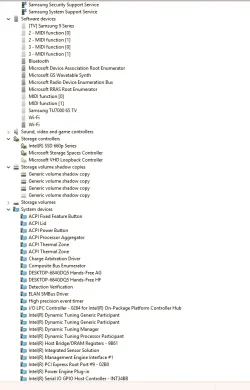
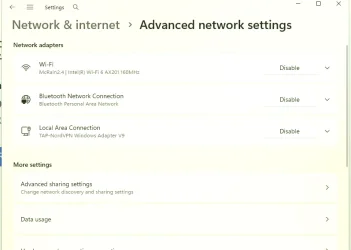
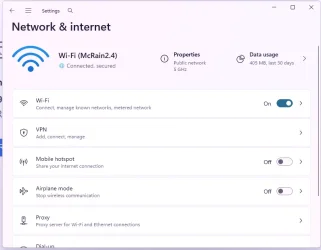
I have been dealing with this for over 3 weeks. I'm not stupid but they did an upgrade that deleted my wifi adapters all together. I now have Wifi IPv6. There is no Realtek PCIe GbE Family Controller, and there is no Realtek RTL8821CE 802.11ac PCIe Adapter. Not even in viewing hidden devices. I'll attach my device manager. I went to Microsoft and Samsung. Both were useless because I am in Mexico. I'm trying to finish my house here that I bought when my father passed. But my stepmother embezzled my Trust, I've been taken by every contractor. I've been burglarized. I had surgery, and they forged my signature. AMX will do nothing. My point is. I'm in big trouble. I must get some money in before I end up on the streets. I have 6 animals, heart disease, and an ex-abusive boyfriend dying of cancer upstairs. I can't get Location off the grey. I am not a student, nor is my computer a company computer. I tried using the command prompt to load GPEDIT with no success... I tried downloading an .iso and doing a recovery without losing my files. It gave me an error that it was the wrong version. I have tried using my cell phone as a hotspot to get wifi on my laptop. I have Telnor fiber with a Zydel modem/router, it's a PMG567-T20B2. Then, because my house is made of block, I have a Linksys Mesh WHW03. I have a Lorez NVR 4844 8-camera system, and out of 8 cameras, only 4 are online. I thought I set everything up correctly, but then when Windows did the upgrade, EVERYTHING was lost. I'm terrified here at night and don't sleep.
Just earlier, I found a Samsung upgrade that I loaded, and the only thing that it did was now I can't even use my Windows Phone link. I tried that and got that you are trying to connect your phone from outside of China, and we don't allow roaming.
Things keep getting worse. Please, can someone help me? I can't get anything done at all. I have a DDNS on my cameras, but they need their IP address range. The reason my cameras are not working is that they are offline, and I spent over two weeks working on that. Just resetting my Linksys Velop and hooking up nodes, in Bridge mode, can take three days, 8 hours a day, to get them to connect!
This is literally killing me and my animals. Please anyone that can help?
Just earlier, I found a Samsung upgrade that I loaded, and the only thing that it did was now I can't even use my Windows Phone link. I tried that and got that you are trying to connect your phone from outside of China, and we don't allow roaming.
Things keep getting worse. Please, can someone help me? I can't get anything done at all. I have a DDNS on my cameras, but they need their IP address range. The reason my cameras are not working is that they are offline, and I spent over two weeks working on that. Just resetting my Linksys Velop and hooking up nodes, in Bridge mode, can take three days, 8 hours a day, to get them to connect!
This is literally killing me and my animals. Please anyone that can help?
Attachments
-
 Screenshot 5 2025-07-26 133353.webp17.7 KB · Views: 8
 -
 Screenshot 5 2025-07-26 133353.webp18.4 KB · Views: 7
 -
 Screenshot 5 2025-07-26 133316.webp74.2 KB · Views: 6
 -
 Screenshot 4 2025-07-26 133222.webp62.6 KB · Views: 7
 -
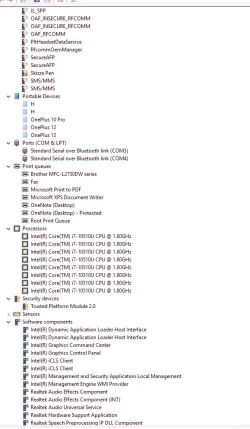 Screenshot 3 2025-07-26 133142.webp64.5 KB · Views: 5
 -
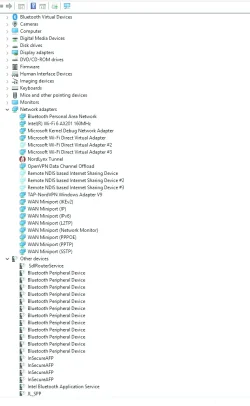 Screenshot 2 2025-07-26 132933.webp58.9 KB · Views: 7
 -
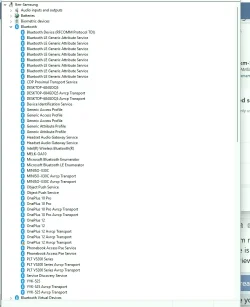 Screenshot 1 2025-07-26 132823.webp68.7 KB · Views: 7
 -
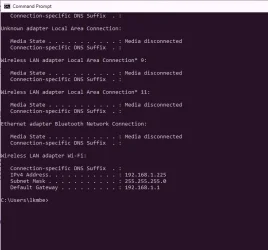 command prompt IP config.webp33.9 KB · Views: 6
 -
 network.webp19.1 KB · Views: 6
 -
 wifi.webp22.5 KB · Views: 8
My Computers
-
At a glance
Windows 11i5-9400F CPU @ 2.90GHz (2.90 GHz)RAM 32.0 GB (31.9 GB usable)NVIDIA GFORCE GTX 1660 TI- OS
- Windows 11
- Computer type
- PC/Desktop
- Manufacturer/Model
- HP Device name DESKTOP-684GDQ5 System type 64-bit operating system, x64-based processor Pen and touch No pen or touch input is available for this display
- CPU
- i5-9400F CPU @ 2.90GHz (2.90 GHz)
- Motherboard
- Device ID 7717F84D-7DBD-499F-AC3F-7E332A45F463 Product ID 00325-81426-95703-AAOEM
- Memory
- RAM 32.0 GB (31.9 GB usable)
- Graphics Card(s)
- NVIDIA GFORCE GTX 1660 TI
- Sound Card
- Microsoft High Definition
- Monitor(s) Displays
- LG Ultragear
- Hard Drives
- I added a 1 ton additional hard drive
- PSU
- Processor Intel(R) Core(TM)
- Keyboard
- Logitech
- Mouse
- Wireless
- Internet Speed
- fiber
- Browser
- Chrome
- Antivirus
- only malware
- Other Info
- The Windows 11 update deleted my IP4 device drivers, so I can't access the internet on this device or my Samsung laptop, often. Or my security cameras. I have a fiber modem and use a Linksys mesh system because I live in Mexico and my house is made of brick. I'm having a heck of a time trying to figure out how to fix this.
-
At a glance
Windows 11Intel Core i7-10510U (1.8 GHz, up to 4.9 GHz ...RAM: 12GB DDR4 SDRAMIntel UHD Graphics- Operating System
- Windows 11
- Computer type
- Laptop
- Manufacturer/Model
- Samsung Model NP730QCJ-K02US
- CPU
- Intel Core i7-10510U (1.8 GHz, up to 4.9 GHz with Turbo Boost)
- Memory
- RAM: 12GB DDR4 SDRAM
- Graphics card(s)
- Intel UHD Graphics
- Monitor(s) Displays
- 13.3-inch QLED Full HD (1920 x 1080) Touchscreen
- Screen Resolution
- (1920 x 1080
- Hard Drives
- 512GB Solid State Drive (PCIe)






