Solution to fix KB5094126 breaking OneDrive integration w/File Explorer


netmation

Member
Local time
10:22 PM
Posts
2
OS
Windows 11
With Windows update KB5094126 multiple users are reporting OneDrive integration failures where the application becomes inaccessible through Windows Explorer after installation, though web-based access remains functional. Searching the Internet one can find several suggestions such as reinstalling OneDrive, running ‘OneDrive.exe /reset’, or various registry edits; none of which seems to fix the behavior.

If anyone has information as to when this will be fixed with a patch, please share. Since this particular KB does potentially have some beneficial improvements.

The only fix that currently seems to work is to uninstall the problem update, and configure Windows Update to not re-install in future updates.

Uninstall Update KB5094126
  1. Press Windows Key + I to open your Windows Settings.
  2. Go to Windows Update > Update History.
  3. Scroll down and click Uninstall updates.
  4. Find KB5094126 in the list, click Uninstall, and restart your PC.
Hide Update KB5094126 from Windows

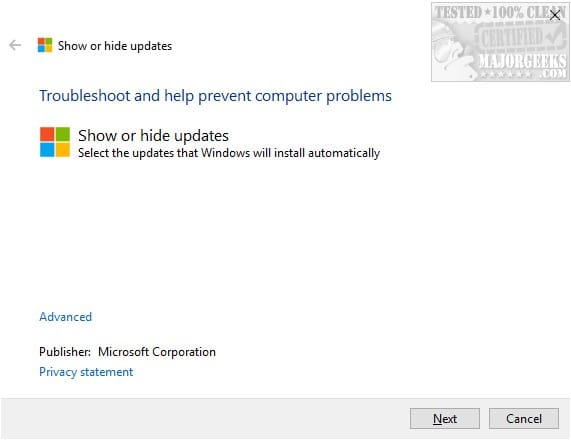
1. Download Microsoft Windows Update Hide Utility – wushowhide.diagcab
2. Run utility and find KB5094126 to be hidden from future updates.
 

My Computer

System One

  • OS
    Windows 11
    Computer type
    PC/Desktop
    Manufacturer/Model
    Asus
    CPU
    Intel Core i9-11900
    Motherboard
    Asus TUF B560M-PLUS
    Memory
    32gb
    Graphics Card(s)
    Intel HD Graphics 530
    Sound Card
    n/a
    Monitor(s) Displays
    Dell Ultrasharp U3415W 34"
    Screen Resolution
    3440 x 1440
    Hard Drives
    WD Black 1TB High-Performance NVMe PCIe Gen3
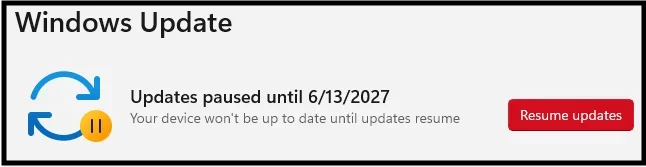
Welcome to the forum. FYI Hiding a monthly cumulative after uninstalling it won't stop the code within the cumulative that broke your onedrive from coming back. It will be part of the next month's cumulative (unless MS acknowledges there is a problem and fixes it before then). IMO pausing updates would be a better solution until there is a fix.

I thought wushowhide.diagcab tool had been deprecated.
 

My Computers

System One System Two

  • OS
    Windows 11 Pro 25H2 26200.8655
    Computer type
    PC/Desktop
    Manufacturer/Model
    Dell Optiplex 7080
    CPU
    i9-10900 10 core 20 threads
    Motherboard
    DELL 0J37VM
    Memory
    32 gb
    Graphics Card(s)
    none-Intel UHD Graphics 630
    Sound Card
    Integrated Realtek
    Monitor(s) Displays
    Benq 27
    Screen Resolution
    2560x1440
    Hard Drives
    2x1tb Solidigm m.2 nvme /External drives 512gb Samsung m.2 sata+2tb Kingston m2.nvme
    PSU
    500w
    Case
    MT
    Cooling
    Dell Premium
    Keyboard
    Logitech wired
    Mouse
    Logitech wireless
    Internet Speed
    so slow I'm too embarrassed to tell
    Browser
    #1 Edge #2 Firefox
    Antivirus
    Defender+MWB Premium
  • Operating System
    Windows 11 Pro 24H2 26200.8457
    Computer type
    PC/Desktop
    Manufacturer/Model
    Beelink Mini PC SER5
    CPU
    AMD Ryzen 7 6800U
    Memory
    32 gb
    Graphics card(s)
    integrated
    Sound Card
    integrated
    Monitor(s) Displays
    Benq 27
    Screen Resolution
    2560x1440
    Hard Drives
    1TB Crucial nvme
    Keyboard
    Logitech wired
    Mouse
    Logitech wireless
    Internet Speed
    still too embarrassed to tell
    Browser
    Firefox
    Antivirus
    Defender
    Other Info
    System 3 is non compliant Dell 9020 i7-4770/24gb ram Win11 PRO 26200.8457
I thought wushowhide.diagcab tool had been deprecated.
It is deprecated. That's why it's not longer listed for download, and you have to "know" the legacy URL.
But it still works.

I agree, rolling back and stopping updates is a stopgap measure. MS will either fix the issue in a future update, or release a newer OneDrive client. The latter is probably easier for MS since they don't have to wait for the next scheduled update.
 

My Computer

System One

  • OS
    Windows 7
Thanks for the tips. Pausing the updates can only be done for 5 week intervals, is that correct? Hopefully, this will be fixed by that time?
 

My Computer

System One

  • OS
    Windows 11
    Computer type
    PC/Desktop
    Manufacturer/Model
    Asus
    CPU
    Intel Core i9-11900
    Motherboard
    Asus TUF B560M-PLUS
    Memory
    32gb
    Graphics Card(s)
    Intel HD Graphics 530
    Sound Card
    n/a
    Monitor(s) Displays
    Dell Ultrasharp U3415W 34"
    Screen Resolution
    3440 x 1440
    Hard Drives
    WD Black 1TB High-Performance NVMe PCIe Gen3
Nah, you can pause updates for a long time. Your man Shawn has you covered.


My Computer

System One

  • OS
    Windows 11 Pro 25H2
    Computer type
    PC/Desktop
    Manufacturer/Model
    Intel NUC12WSHi7
    CPU
    12th Gen Core i7-1260P
    Motherboard
    NUC12WSBi7
    Memory
    64 GB Micron PC4-25600
    Graphics Card(s)
    Intel Iris Xe Graphics
    Sound Card
    on-board Realtek HD Audio
    Monitor(s) Displays
    Dell U3219Q
    Screen Resolution
    3840 x 2160
    Hard Drives
    Samsung SSD 990 PRO 1TB
    Crucial MX500 2 TB
    Antivirus
    Microsoft Defender
It is deprecated. That's why it's not longer listed for download, and you have to "know" the legacy URL.
But it still works.

I agree, rolling back and stopping updates is a stopgap measure. MS will either fix the issue in a future update, or release a newer OneDrive client. The latter is probably easier for MS since they don't have to wait for the next scheduled update.
It's still useful if you wanna skip updates for example.

In my case I prefer to install BIOS updates manually and from the manufacturer, instead of letting Microsoft push their own update. I had a really bad experience letting them handle that for me... I always hide firmware updates unless I'm ready to install those (like with CA 2023 case...)
 

My Computers

System One System Two

  • OS
    Windows 11 Pro 25H2
    Computer type
    PC/Desktop
    Manufacturer/Model
    Built PC
    CPU
    AMD Ryzen 5 5600G @ 3.9/4.4Ghz
    Motherboard
    MSI B550M-PRO-WiFi Ver. 1.4
    Memory
    2 x 16 GB DDR4 Kingston Fury Beast 3200 Mhz
    Graphics Card(s)
    AMD Radeon RX 6600 XT MSI Mech 2X OC Edition 8 GB
    Sound Card
    Realtek High Definition Audio (Integrated)
    Monitor(s) Displays
    Samsung C50Rx 27" LED / HP S2031 20" LCD
    Screen Resolution
    1920 x 1080 px / 1600 x 900 px
    Hard Drives
    WD Blue SN570 NVME M.2 SSD [1 TB] -- External Drives: - WD Scorpion Blue 250 GB 5400 RPM (Data Backup) - Hitachi 500 GB 5400 RPM (Software / ISOs Backup) - Toshiba MQ01ABD100 1 TB 5400 RPM (OS Images) - HGST TravelStar 7K1000 1 TB, 7200 RPM USB 3.0 - ADATA SU800 2TB SSD USB 3.0
    PSU
    Corsair RM750e 750W Fully Modular
    Case
    Naceb Hydra NA-1602
    Cooling
    Naceb Orpheus x 3 (Front) + Naceb Cepheus 1200 RPM Max (Rear) + ThemalRight Assasin X 90 SE (CPU)
    Keyboard
    Logitech MK470 Wireless
    Mouse
    Logitech MK470 Wireless
    Internet Speed
    120 MB Symetrical
    Browser
    Firefox / Brave / Edge
    Antivirus
    Windows Defender
    Other Info
    - VMs: WMware Player - Windows 8.1 Pro x64 / Windows 11 Pro
    - Wacom Intuos Pro Small Tablet PTH-460
  • Operating System
    Windows 11 Pro 25H2
    Computer type
    Laptop
    Manufacturer/Model
    HP Pavilion 15-eh3000la (80M53LA)
    CPU
    AMD Ryzen 7 7730U @ 2.0/4.5 Ghz
    Motherboard
    HP 8BC7
    Memory
    2 x 16 GB Kingston Fury Impact DDR4 3200 Mhz
    Graphics card(s)
    Radeon (tm) Graphics Vega 8 (512 MB)
    Sound Card
    Realtek High Definition Audio (Integrated)
    Monitor(s) Displays
    AU Optronics
    Screen Resolution
    1920 x 1080 px (125% size)
    Hard Drives
    WD Blue SN570 1TB NVME M.2 Drive
    PSU
    45 Watt Charger
    Cooling
    Laptop Cooling Pad
    Keyboard
    Free Wolf Foldable Portable Keyboard
    Mouse
    Free Wolf Wireless Mouse
    Internet Speed
    120 MB Symetrical
    Browser
    Firefox / Brave / Edge
    Antivirus
    Windows Defender
    Other Info
    - 41mWh battery.
    - Wacom Intuos Pro Small Tablet PTH-460
Back
Top Bottom