Hello,
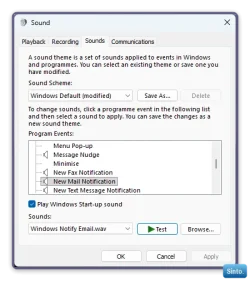
When you change the sound volume with the tray slider, a chime plays to tell you there is a change. I would like to stop that alert chime. My understanding is that you can disable the alert, but it also is tied to other alerts so that is not optimal. I would specifically like to disable it for volume change only.
My keyboard has a volume control on it and it does not play the chime as it changes the volume. In my case it is up-volume and a down-volume buttons although I also had keyboards with wheel type controls. The point is that they do not produce the chime alert.
Does anyone here know if this is possible to stop the chime when using the tray slider?
Thanks!
When you change the sound volume with the tray slider, a chime plays to tell you there is a change. I would like to stop that alert chime. My understanding is that you can disable the alert, but it also is tied to other alerts so that is not optimal. I would specifically like to disable it for volume change only.
My keyboard has a volume control on it and it does not play the chime as it changes the volume. In my case it is up-volume and a down-volume buttons although I also had keyboards with wheel type controls. The point is that they do not produce the chime alert.
Does anyone here know if this is possible to stop the chime when using the tray slider?
Thanks!
My Computer
At a glance
Windows 11
- OS
- Windows 11