Solved Sound change chime


Hollywood

Well-known member
Member
Local time
8:02 AM
Posts
233
OS
Windows 11
Hello,

When you change the sound volume with the tray slider, a chime plays to tell you there is a change. I would like to stop that alert chime. My understanding is that you can disable the alert, but it also is tied to other alerts so that is not optimal. I would specifically like to disable it for volume change only.

My keyboard has a volume control on it and it does not play the chime as it changes the volume. In my case it is up-volume and a down-volume buttons although I also had keyboards with wheel type controls. The point is that they do not produce the chime alert.

Does anyone here know if this is possible to stop the chime when using the tray slider?

Thanks!
 

My Computer

System One

  • OS
    Windows 11
Hi! Can you post more info? someone else may know what you have. How about make, model, browser, sound, speakers, ect..... thanks.....

EDIT: Fill out your system Specs......
 

My Computer

System One

  • OS
    Windows 11 25H2 (OS Build 26200.8655)
    Computer type
    Laptop
    Manufacturer/Model
    Dell
    CPU
    Processor: 11th Gen Intel(R) Core(TM) i5-1135G7 @ 2.40G
    Motherboard
    64-bit operating system Dell 0XMF7W
    Memory
    12GB
    Graphics Card(s)
    Intel R Iris R XE Graphics family
    Sound Card
    Cirrus Speakers High Definition Audio
    Monitor(s) Displays
    Generic PnP monitor
    Screen Resolution
    1920 x 1080
    Hard Drives
    NVMe 670p SSDPEKNU512GZ NVMe I NTEL 512GB
    Case
    cheap
    Mouse
    Logitech wireless mouse
    Internet Speed
    16 Mps download
    Browser
    Google Chrome
    Antivirus
    Security: Microsoft Defender & Malwarebytes Premium (with browser guard)
    Other Info
    Dell model: Inspiron 15 3511
I don't believe any further information is needed. It's the same for everyone. The "System Notification" sound is applied to the volume bar to demonstrate the volume level, the volume of the sound changes with the slider.

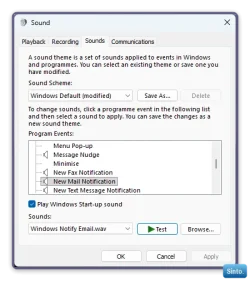
The only way I know to stop it is via the system sounds:

  1. Open Run (Win + R) and enter: control mmsys.cpl sounds
  2. Go to the Sounds tab
  3. Find “System Notification"
  4. Set its sound to “None”
  5. Click Apply, then OK
 

My Computers

System One System Two

  • OS
    Windows 11 Pro 25H2 Build 26200.8655
    Computer type
    PC/Desktop
    Manufacturer/Model
    Sin-built 2013
    CPU
    Intel(R) Core(TM) i7-4770K CPU @ 3.50GHz
    Motherboard
    ASUS ROG Maximus VI Formula
    Memory
    32.0 GB of I forget and the box is in storage.
    Graphics Card(s)
    Gigabyte nVidia GeForce GTX 1660 Super OC 6GB
    Sound Card
    Onboard thingy
    Monitor(s) Displays
    5 x LG 25MS500-B - 1 x 24MK430H-B - 1 x Wacom Pro 22" Touch Screen Tablet
    Screen Resolution
    All over the place
    Hard Drives
    Too many to list.
    OS on Samsung 1TB 870 QVO SATA
    PSU
    Silverstone 1500
    Case
    NZXT Phantom 820 Full-Tower Case
    Cooling
    Noctua NH-D15 Elite Class Dual Tower CPU Cooler / 6 x EziDIY 120mm / 2 x Corsair 140mm somethings / 1 x 140mm Thermaltake something / 2 x 200mm Corsair.
    Keyboard
    Corsair K95 / Logitech diNovo Edge Wireless
    Mouse
    Logitech: G402 / G502 / Mx Masters / Mx Air Cordless
    Internet Speed
    2000/500Mbps
    Browser
    All sorts
    Antivirus
    Kaspersky Premium
    Other Info
    ㅤㅤㅤㅤㅤㅤㅤㅤㅤㅤㅤㅤㅤㅤㅤㅤㅤㅤㅤㅤㅤㅤㅤㅤㅤㅤㅤㅤㅤㅤㅤㅤㅤㅤㅤㅤㅤㅤㅤㅤ⠀⠀⠀⠀⠀⠀⠀⠀⠀⠀
    TP-Link BE9300 WiFi 7 Bluetooth 5.4 (Archer TBE550E)
    TP-Link TX201 V1 2.5GB Lan

    Grandstream HT812 - VoIP
    ASUS DSL-AX82U - Mesh
    ASUS RT-AC68U - Mesh
    ASUS RT-BE88U Router

    Brother MFC-L2880DW Printer

    I’m on a horse.
  • Operating System
    Windows 11 Pro 25H2 Build 26200.8655
    Computer type
    Laptop
    Manufacturer/Model
    LENOVO Yoga 7 14IRL8 - 7i EVO OLED 14" Touchscreen i5 12 Core 16GB/512GB
    CPU
    Intel Core 12th Gen i5-1240P Processor (1.7 - 4.4GHz)
    Memory
    16GB LPDDR5 RAM
    Graphics card(s)
    Intel Iris Xe Graphics Processor
    Sound Card
    Optimized with Dolby Atmos®
    Screen Resolution
    QHD 2880 x 1800 OLED
    Hard Drives
    M.2 512GB
    Antivirus
    Defender / Malwarebytes
    Other Info
    …still on a horse.
nope. only 2 options in 25H2 are:

1) go to C:\windows\media\
and rename Windows Background.wav to Windows Background.wav.bak
*will have to use cmd as trusted installer via @LesFerch right click tools, or reboot and do it from command prompt in advanced startup options

2) use EarTrumpet for changing volume > click the system icon (2nd one down) to mute it, change volume slider, click system to unmute it again
 

My Computer

System One

  • OS
    Windows 11 Pro
I don't believe any further information is needed. It's the same for everyone. The "System Notification" sound is applied to the volume bar to demonstrate the volume level, the volume of the sound changes with the slider.

The only way I know to stop it is via the system sounds:

  1. Open Run (Win + R) and enter: control mmsys.cpl sounds
  2. Go to the Sounds tab
  3. Find “System Notification"
  4. Set its sound to “None”
  5. Click Apply, then OK
Thanks, but as I said, I do want other notifications like when an email arrives. Since the volume control doesn't make the chime, I was hoping that would be a clue to figure this out, so I thought I would ask here. Maybe it can't be done?

Anyway, thanks.
 

My Computer

System One

  • OS
    Windows 11
other notifications like when an email arrives

Not the same chime. Email uses the notify chime.

Win-2002.webp

Disabling the System Notification sound works in 25H2 Build 26200.7462, and I can't think of another action that uses it, that I am aware of.
 

My Computers

System One System Two

  • OS
    Windows 11 Pro 25H2 Build 26200.8655
    Computer type
    PC/Desktop
    Manufacturer/Model
    Sin-built 2013
    CPU
    Intel(R) Core(TM) i7-4770K CPU @ 3.50GHz
    Motherboard
    ASUS ROG Maximus VI Formula
    Memory
    32.0 GB of I forget and the box is in storage.
    Graphics Card(s)
    Gigabyte nVidia GeForce GTX 1660 Super OC 6GB
    Sound Card
    Onboard thingy
    Monitor(s) Displays
    5 x LG 25MS500-B - 1 x 24MK430H-B - 1 x Wacom Pro 22" Touch Screen Tablet
    Screen Resolution
    All over the place
    Hard Drives
    Too many to list.
    OS on Samsung 1TB 870 QVO SATA
    PSU
    Silverstone 1500
    Case
    NZXT Phantom 820 Full-Tower Case
    Cooling
    Noctua NH-D15 Elite Class Dual Tower CPU Cooler / 6 x EziDIY 120mm / 2 x Corsair 140mm somethings / 1 x 140mm Thermaltake something / 2 x 200mm Corsair.
    Keyboard
    Corsair K95 / Logitech diNovo Edge Wireless
    Mouse
    Logitech: G402 / G502 / Mx Masters / Mx Air Cordless
    Internet Speed
    2000/500Mbps
    Browser
    All sorts
    Antivirus
    Kaspersky Premium
    Other Info
    ㅤㅤㅤㅤㅤㅤㅤㅤㅤㅤㅤㅤㅤㅤㅤㅤㅤㅤㅤㅤㅤㅤㅤㅤㅤㅤㅤㅤㅤㅤㅤㅤㅤㅤㅤㅤㅤㅤㅤㅤ⠀⠀⠀⠀⠀⠀⠀⠀⠀⠀
    TP-Link BE9300 WiFi 7 Bluetooth 5.4 (Archer TBE550E)
    TP-Link TX201 V1 2.5GB Lan

    Grandstream HT812 - VoIP
    ASUS DSL-AX82U - Mesh
    ASUS RT-AC68U - Mesh
    ASUS RT-BE88U Router

    Brother MFC-L2880DW Printer

    I’m on a horse.
  • Operating System
    Windows 11 Pro 25H2 Build 26200.8655
    Computer type
    Laptop
    Manufacturer/Model
    LENOVO Yoga 7 14IRL8 - 7i EVO OLED 14" Touchscreen i5 12 Core 16GB/512GB
    CPU
    Intel Core 12th Gen i5-1240P Processor (1.7 - 4.4GHz)
    Memory
    16GB LPDDR5 RAM
    Graphics card(s)
    Intel Iris Xe Graphics Processor
    Sound Card
    Optimized with Dolby Atmos®
    Screen Resolution
    QHD 2880 x 1800 OLED
    Hard Drives
    M.2 512GB
    Antivirus
    Defender / Malwarebytes
    Other Info
    …still on a horse.
Not the same chime. Email uses the notify chime.

View attachment 157248

Disabling System Notification works, and I can't think of another action that uses it, that I am aware of.
i just tested System Notification > None on 25H2 and it still plays Windows Background.wav when changing the volume slider
 

My Computer

System One

  • OS
    Windows 11 Pro
i just tested System Notification > None on 25H2 and it still plays Windows Background.wav when changing the volume slider

Not for me. Clean install.
 

My Computers

System One System Two

  • OS
    Windows 11 Pro 25H2 Build 26200.8655
    Computer type
    PC/Desktop
    Manufacturer/Model
    Sin-built 2013
    CPU
    Intel(R) Core(TM) i7-4770K CPU @ 3.50GHz
    Motherboard
    ASUS ROG Maximus VI Formula
    Memory
    32.0 GB of I forget and the box is in storage.
    Graphics Card(s)
    Gigabyte nVidia GeForce GTX 1660 Super OC 6GB
    Sound Card
    Onboard thingy
    Monitor(s) Displays
    5 x LG 25MS500-B - 1 x 24MK430H-B - 1 x Wacom Pro 22" Touch Screen Tablet
    Screen Resolution
    All over the place
    Hard Drives
    Too many to list.
    OS on Samsung 1TB 870 QVO SATA
    PSU
    Silverstone 1500
    Case
    NZXT Phantom 820 Full-Tower Case
    Cooling
    Noctua NH-D15 Elite Class Dual Tower CPU Cooler / 6 x EziDIY 120mm / 2 x Corsair 140mm somethings / 1 x 140mm Thermaltake something / 2 x 200mm Corsair.
    Keyboard
    Corsair K95 / Logitech diNovo Edge Wireless
    Mouse
    Logitech: G402 / G502 / Mx Masters / Mx Air Cordless
    Internet Speed
    2000/500Mbps
    Browser
    All sorts
    Antivirus
    Kaspersky Premium
    Other Info
    ㅤㅤㅤㅤㅤㅤㅤㅤㅤㅤㅤㅤㅤㅤㅤㅤㅤㅤㅤㅤㅤㅤㅤㅤㅤㅤㅤㅤㅤㅤㅤㅤㅤㅤㅤㅤㅤㅤㅤㅤ⠀⠀⠀⠀⠀⠀⠀⠀⠀⠀
    TP-Link BE9300 WiFi 7 Bluetooth 5.4 (Archer TBE550E)
    TP-Link TX201 V1 2.5GB Lan

    Grandstream HT812 - VoIP
    ASUS DSL-AX82U - Mesh
    ASUS RT-AC68U - Mesh
    ASUS RT-BE88U Router

    Brother MFC-L2880DW Printer

    I’m on a horse.
  • Operating System
    Windows 11 Pro 25H2 Build 26200.8655
    Computer type
    Laptop
    Manufacturer/Model
    LENOVO Yoga 7 14IRL8 - 7i EVO OLED 14" Touchscreen i5 12 Core 16GB/512GB
    CPU
    Intel Core 12th Gen i5-1240P Processor (1.7 - 4.4GHz)
    Memory
    16GB LPDDR5 RAM
    Graphics card(s)
    Intel Iris Xe Graphics Processor
    Sound Card
    Optimized with Dolby Atmos®
    Screen Resolution
    QHD 2880 x 1800 OLED
    Hard Drives
    M.2 512GB
    Antivirus
    Defender / Malwarebytes
    Other Info
    …still on a horse.
i just tested System Notification > None on 25H2 and it still plays Windows Background.wav when changing the volume slider
Looks like EarTrumpet will solve my issue. The EarTrumpet system sound change still plays the chime, but there is a dedicated slider for other apps that play sound.

In my case, it is Youtube that has inconsistent volume, and adjusting the slider for Firefox does not make the chime.

Great solution, Thanks!
 

My Computer

System One

  • OS
    Windows 11

Latest Support Threads

Back
Top Bottom