Spammed with virus notifications


sdowney717

Well-known member
Member
VIP
Local time
5:08 AM
Posts
1,335
OS
windows 11
.I deleted 5 extensions having to do with tab management and suddenly crap virus alerts pop up on screen, Closing them just opens like 5 more of them, and they are on top and cover the windows forms buttons on top right. I managed to open firefox and drag it to the left to even use a browser to post here. Maybe they are notifications but they keep loading more when closed. Will a reboot fix this?
Here is what I see, notice chrome in background under the alert messages, edge does same thing.
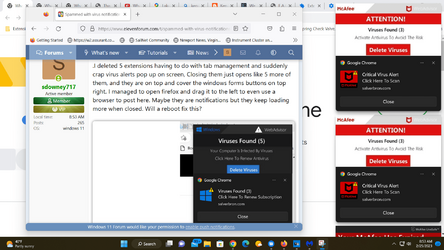
1677333272512.png
 

Attachments

  • 1677332975281.png
    1677332975281.png
    47.7 KB · Views: 4

My Computer My Computer

At a glance

windows 11old AMD B958gb
OS
windows 11
Computer type
PC/Desktop
Manufacturer/Model
some kind of old ASUS MB
CPU
old AMD B95
Motherboard
ASUS
Memory
8gb
Hard Drives
ssd WD 500 gb
I think I solved this, It also had popped up after starting chrome.
I just went to lowest alert and kept closing them as fast as possible , then they stopped and then I saw the last tab open was this website, and chrome said it was infected.

[dodgy site live link removed by admin]
not found 404 now, here is the plain text

Code:
//buginerten.com/click.php?key=uavjzf7h81vvl7qvw9pi&%D1%81ampaignId=6996&creativeId=71234&days=5&subscriptionId=22523541&feedId=3699
 

My Computer My Computer

At a glance

windows 11old AMD B958gb
OS
windows 11
Computer type
PC/Desktop
Manufacturer/Model
some kind of old ASUS MB
CPU
old AMD B95
Motherboard
ASUS
Memory
8gb
Hard Drives
ssd WD 500 gb
It looks like you are using Chrome, paste the following URL into your browser and look at the sites that are allowed to send you push notifications, block any you don't know or think could be the culprit chrome://settings/content/notifications
 

My Computers My Computers

  • At a glance

    Windows 11 WorkstationRyzen 9 5950XCorsair Vengeance RGB PRO Black 64GB (4x16GB)...ASUS AMD Radeon RX 6900 XT 16GB ROG Strix LC OC
    OS
    Windows 11 Workstation
    Computer type
    PC/Desktop
    Manufacturer/Model
    doofenshmirtz evil incorporated
    CPU
    Ryzen 9 5950X
    Motherboard
    Asus ROG Crosshair VIII Formula
    Memory
    Corsair Vengeance RGB PRO Black 64GB (4x16GB) 3600MHz AMD Ryzen Tuned DDR4
    Graphics Card(s)
    ASUS AMD Radeon RX 6900 XT 16GB ROG Strix LC OC
    Sound Card
    Sound BlasterX Katana
    Monitor(s) Displays
    3 x27" Dell U2724D & 1 x 34" Dell U3415W
    Hard Drives
    Samsung 980 Pro 1TB M.2 2280 PCI-e 4.0 x4 NVMe Solid State
    Drive
    PSU
    ASUS ROG THOR 850W 80 Plus Platinum
    Case
    ASUS ROG Strix Helios Midi-Tower ARGB Gaming Case
    Cooling
    ASUS ROG Strix LC Performance RGB AIO CPU Liquid Cooler - 360mm
    Keyboard
    Logi Ergo
    Mouse
    Logitech MX Vertical
    Internet Speed
    1000/200 Mbps
    Browser
    Chrome
    Antivirus
    Windows Defender, Malwarebytes Pro
    Other Info
    HP M281 Printer
    Logitech Brio Stream webcam
    Logitech G Yeti orb mic
  • At a glance

    Windows 11 ProSnapdragon X2 Plus64GB
    Operating System
    Windows 11 Pro
    Computer type
    Laptop
    Manufacturer/Model
    Surface Laptop
    CPU
    Snapdragon X2 Plus
    Memory
    64GB
    Monitor(s) Displays
    15"
  • Nothing to see here.
It sounds like an issue with the push notifications feature in Chromium based browsers (which includes MS Edge). Please see if the instructions in this Malwarebytes Labs article help or not.
 

My Computer My Computer

At a glance

Windows 10
OS
Windows 10
Go to browser settings and search for website notification permissions. Disable permission for "salvebron.com"
I went and saw all permissions for the site were on, no asking permission, so I reset to defaults and it disappeared from the settings list.

How can I just block that site?
 

My Computer My Computer

At a glance

windows 11old AMD B958gb
OS
windows 11
Computer type
PC/Desktop
Manufacturer/Model
some kind of old ASUS MB
CPU
old AMD B95
Motherboard
ASUS
Memory
8gb
Hard Drives
ssd WD 500 gb
Run an antivirus scan as a precaution
 

My Computers My Computers

  • At a glance

    Windows 11 Pro 26H2 26300.9550AMD Ryzen 7 5825U with Radeon Graphics16GB
    OS
    Windows 11 Pro 26H2 26300.9550
    Computer type
    Laptop
    Manufacturer/Model
    Acemagic LX15PRO
    CPU
    AMD Ryzen 7 5825U with Radeon Graphics
    Motherboard
    BIOS CT_BI_AMI_LX15PRO_AB8139_A-004
    Memory
    16GB
    Screen Resolution
    1920 x 1080
    Hard Drives
    SSD 2TB
    Internet Speed
    30 Mbps
    Browser
    Brave
    Antivirus
    Webroot SecureAnywhere Complete beta
  • At a glance

    Windows 11 Pro 23H2 22631.2506Atom N450 1.66GHz2GB
    Operating System
    Windows 11 Pro 23H2 22631.2506
    Computer type
    Laptop
    Manufacturer/Model
    HP Mini 210-1090NR PC (bought in late 2009!)
    CPU
    Atom N450 1.66GHz
    Memory
    2GB
    Browser
    Brave
    Antivirus
    Webroot
  • Acer Swift SF114-34 laptop
    OS Windows 11 Pro 26200.8894
    CPU Pentium Silver N6000
    RAM 4GB
    BIOS v1.17
    SSD Samsung 970 EVO Plus SSD 2TB (an upgrade)
Jeez the security section of these forums have went downhill since SevenForums when jacee was around to whip everything into shape!
Id run adwcleaner and Malwarebytes just to be on the safe side. Any issues with those/after you've ran those let us know
 

My Computer My Computer

At a glance

1110700k@5.2Viper Steelseries 32gb@ 3600mhzGigabyte 2070 Super 8GB, +200 core + 600 memory
OS
11
Computer type
PC/Desktop
Manufacturer/Model
Custom
CPU
10700k@5.2
Motherboard
Gigabyte Gaming X Z490
Memory
Viper Steelseries 32gb@ 3600mhz
Graphics Card(s)
Gigabyte 2070 Super 8GB, +200 core + 600 memory
Monitor(s) Displays
ASUS 4k HDR, Two 1080p Benq and Samsung
Screen Resolution
3840x2160/2560x1440/1920x1080
Hard Drives
Adata XPG SX8200 PRO 1tb
Samsung EVO 870 500GB
PSU
Corsair RX 650
Case
NZXT h510
Cooling
CM HYPER 212 RGB
Keyboard
Razer Ornata Chroma
Mouse
Steelseries Rival 710
Run an antivirus scan as a precaution
There's no hint of an infection.

I went and saw all permissions for the site were on, no asking permission, so I reset to defaults and it disappeared from the settings list.

How can I just block that site?
Add it to "Blocked" (Edge) and "Not allowed to send notifications" (Chrome).
 

My Computer My Computer

At a glance

Windows 11
OS
Windows 11
Computer type
Laptop
Jeez the security section of these forums have went downhill since SevenForums when jacee was around to whip everything into shape!
Id run adwcleaner and Malwarebytes just to be on the safe side. Any issues with those/after you've ran those let us know
There's no evidence of any malware in this thread.
 

My Computer My Computer

At a glance

Windows 11
OS
Windows 11
Computer type
Laptop
There's no evidence of any malware in this thread.
Jesus wept :ROFLMAO::ROFLMAO:

It takes about 3 minutes, Its good practice, Should be something a user does every now and then anyway so yeah.

Theres no evidence about loads of things, Doesn't mean it can't be true lol
 

My Computer My Computer

At a glance

1110700k@5.2Viper Steelseries 32gb@ 3600mhzGigabyte 2070 Super 8GB, +200 core + 600 memory
OS
11
Computer type
PC/Desktop
Manufacturer/Model
Custom
CPU
10700k@5.2
Motherboard
Gigabyte Gaming X Z490
Memory
Viper Steelseries 32gb@ 3600mhz
Graphics Card(s)
Gigabyte 2070 Super 8GB, +200 core + 600 memory
Monitor(s) Displays
ASUS 4k HDR, Two 1080p Benq and Samsung
Screen Resolution
3840x2160/2560x1440/1920x1080
Hard Drives
Adata XPG SX8200 PRO 1tb
Samsung EVO 870 500GB
PSU
Corsair RX 650
Case
NZXT h510
Cooling
CM HYPER 212 RGB
Keyboard
Razer Ornata Chroma
Mouse
Steelseries Rival 710
ShamrockRig, best advice that everyone should get use to doing, that way the bad guys will get the clue they are not wanted !
It takes about 3 minutes, Its good practice, Should be something a user does every now and then anyway so yeah.
Theres no evidence about loads of things, Doesn't mean it can't be true lol
 

My Computer My Computer

At a glance

Windows11 23H2 (OS Build 22631.2428)2.90 gigahertz Intel Core i7-1070016214 Megabytes Usable Installed Memor
OS
Windows11 23H2 (OS Build 22631.2428)
Computer type
PC/Desktop
Manufacturer/Model
HP HP ENVY TE01
CPU
2.90 gigahertz Intel Core i7-10700
Motherboard
Board: HP 8767 A (SMVB)
Memory
16214 Megabytes Usable Installed Memor
Hard Drives
1511.52 Gigabytes Usable Hard Drive Capacity
1418.15 Gigabytes Hard Drive Free Space
Keyboard
Logitech wireless
Mouse
M 185 wireless
Internet Speed
12 ms Jitter 8 ms Download 10.5 Mbps Upload 1.7
Browser
Edge & FF
Antivirus
Windows Defender
I do run malwarebytes, and there is no infection
 

My Computer My Computer

At a glance

windows 11old AMD B958gb
OS
windows 11
Computer type
PC/Desktop
Manufacturer/Model
some kind of old ASUS MB
CPU
old AMD B95
Motherboard
ASUS
Memory
8gb
Hard Drives
ssd WD 500 gb
Possible reset the browser to default.
Clear the cookies, cache & history.
 

My Computers My Computers

  • At a glance

    Windows 11 Pro 64bit6th Gen Intel Core i7-6700HQ Quad Core proces...16GB HyperX IMPACT 1600MHz SODIMM DDR3 (2 x 8GB)NVIDIA® GeForce® GTX 960M - 2.0GB DDR5 Video ...
    OS
    Windows 11 Pro 64bit
    Computer type
    Laptop
    Manufacturer/Model
    PC Specialist Optimus VII V17-960 Gaming Laptop.
    CPU
    6th Gen Intel Core i7-6700HQ Quad Core processor.
    Memory
    16GB HyperX IMPACT 1600MHz SODIMM DDR3 (2 x 8GB)
    Graphics Card(s)
    NVIDIA® GeForce® GTX 960M - 2.0GB DDR5 Video RAM - DirectX® 12
    Sound Card
    Intel 2 Channel High Def. Audio + SoundBlaster™ Cinema 2 & Realtek
    Monitor(s) Displays
    Optimus Series: 17.3" Matte Full HD IPS LED Widescreen (1920x1080)
    Screen Resolution
    Full HD IPS display (1920 x 1080).
    Hard Drives
    4TB SSD (internal).
    1x 1TB & 1x 5TB external HDDs.
    Cooling
    STANDARD THERMAL PASTE FOR SUFFICIENT COOLING
    Keyboard
    Logitech K800 wireless keyboard
    Mouse
    Logitech M705 wireless mouse
    Internet Speed
    Upto 100Mbps
    Browser
    Edge.
    Antivirus
    Windows Defender & MalwareBytes pro.
  • At a glance

    IOS 14.6
    Operating System
    IOS 14.6
    Computer type
    Tablet
    Manufacturer/Model
    Apple
Go to browser settings and search for website notification permissions. Disable permission for "salvebron.com"
I detest this feature. i recognize and support the push for universal web apps, but so many websites give unsolicited requests to push notifications to me even if there's obviously no reason why i'd want to for that website. I can see it being too easy to accidently agree to accept notifications to a site who then uses that permission to spam you.

if you click on the "..." option menu on the popups, does it give you the option to disable notifications from that website?
 

My Computers My Computers

  • At a glance

    Windows 11AMD Ryzen 5 3600G.Skill Flare X 16 GB (2 x 8 GB) DDR4-3200 CL...Dell OEM RX 5700
    OS
    Windows 11
    Computer type
    PC/Desktop
    Manufacturer/Model
    "Selene"
    CPU
    AMD Ryzen 5 3600
    Motherboard
    Gigabyte A520I AC Mini ITX AM4
    Memory
    G.Skill Flare X 16 GB (2 x 8 GB) DDR4-3200 CL16 Memory
    Graphics Card(s)
    Dell OEM RX 5700
    Monitor(s) Displays
    LG 29UM69G-B 29.0" 1.5X Ultrawide 75 Hz Monitor
    Screen Resolution
    2560 x 1080
    Hard Drives
    Intel 660p 1.02 TB M.2-2280 PCIe 3.0 X4 NVME Solid State Drive
    Western Digital Caviar Blue 1 TB 3.5" 7200 RPM Internal Hard Drive
    PSU
    Corsair CX650M 650 W 80+ Bronze Certified Semi-modular ATX Power Supply
    Case
    Thermaltake Suppressor F1
    Keyboard
    SteelSeries APEX RGB Wired Gaming Keyboard
    Mouse
    SteelSeries Rival 300 Wired Optical Mouse
    Other Info
    SteelSeries Arctis 5 7.1 Channel Headset
  • At a glance

    Windows 11
    Operating System
    Windows 11
    Computer type
    Laptop
    Manufacturer/Model
    MSI Katana GF76 11 UD
if you click on the "..." option menu on the popups, does it give you the option to disable notifications from that website?

Yes, good point.

"..." on the notification would give you "Turn off all notifications for salverbron.com" (or whatever.com)

(as well as "Go to notification settings").
 

My Computer My Computer

At a glance

Windows 11
OS
Windows 11
Computer type
Laptop
Back
Top Bottom