SQL 2012 install on Win11


Labonte18

Well-known member
Local time
1:19 PM
Posts
6
OS
Win11
So.. Microsoft removed powershell 2.0..

Which is a prerequisite for installing SQL 2012.

You basically wind up with an error saying that it can't enable Powershell 2.0 and go to windows features to enable it.. Which you can't do, because it's been removed.

I'm going to try to remove the update that removed it, but.. I kinda doubt that's going to bring it back.. Any ideas on a workaround that do not involve using a newer SQL version?
 

My Computer

System One

  • OS
    Win11
I don't believe so. Upgrading SQL is your best option
 

My Computer

System One

  • OS
    Linux Mint
    Computer type
    Laptop
    Manufacturer/Model
    System76 Lemur Pro
1. Reinstall 24H2. Download a clean 24H2 ISO, stop all updates, and manually apply the July 2025 CU. Or use UUP dump to create a July 2025 image.

2. SQL Server 2012 is EOL'ed, so after you apply the last KB updates for it there isn't a need to run setup again.

3. Resume WU updates.
 

My Computer

System One

  • OS
    Windows 7
1. Reinstall 24H2. Download a clean 24H2 ISO, stop all updates, and manually apply the July 2025 CU. Or use UUP dump to create a July 2025 image.

2. SQL Server 2012 is EOL'ed, so after you apply the last KB updates for it there isn't a need to run setup again.

3. Resume WU updates.

On this particular one, I could probably do that.. But.. It's not going to fly for the future.

I actually installed SQL 2022 and with a few tweaks, was able to get it working... If that can get through some testing.. I suppose that's the way we'll go in the future.
 

My Computer

System One

  • OS
    Win11
Thank you! It allows to deploy MS SQL Server 2012 Express on Windows 11 Enterprise.
I run this command and "Windows PowerShell 2.0" feature appeared in Windows Feature List as enabled. ".Net Framework 3.5" was already enabled.

Code:
powershell "Get-ChildItem """"C:\Windows\servicing\Packages\Microsoft-Windows-PowerShell-V2-Client-Package*.mum"""" | foreach { dism.exe /online /norestart /add-package:""""$_"""" }"
 

My Computer

System One

  • OS
    Windows 11
So.. Microsoft removed powershell 2.0..

Which is a prerequisite for installing SQL 2012.

You basically wind up with an error saying that it can't enable Powershell 2.0 and go to windows features to enable it.. Which you can't do, because it's been removed.

I'm going to try to remove the update that removed it, but.. I kinda doubt that's going to bring it back.. Any ideas on a workaround that do not involve using a newer SQL version?
Note --slightly off topic here but could be relevant. If you are using newer versions of OFFICE and you want to use Ms SQL to get data into EXCEL you need to go (via properties -->options->data) and enable the relevant legacy data applications.

In English the data option is 3rd down on the Left side and the legacy data stuff is pretty obvious.

Skjámynd 2025-11-30 095911.webp

You might also have to install an appropriate ODBC driver - there's one available for Microsoft SQL server. I have MariaDB as a database system and use the legacy Microsoft Query to retrieve data which it does perfectly - Get the ODBC driver from MySQL AB in this case.


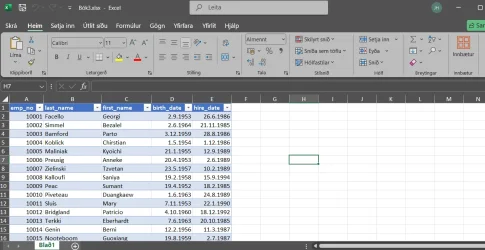
Using a sample test data base from MariaDB here's data retrieved into EXCEL

Skjámynd 2025-11-30 100753.webp

As I have a load of stuff that gets data this way it saves a huge amount or re-writing etc.

Just ignore if not relevant - but so many people using SQL databases of one form or another often have no idea of the ease of getting data into EXCEL (and the other way around too BTW) and spend hours on convoluted bits of code trying to do it (and often making a lot of errors in the process).

Cheers
jimbo
 

My Computer

System One

  • OS
    Windows XP,11 Linux Fedora Rawhide pre-release 45
    Computer type
    PC/Desktop
    CPU
    2 X Intel i7
    Screen Resolution
    4KUHD X 2

Latest Support Threads

Back
Top Bottom