
protegee5165
Member
- Local time
- 6:27 AM
- Posts
- 2
- OS
- Windows 11
Hi,
I'm running Version 25H2 (OS Build 26200.7623), and an annoying change I noticed recently is how the Start Menu displays folders now.
Instead of opening a drop-down, it opens an Apple-style box to display the applications inside the folder. While it's okay for most applications, I noticed that it's not very ergonomic for applications with longer titles.
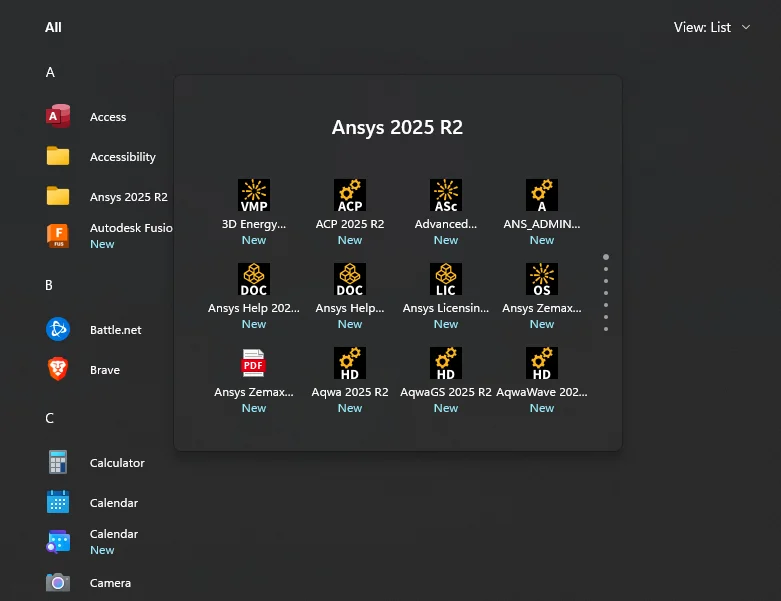
In the screenshot I've attached, many of the names are cut off. I was hoping that changing the setting to a 'List' view would help, but it stays the same.
Does anyone have any workarounds, or does Microsoft plan to change the Start Menu further?
Thanks
I'm running Version 25H2 (OS Build 26200.7623), and an annoying change I noticed recently is how the Start Menu displays folders now.
Instead of opening a drop-down, it opens an Apple-style box to display the applications inside the folder. While it's okay for most applications, I noticed that it's not very ergonomic for applications with longer titles.
In the screenshot I've attached, many of the names are cut off. I was hoping that changing the setting to a 'List' view would help, but it stays the same.
Does anyone have any workarounds, or does Microsoft plan to change the Start Menu further?
Thanks
- Windows Build/Version
- Version 25H2 (OS Build 26200.7623)
My Computer
At a glance
Windows 11Intel Core i5-1135G732 GBRTX 2080 eGPU
- OS
- Windows 11
- Computer type
- Laptop
- Manufacturer/Model
- Framework 13
- CPU
- Intel Core i5-1135G7
- Memory
- 32 GB
- Graphics Card(s)
- RTX 2080 eGPU
- Hard Drives
- 2 TB






