Start menu icons in which path?


DMD

Well-known member
Member
Local time
11:10 PM
Posts
218
OS
W11
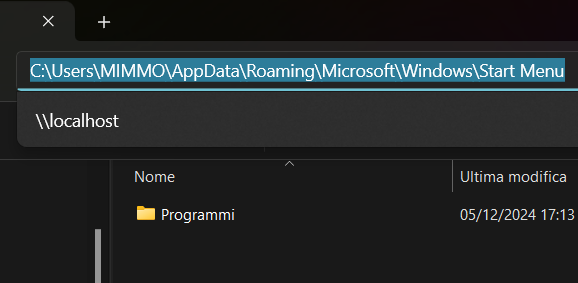
Good evening I can't find the start menu icons, I tried the two paths:
"%programdata%\Microsoft\Windows\Start Menu"
"%appdata%\Microsoft\Windows\Start Menu"

But I couldn't find the program icons, any ideas?
thanks

UdEPs9uc.webp


nvbZZQKo.webp


rgNjx2UL.webp
 

My Computer

System One

  • OS
    W11
    Computer type
    PC/Desktop
    CPU
    CPU AMD Ryzen 9 7950X
    Motherboard
    ASUS ROG Strix X670E-F Gaming WiFi
    Memory
    G.Skill Flare X5 32GB Kit DDR5-6000 CL32 (F5-6000J3238F16GX2-FX5)
    Monitor(s) Displays
    LG E2381VR
    Screen Resolution
    1920x1080
    Hard Drives
    1x Samsung Memorie MZ-V8P1T0B 980 PRO SSD 1TB
    2x Western Digital WD Red Nas 4TB
    PSU
    SEASONIC FOCUS PX-850 Plus Platinum
    Case
    Corsair 4000D Airflow
    Cooling
    ARCTIC Liquid Freezer II 280 A-RGB
    Keyboard
    Logitech G510
    Mouse
    Logitech G502 HERO
    Browser
    Firefox
    Antivirus
    Avg free
    Other Info
    Download: 90 Mbps
    Upload: 20Mbps
Good evening I can't find the start menu icons, I tried the two paths:
"%programdata%\Microsoft\Windows\Start Menu"
"%appdata%\Microsoft\Windows\Start Menu"

But I couldn't find the program icons, any ideas?
thanks


nvbZZQKo.webp


rgNjx2UL.webp
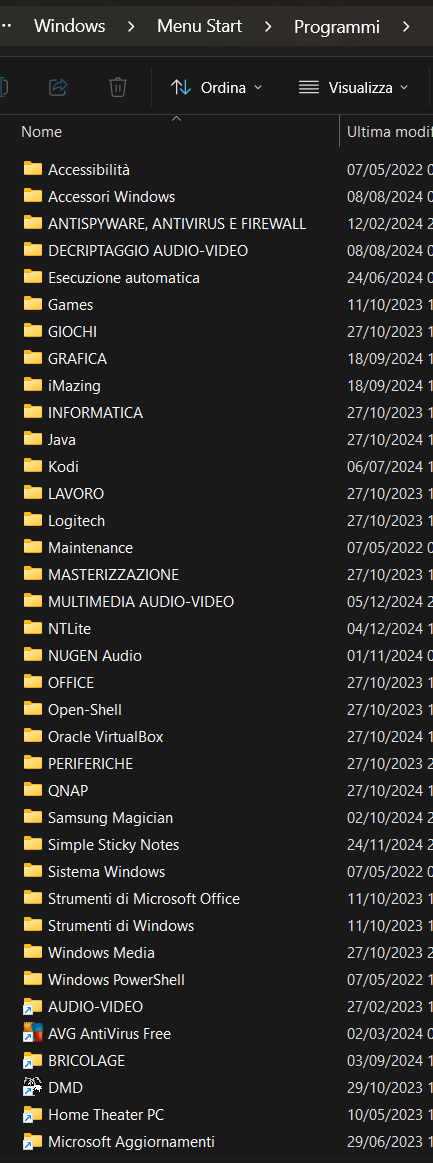
You need to go into each programmi folder.
 

My Computers

System One System Two

  • OS
    All Branches but Release
    Computer type
    Laptop
    Manufacturer/Model
    Acer Nitro ANV15-51
    CPU
    AMD Ryzen 7 7735HS 3200-4500 Mhz 8 cores x 2
    Motherboard
    Sportage_RBH
    Memory
    32 GB DDR5
    Graphics Card(s)
    Radeon Graphic / NVIDIA GeForce RTX 4060 8 GB GDDR6
    Sound Card
    AMD/Realtek(R) Audio
    Monitor(s) Displays
    Integrated Monitor (15.3"vis)
    Screen Resolution
    FHD 1920X1080 16:9 144Hz
    Hard Drives
    KINGSTON OM8SEP4512Q-AA 1TB
    Western Digital 256GB
    PSU
    19V DC 6.32 A 120 W
    Cooling
    Dual Fans
    Mouse
    MS Bluetooth
    Internet Speed
    Fiber 1GB Cox -us & 1GB Orange-fr
    Browser
    Edge Canary- Firefox Nightly-Chrome Dev-Chrome Dev
    Antivirus
    Windows Defender
  • Operating System
    Windows 11 Beta
    Computer type
    Laptop
    Manufacturer/Model
    Asus X751BP
    CPU
    AMD A9-9420
    Memory
    8 GB of DDR4
    Graphics card(s)
    AMD Radeon R5
    Screen Resolution
    1600x900
    Hard Drives
    Seagate 1 TB
In those folders are third-party custom menu folders such as Open shell.

vLALukxu.webp
 

My Computer

System One

  • OS
    W11
    Computer type
    PC/Desktop
    CPU
    CPU AMD Ryzen 9 7950X
    Motherboard
    ASUS ROG Strix X670E-F Gaming WiFi
    Memory
    G.Skill Flare X5 32GB Kit DDR5-6000 CL32 (F5-6000J3238F16GX2-FX5)
    Monitor(s) Displays
    LG E2381VR
    Screen Resolution
    1920x1080
    Hard Drives
    1x Samsung Memorie MZ-V8P1T0B 980 PRO SSD 1TB
    2x Western Digital WD Red Nas 4TB
    PSU
    SEASONIC FOCUS PX-850 Plus Platinum
    Case
    Corsair 4000D Airflow
    Cooling
    ARCTIC Liquid Freezer II 280 A-RGB
    Keyboard
    Logitech G510
    Mouse
    Logitech G502 HERO
    Browser
    Firefox
    Antivirus
    Avg free
    Other Info
    Download: 90 Mbps
    Upload: 20Mbps

This is the path:

C:\Users\your_user_name\AppData\Roaming\Microsoft\Windows\Start Menu

PS: The AppData folder is hidden, to see it you must enable viewing hidden files. Alternatively, if you have Open Shell installed or similar, right click on All Programs and select to Open it (your user) or to Open all users.
 

My Computers

System One System Two

  • OS
    Windows 11 Pro 23H2 (5699), 25H2 (8655)
    Computer type
    Laptop
    Manufacturer/Model
    Acer Extensa 5630EZ
    CPU
    Mobile DualCore Intel Core 2 Duo T7250, 2000 MHz
    Motherboard
    Acer Extensa 5630
    Memory
    4GB
    Graphics Card(s)
    Mobile Intel(R) GMA 4500M (Mobile 4 series)
    Sound Card
    Realtek ALC268 @ Intel 82801IB ICH9 - High Definition Audio Controller
    Monitor(s) Displays
    1
    Screen Resolution
    1280x800
    Hard Drives
    Samsung SSD 850 EVO 250GB SATA Device (250 GB, SATA-III)
    Internet Speed
    VDSL 50 Mbps
    Browser
    MICROSOFT EDGE
    Antivirus
    WINDOWS DEFENDER
    Other Info
    Legacy MBR installation, no TPM, no Secure Boot, no WDDM 2.0 graphics drivers, no SSE4.2, cannot get more unsupported ;) This is only my test laptop. I had installed Windows 11 here before upgrading my main PC. For my main PC I use everyday see my 2nd system specs.
  • Operating System
    Windows 11 Pro v25H2 (build 26200.8655)
    Computer type
    PC/Desktop
    Manufacturer/Model
    Custom-built PC
    CPU
    Intel Core-i7 3770 3.40GHz s1155 (3rd generation)
    Motherboard
    Asus P8H61 s1155 ATX
    Memory
    2x Kingston Hyper-X Blu 8GB DDR3-1600
    Graphics card(s)
    GIGABYTE GeForce RTX 3050 WINDFORCE OC V2 6GB (GV-N3050WF2OCV2-6GD)
    Sound Card
    Realtek HD audio (ALC887)
    Monitor(s) Displays
    Sony Bravia KDL-19L4000 19" LCD TV via VGA
    Screen Resolution
    1440x900 32-bit 60Hz
    Hard Drives
    WD Blue SA510 2.5 1000GB SSD as system disk, Western Digital Caviar Purple 4TB SATA III (WD40PURZ) as second
    PSU
    Thermaltake Litepower RGB 550W Full Wired
    Case
    SUPERCASE MIDI-TOWER
    Cooling
    Deepcool Gamma Archer CPU cooler, 1x 8cm fan at the back
    Keyboard
    Mitsumi 101-key PS/2
    Mouse
    Sunnyline OptiEye PS/2
    Internet Speed
    100Mbps
    Browser
    Microsoft Edge, Mozilla Firefox
    Antivirus
    Microsoft Windows Defender
    Other Info
    Legacy BIOS (MBR) installation, no TPM, no Secure Boot, WDDM 3.0 graphics drivers, WEI score 7.4

My Computer

System One

  • OS
    W11
    Computer type
    PC/Desktop
    CPU
    CPU AMD Ryzen 9 7950X
    Motherboard
    ASUS ROG Strix X670E-F Gaming WiFi
    Memory
    G.Skill Flare X5 32GB Kit DDR5-6000 CL32 (F5-6000J3238F16GX2-FX5)
    Monitor(s) Displays
    LG E2381VR
    Screen Resolution
    1920x1080
    Hard Drives
    1x Samsung Memorie MZ-V8P1T0B 980 PRO SSD 1TB
    2x Western Digital WD Red Nas 4TB
    PSU
    SEASONIC FOCUS PX-850 Plus Platinum
    Case
    Corsair 4000D Airflow
    Cooling
    ARCTIC Liquid Freezer II 280 A-RGB
    Keyboard
    Logitech G510
    Mouse
    Logitech G502 HERO
    Browser
    Firefox
    Antivirus
    Avg free
    Other Info
    Download: 90 Mbps
    Upload: 20Mbps
The icons are usually embedded in the various executables, or in a linked .DLL file. They are not typically separate files as shortcuts are.
 

My Computers

System One System Two

  • OS
    XP64
    Computer type
    PC/Desktop
    Manufacturer/Model
    custom
    CPU
    i7-4770
    Motherboard
    Asus P9X79
    Memory
    64GB
    Monitor(s) Displays
    Samsung S27D360
    Screen Resolution
    1920x1080
    Hard Drives
    SSD 480GB, NVMe 250GB/500GB, HDD 2TB/3TB
  • Operating System
    Win11 Pro
    Computer type
    PC/Desktop
    Manufacturer/Model
    Custom
    CPU
    Xeon E3-1276 v3
    Motherboard
    MSI-7918 H7 Gaming 3
    Memory
    32GB
    Graphics card(s)
    Radeon R7 350X / Intel HD 4600
    Sound Card
    onboard AMD
    Monitor(s) Displays
    Samsung S27D360
    Screen Resolution
    1920x1080
    Hard Drives
    NVMe 500GB
start2.bin is a static (frozen) capture of some user's Start Menu and Taskbar layout. You cannot edit it as a binary file.

None of the icons are stored in start2.bin. Start Menu gathers the different app icons, using their UWP (Store app) or Win32 resources. In the old days, you would copy app shortcuts to the "Start Menu" folder, and the shortcuts would have icons assigned to them. But Start Menu can find app icons even if you don't have any "Start Menu" shortcuts.
 

My Computer

System One

  • OS
    Windows 7
Just checked, the pin icon, like I said, is in file C:\Windows\SystemResources\imageres.dll.mun If you extract all icons they are numbered. The two pin icons (blue and gray) are number #5100 and #5101. I have extracted both the Windows 7 version, which has these icons and the Windows 8.1 version which doesn't. For your convenience I give you the Windows 7 icons here:

PS: I just read your post again. What do you mean Start menu icons? The shortcuts of each user is at:

C:\Users\username\Appdata\Roaming\Microsoft\Windows\Start Menu

where username is your user folder. If you want the shortcuts for all users, then they are at:

C:\ProgramData\Microsoft\Windows\Start Menu

Just make sure you enable hidden files to go to the first path since the AppData folder is hidden.
 

Attachments

My Computers

System One System Two

  • OS
    Windows 11 Pro 23H2 (5699), 25H2 (8655)
    Computer type
    Laptop
    Manufacturer/Model
    Acer Extensa 5630EZ
    CPU
    Mobile DualCore Intel Core 2 Duo T7250, 2000 MHz
    Motherboard
    Acer Extensa 5630
    Memory
    4GB
    Graphics Card(s)
    Mobile Intel(R) GMA 4500M (Mobile 4 series)
    Sound Card
    Realtek ALC268 @ Intel 82801IB ICH9 - High Definition Audio Controller
    Monitor(s) Displays
    1
    Screen Resolution
    1280x800
    Hard Drives
    Samsung SSD 850 EVO 250GB SATA Device (250 GB, SATA-III)
    Internet Speed
    VDSL 50 Mbps
    Browser
    MICROSOFT EDGE
    Antivirus
    WINDOWS DEFENDER
    Other Info
    Legacy MBR installation, no TPM, no Secure Boot, no WDDM 2.0 graphics drivers, no SSE4.2, cannot get more unsupported ;) This is only my test laptop. I had installed Windows 11 here before upgrading my main PC. For my main PC I use everyday see my 2nd system specs.
  • Operating System
    Windows 11 Pro v25H2 (build 26200.8655)
    Computer type
    PC/Desktop
    Manufacturer/Model
    Custom-built PC
    CPU
    Intel Core-i7 3770 3.40GHz s1155 (3rd generation)
    Motherboard
    Asus P8H61 s1155 ATX
    Memory
    2x Kingston Hyper-X Blu 8GB DDR3-1600
    Graphics card(s)
    GIGABYTE GeForce RTX 3050 WINDFORCE OC V2 6GB (GV-N3050WF2OCV2-6GD)
    Sound Card
    Realtek HD audio (ALC887)
    Monitor(s) Displays
    Sony Bravia KDL-19L4000 19" LCD TV via VGA
    Screen Resolution
    1440x900 32-bit 60Hz
    Hard Drives
    WD Blue SA510 2.5 1000GB SSD as system disk, Western Digital Caviar Purple 4TB SATA III (WD40PURZ) as second
    PSU
    Thermaltake Litepower RGB 550W Full Wired
    Case
    SUPERCASE MIDI-TOWER
    Cooling
    Deepcool Gamma Archer CPU cooler, 1x 8cm fan at the back
    Keyboard
    Mitsumi 101-key PS/2
    Mouse
    Sunnyline OptiEye PS/2
    Internet Speed
    100Mbps
    Browser
    Microsoft Edge, Mozilla Firefox
    Antivirus
    Microsoft Windows Defender
    Other Info
    Legacy BIOS (MBR) installation, no TPM, no Secure Boot, WDDM 3.0 graphics drivers, WEI score 7.4
I found out through this post Deploy a customized Windows 11 Start Menu
that the layout of the Windows 11 Start menu is stored in the folder: “%LocalAppData%\Packages\Microsoft.Windows.StartMenuExperienceHost_cw5n1h2txyewy\LocalState”
in a file called “start2.bin.”
 

My Computer

System One

  • OS
    W11
    Computer type
    PC/Desktop
    CPU
    CPU AMD Ryzen 9 7950X
    Motherboard
    ASUS ROG Strix X670E-F Gaming WiFi
    Memory
    G.Skill Flare X5 32GB Kit DDR5-6000 CL32 (F5-6000J3238F16GX2-FX5)
    Monitor(s) Displays
    LG E2381VR
    Screen Resolution
    1920x1080
    Hard Drives
    1x Samsung Memorie MZ-V8P1T0B 980 PRO SSD 1TB
    2x Western Digital WD Red Nas 4TB
    PSU
    SEASONIC FOCUS PX-850 Plus Platinum
    Case
    Corsair 4000D Airflow
    Cooling
    ARCTIC Liquid Freezer II 280 A-RGB
    Keyboard
    Logitech G510
    Mouse
    Logitech G502 HERO
    Browser
    Firefox
    Antivirus
    Avg free
    Other Info
    Download: 90 Mbps
    Upload: 20Mbps
Back
Top Bottom