Startup Boot Choice Delay Length


Dougyyyyy

Member
Local time
12:12 AM
Posts
15
OS
Windows 11 23H2
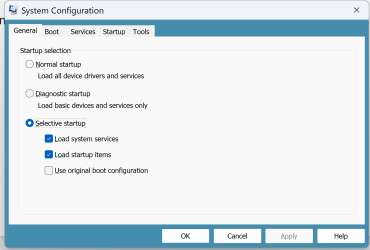
I have been trying to get the delay in which Windows sits at startup with the f2/del boot choice, f8 for this, f11 for that menu. No matter what I do it never changes from 30 seconds. I have changed it in the Computer Configuration tool to various numbers. I have used BCDedit /timeout function. Both of them record the change on the gui as well as bcdedit /enum and it reports that the change has been made but upon boot it still is 30 seconds. I have changed the Advanced System Settings "Startup and Recovery" menu with the time to display boot choice and time to display recovery if necessary time outs that doesn't change anything. There is a function in my ASRock uefi settings that mentions a startup delay but doesn't seem to change anything. I read that BitLocker and/or Secure Boot may inhibit the change but with any combination of them being on or off makes a difference I am not sure what the dilemma is but it is driving me crazy. I am not trying to use Fast Boot. I just want to change it from 30 to 5ish seconds. It is seemingly a simple change but nothing I can do works.

Anyone have any suggestions? because I am out of ideas. Any tips at all would be appreciated. thanks

ASrock AB350M Pro 4, Ryzen 7 3800x, Aorus 3080 Master 10g Rev 2.0. 64gb G Skill Trident Z RGB 3200 (16x4). 2tb Samsung 970 M.2.
 
Windows Build/Version
Windows 11 24h2 26100.1876

My Computer My Computer

At a glance

Windows 11 23H2
OS
Windows 11 23H2
Computer type
PC/Desktop
Manufacturer/Model
Asrock AB350 Pro 4, AMD Ryzen 7 3600x, 16gbx4 Trident-Z RGB DDR4 3200mhz, Aorus 3080 Master 10gb, Samsung 970 Evo Plus 2tb,
View attachment 110620
i'm assuming you meant System Configuration (msconfig), correct?
yeah thats the one my bad


Microsoft Windows [Version 10.0.26100.1876]
(c) Microsoft Corporation. All rights reserved.

C:\Windows\System32>bcdedit /enum

Windows Boot Manager
--------------------
identifier {bootmgr}
device partition=\Device\HarddiskVolume2
path \EFI\MICROSOFT\BOOT\BOOTMGFW.EFI
description Windows Boot Manager
locale en-US
inherit {globalsettings}
flightsigning Yes
default {current}
resumeobject {7be44d91-2d79-11ef-bac1-ed94e47c4cb3}
displayorder {current}
toolsdisplayorder {memdiag}
timeout 6

Windows Boot Loader
-------------------
identifier {current}
device partition=C:
path \WINDOWS\system32\winload.efi
description Windows 11
locale en-US
inherit {bootloadersettings}
recoverysequence {7be44d93-2d79-11ef-bac1-ed94e47c4cb3}
displaymessageoverride Recovery
recoveryenabled Yes
isolatedcontext Yes
flightsigning Yes
allowedinmemorysettings 0x15000075
osdevice partition=C:
systemroot \WINDOWS
resumeobject {7be44d91-2d79-11ef-bac1-ed94e47c4cb3}
nx OptIn
bootmenupolicy Standard
hypervisorlaunchtype Auto
bootlog Yes
sos Yes
 

My Computer My Computer

At a glance

Windows 11 23H2
OS
Windows 11 23H2
Computer type
PC/Desktop
Manufacturer/Model
Asrock AB350 Pro 4, AMD Ryzen 7 3600x, 16gbx4 Trident-Z RGB DDR4 3200mhz, Aorus 3080 Master 10gb, Samsung 970 Evo Plus 2tb,
change it in msconfig, then check if advanced system settings > startup and recovery > settings
reflects the same as msconfig
1727749658755.png
 

My Computer My Computer

At a glance

Windows 11 Pro
OS
Windows 11 Pro
In MSCONFIG, the 30 second delay can be changed, but cannot be reduced to less than 3 seconds.
Just remove the Zero behind the 3, and don't forget to save your change.
That's one of the first things I do on every Windows Install. Been doing it for years.
I also go into "Advanced" and tell it how many CPU cores I want it to use.

Old habits die hard,
TM :cool:
 
I have been trying to get the delay in which Windows sits at startup with the f2/del boot choice, f8 for this, f11 for that menu. No matter what I do it never changes from 30 seconds.

Anyone have any suggestions? because I am out of ideas. Any tips at all would be appreciated. thanks

ASrock AB350M Pro 4, Ryzen 7 3800x, Aorus 3080 Master 10g Rev 2.0. 64gb G Skill Trident Z RGB 3200 (16x4). 2tb Samsung 970 M.2.
Perhaps you could upload a screenshot so people can see what you are referring to.
 

My Computers My Computers

  • At a glance

    Win7,Win11i7-97002x16gb 3600mhz
    OS
    Win7,Win11
    Computer type
    PC/Desktop
    CPU
    i7-9700
    Motherboard
    gigabyte b365m ds3h
    Memory
    2x16gb 3600mhz
    Monitor(s) Displays
    benq gw2480
    PSU
    bequiet pure power 11 400CM
    Cooling
    cryorig m9i
  • At a glance

    win7,win11i5-84002x8gb 3200
    Operating System
    win7,win11
    Computer type
    PC/Desktop
    CPU
    i5-8400
    Motherboard
    gigabyte b365m ds3h
    Memory
    2x8gb 3200
    PSU
    xfx pro 450
In MSCONFIG, the 30 second delay can be changed, but cannot be reduced to less than 3 seconds.
Just remove the Zero behind the 3, and don't forget to save your change.
That's one of the first things I do on every Windows Install. Been doing it for years.
I also go into "Advanced" and tell it how many CPU cores I want it to use.

Old habits die hard,
TM :cool:
You are right about MsConfig however with sysdm.cpl , you can take it down further to 2 seconds!

Screenshot 2024-10-01 173408.jpg
 

My Computers My Computers

  • At a glance

    All Branches but ReleaseAMD Ryzen 7 7735HS 3200-4500 Mhz 8 cores x 232 GB DDR5Radeon Graphic / NVIDIA GeForce RTX 4060 8 GB...
    OS
    All Branches but Release
    Computer type
    Laptop
    Manufacturer/Model
    Acer Nitro ANV15-51
    CPU
    AMD Ryzen 7 7735HS 3200-4500 Mhz 8 cores x 2
    Motherboard
    Sportage_RBH
    Memory
    32 GB DDR5
    Graphics Card(s)
    Radeon Graphic / NVIDIA GeForce RTX 4060 8 GB GDDR6
    Sound Card
    AMD/Realtek(R) Audio
    Monitor(s) Displays
    Integrated Monitor (15.3"vis)
    Screen Resolution
    FHD 1920X1080 16:9 144Hz
    Hard Drives
    KINGSTON OM8SEP4512Q-AA 1TB
    Western Digital 256GB
    PSU
    19V DC 6.32 A 120 W
    Cooling
    Dual Fans
    Mouse
    MS Bluetooth
    Internet Speed
    Fiber 1GB Cox -us & 1GB Orange-fr
    Browser
    Edge Canary- Firefox Nightly-Chrome Dev-Chrome Dev
    Antivirus
    Windows Defender
  • At a glance

    Windows 11 BetaAMD A9-94208 GB of DDR4AMD Radeon R5
    Operating System
    Windows 11 Beta
    Computer type
    Laptop
    Manufacturer/Model
    Asus X751BP
    CPU
    AMD A9-9420
    Memory
    8 GB of DDR4
    Graphics card(s)
    AMD Radeon R5
    Screen Resolution
    1600x900
    Hard Drives
    Seagate 1 TB
In MSCONFIG, the 30 second delay can be changed, but cannot be reduced to less than 3 seconds.
Just remove the Zero behind the 3, and don't forget to save your change.
That's one of the first things I do on every Windows Install. Been doing it for years.
I also go into "Advanced" and tell it how many CPU cores I want it to use.

Old habits die hard,
TM :cool:
I appreciate the response and not to be a jerk but as I said in my post that is precisely what I have been doing. I even posted the bcdedit /enum. I have tried MSConfig more times than I can count. Using both BCDEdit and the gui of msconfig. I have tried plethora of times. As you can see in my BCDEdit /enum currently it is set to 6 seconds but still takes 30 at startup. Tried selective start up, normal startup. I dont get it.

The Startup and recovery also makes no difference as I have tried an extensive number of combinations.
 

Attachments

  • Screenshot 2024-10-01 105100.png
    Screenshot 2024-10-01 105100.png
    69.9 KB · Views: 2
  • Screenshot 2024-10-01 105159.png
    Screenshot 2024-10-01 105159.png
    27.6 KB · Views: 3
  • Screenshot 2024-10-01 105211.png
    Screenshot 2024-10-01 105211.png
    39.9 KB · Views: 3

My Computer My Computer

At a glance

Windows 11 23H2
OS
Windows 11 23H2
Computer type
PC/Desktop
Manufacturer/Model
Asrock AB350 Pro 4, AMD Ryzen 7 3600x, 16gbx4 Trident-Z RGB DDR4 3200mhz, Aorus 3080 Master 10gb, Samsung 970 Evo Plus 2tb,
None of this delay stuff matters if the device only has one boot loader entry, which is the case here, as shown in post #3. Under those circumstances, you can set your delay to 10 seconds or 120 seconds; your PC will boot in the same amount of time.

It would be best if OP could take a picture or screenshot as requested by SIW2. This sounds more to me like a BIOS/UEFI boot menu than a Windows boot menu.
 
Last edited:

My Computer My Computer

At a glance

Windows 11 Pro 25H212th Gen Core i7-1260P64 GB Micron PC4-25600Intel Iris Xe Graphics
OS
Windows 11 Pro 25H2
Computer type
PC/Desktop
Manufacturer/Model
Intel NUC12WSHi7
CPU
12th Gen Core i7-1260P
Motherboard
NUC12WSBi7
Memory
64 GB Micron PC4-25600
Graphics Card(s)
Intel Iris Xe Graphics
Sound Card
on-board Realtek HD Audio
Monitor(s) Displays
Dell U3219Q
Screen Resolution
3840 x 2160
Hard Drives
Samsung SSD 990 PRO 1TB
Crucial MX500 2 TB
Antivirus
Microsoft Defender
  • Like
Reactions: OAT
In MSCONFIG, the 30 second delay can be changed, but cannot be reduced to less than 3 seconds.
Just remove the Zero behind the 3, and don't forget to save your change.
That's one of the first things I do on every Windows Install. Been doing it for years.
I also go into "Advanced" and tell it how many CPU cores I want it to use.

Old habits die hard,
TM :cool:
why bother specifying the processors at startup? what difference does that make?
 

My Computer My Computer

At a glance

Windows 11 23H2
OS
Windows 11 23H2
Computer type
PC/Desktop
Manufacturer/Model
Asrock AB350 Pro 4, AMD Ryzen 7 3600x, 16gbx4 Trident-Z RGB DDR4 3200mhz, Aorus 3080 Master 10gb, Samsung 970 Evo Plus 2tb,
That setting is used to limit the number of processors used (it's actually the number of threads, not physical cores). You would use that for debugging purposes really. If you want Windows to use all available processing power, just leave that setting alone.
 

My Computer My Computer

At a glance

Windows 11 Pro 25H212th Gen Core i7-1260P64 GB Micron PC4-25600Intel Iris Xe Graphics
OS
Windows 11 Pro 25H2
Computer type
PC/Desktop
Manufacturer/Model
Intel NUC12WSHi7
CPU
12th Gen Core i7-1260P
Motherboard
NUC12WSBi7
Memory
64 GB Micron PC4-25600
Graphics Card(s)
Intel Iris Xe Graphics
Sound Card
on-board Realtek HD Audio
Monitor(s) Displays
Dell U3219Q
Screen Resolution
3840 x 2160
Hard Drives
Samsung SSD 990 PRO 1TB
Crucial MX500 2 TB
Antivirus
Microsoft Defender

My Computers My Computers

  • At a glance

    All Branches but ReleaseAMD Ryzen 7 7735HS 3200-4500 Mhz 8 cores x 232 GB DDR5Radeon Graphic / NVIDIA GeForce RTX 4060 8 GB...
    OS
    All Branches but Release
    Computer type
    Laptop
    Manufacturer/Model
    Acer Nitro ANV15-51
    CPU
    AMD Ryzen 7 7735HS 3200-4500 Mhz 8 cores x 2
    Motherboard
    Sportage_RBH
    Memory
    32 GB DDR5
    Graphics Card(s)
    Radeon Graphic / NVIDIA GeForce RTX 4060 8 GB GDDR6
    Sound Card
    AMD/Realtek(R) Audio
    Monitor(s) Displays
    Integrated Monitor (15.3"vis)
    Screen Resolution
    FHD 1920X1080 16:9 144Hz
    Hard Drives
    KINGSTON OM8SEP4512Q-AA 1TB
    Western Digital 256GB
    PSU
    19V DC 6.32 A 120 W
    Cooling
    Dual Fans
    Mouse
    MS Bluetooth
    Internet Speed
    Fiber 1GB Cox -us & 1GB Orange-fr
    Browser
    Edge Canary- Firefox Nightly-Chrome Dev-Chrome Dev
    Antivirus
    Windows Defender
  • At a glance

    Windows 11 BetaAMD A9-94208 GB of DDR4AMD Radeon R5
    Operating System
    Windows 11 Beta
    Computer type
    Laptop
    Manufacturer/Model
    Asus X751BP
    CPU
    AMD A9-9420
    Memory
    8 GB of DDR4
    Graphics card(s)
    AMD Radeon R5
    Screen Resolution
    1600x900
    Hard Drives
    Seagate 1 TB

My Computers My Computers

  • At a glance

    Windows 11 WorkstationRyzen 9 5950XCorsair Vengeance RGB PRO Black 64GB (4x16GB)...ASUS AMD Radeon RX 6900 XT 16GB ROG Strix LC OC
    OS
    Windows 11 Workstation
    Computer type
    PC/Desktop
    Manufacturer/Model
    doofenshmirtz evil incorporated
    CPU
    Ryzen 9 5950X
    Motherboard
    Asus ROG Crosshair VIII Formula
    Memory
    Corsair Vengeance RGB PRO Black 64GB (4x16GB) 3600MHz AMD Ryzen Tuned DDR4
    Graphics Card(s)
    ASUS AMD Radeon RX 6900 XT 16GB ROG Strix LC OC
    Sound Card
    Sound BlasterX Katana
    Monitor(s) Displays
    3 x27" Dell U2724D & 1 x 34" Dell U3415W
    Hard Drives
    Samsung 980 Pro 1TB M.2 2280 PCI-e 4.0 x4 NVMe Solid State
    Drive
    PSU
    ASUS ROG THOR 850W 80 Plus Platinum
    Case
    ASUS ROG Strix Helios Midi-Tower ARGB Gaming Case
    Cooling
    ASUS ROG Strix LC Performance RGB AIO CPU Liquid Cooler - 360mm
    Keyboard
    Logi Ergo
    Mouse
    Logitech MX Vertical
    Internet Speed
    1000/200 Mbps
    Browser
    Chrome
    Antivirus
    Windows Defender, Malwarebytes Pro
    Other Info
    HP M281 Printer
    Logitech Brio Stream webcam
    Logitech G Yeti orb mic
  • At a glance

    Windows 11 ProSnapdragon X2 Plus64GB
    Operating System
    Windows 11 Pro
    Computer type
    Laptop
    Manufacturer/Model
    Surface Laptop
    CPU
    Snapdragon X2 Plus
    Memory
    64GB
    Monitor(s) Displays
    15"
  • Nothing to see here.
None of this delay stuff matters if the device only has one boot loader entry, which is the case here, as shown in post #3. Under those circumstances, you can set your delay to 10 seconds or 120 seconds; your PC will boot in the same amount of time.

It would be best if OP could take a picture or screenshot as requested by SIW2. This sounds more to me like a BIOS/UEFI boot menu than a Windows boot menu.
That is a very good point and I have wondered the same thing. In he UEFI I have scoured to see but the only time I see in there is set to 1 already but still stays at 30. The only other thing is to turn on fast boot but that has consquences.
 

My Computer My Computer

At a glance

Windows 11 23H2
OS
Windows 11 23H2
Computer type
PC/Desktop
Manufacturer/Model
Asrock AB350 Pro 4, AMD Ryzen 7 3600x, 16gbx4 Trident-Z RGB DDR4 3200mhz, Aorus 3080 Master 10gb, Samsung 970 Evo Plus 2tb,
That is a very good point and I have wondered the same thing. In he UEFI I have scoured to see but the only time I see in there is set to 1 already but still stays at 30. The only other thing is to turn on fast boot but that has consquences.
I have never see consequences on fastboot. Are you sure you are not confusing fastboot with fast start which often has consequences, especially on multiboot devices?
 

My Computer My Computer

At a glance

Windows 11 Pro + Win11 Canary VM.I9 13th gen i9-13900H 2.60 GHZ16 GB solderedIntegrated Intel Iris XE
OS
Windows 11 Pro + Win11 Canary VM.
Computer type
Laptop
Manufacturer/Model
ASUS Zenbook 14
CPU
I9 13th gen i9-13900H 2.60 GHZ
Motherboard
Yep, Laptop has one.
Memory
16 GB soldered
Graphics Card(s)
Integrated Intel Iris XE
Sound Card
Realtek built in
Monitor(s) Displays
laptop OLED screen
Screen Resolution
2880x1800 touchscreen
Hard Drives
1 TB NVME SSD (only weakness is only one slot)
PSU
Internal + 65W thunderbolt USB4 charger
Case
Yep, got one
Cooling
Stella Artois (UK pint cans - 568 ml) - extra cost.
Keyboard
Built in UK keybd
Mouse
Bluetooth , wireless dongled, wired
Internet Speed
900 mbs (ethernet), wifi 6 typical 350-450 mb/s both up and down
Browser
Edge
Antivirus
Defender
Other Info
TPM 2.0, 2xUSB4 thunderbolt, 1xUsb3 (usb a), 1xUsb-c, hdmi out, 3.5 mm audio out/in combo, ASUS backlit trackpad (inc. switchable number pad)

Macrium Reflect Home V8
Office 365 Family (6 users each 1TB onedrive space)
Hyper-V (a vm runs almost as fast as my older laptop)

Latest Support Threads

Back
Top Bottom